
Chat, real-time notifications, and collaborative editing all need pages to receive new messages promptly. WebSocket provides clients and servers with a bidirectional communication channel. Once you understand that channel, it becomes easier to map each part of a packet capture to the handshake, message history, and echo experiments.
How WebSocket Communicates
When querying inventory or submitting a form, the client sends an HTTP request and the server returns a result. A chat message, however, may originate from the other side at any time, so the browser cannot know in advance when it will arrive. The client could keep asking whether anything has changed, but that would also generate many requests with no new content.
Polling, SSE, and WebSocket can all keep a page up to date, but they deliver messages differently. With short polling, the client asks at regular intervals; SSE keeps an HTTP event stream open so the server can continuously send events to the page; after a WebSocket connection is established, either side can send messages over the same connection, and both directions can transmit simultaneously. This is full-duplex communication.
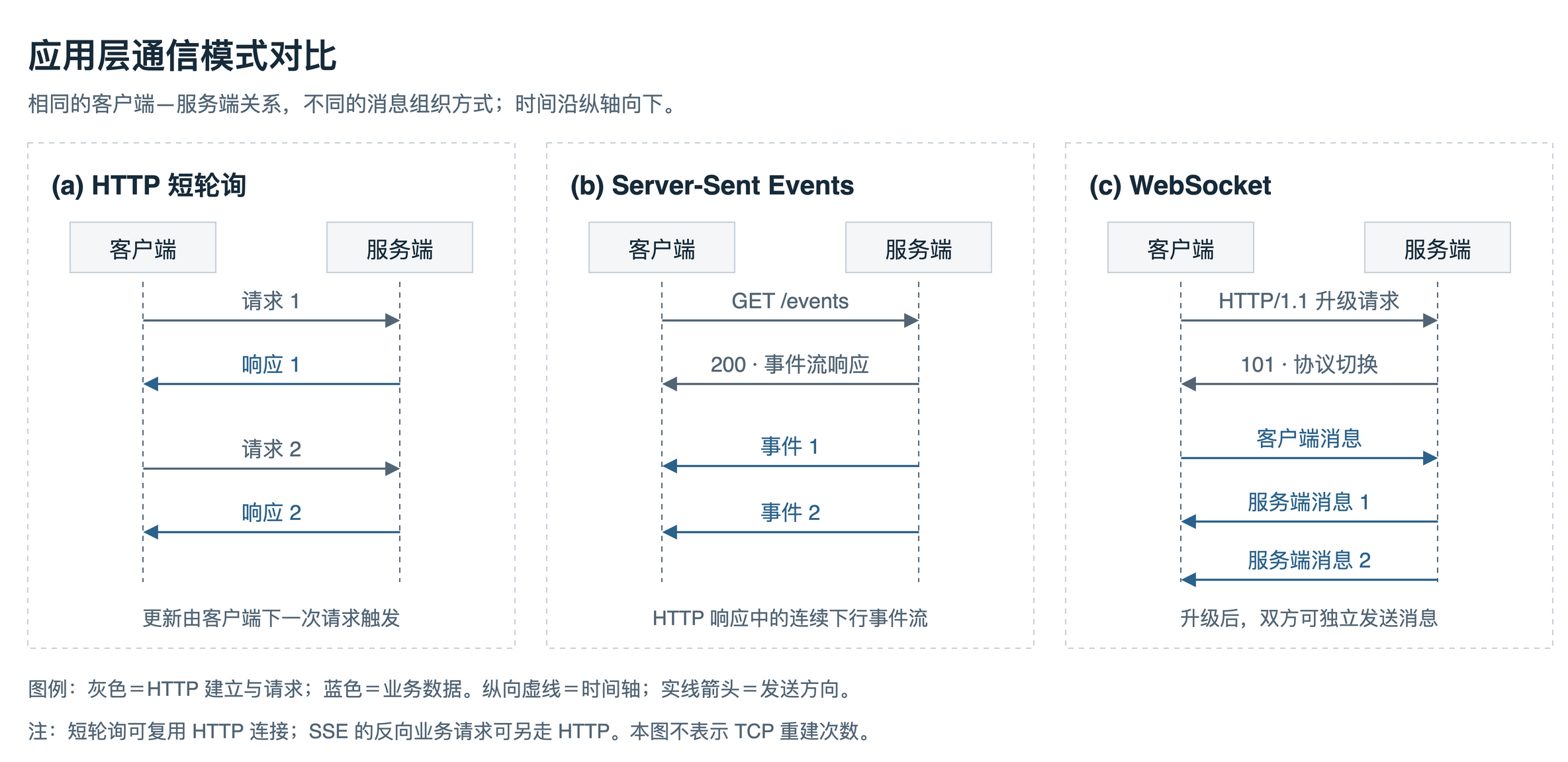
Figure 1. Short polling fetches updates through repeated requests, SSE provides a server-to-client event stream, and WebSocket supports bidirectional messages. The arrows do not mean that a new TCP connection is created for every exchange.
WebSocket offers a more direct interaction when both sides need to send messages frequently. When a page mainly receives server-pushed updates, SSE may also be a good fit, such as for streaming an LLM response; other client actions can continue to use ordinary HTTP requests.
Socket, WebSocket, and Socket.IO are also easy to confuse. Socket usually refers to the socket interface in programming, while WebSocket is a communication protocol. Socket.IO defines mechanisms such as events, acknowledgements, and reconnection on top of underlying transports; a native new WebSocket() client is not directly compatible with a Socket.IO server. Socket.IO’s official explanation
From the HTTP Handshake to WebSocket Messages
Upgrade Request and Response
This article discusses the common HTTP/1.1 upgrade flow. The client first establishes the underlying connection; when using wss://, it also performs a TLS handshake. It then sends an HTTP request asking to upgrade the connection to WebSocket. Browsers typically fire the open event after the protocol handshake completes, and page code can start sending messages from that event. RFC 6455 §4
The request in the packet-capture screenshot includes fields such as Upgrade: websocket, Connection: Upgrade, and Sec-WebSocket-Key:
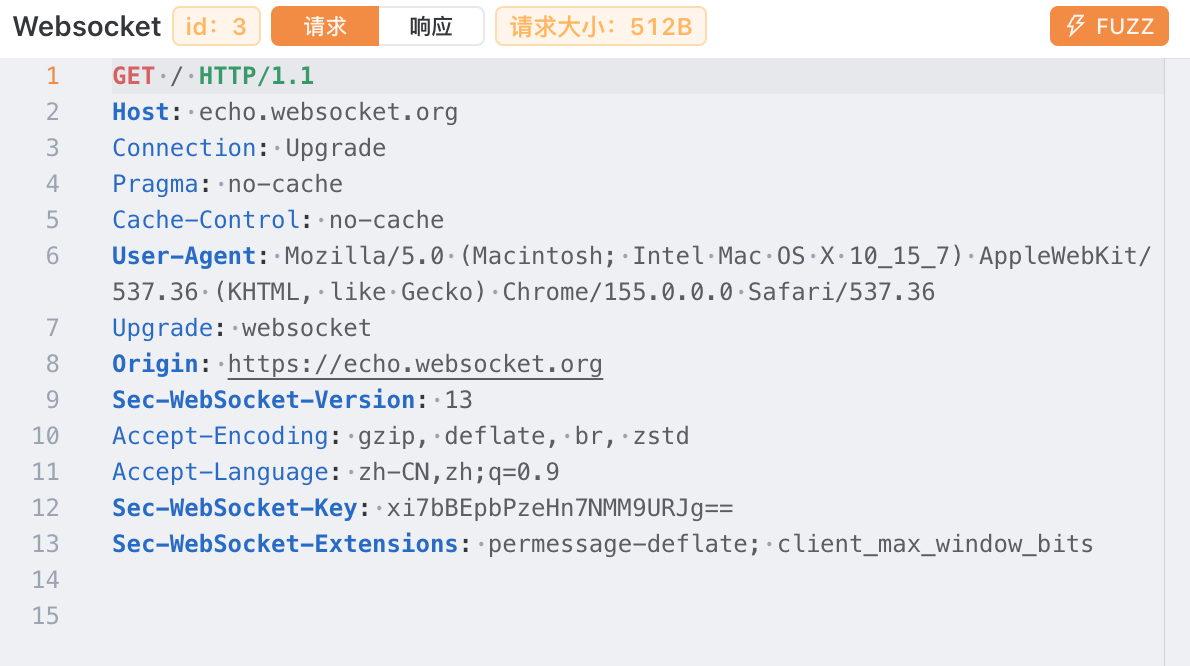
Figure 2. An HTTP/1.1 upgrade request sent by the browser.
The server returns 101 Switching Protocols to indicate that it agrees to switch protocols. The client must also validate the upgrade-related response headers, Sec-WebSocket-Accept, and any negotiated subprotocols or extensions. Seeing the 101 status code alone is not enough to confirm that the entire handshake is valid. RFC 6455 §4.1
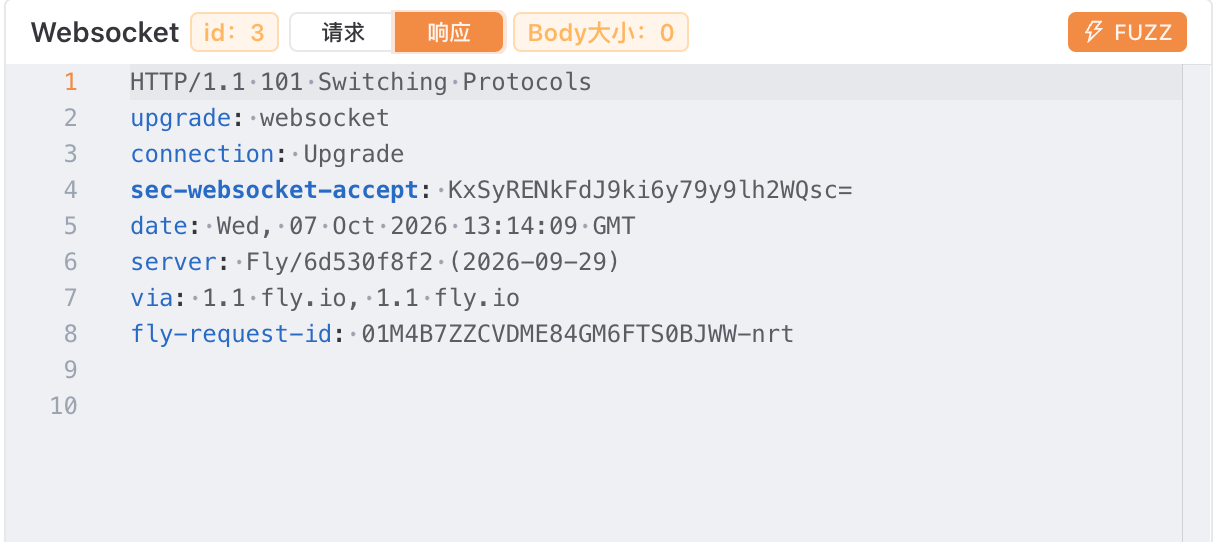
Figure 3. The server’s upgrade response, with status code 101.
Here is a simplified pair of handshake messages. The example Key is fixed to make the calculation easy to check; a real client generates a random 16-byte value for each handshake and then Base64-encodes it.
GET /socket HTTP/1.1
Host: app.example.com
Upgrade: websocket
Connection: Upgrade
Sec-WebSocket-Version: 13
Sec-WebSocket-Key: AQIDBAUGBwgJCgsMDQ4PEA==
Origin: https://app.example.comHTTP/1.1 101 Switching Protocols
Upgrade: websocket
Connection: Upgrade
Sec-WebSocket-Accept: C/0nmHhBztSRGR1CwL6Tf4ZjwpY=To calculate Sec-WebSocket-Accept, concatenate the string value of the Key from the request with the GUID specified by the protocol, compute SHA-1, and then Base64-encode the result. The concatenation uses the Key string itself, not the bytes obtained by Base64-decoding it:
Base64(SHA-1(Sec-WebSocket-Key + "258EAFA5-E914-47DA-95CA-C5AB0DC85B11"))This value is used to validate the handshake response; it has nothing to do with login identity or room permissions. Host identifies the connection target; for browser clients, Origin indicates the origin of the page initiating the connection, which the server can check. A non-browser client can set this header itself, so identity verification still requires mechanisms such as login credentials. MDN server guide
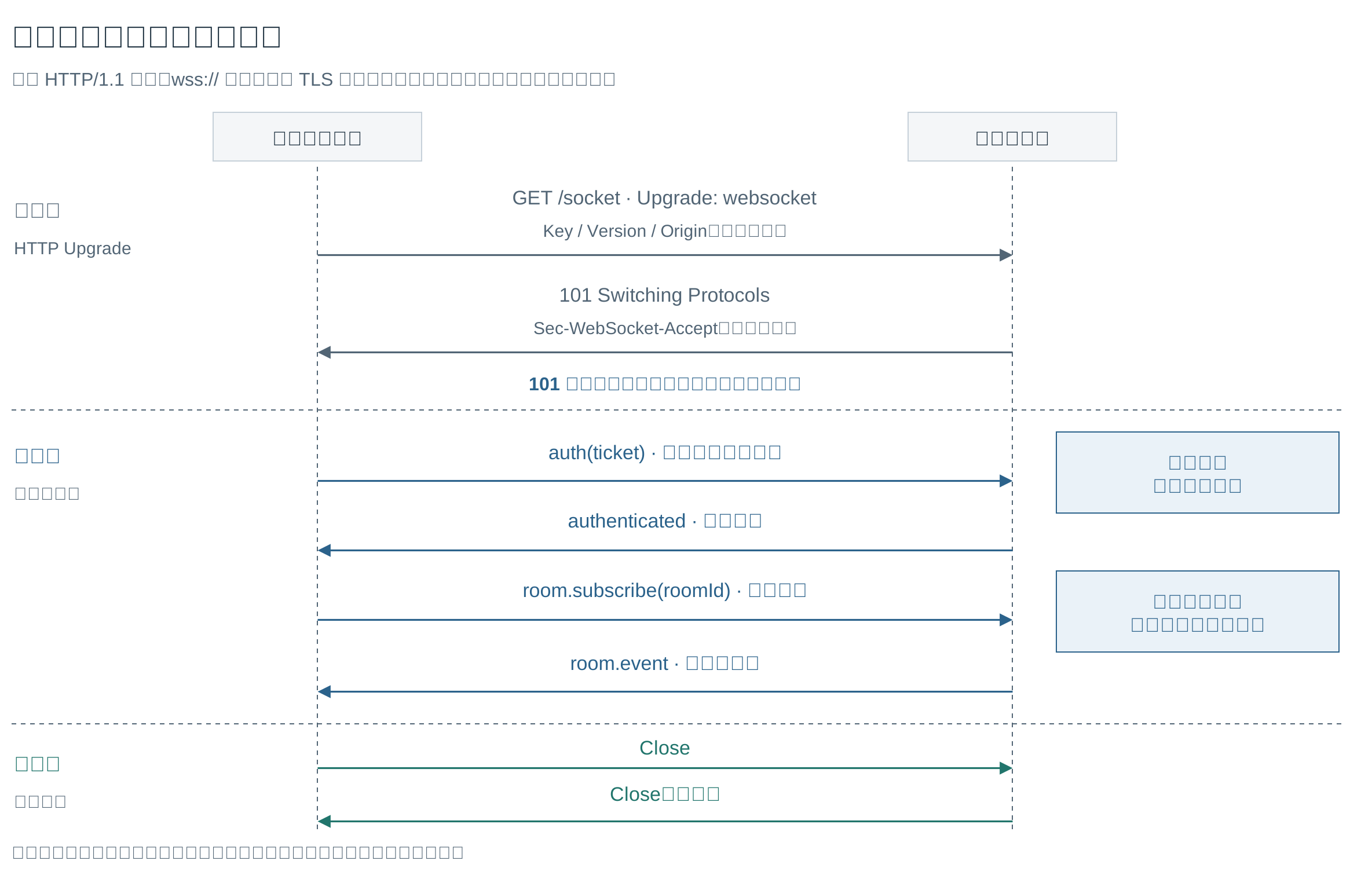
Figure 4. Gray indicates the protocol upgrade, blue indicates application authentication and authorization, and teal indicates the closing handshake. The first-message authentication is only an example; an application can also check credentials during the upgrade. See RFC §4 and §5.5.1 for the handshake and closing flow.
Messages, Frames, and the TCP Byte Stream
After the connection is established, page code handles messages, while network transmission also involves WebSocket frames and the TCP byte stream. A message can be split across multiple frames; a single TCP read may return only part of a frame or several frames, and read boundaries do not necessarily align with frame or message boundaries. A WebSocket library or the browser usually handles parsing and reassembly, and the browser’s message event delivers a complete message.
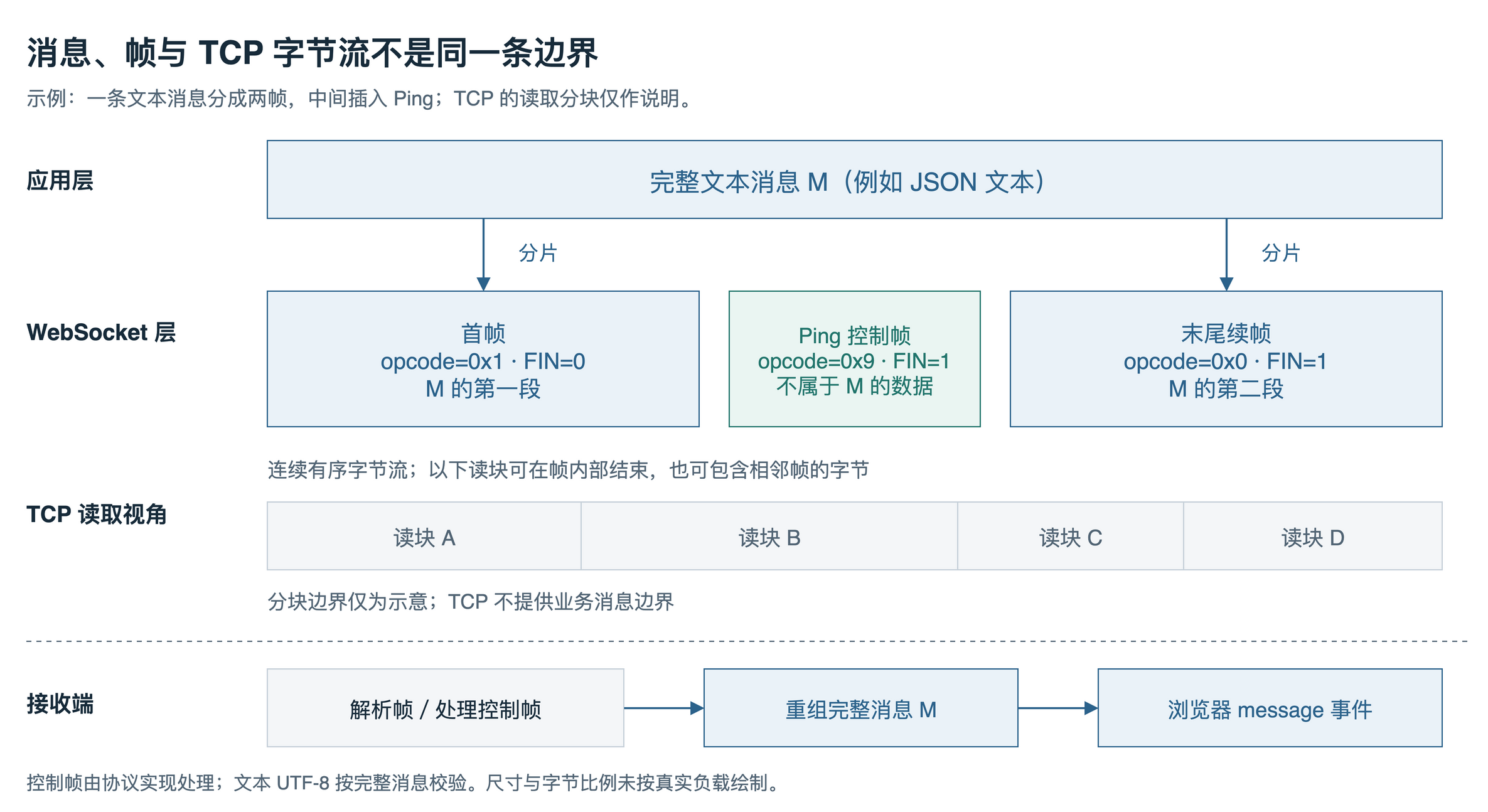
Figure 5. A text message is split into two data frames, with a Ping control frame inserted between them. The TCP read chunks and their widths in the diagram are illustrative only. See RFC §5.4 and §5.5 for fragmentation and control-frame rules.
After the handshake, Yakit displays messages by direction. Labels that help the tool identify content can aid reading, but the actual business format still needs to be determined from the message contents and application conventions.
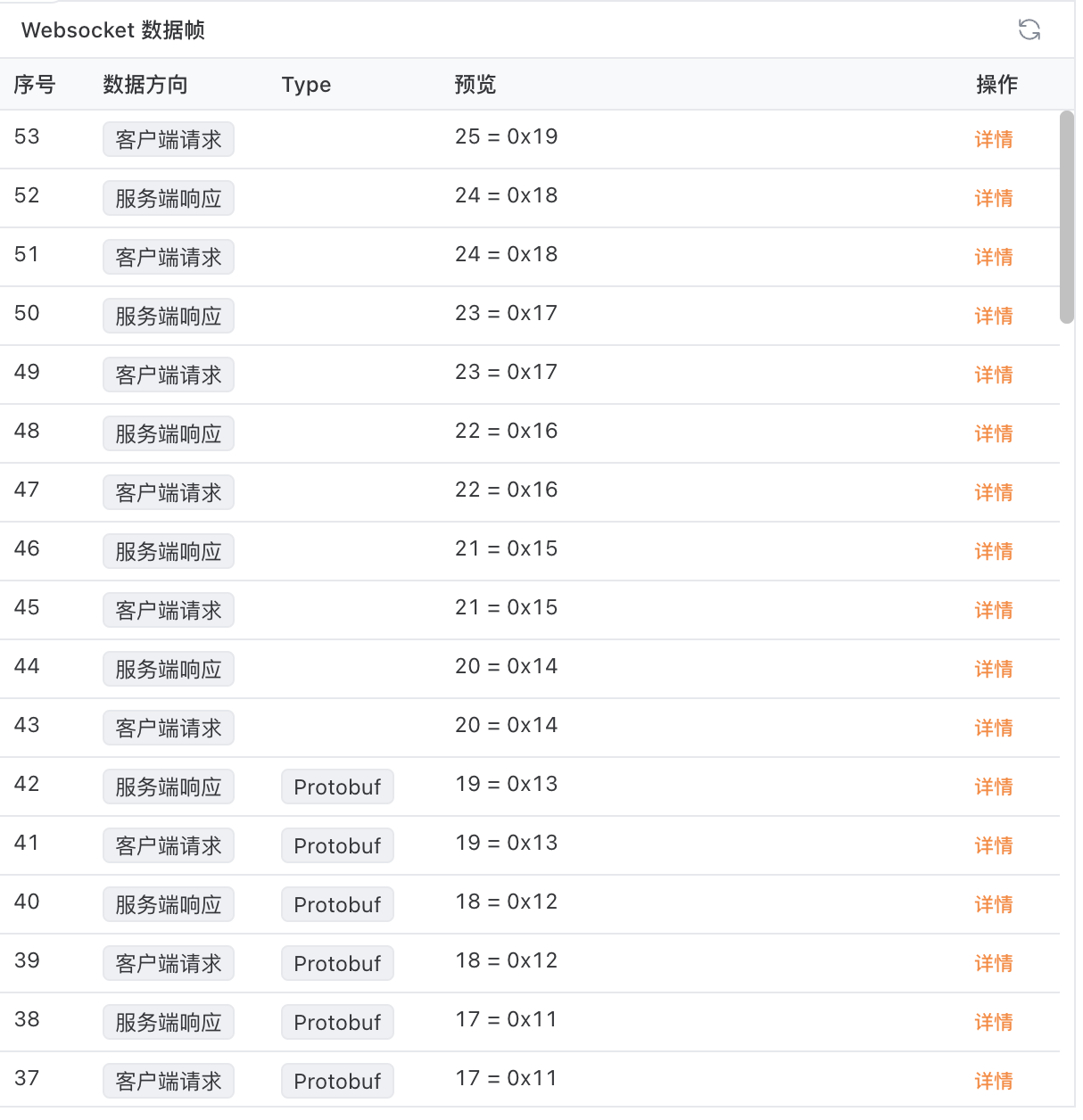
Figure 6. Messages exchanged by the client and server over the same connection.
Text messages use UTF-8 encoding, while binary messages carry bytes. When discussing text length, distinguish a JavaScript string’s length from the number of encoded bytes. For example, "中" occupies one UTF-16 code unit and three bytes when encoded as UTF-8. A server-side byte limit (for example, 4096 bytes) is not the same as a character limit on chat content.
The browser has already handled frame parsing, masking, and fragment reassembly, so page code mainly sends and receives messages. The local echo service below illustrates this process; the transport of WebSocket over HTTP/2 and HTTP/3 can be explored separately in the specifications.
Local Echo Experiment
Start the Echo Service
The experiment uses Python 3.11 or later and pins websockets to 15.0.1. The service listens only on 127.0.0.1:8765 and echoes both text and binary messages unchanged without parsing business fields. websockets 15.0.1 server API
Save the following code as echo_server.py:
"""Local text / binary WebSocket echo server (websockets 15.0.1)."""

import asyncio

from websockets.asyncio.server import serve
from websockets.exceptions import ConnectionClosed


async def echo(websocket):
    try:
        async for message in websocket:
            await websocket.send(message)
    except ConnectionClosed:
        # A disconnected client must not stop the listening server.
        pass


async def main():
    async with serve(echo, "127.0.0.1", 8765):
        print("LISTENING ws://127.0.0.1:8765/", flush=True)
        await asyncio.get_running_loop().create_future()


if __name__ == "__main__":
    try:
        asyncio.run(main())
    except KeyboardInterrupt:
        # asyncio.run cancels main; the context manager closes connections first.
        print("STOPPED", flush=True)
The following terminal commands are for macOS/Linux. Run them in the directory where you saved echo_server.py:
python3 -m venv .venv
source .venv/bin/activate
python -m pip install "websockets==15.0.1"
python echo_server.py
Once the terminal prints LISTENING ws://127.0.0.1:8765/, leave the service running. Open another terminal and serve a local HTTP page from the same directory:
python3 -m http.server 8000 --bind 127.0.0.1Port 8000 serves the page, while 8765 is used for WebSocket communication. http.server does not itself implement a WebSocket echo service.
Send a Text Message
Open http://127.0.0.1:8000/ in a browser and run the following client in the developer tools Console. It sends a text message and closes the connection after receiving the echo. The code is wrapped in an immediately invoked function so it can be pasted and run repeatedly.
(() => {
  const demoWs = new WebSocket("ws://127.0.0.1:8765/");
  console.log(`CONNECTING state=${demoWs.readyState}`);

  demoWs.addEventListener("open", () => {
    console.log(`OPEN state=${demoWs.readyState}`);
    demoWs.send("hello WebSocket");
    console.log("SENT hello WebSocket");
  });
  demoWs.addEventListener("message", (event) => {
    console.log(`RECEIVED ${event.data}`);
    demoWs.close(1000, "done");
    console.log(`CLOSING state=${demoWs.readyState}`);
  });
  demoWs.addEventListener("error", () => {
    console.log(`ERROR state=${demoWs.readyState}`);
  });
  demoWs.addEventListener("close", (event) => {
    console.log(`CLOSE code=${event.code} reason=${event.reason} wasClean=${event.wasClean} state=${demoWs.readyState}`);
  });
})();
During normal operation, the log order is:
CONNECTING state=0
OPEN state=1
SENT hello WebSocket
RECEIVED hello WebSocket
CLOSING state=2
CLOSE code=1000 reason=done wasClean=true state=3
The text and binary examples close the connection automatically after receiving an echo. The service-stop comparison and message-editing experiment below use a separate connection that stays open.
CONNECTING and CLOSING are states read by the code; the events fired by the browser are open, message, error, and close. send() puts data in the send buffer, so SENT in the log only means that the call was made. In this example, RECEIVED is when the echoed result is observed. MDN send()
Send a Binary Message
Keep the service running and run the following code in the Console on the same local page. binaryType = "arraybuffer" controls the data format used to receive binary messages, making the bytes easy to inspect.
(() => {
  const binaryWs = new WebSocket("ws://127.0.0.1:8765/");
  binaryWs.binaryType = "arraybuffer";
  binaryWs.addEventListener("open", () => {
    binaryWs.send(new Uint8Array([0, 1, 127, 255]));
  });
  binaryWs.addEventListener("message", (event) => {
    console.log(Array.from(new Uint8Array(event.data))); // [0, 1, 127, 255]
    binaryWs.close(1000, "done");
  });
  binaryWs.addEventListener("error", () => {
    console.log(`BINARY_ERROR state=${binaryWs.readyState}`);
  });
  binaryWs.addEventListener("close", (event) => {
    console.log(`BINARY_CLOSE code=${event.code} reason=${event.reason} wasClean=${event.wasClean} state=${binaryWs.readyState}`);
  });
})();
The received array should be [0, 1, 127, 255], followed by a BINARY_CLOSE code=1000 log. The code also logs error and close events to help observe connection failures and closure; whether an error event appears depends on the browser and the failure mode.
The default value of binaryType is "blob". Changing it to "arraybuffer" does not change how text messages are represented; text messages remain strings. MDN binaryType
Connection States and Abnormal Closure
new WebSocket() starts establishing a connection, and readyState is used to determine its current state. Before sending a business message, check that the connection is OPEN; calling send() while it is CONNECTING throws InvalidStateError. MDN readyState, send() exceptions
| Value | State | Meaning |
|---|---|---|
| 0 | CONNECTING | The connection is being established |
| 1 | OPEN | The connection is open and can send messages |
| 2 | CLOSING | The connection is closing |
| 3 | CLOSED | The connection is closed, or the connection attempt failed |
Calling close(1000, "done") initiates closure; under normal conditions, both sides complete a closing handshake using Close frames. The code in the close event is the close code, reason is the close-reason string, and wasClean indicates whether the connection closed cleanly. It describes the connection-closing process; it does not mean that a business message was necessarily processed. MDN CloseEvent
To close the connection manually or send messages continuously, first confirm that the echo service is running, then create a connection in the Console that does not close automatically. This stores it in window.ws, so you can use ws directly in later operations:
(() => {
  const liveWs = new WebSocket("ws://127.0.0.1:8765/");
  window.ws = liveWs;
  liveWs.addEventListener("open", () => {
    console.log(`OPEN state=${liveWs.readyState}`);
  });
  liveWs.addEventListener("message", (event) => {
    console.log(`RECEIVED ${event.data}`);
  });
  liveWs.addEventListener("error", () => {
    console.log(`ERROR state=${liveWs.readyState}`);
  });
  liveWs.addEventListener("close", (event) => {
    console.log(`CLOSE code=${event.code} reason=${event.reason} wasClean=${event.wasClean} state=${liveWs.readyState}`);
  });
})();
Test each of the following three cases separately. After the previous connection closes, confirm that the service is running, run the connection code above again, and perform the corresponding operation after OPEN appears:
| Operation | Close log observed in this example |
|---|---|
Run ws.close(1000, "done") in the Console | code=1000 reason=done wasClean=true |
| Press Ctrl+C once in the echo-service terminal | code=1001 reason= wasClean=true |
| Force-terminate the experimental service process | code=1006 reason= wasClean=false |
1000 means normal closure, and 1001 means an endpoint is leaving, for example because the service is shutting down. This Python example exits its asynchronous context cleanly on Ctrl+C and closes the connection orderly first, so its result differs from force-terminating the process. RFC §7.4.1
1006 is a reserved value used to report an abnormal disconnection locally: the connection ended without receiving a Close control frame. It is not a status code sent by the peer in a Close frame; calling close(1006) in the browser throws InvalidAccessError. RFC §7.1.5, MDN close() exceptions
The logs above were checked with Python 3.14.8, websockets 15.0.1, and Chromium. Exact behavior may differ with other browsers, libraries, or failure modes. When the service is not running, this example observed error, followed by close; the error event itself does not provide complete network diagnostic information.
What to Check When a Connection Fails
For common problems in this experiment, start by checking file paths, dependencies, and ports:
| Symptom | What to check |
|---|---|
websockets cannot be found | Is the virtual environment activated, and are the dependency installation and service launch using the same Python? |
| Startup reports that the port is already in use | Is the echo service already running, or is another process listening on 8765? |
| The page opens, but the WebSocket connection fails | Are both the HTTP service on 8000 and the echo service on 8765 running? |
| No messages appear in the packet-capture tool | Is browser traffic passing through the tool’s proxy, and is the local loopback address bypassing the proxy settings? |
You can check the Console close log, the browser’s Network panel, and the server terminal at the same time. This experiment does not reconnect automatically; a real application can retry after disconnection with a delay and progressively increase the interval. A new connection may also need to authenticate again, subscribe to a room, or fetch messages missed while disconnected.
Packet Capture and Message Replay
Handshake messages establish the connection; subsequent messages carry application data. The Yakit WebSocket Fuzzer screenshot below comes from a different connection than the local experiment and contains different content, but it can be read at the same layers:
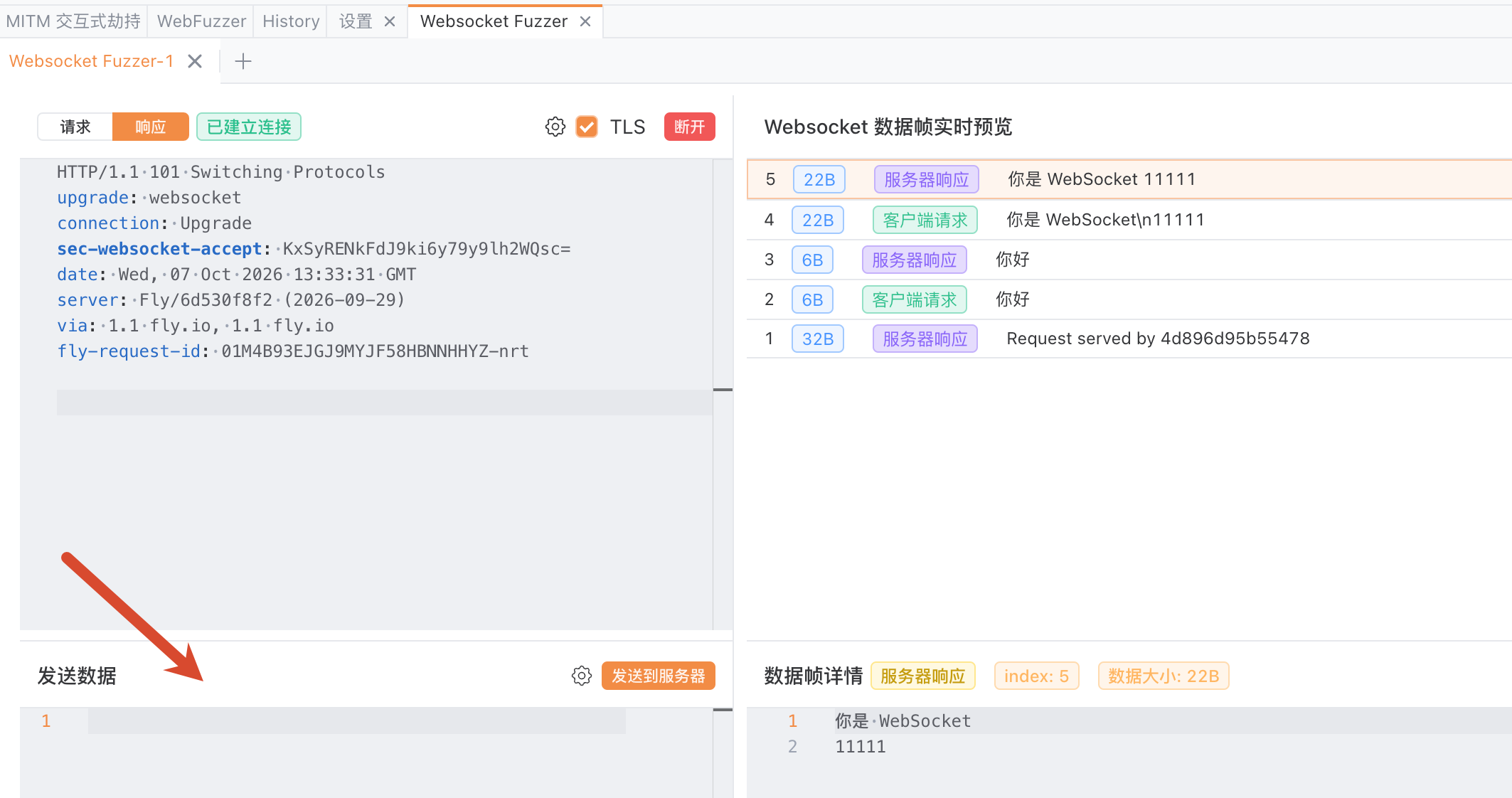
Figure 7. The left side shows the upgrade response and message-sending area; the right side shows message history arranged by direction.
The “你好” in the figure is sent by the client and echoed by the server. Both sides show 6B because the UTF-8 encoding of the two Chinese characters occupies 6 bytes. The first visible record in the list is from the server; the static screenshot only shows these messages and does not establish the complete business request relationship.
Labels such as “client request” and “server response” mainly indicate direction; WebSocket messages do not need to be paired one by one. Text or binary describes the transport representation, whereas fields such as type, message, or a room ID in JSON are application conventions. They should be interpreted separately.
Edit a Message on the Same Connection
Confirm that the echo service is running, then run the connection code from the previous section again. After OPEN appears, first send a JSON text message in the same Console:
ws.send('{"type":"echo","message":"hello"}');After receiving the echo, change message to hello-2 and send it over the same connection:
ws.send('{"type":"echo","message":"hello-2"}');The echoed content this time is:
{"type":"echo","message":"hello-2"}When the experiment is finished, run ws.close(1000, "done") to close the connection.
This shows that both messages reached the echo service and were returned unchanged. The service does not parse type, so this result does not demonstrate business-field handling or permission checks. When testing a business system, interpret the result in the context of its own protocol.
In Burp Suite, select a message under Proxy → WebSockets history and choose Send to Repeater; edit its content, choose the sending direction, then send it and inspect subsequent messages. In Repeater’s message history, you can also use Edit and resend to edit and send it again. Burp Repeater documentation
In Yakit, open a WebSocket connection captured by MITM and enter Fuzz; after connecting, edit the message in the WebSocket Fuzzer’s sending area and inspect the history on the right. The exact entry point depends on the version in use. Yakit official example
Editing and resending a single message is useful for observing the effect of one field; Fuzz can then combine multiple inputs. When recording results, retain the original message, modified message, sending direction, connection state, and actual response. Two messages close together in time may also be unsolicited pushes, so they should not automatically be treated as a request and response.
A Few Common Points of Confusion
ws, wss, and Masking
ws:// does not provide TLS transport protection; wss:// uses TLS to provide confidentiality and integrity in transit. This article connects a local HTTP page to a local ws:// service. A production HTTPS page would normally use wss:// to avoid mixed-content issues. RFC §10.6, MDN client guide
Frames sent by clients must be masked; frames sent by servers are not masked. Using TLS does not remove the client’s masking requirement. The masking key travels with the frame, so the receiver can recover the data according to the rules; masking does not provide encryption or confidentiality. RFC §5.1, §5.3
Ping/Pong and Application Heartbeats
WebSocket defines Ping/Pong control frames for purposes such as keepalive. The browser’s native WebSocket API does not directly expose an interface for sending these control frames; send("ping") sends a text message, and whether the application replies with pong depends on its business conventions. WebSockets standard
The Python service in this article retains the library’s default protocol Ping/Pong keepalive settings, and the page adds no application-level heartbeat. If a page needs to actively determine whether a connection is still usable, it can define an application heartbeat and timeout handling, distinct from protocol control frames. websockets keepalive guide
Message Format and Business Permissions
JSON is a common application message format, but WebSocket itself supports text and binary messages. The echo service passes through ordinary strings, JSON text, and byte arrays; it does not require messages to be JSON.
After the protocol handshake succeeds, the application still determines user identity, which rooms can be subscribed to, and which operations are permitted. Origin checks, login-credential checks, and message-level authorization address different problems; business operations should check permissions for the current session. RFC §10.5