
I’ve recently been learning about RASP and read through the OpenRASP code. This article is a record of what I learned.
WAF, RASP, and EDR
A WAF watches requests outside the application; RASP is embedded in the application process and watches operations; EDR sits on the host and watches processes.
| Technology | Full name | Deployment location | What it mainly protects against |
|---|---|---|---|
| WAF | Web Application Firewall | In front of the application, at the network entry point | SQL injection, XSS, malicious requests, bots |
| RASP | Runtime Application Self-Protection | Embedded in the application runtime | Injection, command execution, deserialization, path traversal |
| EDR | Endpoint Detection & Response | Operating-system endpoint | Trojans, ransomware, privilege escalation, lateral movement |
RASP stands for Runtime Application Self-Protection. It runs as an Agent inside the application process and obtains the actual parameters at the point where sensitive operations occur—SQL execution, command execution, and file reads and writes—then makes decisions using the request context.
Put simply: a WAF sees what you send in; RASP sees what the program is about to do.
From Bytecode to Java Agents
How Java Programs Execute
Java source code does not run directly on the CPU; the JVM sits between them. javac compiles .java files into .class files containing bytecode.
.java 源码
   ↓ javac
.class 字节码
   ↓ ClassLoader 加载
JVM 中的 Class
   ↓
解释执行 / JIT 编译
   ↓
CPU 机器指令
The simplest line, int c = a + b;, compiles into four instructions.
iload_1
iload_2
iadd
istore_3
The JVM is a stack-based virtual machine. “Stack-based” does not mean that the JVM has only a stack; it means bytecode performs computations using an operand stack, unlike x86 assembly, which shuffles values between registers. A method call pushes a stack frame.
栈帧 Stack Frame
├── 局部变量表 Local Variables
└── 操作数栈 Operand Stack
The instructions above mean: iload_1 takes an int from slot 1 in the local-variable table and pushes it onto the stack; iadd pops two values, adds them, and pushes the result back. You can roughly think of JVM bytecode as a kind of stack-based assembly.
Inspecting a Real Class with javap
Let’s write a minimal example: a BusinessService.java file.
public class BusinessService {
    public int process(int value) {
        return value + 1;
    }
}
After compiling with javac, we disassemble it using javap -c -v -p (-c disassembles the code, -v outputs the constant pool, and -p includes private members).
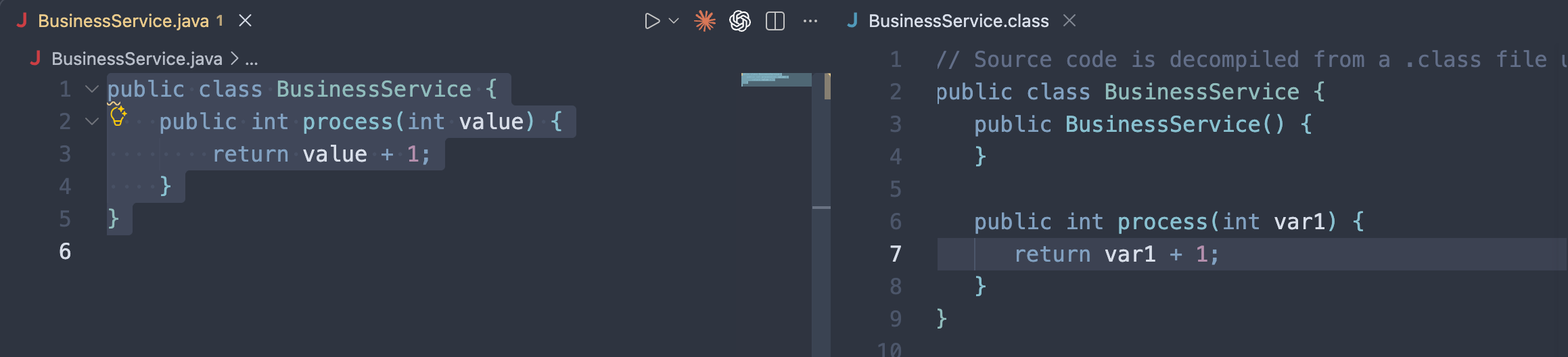
❯ javap -c -v -p BusinessService.class
Classfile xxxxx
  Last modified xxxxxxx
  SHA-256 checksum 0db9428d91bc3389000e9cd137c36e7167e7b8890719424e4c976afa668c6b9c
  Compiled from "BusinessService.java"
public class BusinessService
  minor version: 0
  major version: 61
  flags: (0x0021) ACC_PUBLIC, ACC_SUPER
  this_class: #7                          // BusinessService
  super_class: #2                         // java/lang/Object
  interfaces: 0, fields: 0, methods: 2, attributes: 1
Constant pool:
   #1 = Methodref          #2.#3          // java/lang/Object."<init>":()V
   #2 = Class              #4             // java/lang/Object
   #3 = NameAndType        #5:#6          // "<init>":()V
   #4 = Utf8               java/lang/Object
   #5 = Utf8               <init>
   #6 = Utf8               ()V
   #7 = Class              #8             // BusinessService
   #8 = Utf8               BusinessService
   #9 = Utf8               Code
  #10 = Utf8               LineNumberTable
  #11 = Utf8               process
  #12 = Utf8               (I)I
  #13 = Utf8               SourceFile
  #14 = Utf8               BusinessService.java
{
  public BusinessService();
    descriptor: ()V
    flags: (0x0001) ACC_PUBLIC
    Code:
      stack=1, locals=1, args_size=1
         0: aload_0
         1: invokespecial #1                  // Method java/lang/Object."<init>":()V
         4: return
      LineNumberTable:
        line 1: 0

  public int process(int);
    descriptor: (I)I
    flags: (0x0001) ACC_PUBLIC
    Code:
      stack=2, locals=2, args_size=2
         0: iload_1
         1: iconst_1
         2: iadd
         3: ireturn
      LineNumberTable:
        line 3: 0
}
SourceFile: "BusinessService.java"
Focus on the process section.
| Instruction | Action | Operand stack change |
|---|---|---|
iload_1 | Load the integer in local-variable slot 1 | [] → [value] |
iconst_1 | Push the integer 1 | [value] → [value, 1] |
iadd | Pop two integers, add them, and push the result | [value, 1] → [value+1] |
ireturn | Pop the integer and return it as the method result | Method returns |
Why is the parameter in slot 1?
This is an instance method: slot 0 always holds this, so slot 1 is the first parameter. Static methods have no this, so the first parameter starts in slot 0.
descriptor: (I)I is a method descriptor: the parameters are inside the parentheses and the return type follows them. (I)I means it takes an int and returns an int. The JVM uses descriptors to distinguish overloads; you’ll encounter them often when reading the OpenRASP source later.
stack=2, locals=2, args_size=2 is metadata in the Code attribute: the operand stack can reach a depth of 2, the local-variable table has 2 slots (this + value), and there are 2 arguments.
The 0、1、2、3 on the left are instruction offsets, not source-code line numbers.
Runtime Data Areas
The JVM runtime has more than just an operand stack.
线程
  ↓
JVM Stack
  ↓
一个个 Stack Frame
  ├── Local Variables
  └── Operand Stack

Heap
  ↓
Java 对象

Metaspace
  ↓
类元数据

Constant Pool
  ↓
类名、方法名、字段、字符串常量等
For example, in User user = new User();, the actual object is on the heap, while the stack holds a reference. The Constant pool section in the javap output above is the constant table attached to each class; the #1 in invokespecial #1 is a lookup into that table.
Class Loading: The Instrumentation Timing
A classloader loads a class before it can execute.
.class 文件
   ↓
ClassLoader
   ↓
读取 class 字节
   ↓
defineClass
   ↓
JVM 验证 / 准备 / 解析
   ↓
形成 JVM 中的 Class
   ↓
开始执行
There is a key point in this chain for all instrumentation tools: the class bytes have been read, but have not yet formally become a Class in the JVM. If you modify the bytecode here, the JVM loads the modified version, without the application noticing.
Java provides an official mechanism for this timing: java.lang.instrument.Instrumentation (the word “instrumentation” literally describes inserting instrumentation).
Instrumentation
You can think of it as the JVM’s official runtime-instrumentation interface for Agents. It can observe class loading, modify bytecode, and retransform already-loaded classes.
One point that is easy to confuse: Instrumentation itself does not modify bytecode; it is only the channel between the JVM and the Agent. The actual work is done by one of ASM, Byte Buddy, or Javassist.
Java Agent
     ↓
Instrumentation
     ↓
拿到 class byte[]
     ↓
ASM / Byte Buddy 修改
     ↓
返回新的 byte[]
     ↓
JVM 加载
Java Agents and premain
A Java Agent is a Java program with special JVM capabilities. A regular program’s entry point is main; an Agent’s entry point is:
public static void premain(String agentArgs, Instrumentation inst)When java -javaagent:agent.jar -jar app.jar starts, the JVM first loads agent.jar, calls premain, and passes Instrumentation to the Agent; only then does it run the application’s main. The order is always premain first.
After obtaining inst, an Agent typically does this:
inst.addTransformer(transformer);This registers a ClassFileTransformer, the Hook point in the class-loading chain. Its core method is:
byte[] transform(
    ClassLoader loader,
    String className,
    Class<?> classBeingRedefined,
    ProtectionDomain protectionDomain,
    byte[] classfileBuffer
)
classfileBuffer contains the bytecode the JVM is about to load. Return a new byte array and the JVM loads your version; return null and nothing changes. The class-loading path becomes:
.class
   ↓
ClassLoader
   ↓
ClassFileTransformer 拿到 byte[]
   ↓
Agent 修改 byte[],返回新的 byte[]
   ↓
JVM
For example, the original code:
public void hello() {
    System.out.println("hello");
}
An Agent can change it into the following logical form:
public void hello() {
    Agent.before();

    System.out.println("hello");

    Agent.after();
}
It does not modify the source code (the source is already gone); it modifies the method bytecode by inserting a few instructions at the start of the instruction stream.
Hook
Hook is a broader concept than Agent: it turns A → B → C into A → 我的逻辑 → B → 我的逻辑 → C. There are many ways to implement it; LD_PRELOAD and inline hooks count too. On the JVM, the official route is Agent + Instrumentation + bytecode modification. It does not rely on native tricks or get affected by JIT, making it the most stable approach.
Why APM and RASP Both Favor Java Agents
Because all code eventually becomes bytecode. Spring, Tomcat, MyBatis, third-party SDKs, and your own code all appear to the JVM as .class files. An Agent positioned at the class-loading layer controls a critical choke point, without requiring changes to application source code.
Timing measurement is the most typical APM use case. After instrumentation, the logic is conceptually:
long start = System.nanoTime();

service.query();

long cost = System.nanoTime() - start;
report(cost);
SkyWalking and Pinpoint use this same approach.
RASP follows the same idea, but inserts code at dangerous sinks instead.
命令执行    Runtime.exec / ProcessBuilder.start
SQL         Statement.execute / PreparedStatement.execute
JNDI        Context.lookup
反序列化    ObjectInputStream.readObject
文件访问    FileInputStream / FileOutputStream
For example, for Runtime.getRuntime().exec(cmd), RASP inserts a call to RaspHook.checkCommand(cmd) before exec. Safe operations are allowed; malicious ones throw an exception—the command never runs. Later, we’ll walk through which sinks OpenRASP actually covers.
agentmain and retransformClasses
Besides premain, there is a second entry point, agentmain, for dynamically attaching to a JVM that is already running.
premain    JVM 启动时 Agent 就在了
agentmain  JVM 已经在跑,Attach 机制把 Agent 塞进去
When Tomcat is running, diagnostic tools such as Arthas can Attach to it and enter the JVM without a restart; this is how they do it.
That raises a question: if the Agent arrives later, what happens when the target Class has already been loaded?
Instrumentation provides retransformClasses():
inst.retransformClasses(UserService.class);It makes the JVM pass the class through the Transformer again and update the implementation that is running. So the complete picture has two paths:
类还没加载:.class → transform → 修改 → 加载
类已经加载:retransformClasses → transform → 修改 → 更新实现
One Diagram to Wrap Up
                  javac
Java 源代码 ----------------> .class 字节码
                                |
                                v
                           ClassLoader
                                |
                                v
                      --------------------
                      | Instrumentation  |
                      --------------------
                                |
                         调用 Transformer
                                |
                                v
                   ClassFileTransformer
                                |
                         拿到 byte[]
                                |
                                v
                      ASM / Byte Buddy
                                |
                         修改 JVM 指令
                                |
                                v
                         新的 byte[]
                                |
                                v
                              JVM
                                |
                       验证 / 加载 Class
                                |
                                v
                         Interpreter / JIT
                                |
                                v
                            CPU
Here’s a way to remember the concepts: a Java Agent is a Java program with special capabilities; Instrumentation is the JVM’s official instrumentation interface for it; ClassFileTransformer is the conversion Hook before bytecode enters the JVM; ASM / Byte Buddy are the tools that actually modify bytecode; Hook is the idea of “inserting into the execution flow.” RASP and APM are applications of this combination.
Experiments
Let’s work through a simple Java Agent experiment to get a feel for it.
Proving that premain Runs Before main
Create SimpleAgent.
package demo.agent;

import java.lang.instrument.Instrumentation;

public class SimpleAgent {

    public static void premain(String agentArgs, Instrumentation inst) {
        System.out.println("Java Agent 启动了");
        System.out.println("参数: " + agentArgs);
    }
}
The Agent’s MANIFEST.MF:
Manifest-Version: 1.0
Premain-Class: demo.agent.SimpleAgent
Create the app.
public class App {
    public static void main(String[] args) {
        System.out.println("业务 main 启动");
    }
}
Package and run it.
java -javaagent:agent.jar=hello -jar app.jar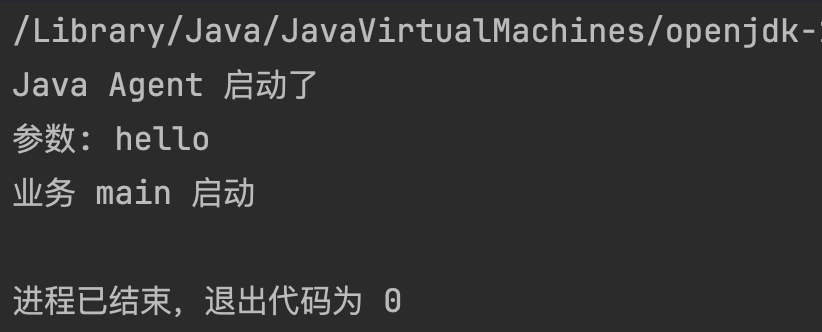
The Agent’s output appears before the application’s output, completing the outermost layer.
Observing Class Loading
Let’s go deeper and add addTransformer.
package demo.agent;

import java.lang.instrument.ClassFileTransformer;
import java.lang.instrument.IllegalClassFormatException;
import java.lang.instrument.Instrumentation;
import java.security.ProtectionDomain;

public class SimpleAgent {
    public static void premain(String agentArgs, Instrumentation inst) {
        System.out.println("Java Agent 启动了");
        System.out.println("参数: " + agentArgs);

        inst.addTransformer(new ClassFileTransformer() {
            @Override
            public byte[] transform(ClassLoader loader, String className, Class<?> classBeingRedefined, ProtectionDomain protectionDomain, byte[] classfileBuffer) throws IllegalClassFormatException {
                if ("App".equals(className)) {
                    System.out.println("Agent 观察到类加载"+className);
                }
                return null;
            }
        });
    }
}
addTransformer registers a “class-loading observer” with the JVM, which calls it every time a class is loaded. The current App has no package name, so we match "App".
Build the artifact and check the result after running it.
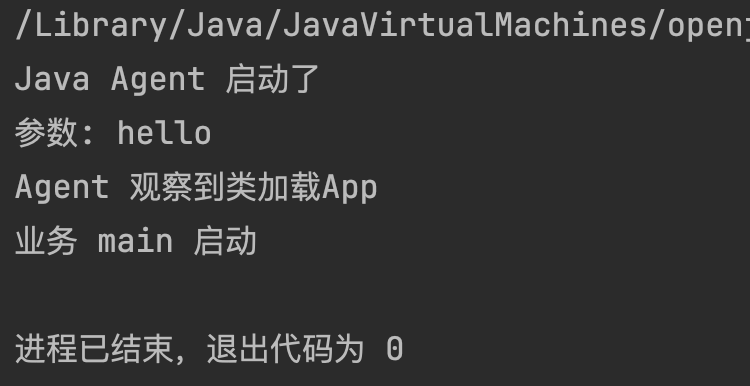
This step still returns null (no modification); next, we’ll make an actual change.
Modify Bytecode and Insert the First Hook
Let’s go further and experience the Java Hook idea by creating HookAgent.java and using Javassist to modify the target method.
package demo.agent;

import java.io.ByteArrayInputStream;
import java.lang.instrument.ClassFileTransformer;
import java.lang.instrument.Instrumentation;
import java.security.ProtectionDomain;
import javassist.ClassPool;
import javassist.CtClass;
import javassist.CtMethod;

public class HookAgent {
    public static void premain(String agentArgs, Instrumentation inst) {
        System.out.println("Agent premain: " + agentArgs);

        inst.addTransformer(new ClassFileTransformer() {
            @Override
            public byte[] transform(ClassLoader loader, String className,
                    Class<?> classBeingRedefined, ProtectionDomain protectionDomain,
                    byte[] classfileBuffer) {
                if (!"demo/app/BusinessService".equals(className)) {
                    return null;
                }

                CtClass target = null;
                try {
                    ClassPool pool = new ClassPool(true);
                    target = pool.makeClass(new ByteArrayInputStream(classfileBuffer));
                    CtMethod process = target.getDeclaredMethod("process");
                    process.insertBefore("System.out.println(\"[HOOK] process 参数: \" + $1);");
                    byte[] transformed = target.toBytecode();
                    System.out.println("Agent 已转换类: " + className);
                    return transformed;
                } catch (Exception e) {
                    System.err.println("Agent 转换失败: " + e);
                    return null;
                } finally {
                    if (target != null) {
                        target.detach();
                    }
                }
            }
        });
    }
}
In the App directory, create App.java and BusinessService.java.
package demo.app;

public class App {
    public static void main(String[] args) {
        System.out.println("业务 main 启动");
        BusinessService service = new BusinessService();
        service.process("alpha");
        service.process("beta");
    }
}
package demo.app;
public class BusinessService {
public void process(String value) {
System.out.println("业务处理: " + value);
}
}Run configuration:
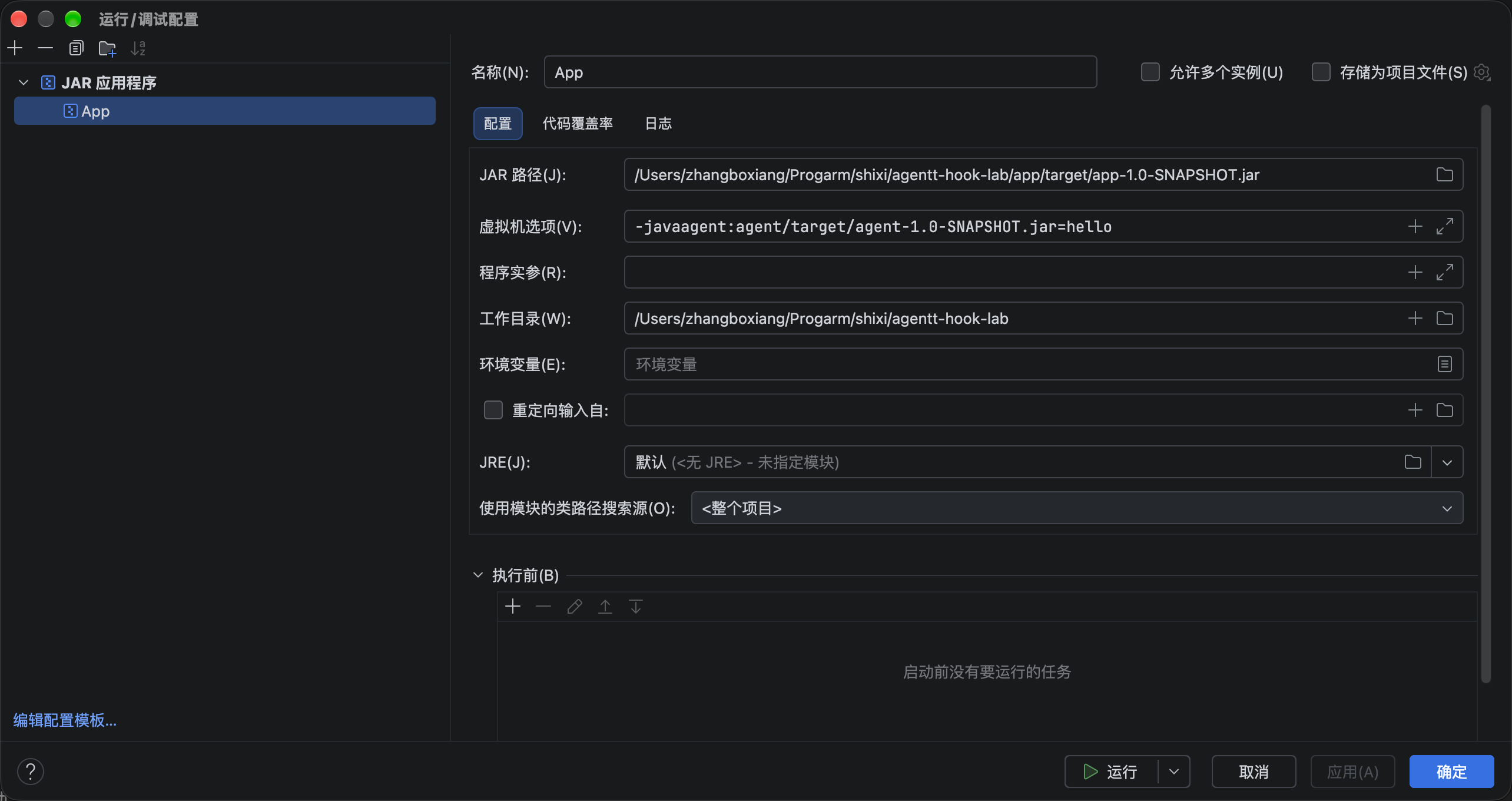
Or run the command:
java -javaagent:agent/target/agent-1.0-SNAPSHOT.jar=hello \
  -jar app/target/app-1.0-SNAPSHOT.jar
The result is:
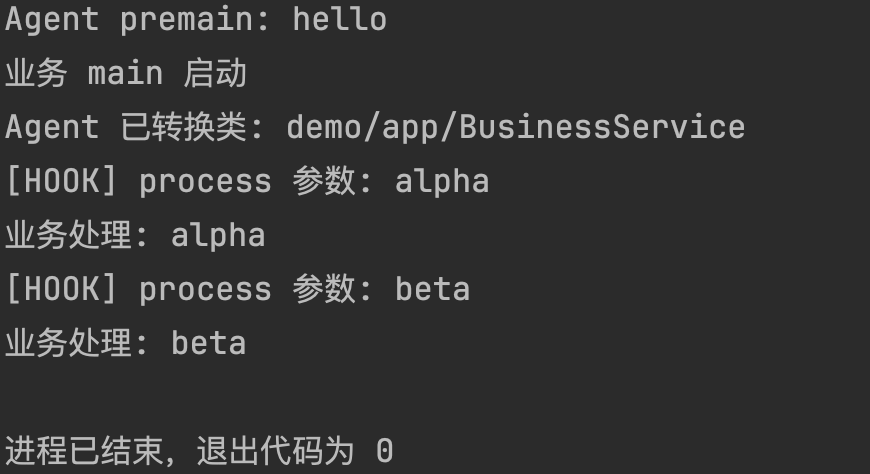
We can summarize the call trace as follows:
Agent premain
→ App.main 开始
→ JVM 首次加载 BusinessService
→ Transformer 修改它的 process 方法字节码(一次)
→ process("alpha"):先打印 Hook 日志,再执行原业务代码
→ process("beta"):再次打印 Hook 日志,再执行原业务代码
An important timing detail is immediately visible here: Agent 已转换类 appears only once, while [HOOK] appears twice. Class loading and method invocation do not happen at the same time: instrumentation occurs during the former, while the Hook runs during the latter.
Separating Detection Logic from the Hook
So far, we have inserted a print statement, with no policy check or blocking. Let’s continue and build the flow business method → Hook → detection logic → return to business method.
Replace the direct println insertion from the previous stage with a call to DetectionBridge.checkProcess at the entry to process. HookAgent.java still matches only demo/app/BusinessService, but now it returns new bytecode containing this call.
package demo.agent;

import java.io.ByteArrayInputStream;
import java.lang.instrument.ClassFileTransformer;
import java.lang.instrument.Instrumentation;
import java.security.ProtectionDomain;
import javassist.ClassPool;
import javassist.CtClass;
import javassist.CtMethod;

public class HookAgent {
    public static void premain(String agentArgs, Instrumentation inst) {
        System.out.println("Agent premain: " + agentArgs);

        inst.addTransformer(new ClassFileTransformer() {
            @Override
            public byte[] transform(ClassLoader loader, String className,
                    Class<?> classBeingRedefined, ProtectionDomain protectionDomain,
                    byte[] classfileBuffer) {
                if (!"demo/app/BusinessService".equals(className)) {
                    return null;
                }

                CtClass target = null;
                try {
                    ClassPool pool = new ClassPool(true);
                    target = pool.makeClass(new ByteArrayInputStream(classfileBuffer));
                    CtMethod process = target.getDeclaredMethod("process");
                    process.insertBefore("{ demo.agent.DetectionBridge.checkProcess($1); }");
                    byte[] transformed = target.toBytecode();
                    System.out.println("Agent 已转换类: " + className);
                    return transformed;
                } catch (Exception e) {
                    System.err.println("Agent 转换失败: " + e);
                    return null;
                } finally {
                    if (target != null) {
                        target.detach();
                    }
                }
            }
        });
    }
}
DetectionBridge.java:
package demo.agent;

public final class DetectionBridge {
    private DetectionBridge() {
    }

    public static void checkProcess(String value) {
        System.out.println("[DETECT] process 参数: " + value);
    }
}
Run it:
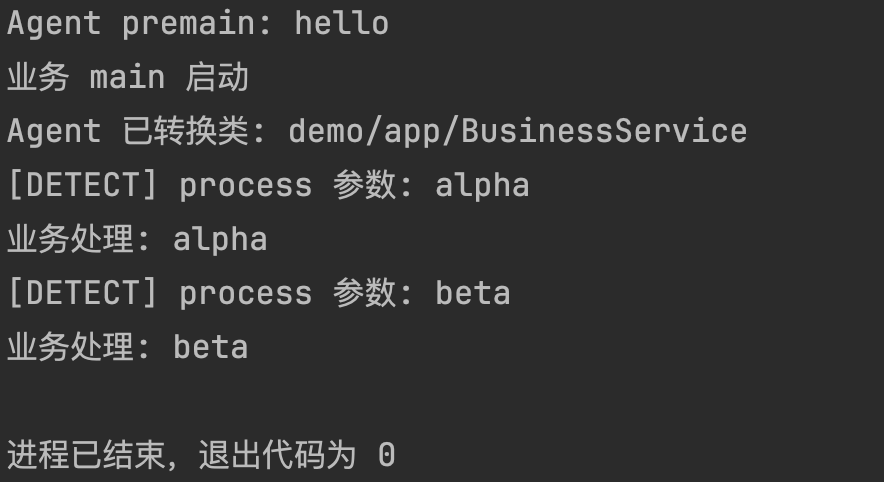
It may look as if we merely renamed the log from [HOOK] to [DETECT], but the call location has changed. The rewritten process is equivalent to:
public void process(String value) {
    DetectionBridge.checkProcess(value);      // 新插入的调用
    System.out.println("业务处理: " + value);  // 原业务代码
}
The Agent can obtain a target class’s bytecode as it enters the JVM and return modified bytecode. We can also see that BusinessService is transformed once, while the modified process is called twice; class loading and method invocation are not the same event.
At this point, we have the skeleton of a mini RASP. What OpenRASP does is essentially an enlarged version of this skeleton: it replaces BusinessService.process with the JDBC driver’s execute, and replaces DetectionBridge with a JS detection plugin running in V8.
OpenRASP
Project: https://github.com/baidu/openrasp
Project Structure
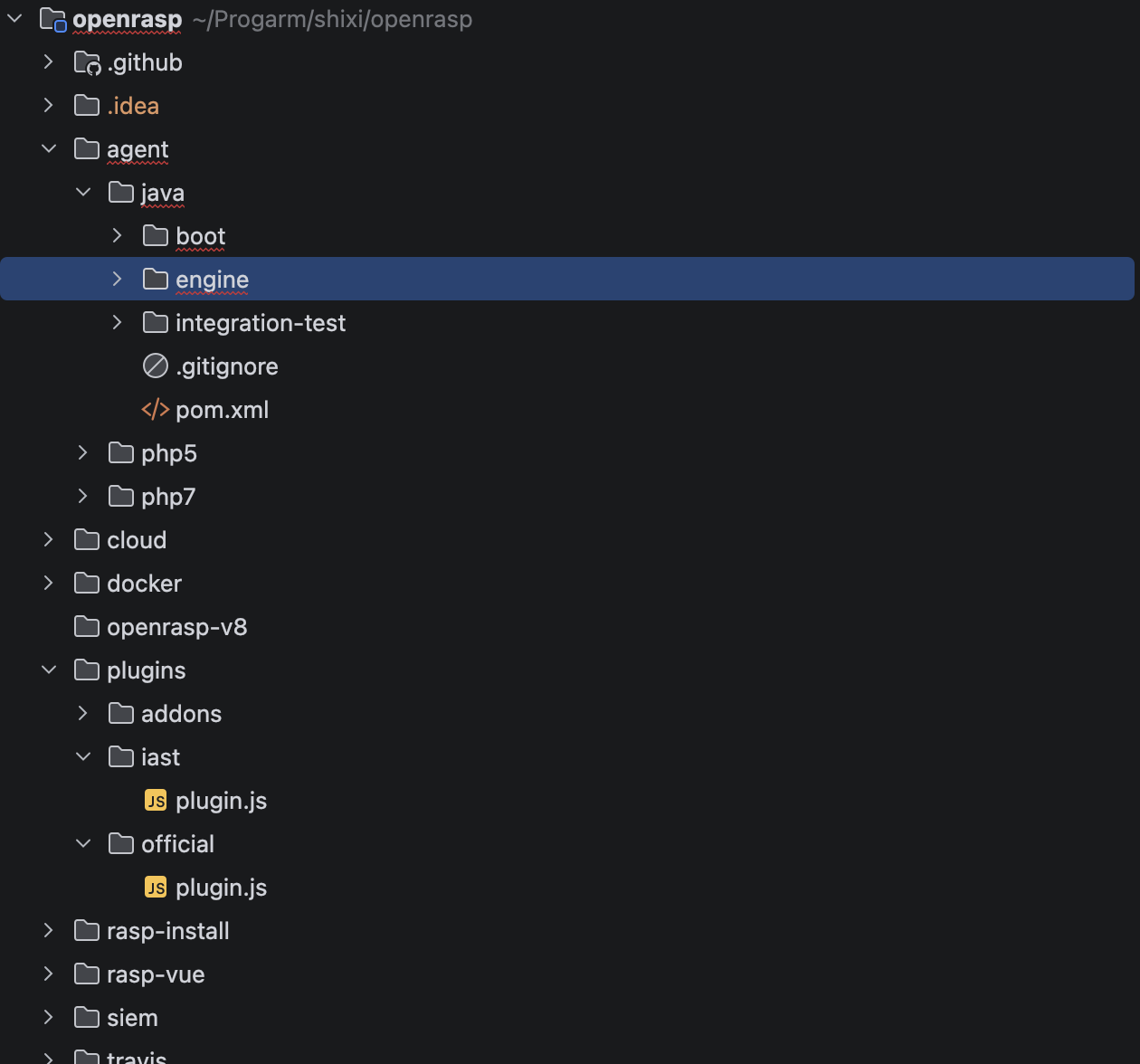
openrasp/
├── agent/java            Java Agent(本文主角)
│   ├── boot              引导模块:premain / agentmain 入口、模块加载器
│   └── engine            引擎模块:Hook、检测调度、V8 桥接、云控
├── agent/php ...         PHP 扩展实现,思路相同
├── plugins/
│   ├── official/         官方检测插件
│   ├── iast/             IAST 传感器插件
│   └── addons/           辅助插件(XSS 演示、扫描器识别等)
├── openrasp-v8           V8 引擎 + SQL/命令词法器的原生实现(git 子模块)
├── cloud                 云控管理平台后端
├── rasp-vue              管理平台前端
├── rasp-install          安装脚本
└── siem                  SIEM 对接
Why boot and engine Are Separate Modules
The Agent class in the boot module is the production-grade version of SimpleAgent from the experiment; it has both entry points.
public static void premain(String agentArg, Instrumentation inst) {
    init(START_MODE_NORMAL, START_ACTION_INSTALL, inst);
}

public static void agentmain(String agentArg, Instrumentation inst) {
    init(Module.START_MODE_ATTACH, agentArg, inst);
}
init does only two things: it adds the agent jar to the Bootstrap ClassLoader’s search path, then asks ModuleLoader to load the actual engine module (the entry class is EngineBoot, declared in the MANIFEST’s Rasp-Module-Class attribute).
The purpose of this split is that boot stays small and stable and hardly needs changes, while engine is an independent jar that can be upgraded or replaced separately (together with attach + retransform, this theoretically supports swapping the engine without downtime).
Keep one more detail in mind for the bypass chapter later: init wraps the entire startup in catch (Throwable). On failure it prints:
Failed to initialize, will continue without security protectionThen the application continues to run as usual. Startup failure does not stop the application; protection is simply absent.
EngineBoot Startup Order
EngineBoot.start() proceeds in this order:
Loader.load()                加载 openrasp-v8 原生库(JNI:V8 引擎 + 词法器)
loadConfig()                 读取配置、初始化日志 / syslog
JS.Initialize()              初始化 V8、加载 JS 检测插件
CheckerManager.init()        注册检测器(V8AttackChecker 等)
initTransformer(inst)        创建 CustomClassTransformer 并 retransform
CrashReporter.install()      云控模式下安装崩溃上报
Compare this with the experiment: the “register Transformer” step in the mini RASP’s premain is split here into three steps—“load rules → register detection dispatch → install instrumentation.” Rules and instrumentation are decoupled.
How Hooks Are Discovered
CustomClassTransformer does not maintain the Hook list by hand. It scans the com.baidu.openrasp.hook package for classes annotated with @HookAnnotation, instantiates them with reflection, and collects them into a set. When classes are loaded, it calls isClassMatched on each one to decide whether to instrument them. To add a detection point, write an annotated class and put it in this package.
It also handles the case of already-loaded classes:
public void retransform() {
    Class[] loadedClasses = inst.getAllLoadedClasses();
    for (Class clazz : loadedClasses) {
        if (isClassMatched(clazz.getName().replace(".", "/"))) {
            // hook已经加载的类,或者是回滚已经加载的类
            inst.retransformClasses(clazz);
        }
    }
}
It iterates over every class already loaded in the JVM and retransforms all matches.
The
release()method uses the same steps in reverse: removeTransformer + retransform to restore the original bytecode. We’ll revisit this rollback capability in the chapter about attacking the detector.
The ignoreHooks configuration can also disable Hooks by type; set it to all to disable them all (except a few marked necessary, such as those that collect request parameters—without them detection would have no context).
Plugins and Deployment Modes
The JS plugin directory is monitored by FileScanMonitor; whenever a plugin file changes, it is reloaded. Rules can be changed without reinstrumentation or even restarting the application—this is the most direct benefit of putting detection logic in JS.
| Plugin | Role |
|---|---|
plugins/official | Production detection rules |
plugins/iast | IAST sensor; collects data but does not make decisions |
plugins/addons | Demonstrations and utilities |
There are two deployment modes: standalone uses a local configuration file; in cloud mode, configuration, plugins, and alerts all go through the cloud-control platform. rasp-install injects the -javaagent argument into the startup scripts of each container.
boot(Agent.premain / agentmain)
   ↓ ModuleLoader
engine(EngineBoot) ── Transformer ── @HookAnnotation Hooks
   │                                     ↕ 插桩 / 回滚
   └── JS.Initialize ── V8(openrasp-v8) ── plugins/(official | iast | addons)
                          ↕ 云控通道
                       cloud / rasp-vue
How OpenRASP Detects an SQL Statement
Let’s start with this question: “An HTTP request enters a Java web application, and the application executes an SQL statement through JDBC. Where does OpenRASP intervene, and how does it decide whether to allow, alert on, or block it?”
First, take a look at the overall timeline.
【JVM 启动、类加载阶段】
premain
  → 加载 OpenRASP 引擎
  → 注册 Transformer
  → 找到要 Hook 的类和方法
  → 将检测调用写入方法字节码

【应用运行、请求处理阶段】
HTTP 请求进入
  → 保存当前请求的上下文
  → 应用执行 JDBC Statement.execute(...)
  → 已插入的 Hook 收集 SQL
  → Checker 执行检测
  → 放行 / 记日志 / 阻断
The Two Stages We Need to Distinguish
类加载阶段:安装 Hook(装一次)
    驱动类加载 → Transformer 修改 execute 等方法的字节码

业务运行阶段:执行检测(每次调用都走)
    调用 execute(sql) → 插入的 checkSQL 运行 → 插件判断 → 放行或阻断
Experiments three and four already verified this sequence. Below, we’ll read the source code along these two tracks.
Class Loading Stage: SQLStatementHook
The key file here is SQLStatementHook.java
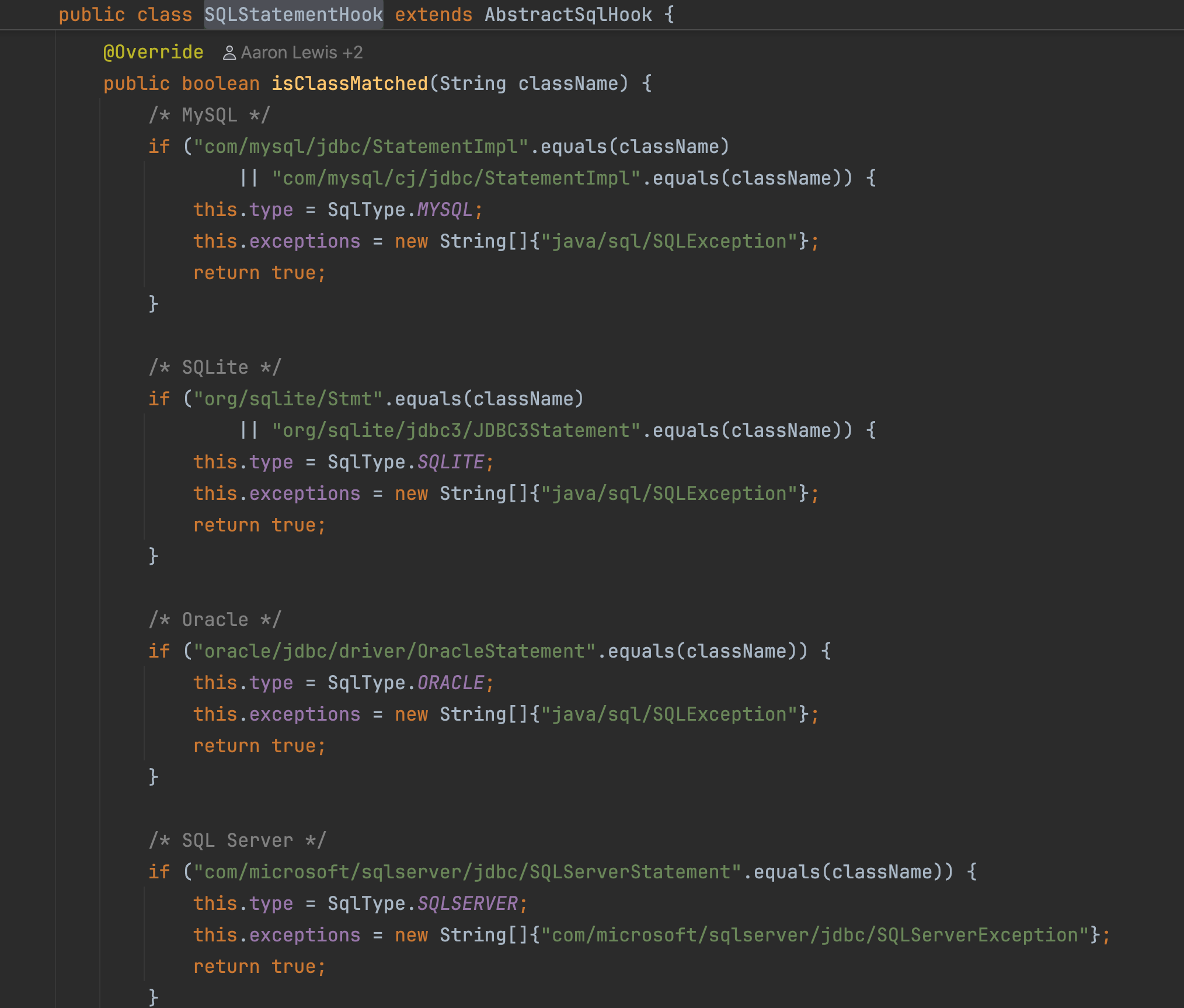
It matches the concrete Statement implementation classes of specific drivers, such as MySQL and PostgreSQL, while also determining the database type, server. We’ll return to this “exact class-name matching” approach in the bypass chapter.
After a match, hookSqlStatementMethod (L129-L149) selects specific overloads of execute, executeUpdate, executeQuery, and addBatch based on the method name and descriptor, then calls insertBefore.
Here is the specific code. This section is actually rather difficult to read, so I have recorded a line-by-line analysis.
    private void hookSqlStatementMethod(CtClass ctClass) throws NotFoundException, CannotCompileException {
        String[] executeFuncDescs = new String[]{"(Ljava/lang/String;)Z", "(Ljava/lang/String;I)Z",
                "(Ljava/lang/String;[I)Z", "(Ljava/lang/String;[Ljava/lang/String;)Z"};

        String[] executeUpdateFuncDescs = new String[]{"(Ljava/lang/String;)I", "(Ljava/lang/String;I)I",
                "(Ljava/lang/String;[I)I", "(Ljava/lang/String;[Ljava/lang/String;)I"};

        String executeQueryFuncDesc = "(Ljava/lang/String;)Ljava/sql/ResultSet;";

        String addBatchFuncDesc = "(Ljava/lang/String;)V";

        String checkSqlSrc = getInvokeStaticSrc(SQLStatementHook.class, "checkSQL",
                "\"" + type.name + "\"" + ",$0,$1", String.class, Object.class, String.class);
        insertBefore(ctClass, "execute", checkSqlSrc, executeFuncDescs);
        insertBefore(ctClass, "executeUpdate", checkSqlSrc, executeUpdateFuncDescs);
        insertBefore(ctClass, "executeQuery", executeQueryFuncDesc, checkSqlSrc);
        insertBefore(ctClass, "addBatch", addBatchFuncDesc, checkSqlSrc);

        addCatch(ctClass, "execute", executeFuncDescs);
        addCatch(ctClass, "executeUpdate", executeUpdateFuncDescs);
        addCatch(ctClass, "executeQuery", new String[]{executeQueryFuncDesc});
        addCatch(ctClass, "addBatch", new String[]{addBatchFuncDesc});
    }
We can divide it into three parts.
① Desc 数组:列出要修改的具体方法签名
② checkSqlSrc + insertBefore:方法开头插 checkSQL 调用
③ addCatch:方法抛 SQLException 时插异常检查
① What is Desc?
It is the method descriptor, covered in the earlier javap section. (Ljava/lang/String;)Ljava/sql/ResultSet; translated into a human-readable form is:
ResultSet executeQuery(String sql)Why list four Desc values for execute? Because it is an overloaded method. The name alone is not enough; the JVM uses descriptors to distinguish overloads. These four correspond to:
boolean execute(String sql)
boolean execute(String sql, int option)
boolean execute(String sql, int[] indexes)
boolean execute(String sql, String[] names)
② What does checkSqlSrc do?
This line assembles a piece of call code that will be inserted; it does not call checkSQL right now.
String checkSqlSrc = getInvokeStaticSrc(
    SQLStatementHook.class, "checkSQL",
    "\"" + type.name + "\"" + ",$0,$1",
    String.class, Object.class, String.class
);
The assembled result is approximately:
SQLStatementHook.checkSQL("mysql", this, sql);type.name: the database type determined when matching the driver class, such as “mysql”$0: the current object of the modified method, equivalent tothis$1: the first parameter of the modified method, which here is the SQL string- The last three
*.classvalues: the parameter types for the target checkSQL method
The four insertBefore lines insert the same call into four methods. Experiment four demonstrates the same thing.
process.insertBefore("DetectionBridge.checkProcess($1);");It is just that OpenRASP has to handle multiple drivers and overloads, so the code is longer.
③ What is addCatch?
It handles another point in time: when the driver method throws SQLException during execution. Taking executeQuery as an example, the instrumented effect is roughly:
ResultSet executeQuery(String sql) {
    checkSQL("mysql", this, sql);     // 执行前检查

    try {
        return 原来的SQL执行逻辑(sql);
    } catch (SQLException e) {
        checkSQLErrorCode("mysql", e, sql); // SQL 异常检查
        throw e;                           // 原异常继续抛出
    }
}
This is an illustration to aid understanding, not a verbatim representation of the bytecode. Exception checks filter by configured error codes, so not every SQL exception counts. This catches error-based injection: when an injection takes effect, the database throws specific errors (such as MySQL 1064 syntax errors, 1105 XPATH errors, and 1367 non-geometry-value errors). This corresponds to algorithm 3, sql_exception, in the plugin, which only logs by default.
Request Entry: Saving Context
At the web-request entry point (the Adapter/Filter hooks for each container; see the hook/server/ directory), HookHandler.checkRequest associates the request object with the current thread and turns detection on. When the request ends, onServiceExit turns it off and clears the cache.
So when SQL executes on the same request thread, the detector has two things available:
SQL Hook 提供:实际要执行的 SQL
请求 Hook 提供:当前请求的参数等上下文
This is the foundation of RASP detection: context and operation converge in one place. Without context, SQL detection degrades into an “SQL firewall” that can only inspect the statement itself.
Business SQL Execution: The Hook Collects Data
Suppose the application calls:
statement.executeQuery("SELECT * FROM users");The inserted method-entry code first calls checkSQL. Simplified, the logic is:
public static void checkSQL(String server, Object statement, String stmt) {
    if (stmt != null && !stmt.isEmpty()) {
        HashMap<String, Object> params = new HashMap<String, Object>();
        params.put("server", server);
        params.put("query", stmt);
        HookHandler.doCheck(CheckParameter.Type.SQL, params);
    }
}
It only extracts data and initiates detection; the decision is not made here.
Java Hands the Detection Task to the JS Plugin
The call chain is:
HookHandler.doCheck(SQL, params)
    ↓ 检查当前线程、配置及全局开关
CheckerManager.check(SQL, checkParameter)
    ↓ 根据 SQL 类型选择 Checker
V8AttackChecker.checkParam(...)
    ↓
JS.Check(...)
    ↓
V8.Check("sql", 参数, 请求上下文, 超时设置)
CheckParameter stores the detection type, Hook parameters, and current request. For SQL, the corresponding checker is V8AttackChecker; JS.Check serializes the parameters as JSON and passes them through JNI to the JS function registered in V8 for the SQL detection point. Relevant source: HookHandler, CheckerManager, JS.Check
One point is easy to misunderstand: V8 is an engine for running JS rules, not a black box that has built-in SQL injection detection. All decision logic lives in the official plugin’s plugin.js. Incidentally, at the start of plugin.js there is also a compatibility branch that checks RASP.get_jsengine() !== 'v8'—early versions used Rhino, and for a while SQL/SSRF detection was implemented natively in Java. It was later unified into the JS plugin plus V8.
How the JS Plugin Checks SQL
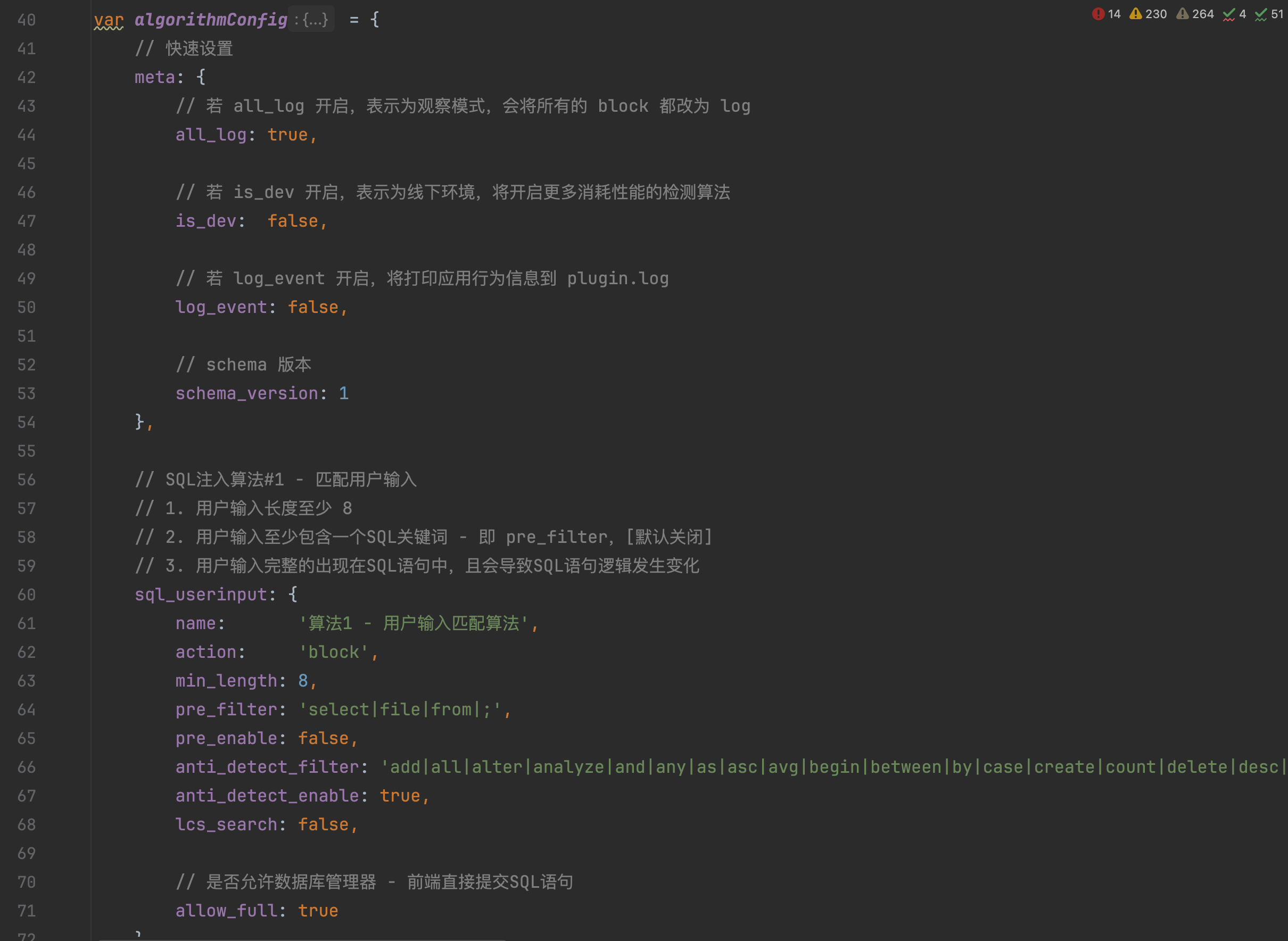
The rule entry point is the official plugin.register(‘sql’, …) in plugin.js. The function receives:
params.query   → 实际执行的 SQL
params.server  → 数据库类型
context        → 当前请求信息
There are four main algorithms:
| Algorithm | Approach | Default action |
|---|---|---|
sql_userinput | User input enters SQL and changes the token structure | block, confidence 90 |
sql_policy | The SQL itself matches dangerous structural features | block, confidence 100 |
sql_exception | Database error signatures (traces of error-based injection) | log only |
sql_regex | User-defined regular expression | disabled by default |
sql_userinput
This is the most important one. The decision is a funnel: if any stage fails, the request is allowed through.
遍历输入源:parameter(GET/POST/multipart)
           cookie、user-agent / referer / x-forwarded-for、JSON body
  → 参数值长度 < 8(min_length)→ 跳过
  → params.query.indexOf(value) 找不到原文 → 跳过
  → 整条 SQL 恰好等于参数值 且 allow_full 开启 → 跳过
  → 形如 "1,2,3"、"user_id,user_name" 的值 → 跳过(防误报)
  → RASP.sql_tokenize 词法分析
     (MySQL 用 ANTLR 完整语法器,其他库用简化 flex 词法器)
  → is_token_changed:输入跨越 ≥ 2 个 token(长度 > 20 时 ≥ 3)
     → 判定"SQL 结构被用户输入改写" → block
It is worth spelling out a few stages in more detail.
“Input appears in SQL” does not mean an attack. In normal business logic such as where name='alice', the parameter alice also appears in the SQL, but the entire value sits inside one string-literal token and the structure has not changed. The actual criterion is is_token_changed: after tokenization, it checks whether the region covered by the user input has “expanded” into multiple tokens. Something like alice' or '1'='1, which closes a quote and adds a logical operation, necessarily spans several tokens. This is a semantic-level check, a step above a regular-expression blacklist.
Why is min_length = 8? Short parameters produce too many false positives (for example, id=1), so inputs shorter than 8 characters are skipped entirely. Note that all checks are skipped; this will matter in the bypass chapter.
Anti-probing exception. There is a section in is_token_changed: if the token span is less than 10 and there are fewer than 2 tokens that are “not SQL keywords,” it is not counted as an attack. This is intended to prevent probing: an attacker can try a minimal payload such as and 1=1, one character at a time, to see whether RASP is present; blocking every attempt would reveal the detector’s behavior. This exception relies on substring matching against a keyword table, and we’ll examine its gaps together later.
sql_policy
This is a policy check: regardless of who supplied the input, it looks at whether the SQL itself is dangerous. To save performance, it first applies a pre-filter regular expression, pre_filter; if there is no match, it does not tokenize the input at all. The features enabled by default are:
| Feature | What it blocks |
|---|---|
union_null | union select NULL,NULL,NULL / union select 1,2,3 |
version_comment | MySQL version comments beginning with /*! |
function_blacklist | load_file / sleep / benchmark / pg_sleep / is_srvrolemember / updatexml / extractvalue |
into_outfile | File writes using INTO OUTFILE / DUMPFILE |
Disabled by default: stacked_query (stacked queries), no_hex (0x literals), information_schema (metadata tables), and function_count (function frequency). Which checks are enabled is a tradeoff between false-positive and detection rates.
The V8 Engine
OpenRASP includes an engine for running JavaScript: Google’s V8. Together with dedicated interfaces and JNI bridging, it forms the openrasp-v8 component.
| Part | Role |
|---|---|
| Java Agent, Hook | Collect SQL and request context |
| JS plugin | Execute detection rules |
| V8 | Run these rules |
Java 应用准备执行 SQL
        ↓
Java Hook 获取 SQL 和请求上下文
        ↓
通过 JNI 交给嵌入的 V8
        ↓
V8 执行 plugin.js 里的 SQL 检测函数
        ↓
返回检测结果
        ↓
Java 侧处理告警或阻断
So there is no need to open a browser, nor to start a separate Node.js service. Keeping rules in JS has an advantage: instrumentation is installed in the JVM, while rules can be hot-updated in JS, so policy iteration does not require reinstrumentation. The tradeoff is an extra layer of JNI overhead, so the engine implements an LRU cache—a cache covered later in the detector-attacking chapter.
Summary
类加载:
Transformer → 匹配 JDBC 驱动类 → 给 execute 等方法插入 checkSQL

请求运行:
请求上下文 ───────────────────────────┐
业务调用 execute(sql) → checkSQL 提取 SQL ├→ HookHandler
                                      ↓
                           CheckerManager → V8 → JS SQL 插件
                                                   ↓
                                          ignore / log / block
What Other Detection Points Are There Besides SQL?
The earlier sink checklist listed a number of them. To see what OpenRASP actually covers, look directly at the hook package directories; the directory structure itself is an inventory of the detection surface.
| Directory / file | Detection points | Covered classes |
|---|---|---|
hook/sql/ | sql, sql_exception | Statement / PreparedStatement / Connection in various JDBC drivers |
hook/system/ | command | ProcessBuilder / ProcessImpl. In modern JDKs, Runtime.exec delegates internally to ProcessBuilder, so one Hook covers both. |
hook/file/ | directory, readFile, writeFile, deleteFile, rename, fileUpload, link | FileInputStream / FileOutputStream / NIO Files.* / commons-fileupload / Spring uploads |
hook/ssrf/ | ssrf, ssrfRedirect | URLConnection, Apache HttpClient, OkHttp, WebLogic UDDI, plus a second check after redirects |
hook/xxe/ | xxe | Various XML parsers: SAX / DOM / dom4j / JDOM / StAX / Woodstox |
| Root directory | deserialization | ObjectInputStream (resolveClass) |
| jndi | Context.lookup, a key sink for attacks such as Log4Shell | |
| dns | Domain-name resolution, a DNS out-of-band channel | |
| ognl | Struts2 OGNL expressions (S2-series RCE) | |
JspCompilationContextHook | writeFile | JSP compilation context; JSP webshells are written to disk through file-write detection |
hook/server/ | request, requestEnd, response, parameter collection | Container adapters: catalina (Tomcat), jetty, resin, weblogic, websphere, wildfly, tongweb, bes, spring |
hook/dubbo/ | dubbo lifecycle | Dubbo RPC context collection |
These correspond to the detection points actually registered in the official plugin.js: sql / command / directory / readFile / writeFile / deleteFile / rename / fileUpload / link / include / ssrf / ssrfRedirect / xxe / ognl / eval / loadLibrary / jndi / dns / deserialization / webdav / response
A Few Representative Detection Points
Command execution. It is structurally similar to sql_userinput: after cmd_tokenize, it checks whether user input has changed the token structure. There is also a command_common algorithm whose action is log; its regular expressions specifically look for penetration-testing signatures such as cat /etc/passwd, nc -e /bin/sh, a reverse shell using bash -i >& /dev/tcp/, and {echo,base64,-d}. Its role is as a probe: normal business logic almost never runs these commands, so their appearance means something has already gone wrong. Record them and investigate.
The three SSRF algorithms:
1. 参数来自用户输入且解析出内网 IP → block
2. 目标是已知回传地址(dnslog 系、requestb.in、transfer.sh)→ block
3. 目标是云厂商 metadata 地址 → block
   硬编码:169.254.169.254(AWS)
          100.100.100.200(阿里云)
          168.63.129.16(Azure)
          metadata.google.internal(GCP)
Redirects are a classic SSRF bypass (a public address returns a 302 to an internal network address), so ssrfRedirect checks the new address after the redirect again.
Deserialization. The Hook is on ObjectInputStream.resolveClass; each class name parsed from the stream is compared for exact equality against a blacklist. The list contains 13 classes: Commons-Collections’ InvokerTransformer / InstantiateTransformer / ChainedTransformer (including the collections4 versions), Groovy’s MethodClosure, TemplatesImpl, c3p0’s PoolBackedDataSourceBase, Spring’s ClassPathXmlApplicationContext, and others. Exact matching is simple and reliable, but gadgets not on the list and subclasses of these classes are outside the defense—another point that depends on the completeness of an enumerated list.
XXE. This detection point is somewhat unusual: besides detection, hook/xxe/ also contains a set of components such as DisableDom4jXxeEntity and DisableSaxXxeEntity. They directly rewrite parser configuration to disable external entities. This is not an alert; it patches the application on its behalf. For situations where the business code cannot be changed, this kind of virtual patch is more practical than an alert.
JNDI and DNS only log by default. They mainly provide data for correlation analysis. For example, after the Log4Shell outbreak, reviewing the JNDI logs can show who was affected.
The Fundamental Difference Between RASP and WAF
RASP’s fundamental advantage over WAF is that it can see the final SQL and the full context (more precisely: RASP can see the actual operation parameters at instrumented sensitive operations and make decisions using the request context it has collected).
Suppose a user submits
name=aliceA WAF sees the input at the entry point itself
用户提交了 name=aliceAt the SQL execution point, RASP can also see the query generated by the application
SELECT * FROM users WHERE name = 'alice'WAF mainly checks input; RASP can check the actual operation produced after the input has passed through business logic.
So if a transformation happens only at the HTTP representation layer—URL encoding, case changes, or comment insertion—and the application restores it to the same SQL after parsing, it has no effect at all on SQL detection. Classic WAF-era techniques such as sel/**/ect and double encoding are meaningless against RASP.
But RASP is not without bypass opportunities. Its detection depends on two assumptions: that it can associate “user input” with “final SQL” (the taint correlation in Algorithm 1), and that it can enumerate all “dangerous features” (the blacklist in Algorithm 2 and the Hook class-name list). The next two chapters examine these assumptions in turn.
Bypassing SQL Injection Detection
Verify only in a local environment you set up yourself.
Overall Approach
Transformation-based techniques are all ineffective; the only viable targets are those two structural assumptions. They can be organized into several categories.
A 类:打断"参数值 == SQL 子串"这个前提(打算法1)
B 类:token 判定层的缝隙(打算法1 的判定细节)
C 类:sql_policy 的枚举缺口(打算法2)
D 类:Hook 覆盖面的盲区(打插桩层)
E 类:杂项
There is also a category of techniques that do not target the detection logic at all, but directly prevent detection from happening. That is covered separately in the next chapter.
Category A: Breaking “Parameter Value == SQL Substring”
Algorithm 1 starts with params.query.indexOf(value), plugin.js:1755. If it cannot match, the entire algorithm is rendered useless. The question, then, is: when can “the string that enters the SQL” differ from “the HTTP parameter value”?
1. The input source is outside the collection scope. The plugin compares only four types of input (plugin.js:701, L1818-L1858): GET/POST/multipart parameters, cookies, JSON body, and three headers (user-agent / referer / x-forwarded-for). Sources outside its view include:
- RESTful path parameters: the
idin/user/{id}comes from the URI path and is not in the parameter map. - Other headers: Authorization, Host, X-Real-IP, and custom headers.
- Non-HTTP entry points: data consumed from MQ, CSV imports, and caches.
2. Second-order injection. This is the most typical form of a “missing input source,” so it deserves separate mention: when a user registers, their username is stored in the database (the INSERT is normal); later, a page retrieves that username and concatenates it into a query—SELECT ... WHERE created_by='用户名'. In the request where the injection occurs, that payload value is not present in the HTTP parameters at all, so indexOf naturally cannot find it. Parameterized queries are equally effective against second-order injection, but this kind of “request-context correlation” detection, as used by OpenRASP, cannot cover it by design unless taint propagation across requests is implemented.
3. The application transforms the input before concatenation. The application escapes input before concatenating the SQL (PHP’s addslashes, or a custom Java replace("'","''")), adding backslashes or quotes to the query so the original parameter no longer matches. The same applies to a second urldecode, case conversion, or base64 decoding. OpenRASP has an lcs_search that tolerates inserted characters (longest common substring matching), but it is disabled by default. GBK wide-byte behavior is also in this category: after the bytes introduced by escaping interact with the connection encoding, the query and parameter value no longer match.
4. Short parameters. min_length: 8 (plugin.js:63, 1734). Count the characters: 'or 1=1 is 7 characters (quote, o, r, space, 1, =, 1), fewer than 8, so all checks are skipped. Quite a few minimum viable payloads for blind Boolean injection fall below this length.
5. allow_full. The entire SQL is allowed through if it exactly equals the parameter value, plugin.js:1761. This is an escape hatch for managers such as phpMyAdmin that submit SQL directly. If the target application itself has an interface that accepts complete SQL (reports, query builders), Algorithm 1 is ineffective against it as a whole, leaving only Algorithm 2.
Category B: Gaps in the Token-Classification Layer
The distance threshold. The injection fragment must span ≥2 tokens (or ≥3 when its length exceeds 20) to trigger an alert, plugin.js:1283-1286. This prevents false positives: quoted identifiers such as dbname.table are split into adjacent tokens, and ordinary business logic contains them everywhere. To exploit this, a payload would need to fit within a single token, but injections that actually change SQL semantics almost inevitably span multiple tokens, making this mostly a theoretical window.
The anti-probing whitelist uses substring matching. When the token span is less than 10 and there are fewer than 2 non-keyword tokens, no alert is raised, plugin.js:1317-1326. The problem lies in how keywords are identified—the regex is not anchored, and test() performs substring matching.
sqliAntiDetect.test(raw_tokens[i].text) || non_kw++A token counts as a keyword as long as it contains any keyword: forest contains or, and interval contains in and into. By constructing a short payload composed almost entirely of keywords (or identifiers containing keywords), the number of non-keyword tokens can be reduced to fewer than 2, and Algorithm 1 stays silent. Layered together with the distance threshold and min_length, this silent zone is not small.
Category C: Enumeration Gaps in sql_policy
The bounds of the pre-filter regex. To save tokenization overhead, Algorithm 2 requires SQL to match pre_filter before it proceeds to subsequent checks (plugin.js:1874-1876). On both sides of function names, the regex requires \W (a non-word character).
\W(information_schema|outfile|dumpfile|load_file|benchmark|pg_sleep|sleep|...)\Wsleep( matches (a space before it and a parenthesis after it), but it does not match when embedded in an identifier: in to_char(, char is preceded by the letter o; in unhex(, hex is preceded by n. If the pre-filter does not match, tokenization does not even take place, so the function blacklist never gets a chance to run—even if hex detection is enabled separately.
The function blacklist matches complete tokens. The blacklist check asks whether “the token is ( and the preceding token equals a name on the list.” In Oracle, dbms_lock.sleep(5) has dbms_lock.sleep as one token, which is not equal to sleep, so it does not match. Other missed alternatives include:
- Time-based blind injection lists only sleep / benchmark / pg_sleep: SQL Server’s
waitfor delay, MySQL’sget_lock()(used with two connections), and regex backtracking withrlike '(a+)+$'are not on the list. - Error-based injection lists only updatexml / extractvalue:
exp(~...),polygon(), and the GTID family are not covered; the fallback Algorithm 3, sql_exception, only logs and does not block.
The counting window for union_null. It recognizes only two patterns among at most the next 5 tokens after union select: a pure NULL/comma sequence (null_count ≥ 5) or a pure number/comma sequence (num_count ≥ 5). Let’s walk through the actual token sequences.
The tokens for union select 1,2,3 are 1 , 2 , 3; counting each one gives num_count exactly 5, so it is blocked.
The tokens for union select null,user(),version() are null , user ( ) , version (—null_count stops when it reaches user (only 2); num_count fares worse: null is not a number, so it stops at the first token (0). Neither counter reaches 5, so it is allowed through.
Mixed-type UNION injection is entirely in the blind spot.
Features disabled by default. Stacked queries (;), 0x hexadecimal, and access to information_schema are not blocked by default. Even when information_schema checks are enabled, they match only the exact form information_schema.tables—columns, schemata, and mysql.innodb_table_stats are not covered.
Category D: Hook Coverage
isClassMatched uses exact class-name matching, SQLStatementHook.java:47-106; this list is worth auditing item by item.
- No MariaDB driver.
org.mariadb.jdbc.*is not in the matching list for any SQL Hook. Replace mysql-connector-java with mariadb-java-client, and the application continues to work normally (the protocols are compatible), but all SQL becomes invisible to RASP. For an attacker, this is a matter of getting lucky with an existing environment; for defenders, it is a deployment audit item: check whether the classpath contains any drivers outside the list. - A driver upgrade may change class names, or a new wrapper class may be introduced, breaking the match. Connection-pool proxies (c3p0, Druid wrappers) are fine—the call ultimately reaches the underlying driver implementation, and the Hook remains in place—but a refactor of the driver’s own class names can create a gap.
- Non-JDBC data sources: MongoDB has a separate Hook; Redis, Elasticsearch, and Cassandra do not. NoSQL injection is outside this system.
Category E: Miscellaneous
- Stack whitelist: if the class name in the first stack frame contains
phpmyadmin, Algorithm 1/2 is allowed through entirely (plugin.js:755, 1860). Any business package name that happens to contain this word is effectively whitelisted. - Algorithm 4, sql_regex, has an empty configuration by default.
- The databases covered by sql_exception are mainly MySQL, and it only logs.
Target the Detector, Not Its Detection Logic
All the bypasses above share one feature: detection occurs, but the decision is fooled. This chapter takes a different approach: instead of caring whether the decision is correct, make sure detection does not happen at all.
First, keep in mind that the RASP engine itself is an ordinary Java program running in the same JVM. It can instrument business classes, and business-side code (or an attacker who has already obtained code execution in the JVM) can also get at it. But first, let’s start with what does not require code execution—the engine’s own runtime behavior already contains many points where “protection quietly disappears.”
Cross-Thread Blind Spots
As mentioned earlier, the request entry point enables detection for “the current thread.” Here’s the implementation (HookHandler.java:377):
public static void doCheck(CheckParameter.Type type, Map params) {
    if (enableCurrThreadHook.get()) {      // ThreadLocal 开关
        doCheckWithoutRequest(type, params);
    }
}
The comment on this line of source is quite direct:
Hooks are disabled by default; only threads that have processed an HTTP request are enabled.
enableCurrThreadHook is a ThreadLocal. checkRequest sets it to true when a request enters, and onServiceExit resets it to false when the request ends. Checks such as SQL that go through doCheck are effective only on a thread “currently processing an HTTP request.”
Move execution off the request thread, and detection does not happen at all.
Tomcat 工作线程                异步线程池
─────────────                ─────────────
checkRequest: 开关 = true
业务把任务丢进 @Async ───────→  execute(sql)
                               doCheck: 开关 == false
                               直接 return,检测没发生
onServiceExit: 开关 = false
Real-world examples include JDBC executed in @Async, CompletableFuture, custom thread pools, MQ listeners, and scheduled tasks. Note that this is much more complete than the blind spots in Category A—the entire chain of input matching, tokenization, and policy checks never starts. Modern applications rely increasingly on asynchronous processing, which is a recognized challenge for RASP products: the context is attached to a ThreadLocal, and it is lost when the thread changes.
The Fail-Open Family
RASP’s first principle is that it must not bring down the business; when the detector itself encounters a problem, it can only allow the operation. This tradeoff appears in the code as a whole family of fail-open paths.
| Scenario | Behavior | Location |
|---|---|---|
| Agent initialization fails | Application runs normally, without protection | catch in boot Agent.init |
| Plugin detection throws an exception | Log it; do not block | doRealCheckWithoutRequest catch Throwable |
| V8 call throws an exception | Return null (equivalent to no detection result) | JS.Check catch |
| JS plugin execution times out | Engine terminates the script; does not block | V8.Check(…, pluginTimeout) |
| CPU usage is too high | Disable all hooks | disableHooks configuration + CpuMonitor |
| Cloud-control whitelist mode | Do not enter hooks before cloud-control registration succeeds | hookWhiteAll in doCheckWithoutRequest |
Each row, taken individually, is a reasonable engineering decision—the detector cannot be allowed to take down the business. The CpuMonitor entry even reads Cpus_allowed_list in /proc/<pid>/status to calculate the actual CPU allocation inside the container, which is quite thorough. But from an attacker’s perspective, taken together, creating high CPU load, causing plugin exceptions, or finding a way to make initialization fail could all silently disable protection. The failure is often invisible to defenders: only an error entry remains in the agent log file, with no alert.
Detection-Result Cache: No Context in the Key
JS.Check uses an LRU cache for SQL / SSRF / file read-write checks (the comment in plugin.js saying it is “especially effective for prepared sql” refers to this).
Object hashData = null;
if (type == Type.DIRECTORY || type == Type.READFILE || type == Type.WRITEFILE || type == Type.SQL
        || type == Type.SSRF) {
    byte[] paramData = out.getByteArray();
    if (!Config.getConfig().getLruCompareEnable()) {
        hashData = ByteBuffer.wrap(paramData).hashCode();
    }
    ...
    if (Config.commonLRUCache.isContainsKey(hashData)) {
        return null;          // 命中缓存,直接当作干净
    }
}
The cache key is a hash of the serialized Hook parameter sequence—for SQL, the text {server, query}—and contains no request context. The flow is: the first time a particular SQL statement is encountered, it goes through V8 detection and is found clean; its hash is cached. The next time the same text appears, it returns null directly.
For a judgment such as sql_policy, which is a “pure function of query text,” caching is safe: the same SQL produces the same result every time. But sql_userinput depends on context (which parameters matched), so the same SQL text can lead to different conclusions in different requests. A theoretical exploitation window would work like this: first use a request whose parameter source is outside the collection scope (for example, a payload in a path parameter) so this SQL is cached as “clean”; then use a normal parameter source to trigger the same SQL, and detection is skipped because of the cache. In practice, the SQL text must be exactly identical, which is not always convenient to arrange, but defenders should note the choice of cache key.
Configuration and Switches
Switches accessible without writing code include: ignoreHooks to disable Hooks by type (the value can be all), URL whitelists that allow requests through at the detection-point level, and a cloud-control channel that can distribute configurations and plugins. Access to configuration is equivalent to access to the detector’s switches; this falls under access management.
After Code Execution Is Obtained
If an attacker already has code execution in the JVM, the contest moves down to the bytecode level. A few directions (for research purposes):
- Revert instrumentation.
CustomClassTransformer.release()itself demonstrates the standard operation: removeTransformer + retransform, restoring the bytecode to its original form. An attacker who obtains anInstrumentationinstance (for example, by attaching another agent of their own) can use the same sequence to remove the instrumentation. - Reflectively flip the switches.
enableHookandenableCurrThreadHookare fields that can both be modified through reflection. - Memory-resident webshell. A Filter / Listener-type memory-resident webshell does not touch disk and bypasses the “file write + JSP compilation” detection chain, but component registration and subsequent request processing remain within the server Hook’s view. This is a current focus of Java offensive and defensive research, with both sides continuing to contest Hook coverage.
One related point deserves clarification: blocking is implemented by throwing SecurityException("Request blocked by OpenRASP") at the beginning of the instrumented method. Once the exception is thrown, the original execute is never run. So business code that catches and swallows the exception cannot “make the SQL run anyway”; it can only suppress the error, and nothing happens on the database side.
IAST: Another Use for the Same Foundation
Finally, let’s look at plugins/iast. It shares the same Hooks and context as the official plugin, but plays a completely different role: it does not include any attack-detection logic and only acts as a sensor.
The code is very thin, with two core steps.
1. 注册几乎所有检测点,每次触发把 hook 参数和请求上下文暂存
   (sql 附带 RASP.sql_tokenize 结果,command 附带 cmd_tokenize 结果)

2. 请求结束时(requestEnd)把整包数据 POST 出去
var data = {
"web_server": web_server, // 应用监听的地址端口
"context": new_context, // 本次请求的完整上下文
"hook_info": hook_info, // 这次请求触发过的所有 sink 及参数
"plugin_version": plugin_version
}
// 默认发往 http://127.0.0.1:25931/openrasp-result
// 请求头带 scan-request-server 时,发往 header 指定的地址
RASP.request(request_config)All the judgment happens on an external scanning server: after receiving “which sinks were triggered by which requests, and what the parameters looked like,” it performs correlation analysis, replay, and active fuzzing. DongTai is an open-source implementation compatible with this approach.
Comparison with several common models:
| SAST | DAST | IAST (gray-box) | RASP | |
|---|---|---|---|---|
| Form | Static source-code scanning | Black-box traffic scanning | Test-environment agent + scanner | Runtime agent |
| What it sees | Source code | HTTP requests | Context + sink parameters | Context + sink parameters |
| False positives / false negatives | High false-positive rate | High false-negative rate | More balanced | Low false-positive rate (most complete context) |
| Real-time blocking | No | No | Generally does not block | Yes |
| Cost | CI integration | Test wherever traffic reaches | Test-environment performance | Production performance overhead |
The relationship between RASP and IAST is clear from the architecture diagram: Hooking and context collection are the shared foundation, while official and iast are simply two consumers attached to V8—one needs to make blocking decisions in milliseconds, while the other can send data out slowly for offline analysis.
The Limitations of RASP
At this point, we can answer a practical question: why has RASP remained lukewarm over the past few years?
The security world’s buzzwords have also shifted from RASP to eBPF, CNAPP, supply chains, and large models.
Parasite
RASP runs inside the business process. This deployment model determines two things.
First, performance. Every SQL statement has to go through JNI + V8 + tokenize. Under heavy traffic, a few percentage points of overhead may not be acceptable to the business. That is why the engine side has both an LRU cache and prefiltering regular expressions—patches all meant to save overhead.
Second, its stability is coupled to the host. A RASP memory leak becomes a business memory leak; a hung RASP means a hung business process. The fail-open table from earlier can now be properly interpreted: disable hooks when CPU exceeds 90%, allow requests through when a plugin errors, and run unprotected when initialization fails—this is not a design mistake, but not daring to fail closed. A parasite does not dare kill its host.
Going deeper, this is a question of responsibility: if RASP is installed and it mistakenly blocks a payment order, who takes the blame? So in most real deployments, it ultimately runs in log mode.
But RASP in log mode is just an expensive IDS: alerts go into the SIEM, and then nobody looks at them.
The Ceiling
The two chapters on bypasses have already exposed the whole picture.
RASP’s advantage over a WAF is visibility—it can see the final SQL and the full context. But its detection logic has not kept pace with that visibility: taint correlation is at the level of indexOf string matching, not actual taint propagation (cross-thread flows, second-order injection, and MQ input are all lost); policy detection is based on enumerated blacklists (waitfor, mixed-case union, or switching to a MariaDB driver makes it disappear). Its visibility reaches the SQL execution point, but its detection still follows the WAF playbook.
So its actual capability is “runtime confirmation of known attack patterns.” It cannot help with logic flaws, business vulnerabilities, or new gadget chains. On top of that, every business integration requires tuning allowlists and thresholds (the phpmyadmin stack allowlist, URL allowlists, and ignoreHooks are all operational patches), and security teams simply lack the people to maintain it continuously.
Changes in Production Environments
- Language binding. Instrumentation works well in the JVM ecosystem; PHP relies on hard-coded extensions, and statically compiled languages like Go cannot be instrumented at all. In the cloud-native era, a company may mix Java/Go/Python/Node, and maintaining one agent per language makes costs explode.
- eBPF took over the observation work. It does not touch business processes and has near-zero overhead; it can see both the network layer and the system-call layer, and container runtime security (CWPP) vendors have all shifted to it. Much of the “in-process visibility” advantage RASP prided itself on has been leveled.
- Shift-left took over the remediation work. SCA, IAST, and SAST in CI solve problems during development and testing, leaving RASP, as a runtime compensating control, positioned as an “emergency measure for problems discovered only after launch.”
- Cloud native disrupted the deployment model. With immutable infrastructure and containers that are created and destroyed, putting an agent into an image is itself counter to the trend.
References
OpenRASP official documentation - Detection algorithm notes
OpenRASP official documentation - How the Java Agent works
DongTai - Open-source IAST implementation
Appendix: Structure of the Java Startup Command
java [启动选项] <运行入口> [程序参数]Two common entry points:
java [启动选项] -cp 类路径 主类名 [程序参数]
java [启动选项] -jar 程序.jar [程序参数]
Example from this project:
java -javaagent:agent.jar=hello -cp out/production/agentt App Alice| Part | Purpose | Receiver |
|---|---|---|
-javaagent:agent.jar=hello | Load the Agent when the JVM starts | premain receives hello |
-cp out/production/agentt | Specify where to look for .class files | Java launcher |
App | Specify the business main class | Calls App.main |
Alice | Program argument | args[0] of main |
Placement matters most: -javaagent must go before the main class App; after App, it is just a string passed to main and will not load the Agent. In IDEA: put -javaagent:... in VM options, App in Main class, and the content you want to pass to main in Program arguments.