
MCP Learning & Practice — Model Context Protocol
MCP Concepts
A fairly official definition:
MCP (Model Context Protocol) is an open protocol introduced by Anthropic in November 2024. It aims to establish a unified, secure, standardized communication interface between large language models (LLMs) and external tools and data sources.
It solves the complexity of traditional “M × N” integrations by turning them into an easier-to-manage “M + N” structure: each LLM client only needs to implement an MCP client once, and each tool or data source only needs to implement an MCP server once, simplifying development and maintenance.
MCP can be used for:
- Tool operations such as filesystem access, database queries, and API calls;
- Securely granting permissions while ensuring that users control access authorization;
- Supporting the JSON-RPC 2.0 protocol, a client-server architecture, and capability negotiation.
Image from:
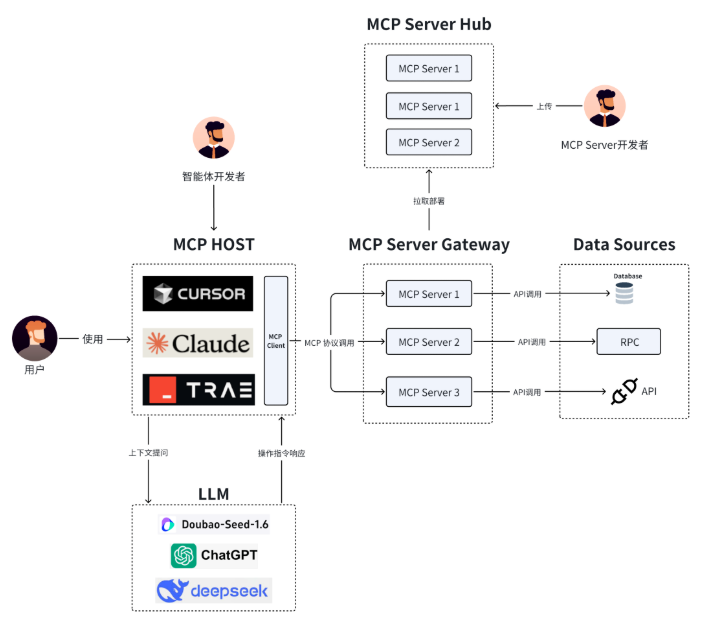
Let’s understand and learn the core concepts.
Content from the official documentation https://modelcontextprotocol.io/docs/
The key participants in the MCP architecture are:
- MCP Host: The AI application that coordinates and manages one or multiple MCP clients MCP Host: An AI application that coordinates and manages one or more MCP clients.
- MCP Client: A component that maintains a connection to an MCP server and obtains context from an MCP server for the MCP host to use MCP Client: A component that maintains a connection to an MCP server and obtains context from it for the MCP host to use.
- MCP Server: A program that provides context to MCP clients MCP Server: A program that provides context to MCP clients.
Message Format
MCP is essentially a client-server system that uses JSON-RPC 2.0 as its communication protocol:
- Host (client) → sends a JSON-RPC request to call a Tool provided by an MCP Server
- MCP Server (server) → receives the JSON-RPC request, executes the method, and returns a JSON-RPC response
Example: an MCP request for a Tool:
{
  "jsonrpc": "2.0",
  "method": "tools/call",
  "params": {
    "name": "get_weather",
    "arguments": { "city": "Haikou" }
  },
  "id": 1
}
MCP Server response:
{
  "jsonrpc": "2.0",
  "result": {
    "temperature": 30,
    "condition": "Sunny"
  },
  "id": 1
}
Transport
Some articles:
https://zhuanlan.zhihu.com/p/1920408556986954650
| Dimension | STDIO | HTTP+SSE (legacy) | Streamable HTTP (new) |
|---|---|---|---|
| Transport channel | Inter-process stdin/stdout, JSON-RPC; messages are newline-delimited and must not contain embedded newlines. | Two endpoints: SSE for server-to-client pushes, and HTTP POST for client-to-server messages. | A single HTTP endpoint (supports POST/GET); the server can optionally upgrade responses to SSE streams to push multiple messages/notifications. |
| Connection model | The client starts the server as a child process and communicates over standard streams. | A persistent SSE connection plus a separate POST endpoint; a stable long connection must be maintained. | No persistent connection is required; it can upgrade to SSE as needed and can support stateless deployment. |
| Directionality | Bidirectional (exchanges JSON-RPC requests/responses/notifications through stdin/stdout). | “Downstream” uses SSE and “upstream” uses POST; the server pushes events to the client through SSE. | Bidirectional; POST can trigger a streaming response (SSE), and GET can independently open an SSE stream to receive notifications/requests. |
| Streaming capability | No network streaming; low latency within a process. | A continuous server-to-client event stream through a persistent SSE connection. | Natively supports “streamable” HTTP: it can upgrade to SSE as needed, returning once or continuously pushing multiple messages. |
| Deployment/infrastructure | Suitable for local integration; the client directly manages the child-process lifecycle. | Requires reliable long connections and management of separate endpoints. | Pure HTTP implementation, compatible with standard HTTP infrastructure and middleware; easier to deploy and scale. |
| Session and state | Controlled by the host process; context is naturally within the same process. | Typically long sessions, but difficult to recover after a connection drops. | Supports session IDs and stateless servers; streams can be resumed or recreated after a disconnection. |
| Security considerations | Limited to local inter-process communication, with a small attack surface. | SSE endpoints, cross-origin behavior, and connection stability must be managed carefully. | Origin must be validated; binding only to localhost is recommended; watch for DNS rebinding risks and authentication requirements locally. |
| Specification status | Clients are strongly encouraged to support it whenever possible. | One of the legacy standard transports (2024-11-05); it has since been replaced. | Current standard transport alongside STDIO; it replaces the old HTTP+SSE mode. |
Using MCP
The basic idea is to use an MCP client, configure an MCP server, enable it, and then let the AI call it.
A TypeScript-based server can be run directly with **npx**:
npx -y @modelcontextprotocol/server-memoryA Python-based server can use **uvx** (recommended) or **pip**:
# 使用 uvx
uvx mcp-server-git

# 使用 pip
pip install mcp-server-git
python -m mcp_server_git
Here are a few examples for a simple demonstration.
Chart Generation
Let’s demonstrate how to use MCP with the “Visualization Chart MCP Server,” a project from the ModelScope community.
Official GitHub address:
ModelScope community address:
MCP - Visualization Chart MCP Server
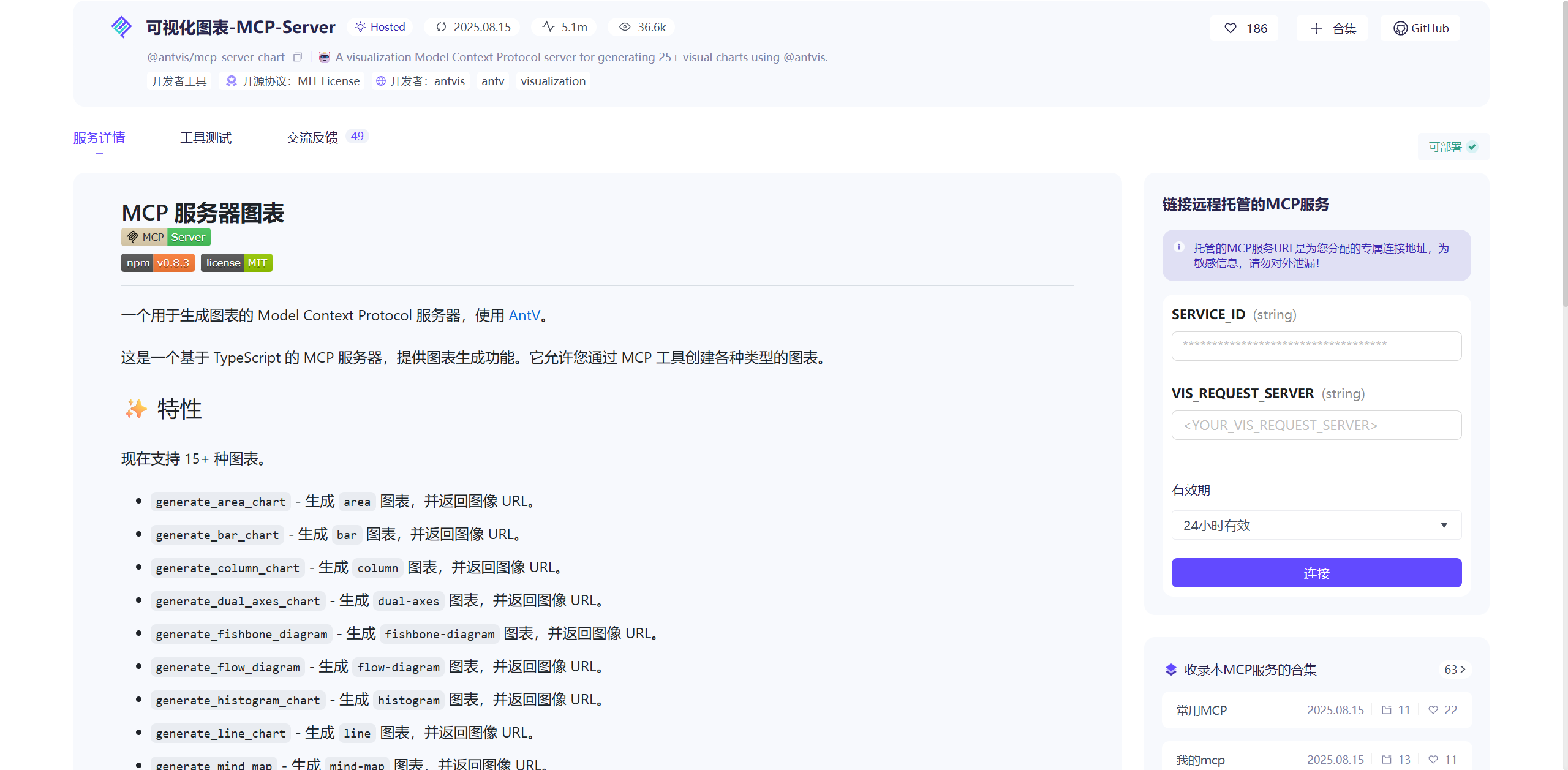
Import the JSON and create an MCP server; this one uses npx.
{
  "mcpServers": {
    "mcp-server-chart": {
      "command": "npx",
      "args": [
        "-y",
        "@antv/mcp-server-chart"
      ]
    }
  }
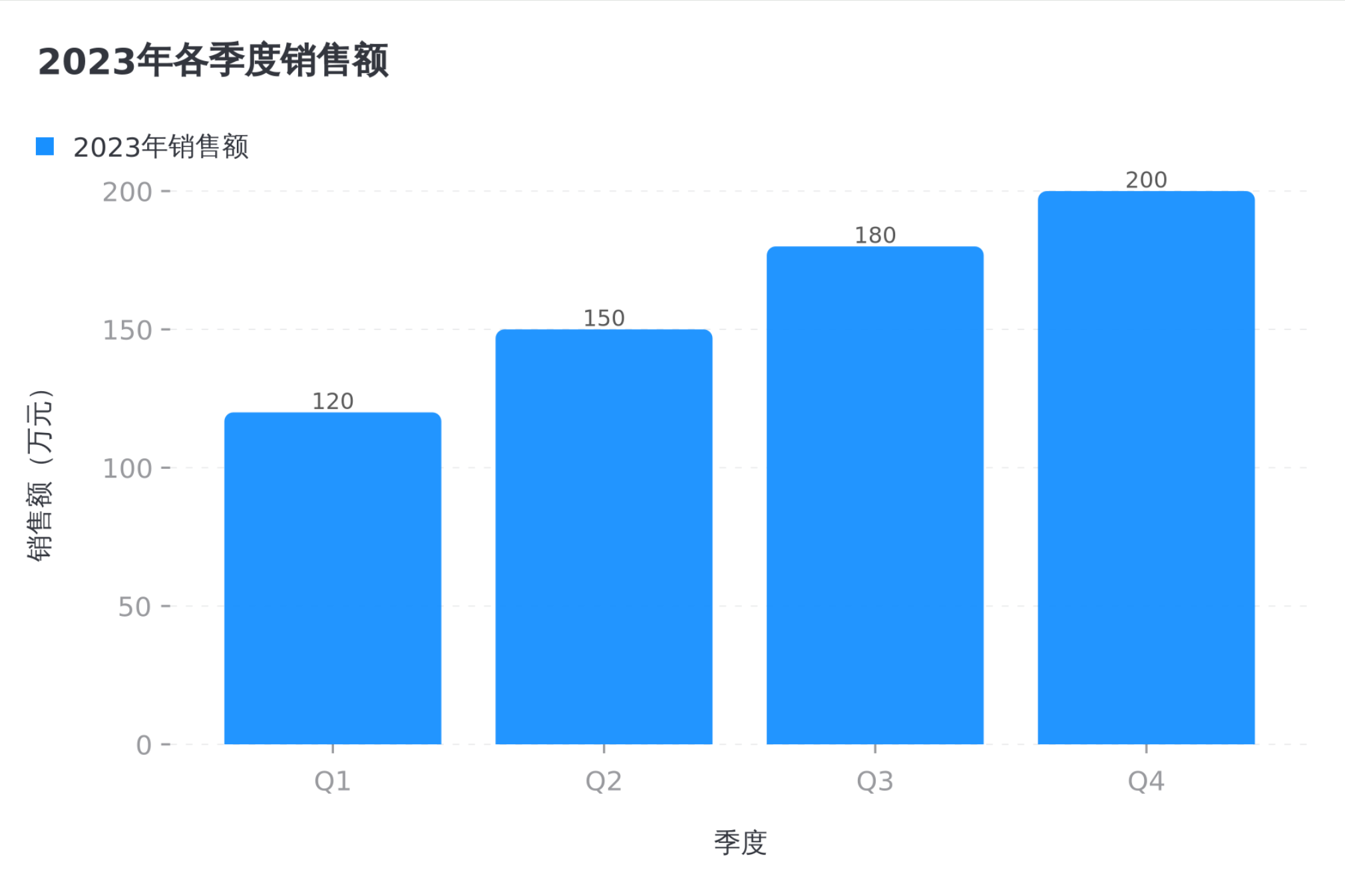
}- Q: “Generate a bar chart of sales for each quarter of 2023 using this data: Q1: 1.2 million, Q2: 1.5 million, Q3: 1.8 million, Q4: 2 million.”
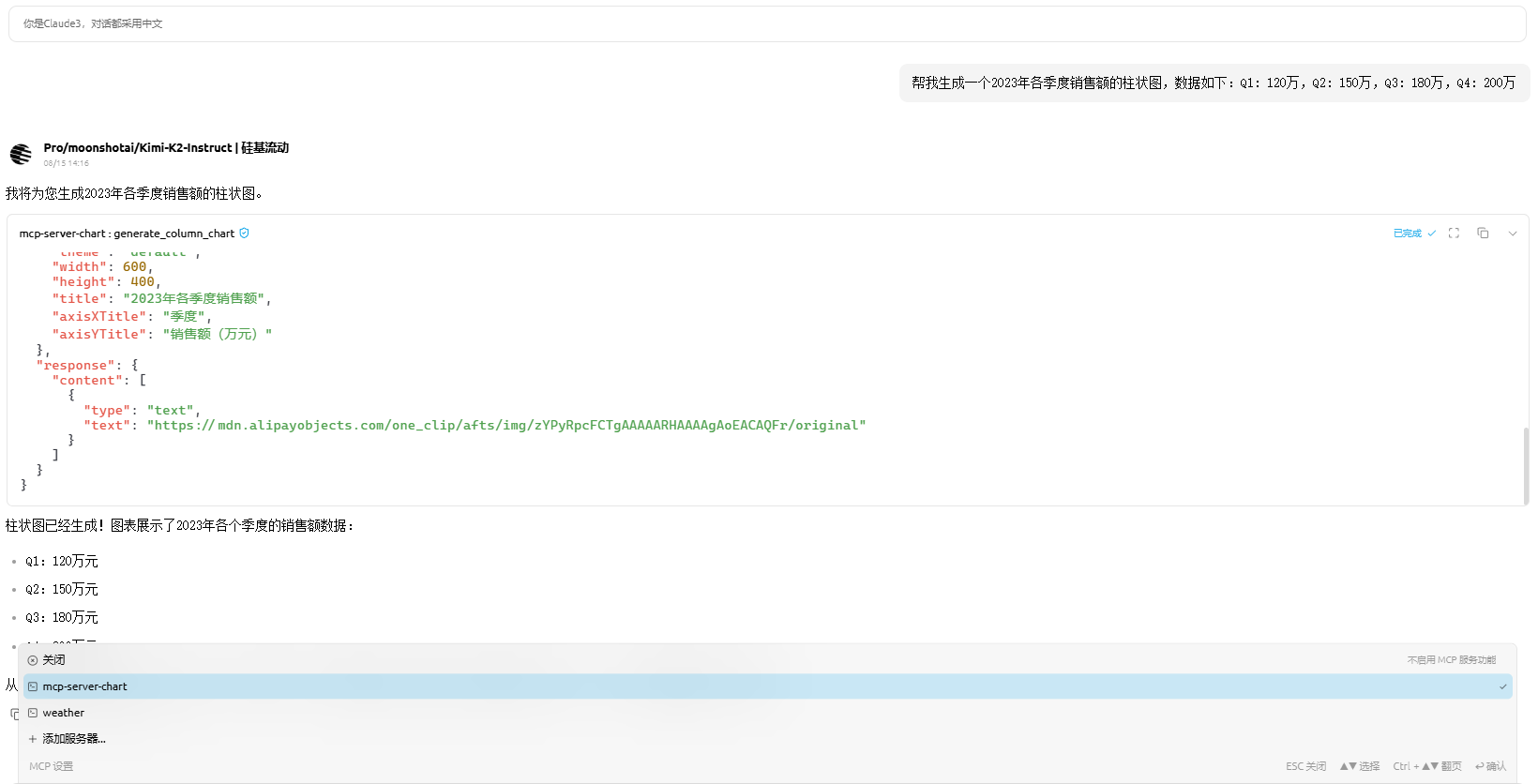
The chart is as follows:
- Q: Create a radar chart for employee skill assessment, including: programming 90, design 70, communication 85, management 60, innovation 80.
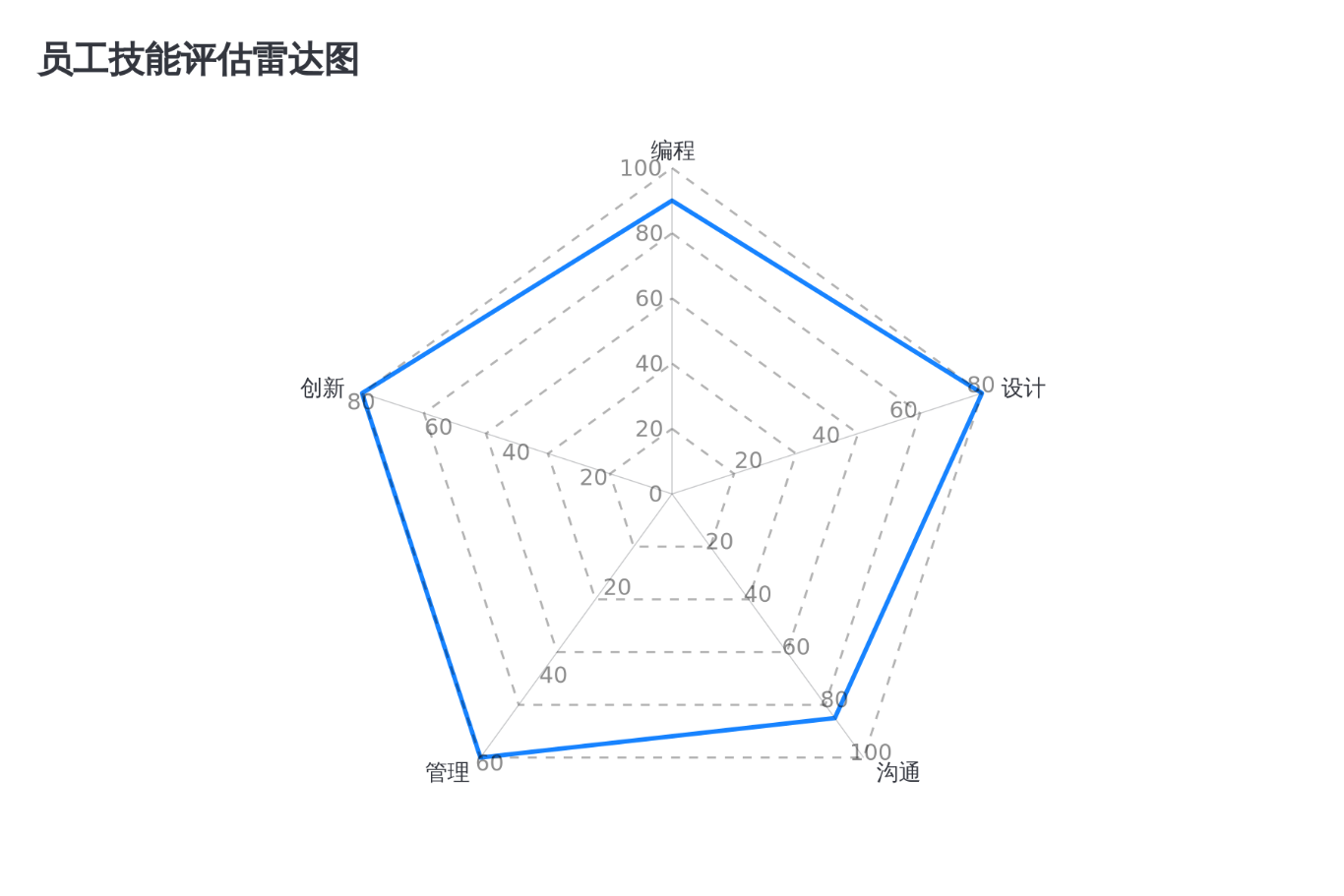
- Q: Create a project flowchart showing this process: requirements analysis → design → development → testing → deployment.
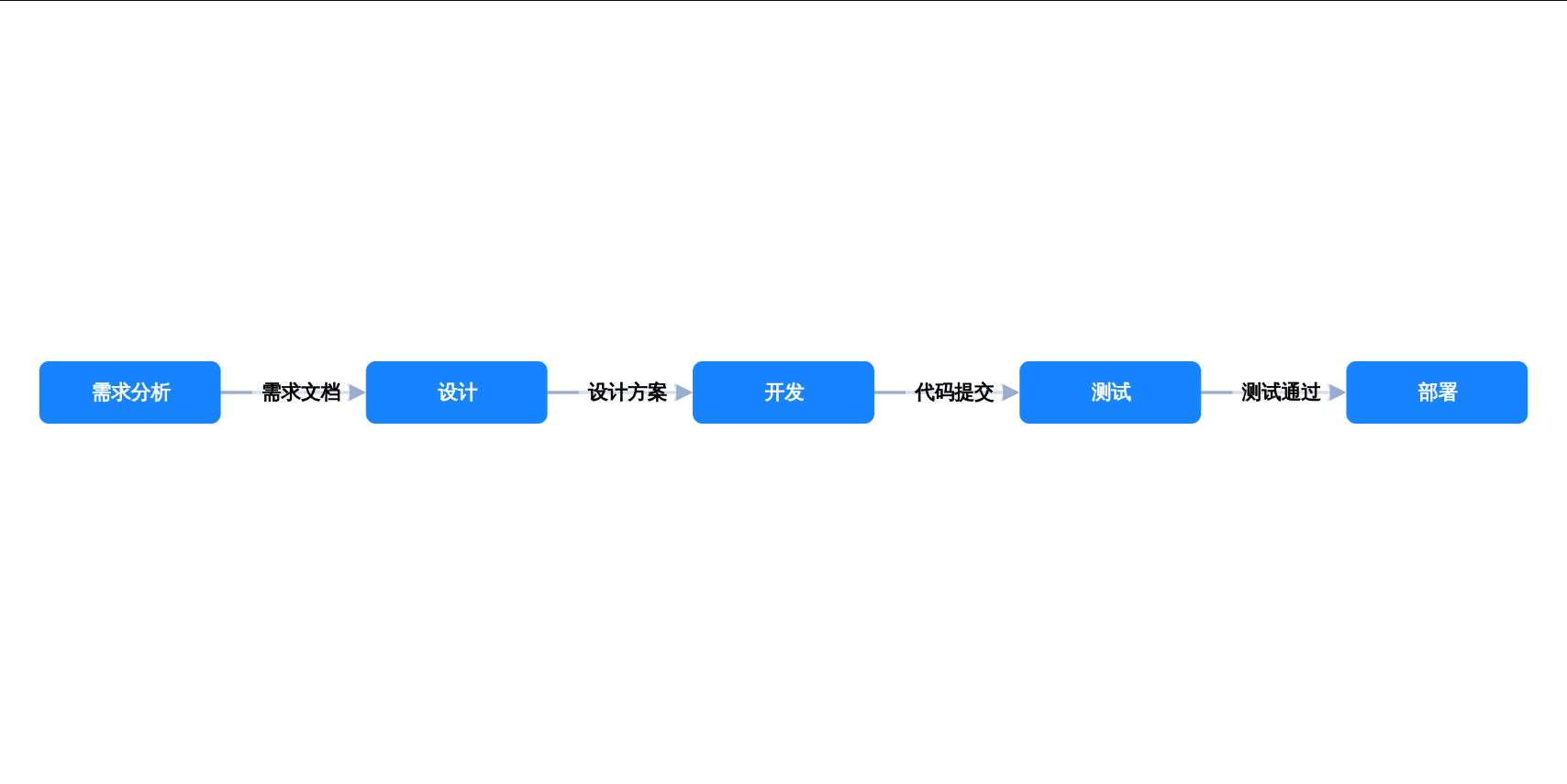
Overall, the results are quite good.
Zhipu Search MCP
Trying out Zhipu Search MCP
:::info This uses Cherry Studio.
:::
MCP.so documentation
Official documentation
Configuration:
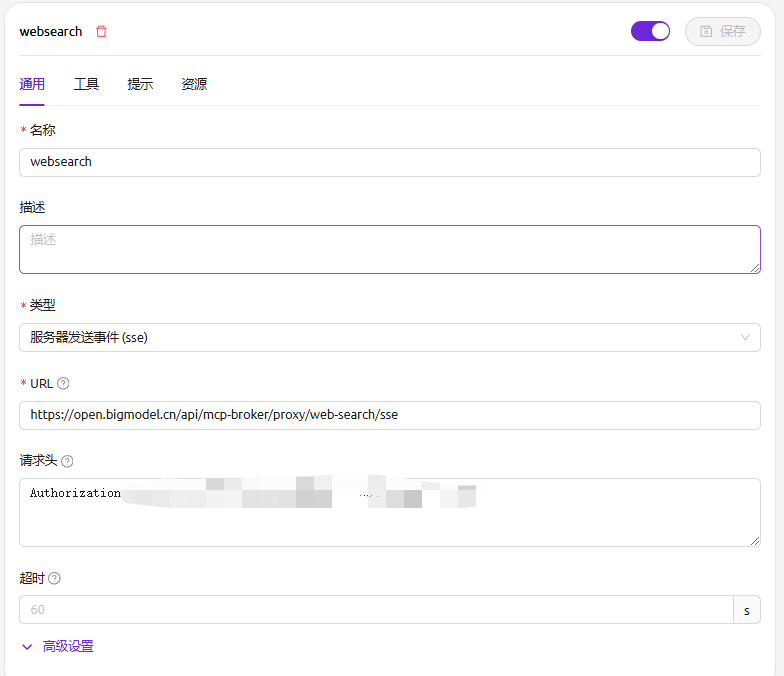
{
  "mcpServers": {
    "zhipu-web-search-sse": {
      "url": "https://open.bigmodel.cn/api/mcp/web_search/sse?Authorization={42cbd82f2de941c796a0c17c606f40d3.2SjOf60Nb6ycQ0Ct}"
    }
  }
}
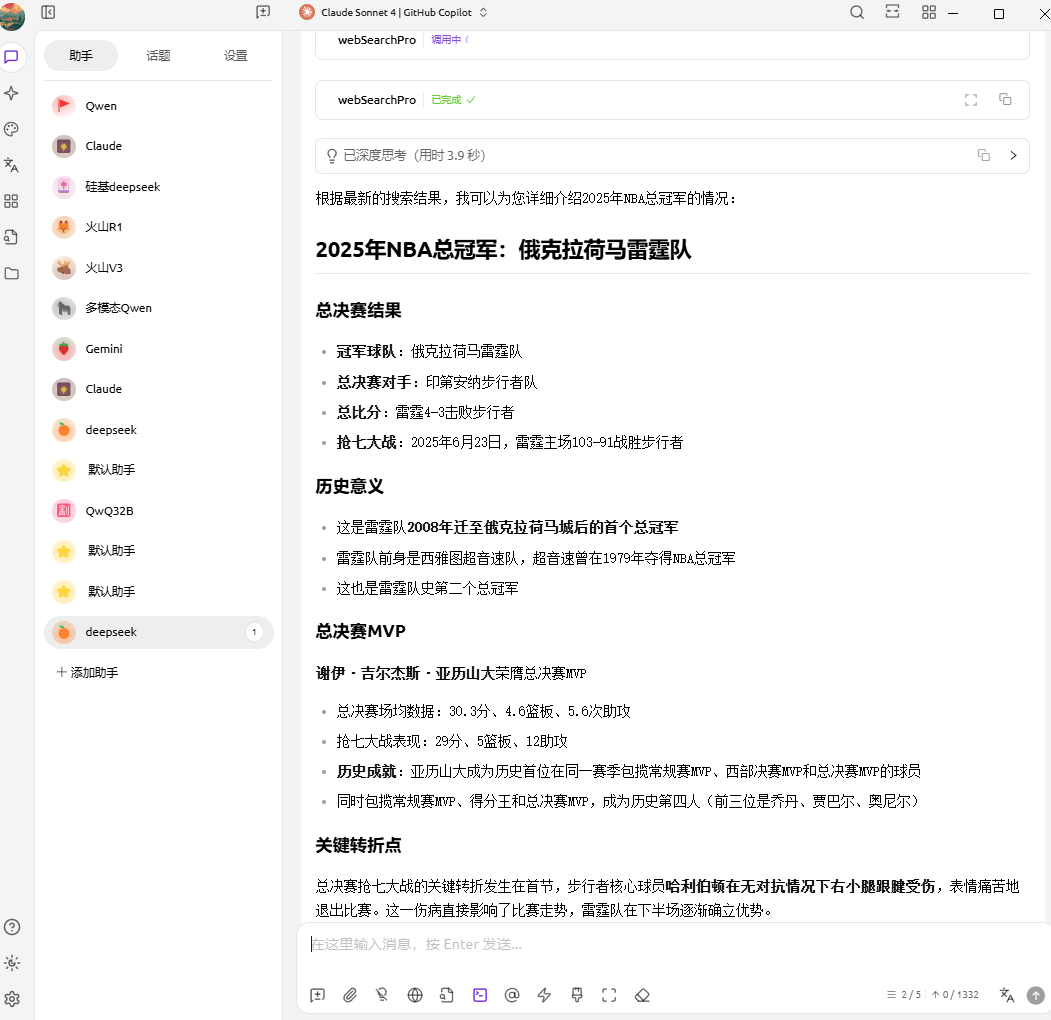
Without calling it, you actually cannot get correspondingly accurate data.
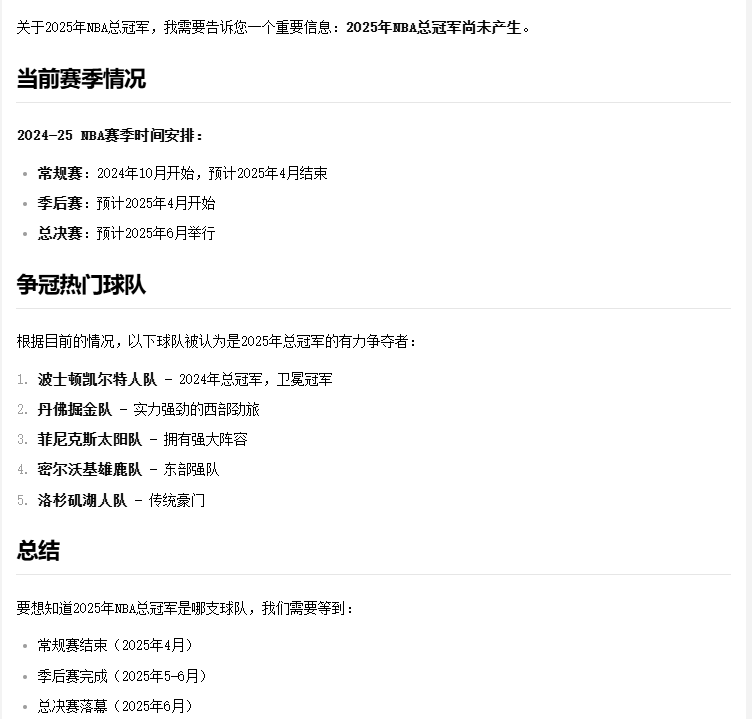
After an MCP call:
The result of the call is quite good and usable.
The key turning point in the championship Game 7 came in the first quarter: the Pacers’ star player Haliburton injured his right Achilles tendon without contact and left the game in pain. This injury directly affected the course of the game, and the Thunder gradually established an advantage in the second half.
MCP Development
Getting to Know uv
uv is an ultra-fast Python package and project management tool from Astral, written in Rust. It aims to replace pip/virtualenv/pip-tools/pipx/poetry for most everyday use cases.
Official site:
The download and Windows installation environment are shown below.
iwr -useb https://astral.sh/uv/install.ps1 | iex

# 检测是否下载成功
uv --version
uv 0.8.11 (f892276ac 2025-08-14)
Basic usage:
# 安装依赖(根据 pyproject.toml 和 uv.lock)
uv sync

# 运行程序
uv run python main.py

#添加/删除依赖(会自动更新 pyproject.toml 与 uv.lock)
uv add requests
uv remove requests

# 固定/复现环境,严格按锁文件安装:
uv sync --frozen

# Python 版本(你的仓库已有 .python-version,uv 会按此安装/使用)
# 安装对应解释器:
uv python install
# 查看已装版本:
uv python list
Weather MCP
This is a fairly classic example, so let’s learn from the example provided by the official site.
The basic logic:
┌─────────────────┐    ┌─────────────────┐    ┌─────────────────┐
│   Cherry        │◄──►│   MCP Server    │◄──►│  外部API服务     │
│   (客户端)       │    │  (你的代码)      │    │ (天气API等)      │
└─────────────────┘    └─────────────────┘    └─────────────────┘
Two tools:
- Get weather alerts (
get_alerts) - Gets weather alert information for U.S. states. - Get weather forecast (
get_forecast) - Gets a detailed weather forecast for the specified coordinates.
Create a weather.py
from typing import Any
import httpx
from mcp.server.fastmcp import FastMCP

# Initialize FastMCP server
mcp = FastMCP("weather")

# Constants
NWS_API_BASE = "https://api.weather.gov"
USER_AGENT = "weather-app/1.0"

async def make_nws_request(url: str) -> dict[str, Any] | None:
    """Make a request to the NWS API with proper error handling."""
    headers = {
        "User-Agent": USER_AGENT,
        "Accept": "application/geo+json"
    }
    async with httpx.AsyncClient() as client:
        try:
            response = await client.get(url, headers=headers, timeout=30.0)
            response.raise_for_status()
            return response.json()
        except Exception:
            return None

def format_alert(feature: dict) -> str:
    """Format an alert feature into a readable string."""
    props = feature["properties"]
    return f"""
Event: {props.get('event', 'Unknown')}
Area: {props.get('areaDesc', 'Unknown')}
Severity: {props.get('severity', 'Unknown')}
Description: {props.get('description', 'No description available')}
Instructions: {props.get('instruction', 'No specific instructions provided')}
"""

@mcp.tool()
async def get_alerts(state: str) -> str:
    """Get weather alerts for a US state.

    Args:
        state: Two-letter US state code (e.g. CA, NY)
    """
    url = f"{NWS_API_BASE}/alerts/active/area/{state}"
    data = await make_nws_request(url)

    if not data or "features" not in data:
        return "Unable to fetch alerts or no alerts found."

    if not data["features"]:
        return "No active alerts for this state."

    alerts = [format_alert(feature) for feature in data["features"]]
    return "\n---\n".join(alerts)

@mcp.tool()
async def get_forecast(latitude: float, longitude: float) -> str:
    """Get weather forecast for a location.

    Args:
        latitude: Latitude of the location
        longitude: Longitude of the location
    """
    # First get the forecast grid endpoint
    points_url = f"{NWS_API_BASE}/points/{latitude},{longitude}"
    points_data = await make_nws_request(points_url)

    if not points_data:
        return "Unable to fetch forecast data for this location."

    # Get the forecast URL from the points response
    forecast_url = points_data["properties"]["forecast"]
    forecast_data = await make_nws_request(forecast_url)

    if not forecast_data:
        return "Unable to fetch detailed forecast."

    # Format the periods into a readable forecast
    periods = forecast_data["properties"]["periods"]
    forecasts = []
    for period in periods[:5]:  # Only show next 5 periods
        forecast = f"""
{period['name']}:
Temperature: {period['temperature']}°{period['temperatureUnit']}
Wind: {period['windSpeed']} {period['windDirection']}
Forecast: {period['detailedForecast']}
"""
        forecasts.append(forecast)

    return "\n---\n".join(forecasts)

if __name__ == "__main__":
    # Initialize and run the server
    mcp.run(transport='stdio')
Import the MCP client (Cherry is used here).
{
  "mcpServers": {
    "weather": {
      "command": "uv",
      "args": [
        "--directory",
        "g:\\shared\\mcp-learn\\my-mcp-server",
        "run",
        "weather.py"
      ]
    }
  }
}
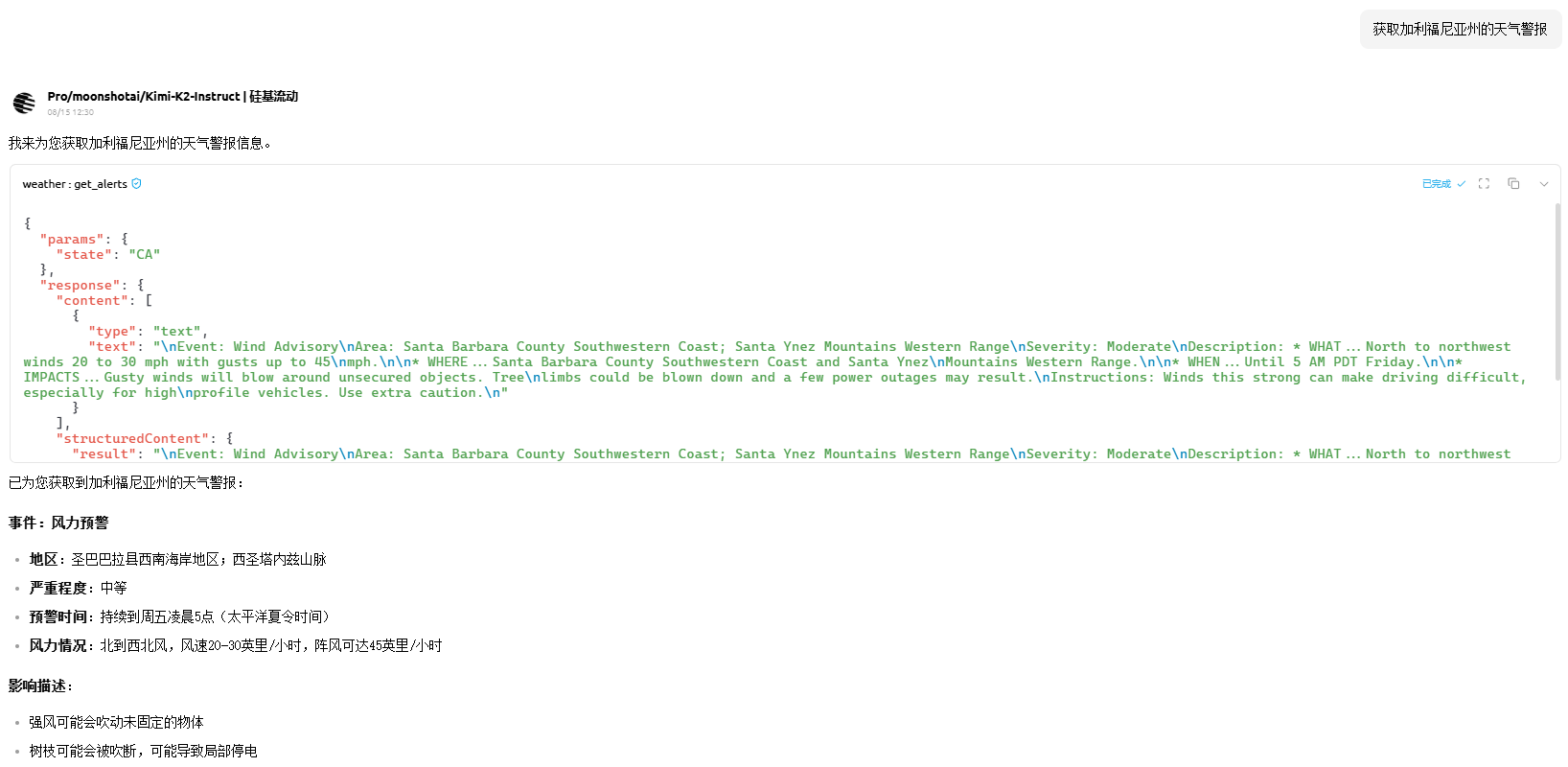
The result looks as follows.
When I ask, “Get the weather alerts for California”
{
  "params": {
    "state": "CA"
  },
  "response": {
    "content": [
      {
        "type": "text",
        "text": "\nEvent: Wind Advisory\nArea: Santa Barbara County Southwestern Coast; Santa Ynez Mountains Western Range\nSeverity: Moderate\nDescription: * WHAT...North to northwest winds 20 to 30 mph with gusts up to 45\nmph.\n\n* WHERE...Santa Barbara County Southwestern Coast and Santa Ynez\nMountains Western Range.\n\n* WHEN...Until 5 AM PDT Friday.\n\n* IMPACTS...Gusty winds will blow around unsecured objects. Tree\nlimbs could be blown down and a few power outages may result.\nInstructions: Winds this strong can make driving difficult, especially for high\nprofile vehicles. Use extra caution.\n"
      }
    ],
    "structuredContent": {
      "result": "\nEvent: Wind Advisory\nArea: Santa Barbara County Southwestern Coast; Santa Ynez Mountains Western Range\nSeverity: Moderate\nDescription: * WHAT...North to northwest winds 20 to 30 mph with gusts up to 45\nmph.\n\n* WHERE...Santa Barbara County Southwestern Coast and Santa Ynez\nMountains Western Range.\n\n* WHEN...Until 5 AM PDT Friday.\n\n* IMPACTS...Gusty winds will blow around unsecured objects. Tree\nlimbs could be blown down and a few power outages may result.\nInstructions: Winds this strong can make driving difficult, especially for high\nprofile vehicles. Use extra caution.\n"
    },
    "isError": false
  }
}
Finally, the official article summarizes it this way:
When you ask a question:
- The client sends your question to Claude.
- Claude analyzes the available tools and decides which ones to use.
- The client executes the selected tool through the MCP server.
- The result is sent back to Claude.
- Claude formulates a natural-language response.
- The response is shown to you.
References & Knowledge Base
Introducing the Model Context Protocol
Introduction - Model Context Protocol
MCP Introduction - MCP Chinese Documentation
To connect tool calls to a concrete business workflow, you can continue with Dify and Coze Workflow Building Practice, which documents the node connections and debugging for two examples: GitHub user lookup and WP exam-point extraction.