
TCP/IP Core Protocols

First, here is a simplified OSI diagram.
应用层         ← HTTP、FTP、SMTP、POP3、IMAP、DNS...
传输层         ← TCP 或 UDP
网络层         ← IP 协议(IP地址等)
链路层         ← 物理传输(网卡、Wi-Fi、电缆等)
DNS
DNS operates at the application layer, or Layer 7 of the ISO OSI model. DNS traffic uses UDP port 53 by default, with TCP port 53 as the default fallback. There are many types of DNS records.
WHOIS
whois is a network command-line tool used to query domain registration information or the ownership of an IP address. It accesses public WHOIS databases and returns information about the registrant, registrar, registration date, expiration date, DNS servers, and other details for a domain or IP address.
sudo apt install whois       # Debian/Ubuntu
sudo yum install whois       # RHEL/CentOS
Basic query syntax
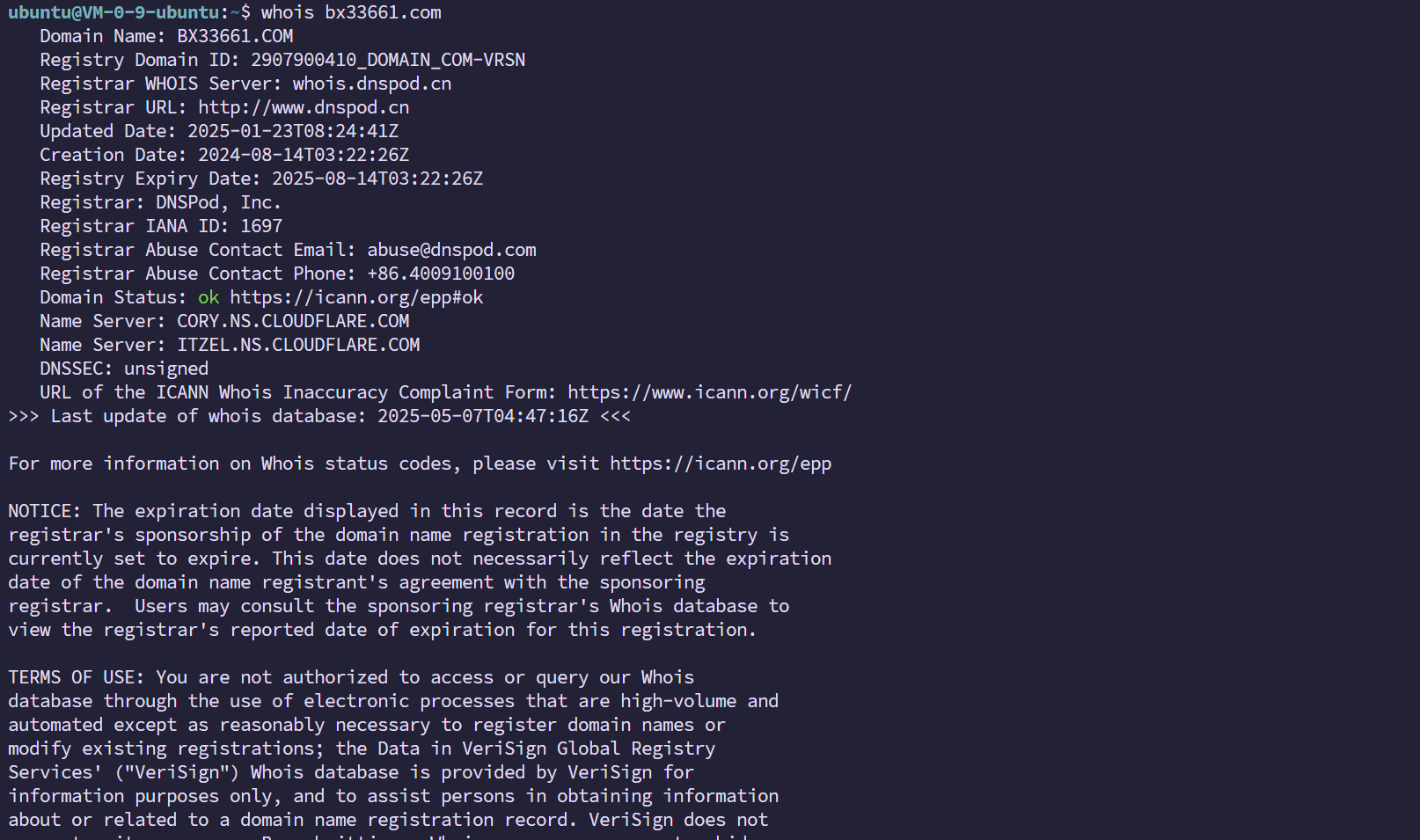
whois [选项] [域名或IP地址]

# 查询域名注册信息
whois example.com

# 查询IP归属
whois 8.8.8.8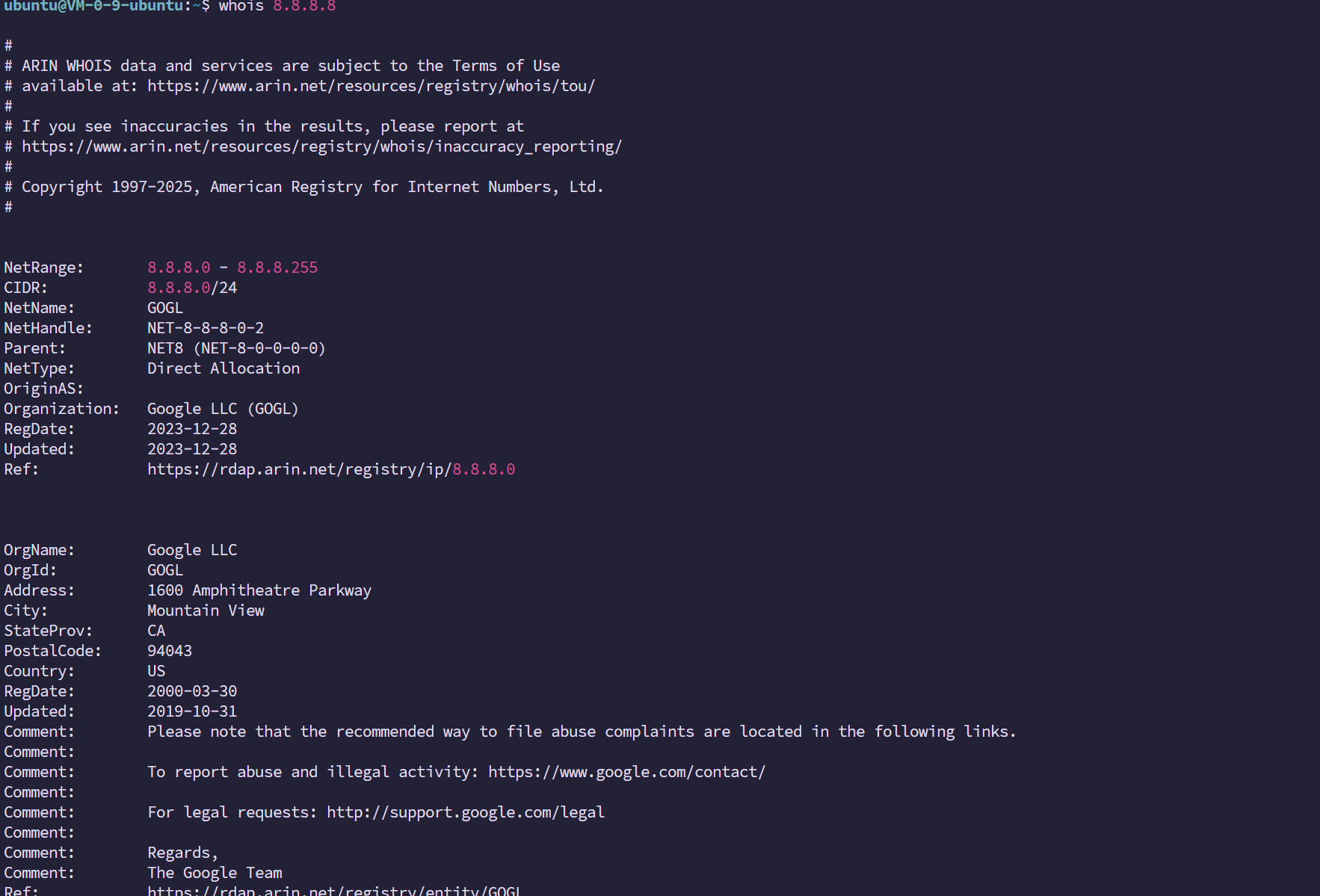
Also note:
- WHOIS queries are not real-time, but the information is updated frequently.
- Frequent use may result in temporary blocking by some WHOIS servers.
- Following the GDPR (the EU General Data Protection Regulation), much personal information has been anonymized.
Example
For example, let’s query when x.com was created.
whois x.com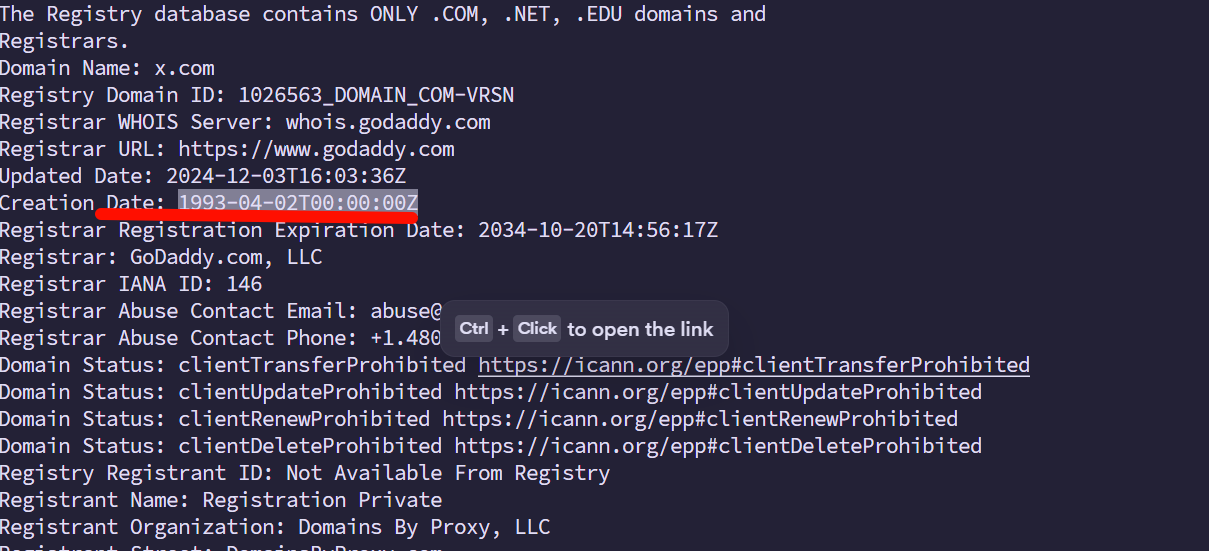
FTP
Basic characteristics:
- Operates over TCP and uses port 21 by default
- Supports bidirectional transfer: uploading and downloading
- Supports user authentication
- Can operate in active mode (PORT) or passive mode (PASV)
- Supports both text and binary transfer modes
Commands:
| Command | Function |
|---|---|
open | Connect to an FTP server |
user | Enter a username and password |
ls | List directory contents |
cd | Change directory |
get | Download a file |
put | Upload a file |
mget | Batch-download files |
bye / quit | Disconnect |
Connection example
root@ip-10-10-82-248:~# ftp 10.10.64.101
Connected to 10.10.64.101.
220 (vsFTPd 3.0.5)
Name (10.10.64.101:root): anonymous
331 Please specify the password.
Password:
230 Login successful.
Remote system type is UNIX.
Using binary mode to transfer files.
ftp> ls
200 PORT command successful. Consider using PASV.
150 Here comes the directory listing.
-rw-r--r--    1 0        0            1480 Jun 27  2024 coffee.txt
-rw-r--r--    1 0        0              14 Jun 27  2024 flag.txt
-rw-r--r--    1 0        0            1595 Jun 27  2024 tea.txt
226 Directory send OK.
ftp> get flag.txt
local: flag.txt remote: flag.txt
200 PORT command successful. Consider using PASV.
150 Opening BINARY mode data connection for flag.txt (14 bytes).
226 Transfer complete.
14 bytes received in 0.00 secs (11.9929 kB/s)
ftp> !ls
'=2.5,!=2.5.0,!=2.5.2,!=2.6'   Downloads      Postman   thinclient_drives
 burp.json		       flag.txt       Rooms     Tools
 CTFBuilder		       Instructions   Scripts
 Desktop		       Pictures       snap
ftp> !cat flag.txt
THM{FAST-FTP}
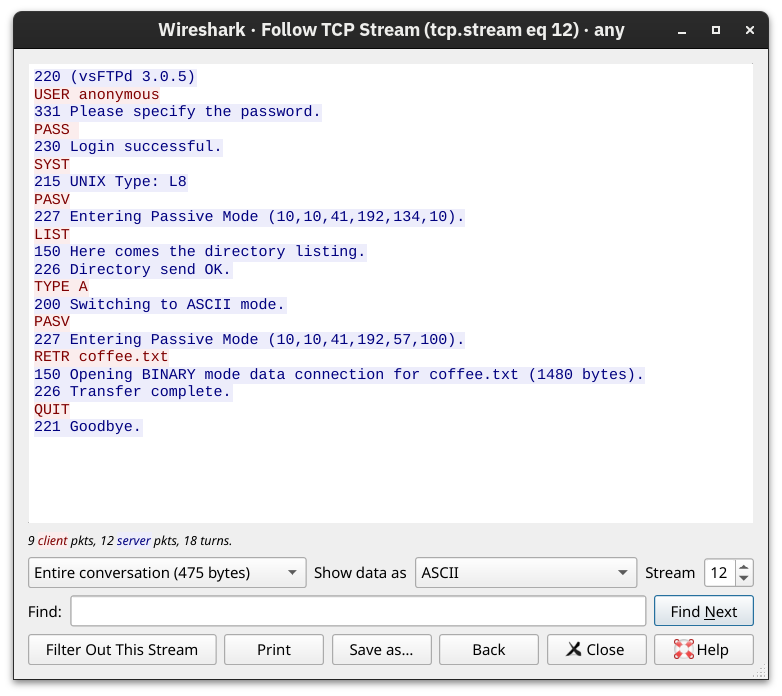
Traffic analysis
Common FTP command definitions (at the protocol level)
| Command | Meaning |
|---|---|
USER | Specify a username |
PASS | Specify a password |
LIST | Display the file list |
RETR | Download a file |
STOR | Upload a file |
DELE | Delete a file |
CWD | Change the current directory |
PWD | Display the current directory |
QUIT | Close the connection |
| Protocol | Purpose | Typical ports | Supports email reception |
|---|---|---|---|
| SMTP | Sending email | 25, 587, 465 | No |
| POP3 | Receiving email (download) | 110, 995 | Yes |
| IMAP | Receiving email (synchronization) | 143, 993 | Yes |
SMTP
SMTP (Simple Mail Transfer Protocol) is the core protocol for email transmission. It is used to send email between email clients and servers, or between servers. It defines the rules and process for delivering mail from sender to recipient.
SMTP characteristics:
- Responsible only for sending; it does not receive or store email (receiving and storage are usually handled by POP3 or IMAP)
- A text protocol: commands and responses are ASCII text
- Reliable, because it is transmitted over TCP
SMTP communication
SMTP communication is mainly divided into three stages:
Here we use a screenshot from THM to illustrate.
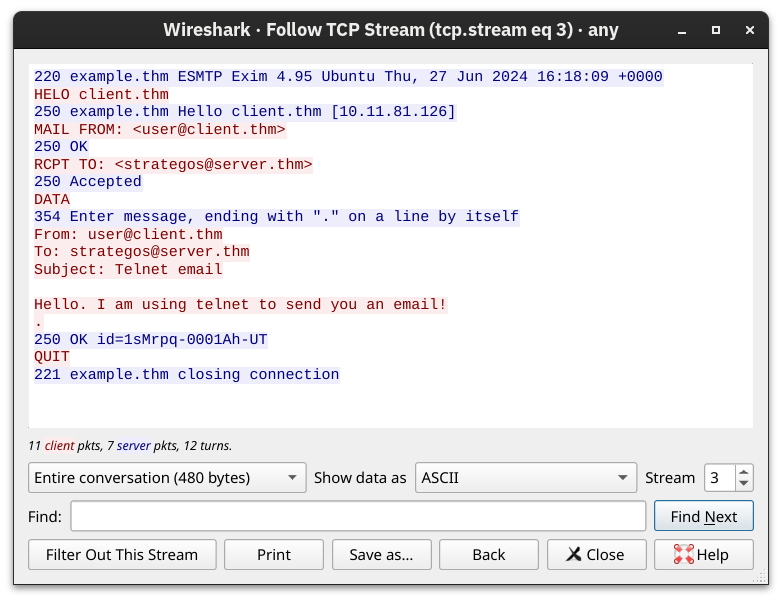
1. Establishing a connection
- The client connects to the server over TCP (for example, port 25).
- The server returns a welcome message beginning with
220.
2. Transferring email
- The client and server complete the email transfer through a series of commands and responses:
| Command | Meaning |
|---|---|
HELO or EHLO | Greet the server and identify yourself |
MAIL FROM: | Specify the sender’s email address |
RCPT TO: | Specify the recipient’s email address |
DATA | Begin sending the message body, which ends with . |
QUIT | Terminate the session |
For example:
C: HELO example.com
S: 250 Hello example.com
C: MAIL FROM:<alice@example.com>
S: 250 OK
C: RCPT TO:<bob@example.com>
S: 250 OK
C: DATA
S: 354 Start mail input; end with <CRLF>.<CRLF>
C: Subject: Hello
C: This is a test email.
    C: .
S: 250 OK
C: QUIT
S: 221 Bye
3. Disconnecting
- After the email is sent successfully, the client sends
QUIT. The server responds with221, and the connection closes.
POP3
Post Office Protocol version 3
This is an application-layer protocol for receiving email, primarily used to download email from a remote mail server to a local client. It is commonly used with SMTP.
Telnet connection example
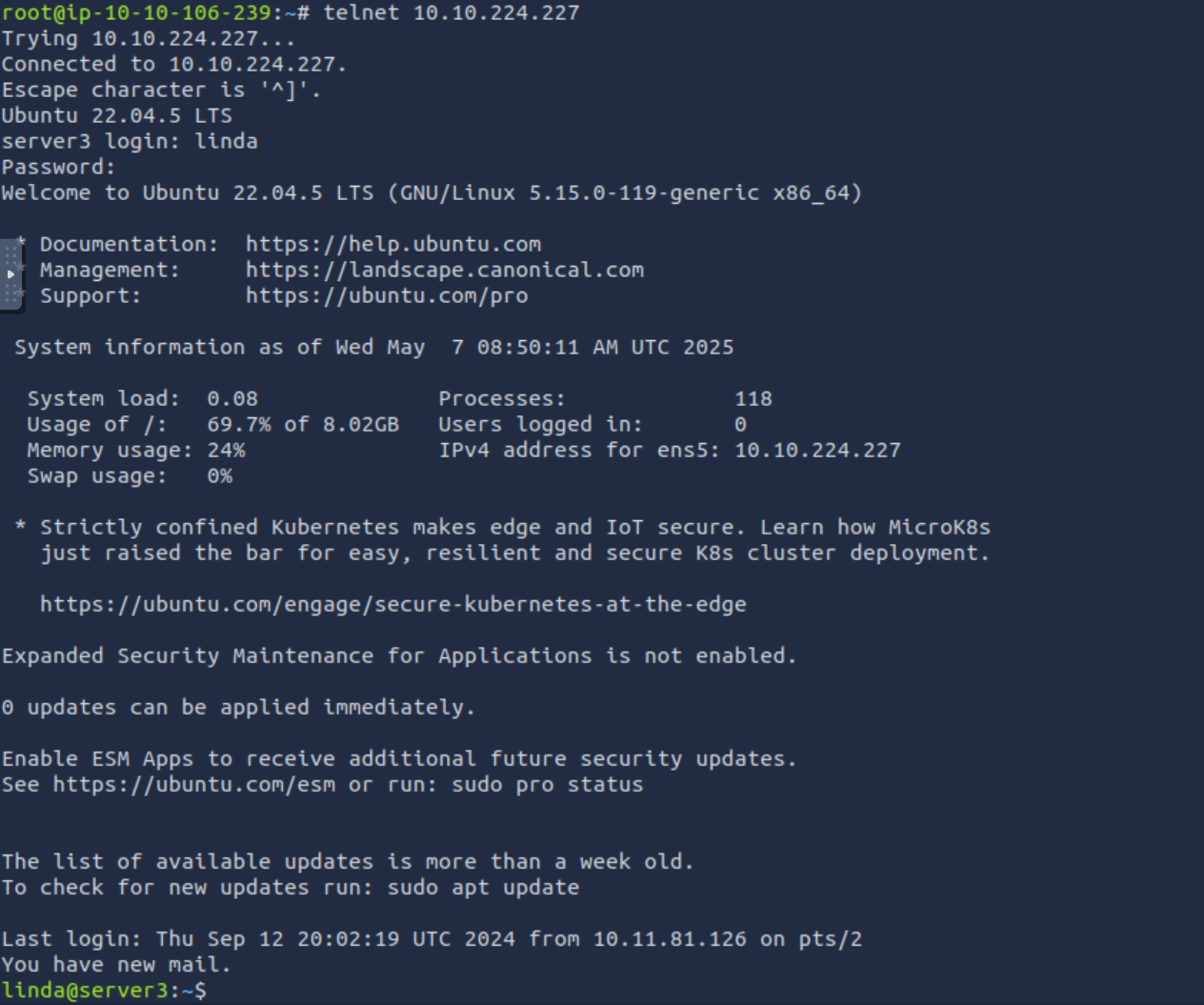
root@ip-10-10-106-239:~# telnet 10.10.224.227 110
Trying 10.10.224.227...
Connected to 10.10.224.227.
Escape character is '^]'.
+OK [XCLIENT] Dovecot (Ubuntu) ready.
USER linda
+OK
PASS Pa$$123
+OK Logged in.
STAT
+OK 4 2216
LIST
+OK 4 messages:
1 690
2 589
3 483
4 454
.
RETR 4
+OK 454 octets
Return-path: <user@client.thm>
Envelope-to: linda@server.thm
Delivery-date: Thu, 12 Sep 2024 20:12:42 +0000
Received: from [10.11.81.126] (helo=client.thm)
	by example.thm with smtp (Exim 4.95)
	(envelope-from <user@client.thm>)
	id 1soqAj-0007li-39
	for linda@server.thm;
	Thu, 12 Sep 2024 20:12:42 +0000
From: user@client.thm
To: linda@server.thm
Subject: Your Flag

Hello!
Here's your flag:
THM{TELNET_RETR_EMAIL}
Enjoy your journey!
The question is as follows.
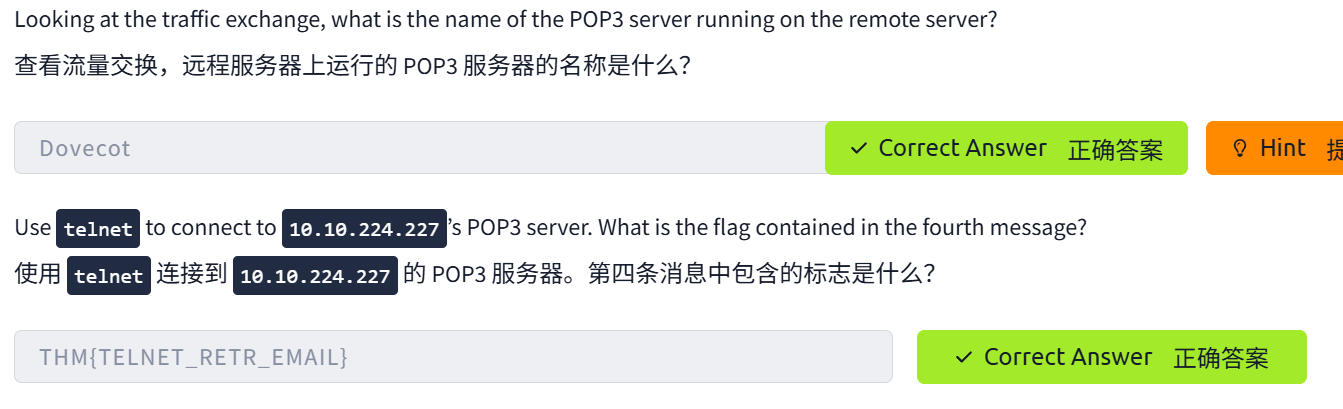
POP3 process
POP3 is designed around the idea that mail is deleted from the server after it is downloaded (unless “keep a copy” is configured). The process is as follows:
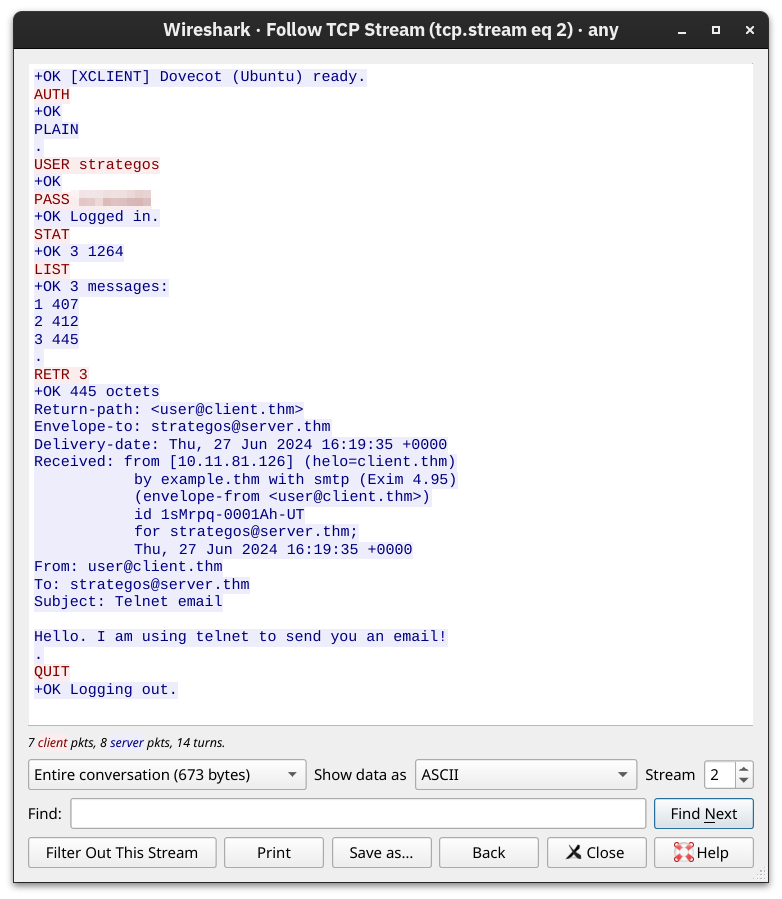
1. Establishing a connection
The client (such as Outlook or Foxmail) connects to the POP3 service port on the mail server.
2. User authentication
The client sends a username and password for authentication.
3. Working with the mailbox
After authentication succeeds, the client can use the following POP3 commands to work with email:
| Command | Meaning |
|---|---|
USER | Send the username |
PASS | Send the password |
STAT | Query the number of messages and their total size |
LIST | List messages and their sizes |
RETR | Download message contents |
DELE | Delete a message (POP3 deletes it by default) |
QUIT | Disconnect and delete messages already marked for deletion |
4. Downloading and deleting
The client uses RETR to download a message, then uses DELE to mark it for deletion (the server actually deletes it when the session ends).
5. Disconnecting
The client uses the QUIT command to disconnect.
IMAP
The key difference between IMAP and POP3 is:
- POP3 downloads email (and then deletes it).
- IMAP provides online access to email (the server remains the primary copy).
Typical IMAP characteristics:
- Email remains on the server.
- Supports multiple folders (Inbox, Sent, Draft, Trash).
- Supports synchronization across multiple clients (a phone and PC can manage the same mailbox).
- Can download only message headers (for greater efficiency).
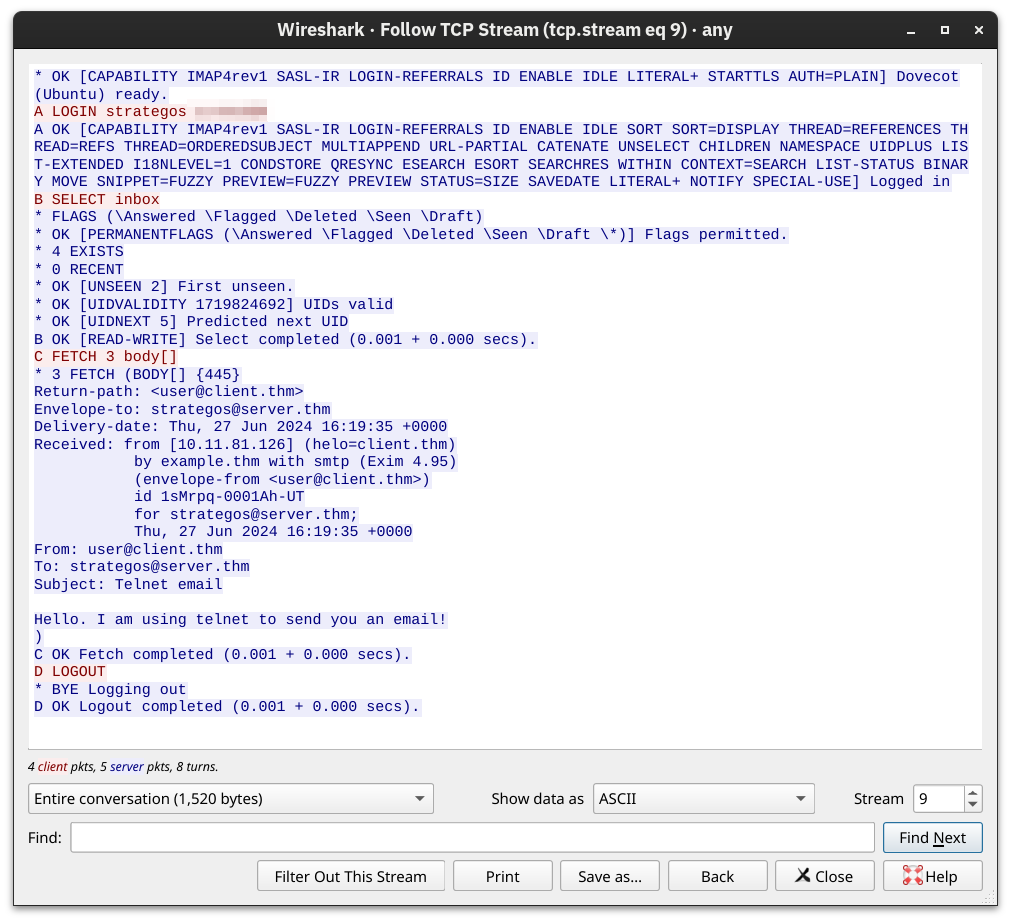
IMAP uses a text-based command/response structure. Each command begins with an identifier (tag), such as A001.
| Command | Description |
|---|---|
LOGIN | Log in to an account |
LIST | View the list of mailbox folders |
SELECT INBOX | Select a folder (such as the Inbox) |
FETCH | Fetch a message (headers only can be fetched) |
STORE | Change message status (such as read or deleted) |
SEARCH | Search for messages matching criteria |
LOGOUT | Log out and disconnect |
Example:
A001 LOGIN yourusername yourpassword
A002 SELECT INBOX
A003 FETCH 1 BODY[HEADER]
A004 LOGOUT
Answer the questions.
FETCH 4 body[]
Think 🤔
| Protocol | Transport Protocol | Default Port Number |
|---|---|---|
| TELNET | TCP | 23 |
| DNS | UDP or TCP | 53 |
| HTTP | TCP | 80 |
| HTTPS | TCP | 443 |
| FTP | TCP | 21 |
| SMTP | TCP | 25 |
| POP3 | TCP | 110 |
| IMAP | TCP | 143 |
A simplified way to understand it:
| Protocol | Why it uses TCP |
|---|---|
| HTTP | Data must arrive intact and reliably; it cannot be lost. |
| FTP | File transfer requires high reliability. |
| SMTP/POP3/IMAP | Email must not be lost or reordered. |
| DNS (mostly UDP) | Queries are fast; occasional loss can be retried, and establishing a connection is unnecessary. |
Others
❌ telnet command unavailable
-
Windows users may need to enable Telnet:
-
Control Panel → Programs and Features → Turn Windows features on or off → check “Telnet Client”
-
Linux users can use:
sudo apt install telnet
References
After establishing a connection, to learn how to discover peers, locate resources, and transfer pieces, see the P2P and BT protocol study notes. That article compares torrent files, magnet links, Trackers, and DHT within the same download process.