
Article Overview
This article systematically documents recent research and automated auditing approaches for WeChat Mini Program security, covering cache discovery, package extraction and decompilation, architecture analysis, development of a local tool (WxLocated), and multi-Agent automated code auditing practices.
I. Mini Program Extraction and Decompilation
1.1 WeChat Mini Program Cache Locations
Mini Program cache directories on different operating systems:
Windows
C:\Users\{用户名}\Documents\WeChat Files\Applet\
C:\Users\{用户名}\Documents\WeChat Files\{微信ID}\Applet\

文件结构:
Applet/
├── {appid}/
│   ├── __APP__.wxapkg          # 主包
│   ├── __SUBPKG__*.wxapkg      # 分包
│   └── ...
Linux
Not yet covered.
macOS
macOS client versions evolve rapidly. Newer versions commonly use the users/<账号哈希>/applet/packages multi-account-isolated directory structure:
# 典型历史路径
~/Library/Containers/com.tencent.xinWeChat/Data/Library/Application Support/com.tencent.xinWeChat/2.0b4.0.9/Applet/

# 常见缓存路径
~/Library/Containers/com.tencent.xinWeChat/Data/Documents/Applet/
~/Library/Containers/com.tencent.xinWeChat/Data/Library/Application Support/WeChat/Applet/
The latest WeChat Mini Program cache tree topology is as follows:
__APP__.wxapkgApp startup logic, main pages, tabBar, and subpackage inventory
xxxx.wxapkgDownloaded when the corresponding page is opened
yyyy.wxapkgCan launch without loading the main package
zzzz.wxapkgPlugins or other resources
One AppID may have several versions; actual package names and directory contents depend on the collected material.
To quickly locate and parse these wxapkg files on macOS, I developed a native macOS tool, WxLocated (its features are described in detail below).
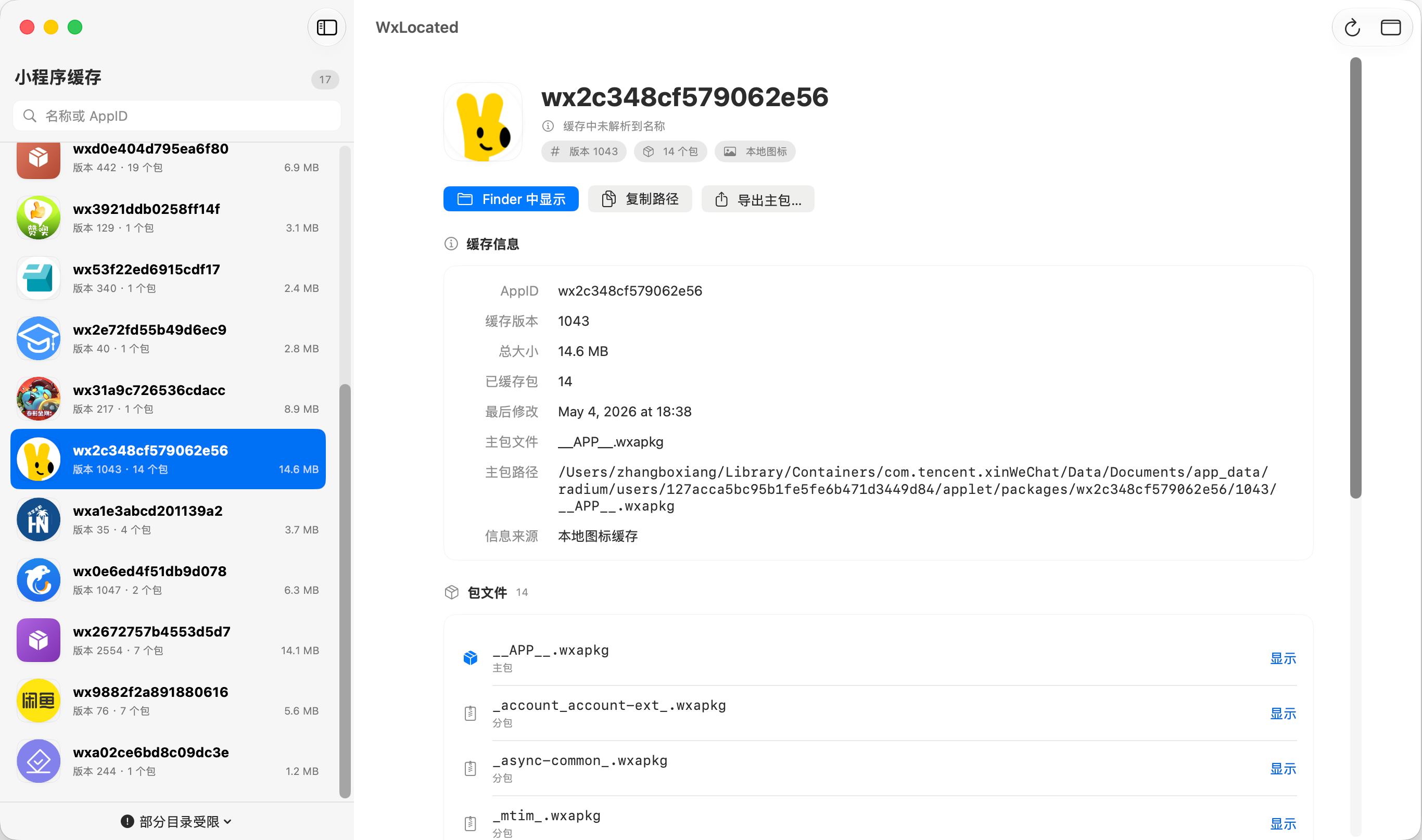
1.2 Extraction and Decompilation Approaches
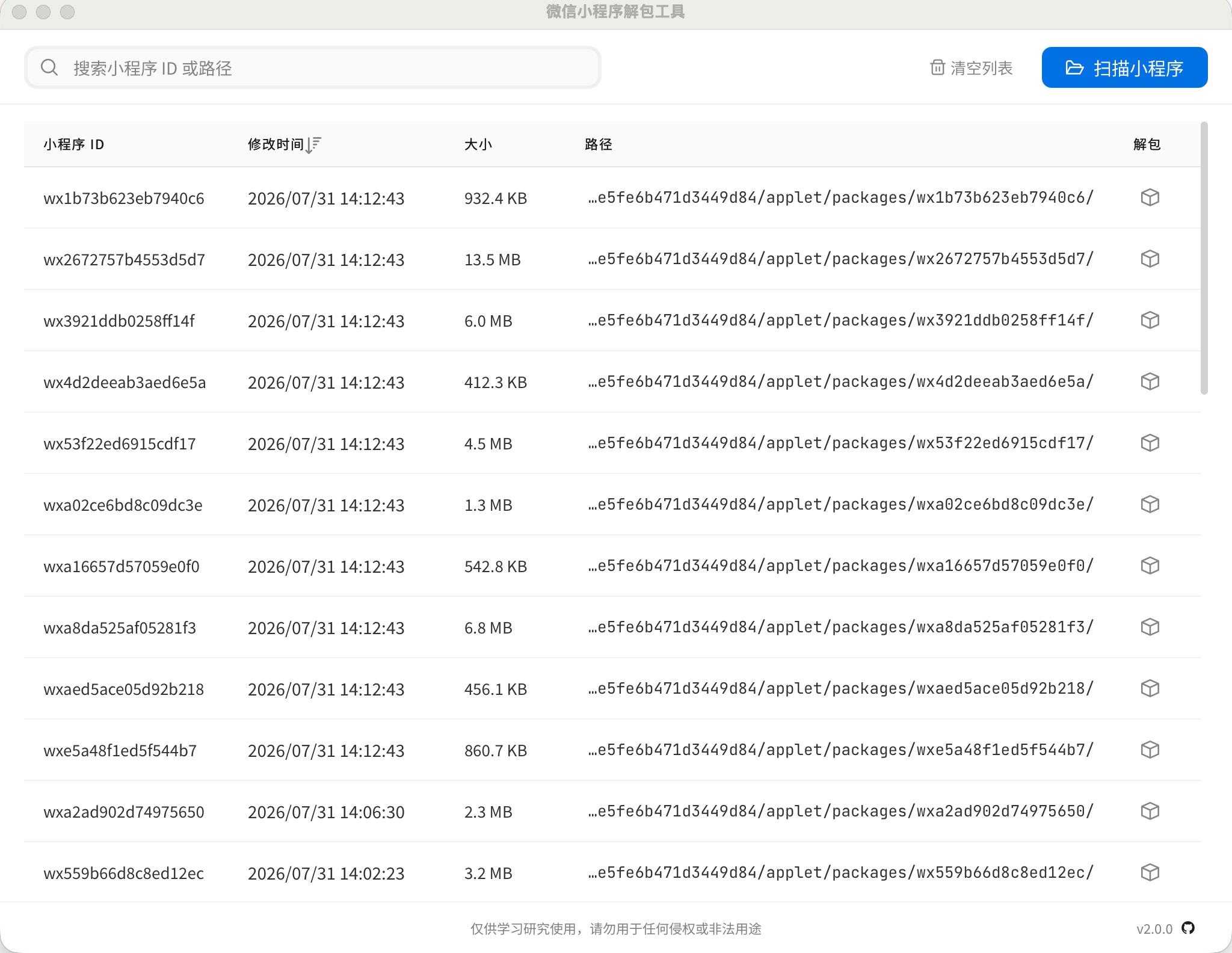
Mature approaches already exist in the community for extracting and decompiling WeChat version 4.0 packages, such as this open-source tool written in Go:
- Project: https://github.com/wux1an/wxapkg
Example output (although on macOS it is often difficult to tell which specific AppID a package belongs to; locating it with WxLocated is more efficient):
II. wxapkg Analysis and Mini Program Architecture
Reverse analysis of wxapkg files is essentially similar to front-end security analysis, with an additional layer: the “WeChat runtime and client container.” Typically, static analysis is first used to locate risk points, followed by deeper dynamic testing.
微信小程序逆向分析核心要素:
WXML + WXSS + JavaScript + 微信客户端运行时
The core approach is consistent with conventional web penetration testing: mine source code for hardcoded credentials, API endpoints, and authorization flaws, then forge credentials or exploit the findings.
2.1 Web Front-End and WeChat Mini Program Technology Comparison
| Web Front End | WeChat Mini Program | Description |
|---|---|---|
| HTML | WXML | Tag-based structural definition language |
| CSS | WXSS | Styling language, supports rpx size conversion |
| JavaScript | JavaScript | Dual-thread architecture, runs in JsCore |
| Browser DevTools | WeChat DevTools / client debugging | Official debugging suite |
| localStorage | wx.setStorage / wx.getStorage | Local key-value persistence |
| fetch / axios | wx.request | Network data requests |
| WebSocket | wx.connectSocket | Persistent connection communication |
| Page routing | navigateTo / redirectTo | Page stack management |
| iframe | <web-view> | Embedded external web component |
| npm build output | app-service.js | Compiled and packaged logic-layer output |
| Source Map | Mini Program Source Map | Source mapping file |
| Webpack Chunk | Main package / subpackage | Modular code-splitting mechanism |
2.2 Packaging and Runtime Mechanism
Developers write project code in the development environment:
app.js
app.json
app.wxss

pages/
  index/
    index.js
    index.json
    index.wxml
    index.wxss
After upload to the WeChat Open Platform, the code is compiled, minified, and packaged into a binary package:
__APP__.wxapkgAfter downloading the package, the client performs the following startup stages in sequence:
- Parse files: Read the
.wxapkgfile header and index structure; - Extract resources: Extract virtual files in the package and establish mappings;
- Load configuration: Parse
app.jsonglobal and page configurations; - Initialize logic: Start the JavaScript logic layer in the JsCore thread;
- Render pages: Render the WXML and WXSS interface in the WebView thread.
2.3 wxapkg Physical File Structure
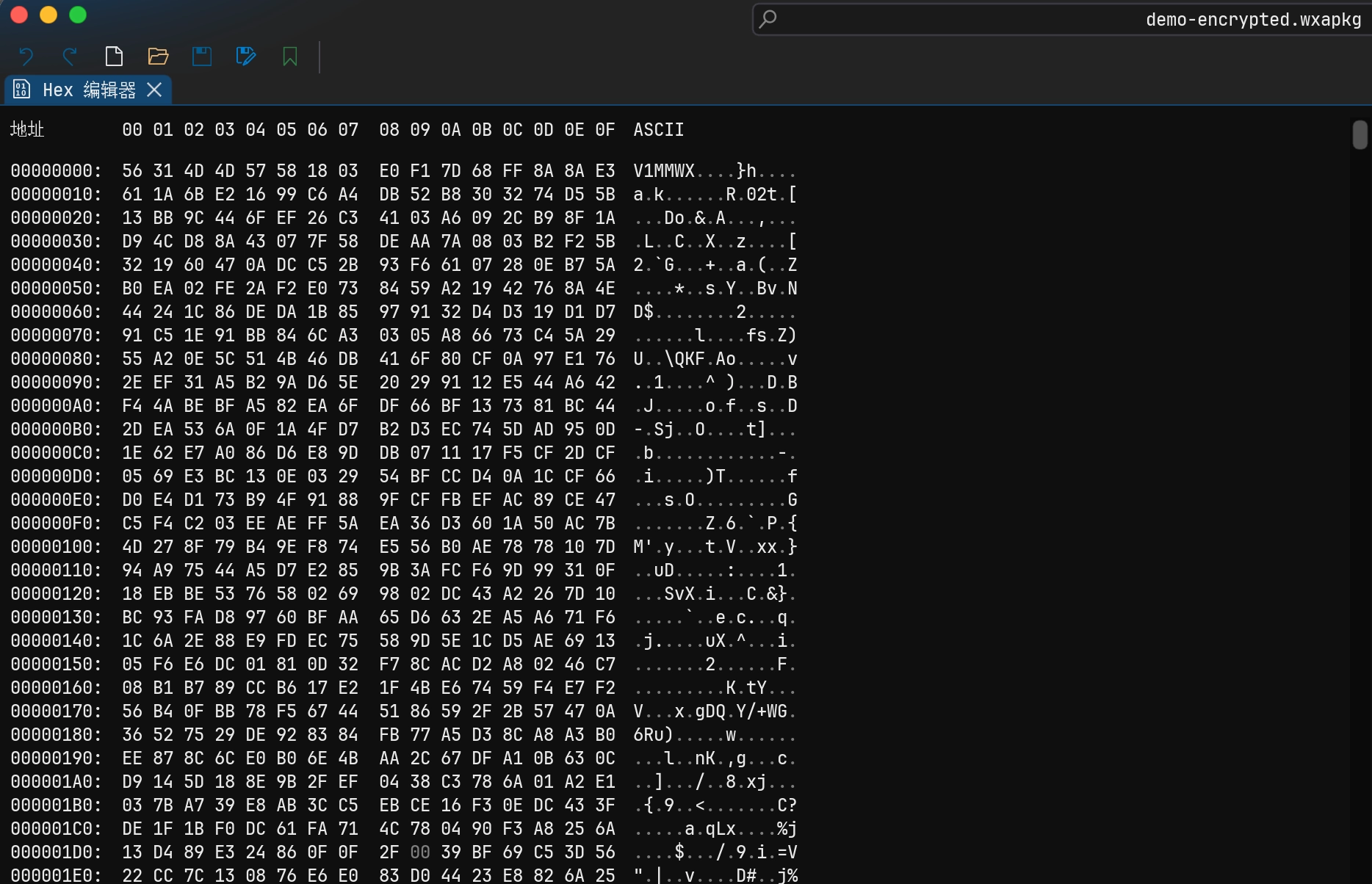
.wxapkg is a custom file packaging system used by WeChat and cannot be opened directly with general-purpose extraction tools such as unzip. Its structure consists of a fixed header, file index table, and body data area:
HEADERINDEXDATA BODYTRAILERRead the path, offset, and size from the index, then extract the corresponding file from the data section.
The core logic of an extraction tool is to first parse the file index table to obtain each file’s virtual path, starting offset, and byte length, then accurately extract the corresponding file contents from the data area.
.wxapkg 映射模型
├── 文件名 1 → offset / size
├── 文件名 2 → offset / size
├── 文件名 3 → offset / size
└── Body Data ...
2.4 Common wxapkg Extraction Contents
Extracted packages typically contain the following four categories of files:
Global files
app-config.json     # 全局编译后配置
app-service.js      # 核心逻辑层整合代码
app-wxss.js         # 全局样式转换脚本
common.app.js       # 提取出的公共模块
(Note: filenames may differ across WeChat versions, base library versions, and packaging strategies.)
Page resources
In the development environment, each page is distributed independently:
pages/index/index.js
pages/index/index.json
pages/index/index.wxml
pages/index/index.wxss
After compilation and packaging, however, the JavaScript for multiple pages is often merged into app-service.js, while their styles are merged into app-wxss.js.
Static resources
images/logo.png
assets/icon.svg
static/banner.jpg
Configuration information
app.json
app-config.json
project.config.json   # 开发者工具本地配置(通常不打包进线上产物)
2.5 Main Package and Subpackage Mechanism
Medium and large Mini Programs commonly use subpackage loading to reduce the initial download size:
小程序版本包分类
├── 主包:启动时必须加载的核心代码
├── 普通分包:访问特定页面时按需下载加载
├── 独立分包:可绕过主包直接启动加载
└── 资源扩展包:插件包、游戏资源或运行时模块
Diagram of the multi-version directory hierarchy:
packages / wx1234567890abcdef /APP ID__APP__.wxapkg Main packagexxxxx.wxapkg Subpackage Ayyyyy.wxapkg Subpackage B__APP__.wxapkg Main packagexxxxx.wxapkg Subpackage AArchive collected files by version first to avoid pairing old subpackages with a new main package.
Main package (__APP__.wxapkg)
Provides the Mini Program’s global foundational capabilities:
- Default launch homepage and tabBar pages;
app.js/ global startup listener logic;app.jsonglobal routing and configuration;- Shared components, common utility modules, and global dependent resources.
Configuration example:
{
  "pages": [
    "pages/index/index",
    "pages/profile/profile"
  ],
  "tabBar": {
    "list": [
      {
        "pagePath": "pages/index/index",
        "text": "首页"
      }
    ]
  }
}
Regular subpackages
Use an on-demand loading strategy:
分包加载流程:
主包初始化完成
      ↓
页面跳转至 packageOrder/pages/list/list
      ↓
检查订单分包是否已缓存
      ↓
未缓存则从微信 CDN 异步拉取分包
      ↓
分包下载完毕并完成加载挂载
      ↓
渲染目标页面
Subpackage configuration example:
{
  "pages": [
    "pages/index/index"
  ],
  "subPackages": [
    {
      "root": "packageOrder",
      "name": "order",
      "pages": [
        "pages/list/list",
        "pages/detail/detail"
      ]
    },
    {
      "root": "packageShop",
      "name": "shop",
      "pages": [
        "pages/list/list",
        "pages/detail/detail"
      ]
    }
  ]
}
This also explains why, on the first visit to a Mini Program, only __APP__.wxapkg is usually captured locally; the user must browse all business modules for WeChat to fetch all subpackages to the local machine.
2.6 Mini Program Lifecycle and Audit Focus
Mini Programs run in a client-hosted container, and their lifecycle closely resembles that of native applications:
生命周期层级:

App 维度
├── onLaunch(options)   # 初始化(关注入参解析、身份验证与全局状态)
├── onShow()            # 切换至前台
├── onHide()            # 切入后台
└── onError(msg)        # 异常捕获

Page 维度
├── onLoad(options)     # 页面加载(重点:URL/页面传参来源、权限校验)
├── onShow()            # 页面展示(重点:数据刷新与重复鉴权逻辑)
├── onReady()           # 初次渲染完成
├── onHide()            # 页面隐藏
└── onUnload()          # 页面卸载

Component 维度
├── created / attached  # 组件创建与节点挂载
├── ready               # 视图布局完成
└── moved / detached    # 节点移动与移除
During a security audit, pay particular attention to onLaunch(options), onLoad(options), and onShow(): most unauthorized access, parameter injection, and privilege-escalation parameter binding issues occur in these entry-point functions.
2.7 Developer Tools
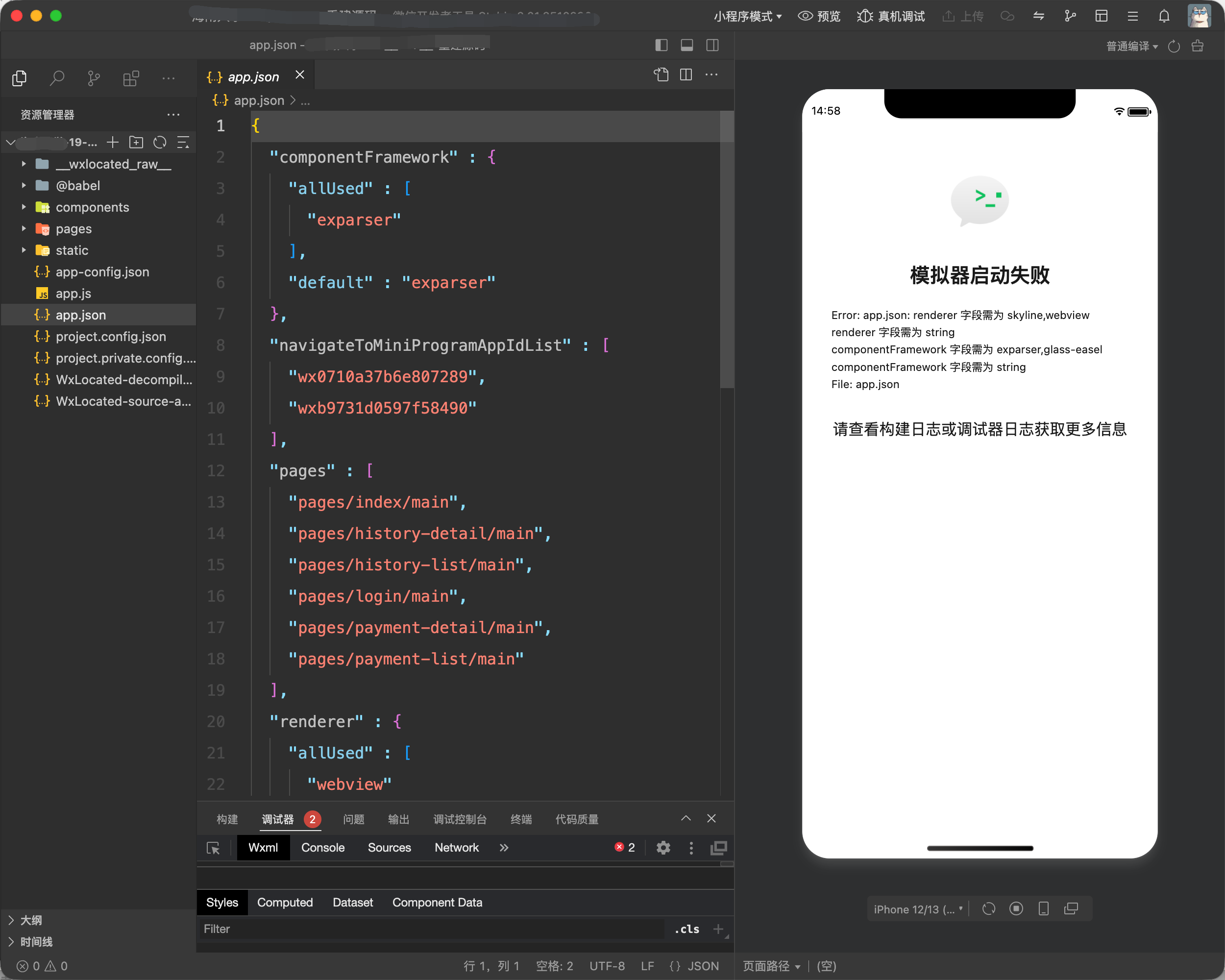
WeChat DevTools integrates a simulator, compiler, and debugging console (similar to Xcode / Android Studio):
- Official download: WeChat DevTools download page
III. Dynamic Traffic Capture and Supporting Tools
3.1 Traffic Capture Approach
For dynamic testing, Proxifier + Yakit / Burp Suite is recommended for proxying all network traffic:
- Use client rules to force WeChat network requests through a local proxy;
- Intercept and analyze HTTPS API communications and sensitive parameter interactions.
3.2 WxLocated: Native macOS Mini Program Analysis Tool
To address the lack of convenient Mini Program reverse-engineering and locating tools in the macOS ecosystem, I developed a lightweight Mini Program security analysis tool using Swift + SwiftUI:
- Open-source project: https://github.com/bx33661/WxLocated
Core Positioning and Capabilities
- Cache directory discovery: Automatically identifies common macOS cache directories for 3.x, 4.x, and multi-account architectures;
- Package fingerprint parsing: Natively parses standard wxapkg and V1MMWX encrypted local WeChat cache packages, extracting AppID, name, logo, version, and main/subpackage relationships;
- Virtual file tree reconstruction: Reconstructs the main package and multi-level subpackages into one complete, unified project tree;
- Source decompilation and recovery: Statically restores
app.json, page configuration files, JavaScript logic, WXS, WXML tag trees, and WXSS styles; - Source Map recovery: Automatically extracts embedded Source Maps and restores the original unobfuscated source;
- Code semantic formatting: Context-aware formatting of JS syntax while preserving the semantics of compound operators, regular expressions, and template strings;
- Attack surface extraction: Automatically aggregates all request endpoints, request parameters, external domains, encryption/decryption keys, and sensitive credentials;
- Safe, non-invasive operation: All parsing is performed entirely on the local machine; the application never executes code contained in packages and never initiates external network communications.
Software Interface
Automatically scans multiple generations of WeChat cache directories on macOS (some directories may require access authorization):
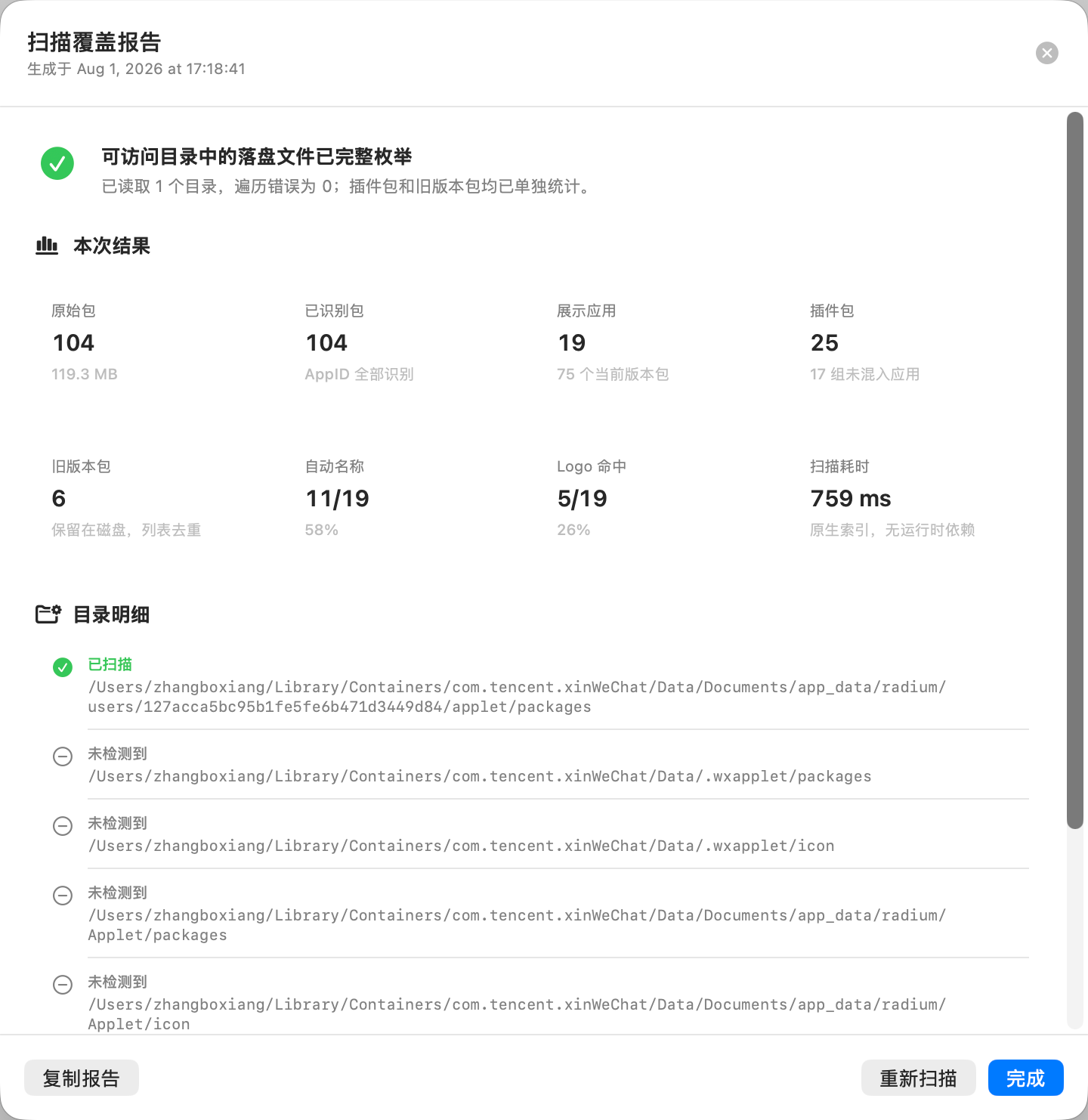
View Mini Program metadata and package structure:
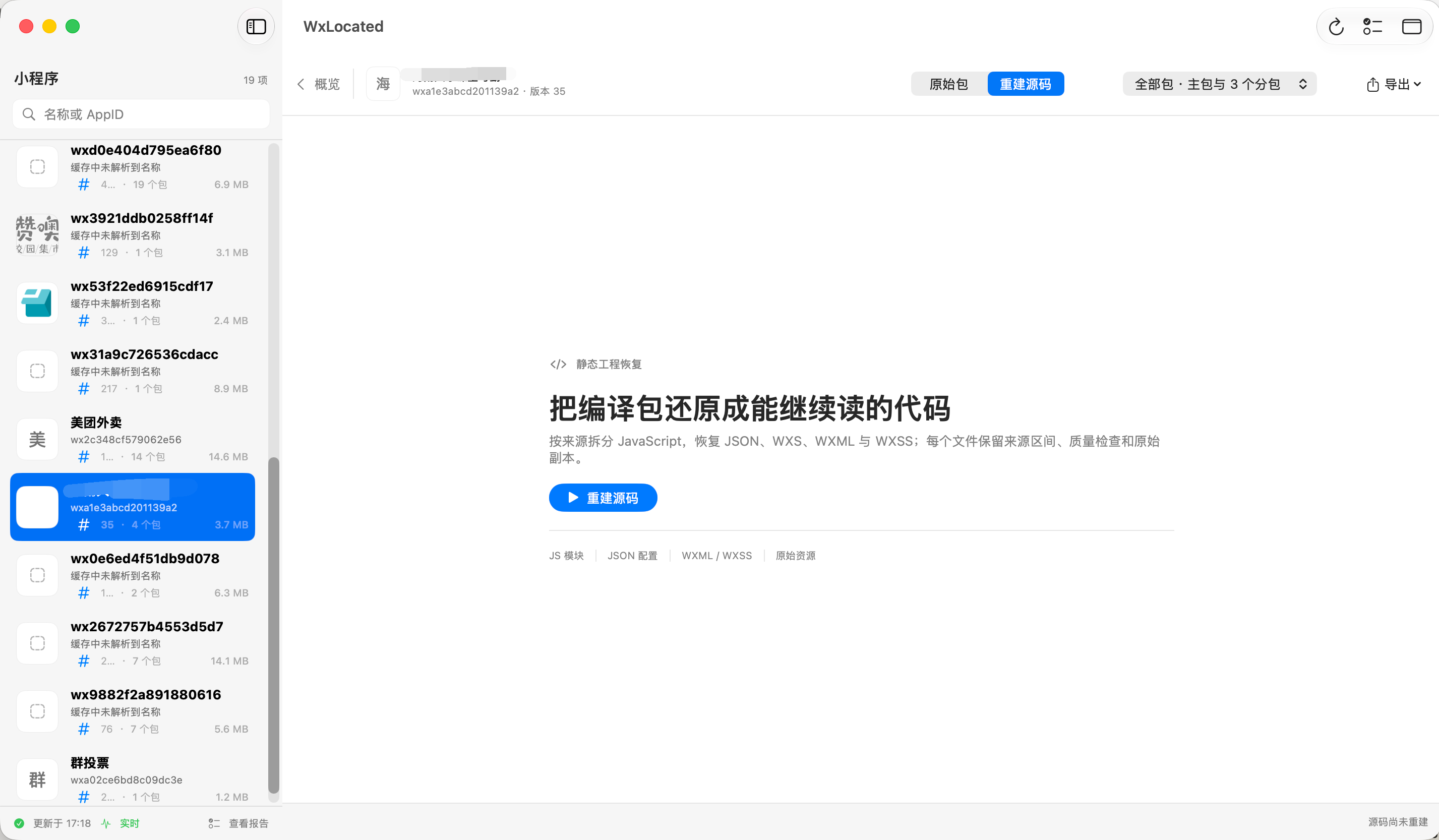
Batch-export decompiled source code and resource files:
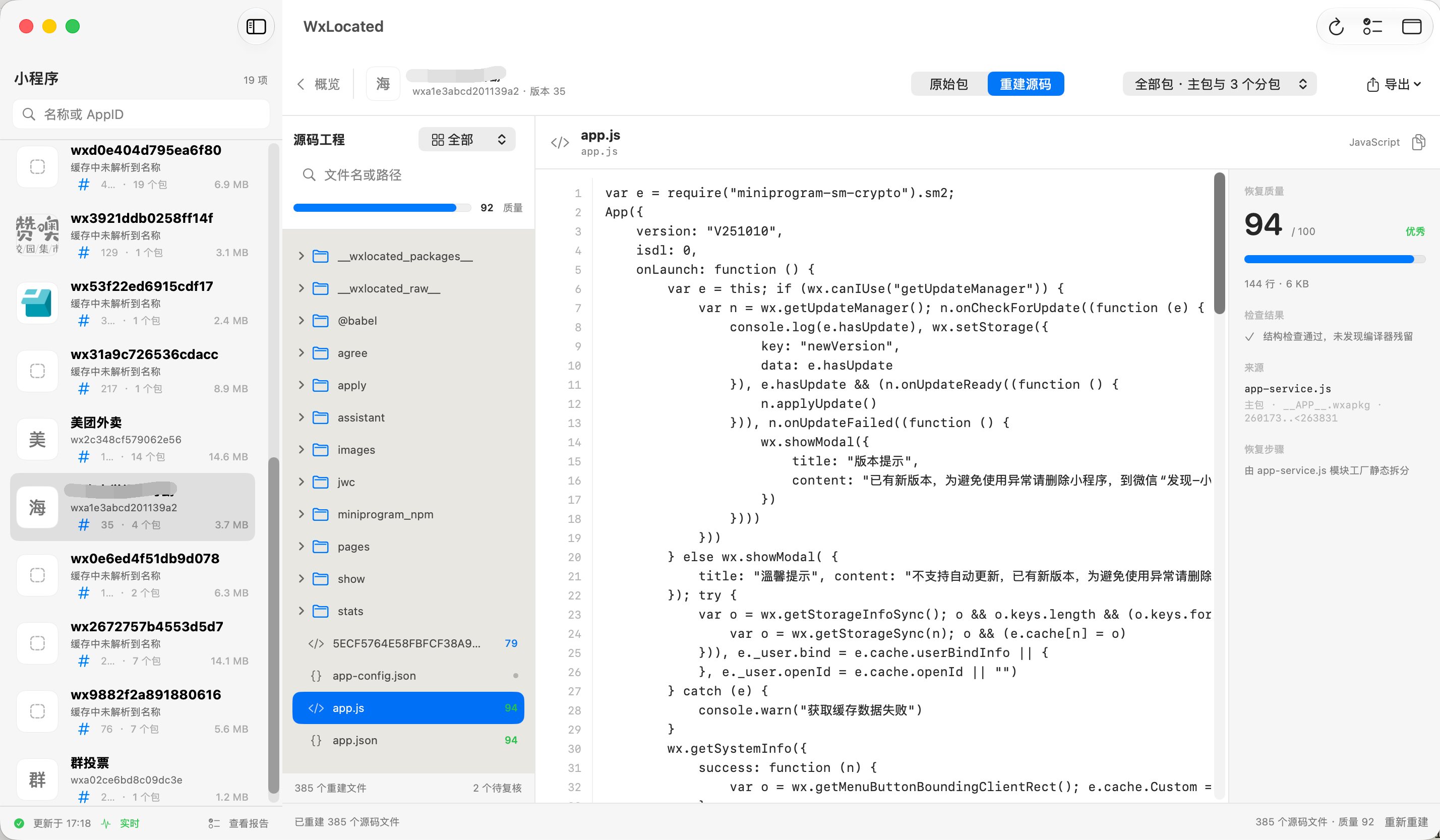
Notes on native macOS UI development:

Building from Source
cd WxLocated

# 1. Debug 构建
DEVELOPER_DIR=/Applications/Xcode.app/Contents/Developer \
xcodebuild build \
  -project WxLocated.xcodeproj \
  -scheme WxLocated \
  -configuration Debug \
  -destination 'platform=macOS' \
  -derivedDataPath ./DerivedData \
  CODE_SIGNING_ALLOWED=NO

# 运行 Debug 版本
open ./DerivedData/Build/Products/Debug/WxLocated.app

# 2. Release 构建
DEVELOPER_DIR=/Applications/Xcode.app/Contents/Developer \
xcodebuild build \
  -project WxLocated.xcodeproj \
  -scheme WxLocated \
  -configuration Release \
  -destination 'platform=macOS' \
  -derivedDataPath ./DerivedData \
  CODE_SIGNING_ALLOWED=NO
IV. Building an Agent-Based Automated Audit System
To address challenges in Mini Program auditing such as complex business logic, difficult-to-read obfuscated variables, and complex permission models, I designed an automated code auditing suite for multiple Agents:
- Suite source code: https://github.com/bx33661/miniapp-audit-skills
4.1 Orchestration Architecture
Select a stage to see the questions it must answer and the material it should produce.
Check the main package, regular subpackages, and independent subpackages, recording versions and sources. Mark missing material first; do not treat uncovered code as a security conclusion.
__APP__.wxapkg + package inventoryAny stage may stop at insufficient material; the workflow is not a promise of automatic vulnerability confirmation.
material-checkMaterial and completeness assessment
attack-surfaceAttack surface and endpoint inventory
secret-scanHardcoded credential scanning
authz-analyzerAuthorization flaws and permission matrix
payment-auditPayment security checks
dataflow-tracerTaint and data-flow tracing
privacy-complianceUser privacy compliance
dynamic-testerDynamic verification and PoC
code-restorerLLM-assisted semantic code recovery
report-builderAudit report generation
Each module retains intermediate material; the reporting stage then links evidence to conclusions.
4.2 Core Design Principles
4.2.1 Completeness Awareness
Traditional static scanning tools often “scan whatever they are given,” which can cause false positives or serious omissions when materials are incomplete. A truly capable intelligent auditing Agent must be aware of completeness:
完整性闭环流程:
输入 wxapkg / 微信缓存 / 反编译目录
           ↓
material-check 检查材料完备度
           ↓
智能决策:材料是否足以开展全量分析?
           ↓
构建攻击面总览与接口拓扑
           ↓
自动生成针对性测试假设与验证任务
           ↓
排除误报并关联上下文
           ↓
输出带证据链条的报告与复现脚本
Before starting a scan, the Agent must first verify these prerequisites:
- Is the main package present?
- How many subpackages are declared in the global configuration, and how many were actually collected?
- Are there independent subpackages that have not been loaded?
- Were subpackages from an old version accidentally mixed in?
- Are any plugin packages missing?
- Is the decompiled code semantically complete?
4.2.2 Progressive Reverse-Engineering Recovery
Front-end code recovered with open-source reverse-engineering tools often contains many obfuscated variable names (such as _0x1a2b), minified syntax, and dead code:
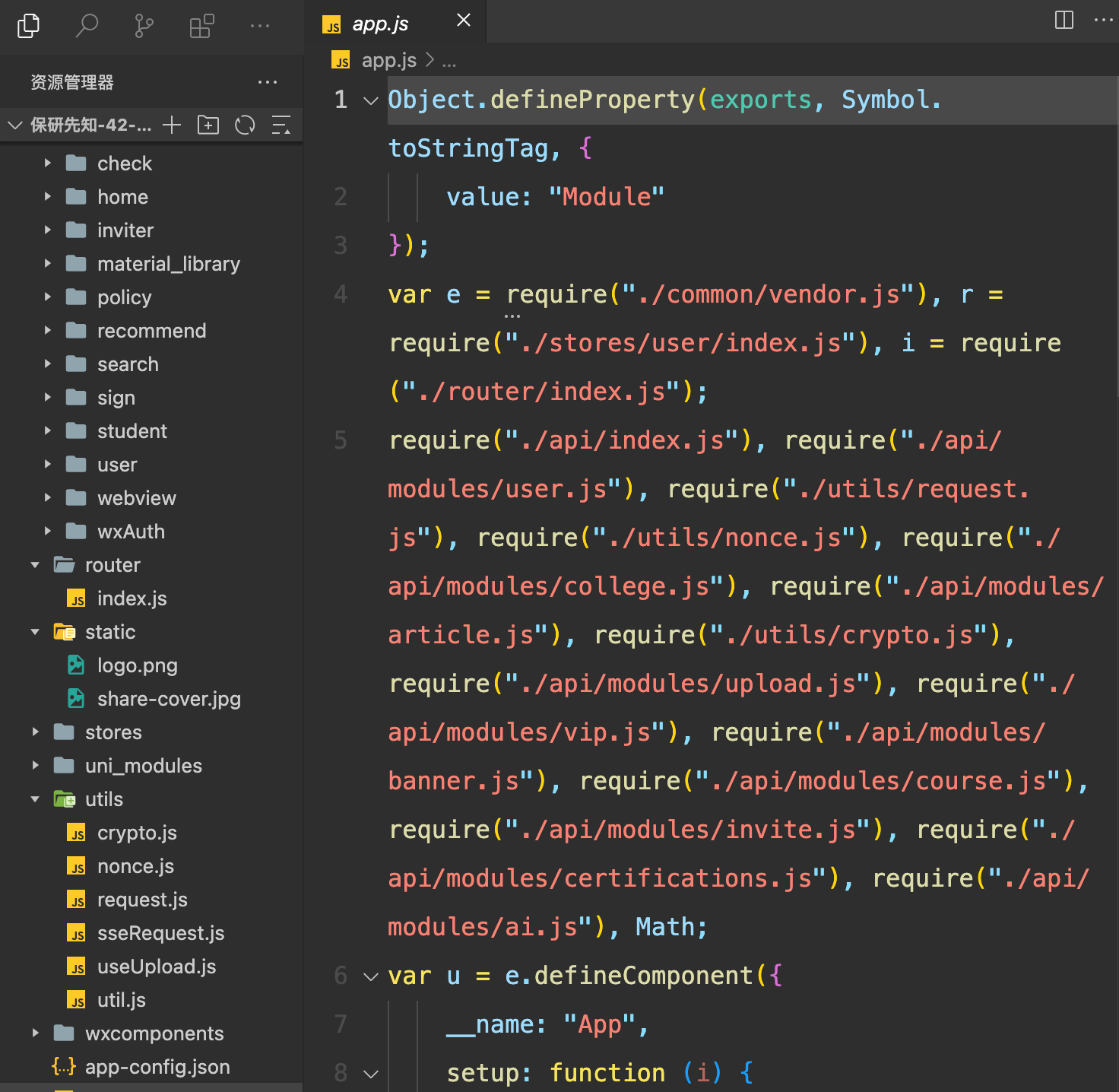
One of the LLM’s most notable capabilities is contextual understanding and semantic inference. The audit suite includes a progressive reverse-engineering recovery mechanism:
代码还原编排:
用户输入反编译目录(混淆/质量参差不齐)
               ↓
material-check 自动化评估代码可读性与质量
               ↓
       ┌───────┴───────┐
    质量合格        存在明显缺陷
       │               │
    直接审计        交互询问 / 自动评估策略
                       ↓
               是否启动 Agent 逆向重构?
                       ↓
               ┌───────┴───────┐
              是               否
               │               │
         Agent 语义还原    标注局限性并直接审计
Through collaboration among sub-Agents, it can progressively:
- Infer semantic variable names: Use the call chain to turn unordered variables (
_0x1a2b) into names with business meaning (userToken,orderId); - Format and beautify the AST: Reconstruct control flow and standardize indentation;
- Add business comments and function summaries: Infer function purposes from business logic and add key comments;
- Parallelize multi-file workflows: Use Workflow multi-Agent concurrency to semantically reconstruct critical pages.
4.2.3 Evidence-First
To avoid factual hallucinations or contradictory conclusions by Agents over multiple conversation turns and complex call chains, the entire audit process must maintain a strongly typed state topology:
{
  "facts": [],
  "hypotheses": [],
  "confirmed_findings": [],
  "rejected_findings": [],
  "blocked_tasks": [],
  "missing_artifacts": [],
  "coverage": {},
  "next_actions": []
}
For every potential vulnerability, strictly record its progression chain:
{
  "hypothesis": "订单详情接口可能存在水平越权 (IDOR)",
  "evidence": [
    "orderId 直接来源于 onLoad.options.id",
    "网络请求携带当前登录用户的 JWT Bearer Token",
    "前端未进行订单 owner 校验,后端接口亦无隔离校验"
  ],
  "missing_evidence": [
    "测试账号 B 凭证",
    "属于账号 B 的真实 orderId"
  ],
  "status": "NEEDS_SECOND_ACCOUNT"
}
At the same time, maintain a global artifact-manifest.json to track all material sources, ensuring every audit Finding can be traced back to the original package and line number:
{
  "artifact_id": "pkg-001",
  "type": "wxapkg",
  "role": "main_package",
  "appid": "wx1234567890",
  "version": "42",
  "source": "wechat_macos_cache",
  "original_path": "/path/to/__APP__.wxapkg",
  "sha256": "3a8c1f...",
  "size": 1837462,
  "collected_at": "2026-08-01T14:00:00+08:00",
  "toolchain": {
    "extractor": "WxLocated",
    "extractor_version": "1.2.0"
  },
  "status": "EXTRACTED",
  "warnings": []
}
Findings link back to their evidence chains:
{
  "finding_id": "VULN-2026-001",
  "evidence_refs": [
    "pkg-001:pages/order/detail.js:120-146",
    "request-017",
    "response-019"
  ]
}
4.2.4 Identity Matrix
Privilege escalation and unauthorized access are common vulnerabilities in API and logic-layer audits. Agents must understand identity topologies rather than only supporting “single token, single role” testing:
角色维度:
├── 匿名访问 (No Auth)
├── 普通用户 A
├── 普通用户 B
├── 付费 VIP 会员
├── 商家 / 商户端
├── 内部员工
├── 系统管理员
└── 租户边界 (Tenant A vs Tenant B)
Automatically derive a Cartesian cross-validation matrix:
交叉测试用例:
├── 用户 A Token + 用户 A 资源  → [正常访问基线]
├── 用户 A Token + 用户 B 资源  → [测试水平越权]
├── 用户 B Token + 用户 A 资源  → [双向水平校验]
├── 无 Token     + 敏感业务接口 → [测试未授权访问]
├── 过期 Token   + 受保护资源   → [测试凭证失效机制]
├── 普通用户凭证 + 后台管理接口 → [测试垂直越权]
└── 租户 A 凭证  + 租户 B 资源  → [测试多租户数据穿透]
Classify anomalous results explicitly to avoid misreporting public static resources or normal unauthenticated endpoints as authorization flaws:
- Missing authentication
- IDOR / horizontal privilege escalation
- Privilege escalation
- Cross-tenant data breach
- 404 Not Found
- Publicly accessible
V. Review of Real-World Audit Cases
Two recent practical audits completed with this approach are reviewed below.
5.1 Case One: A Graduate School Selection and Coaching Mini Program
Target Characteristics
- Business scenario: university selection assessments, VIP paid consultations, and a graduate-school study materials library;
- Architecture: main package + 3 business subpackages.
Audit Process
- Package reconstruction: Use WxLocated for rapid locating, extraction, and directory topology generation;
- Intelligent analysis: Load the
miniapp-auditorchestration suite in the Claude Code environment (using Claude 3.7 Sonnet / High Thinking); - Concurrent recovery: Dispatch SubAgents to concurrently clean up and semantically recover code for core routing and payment/authentication modules;
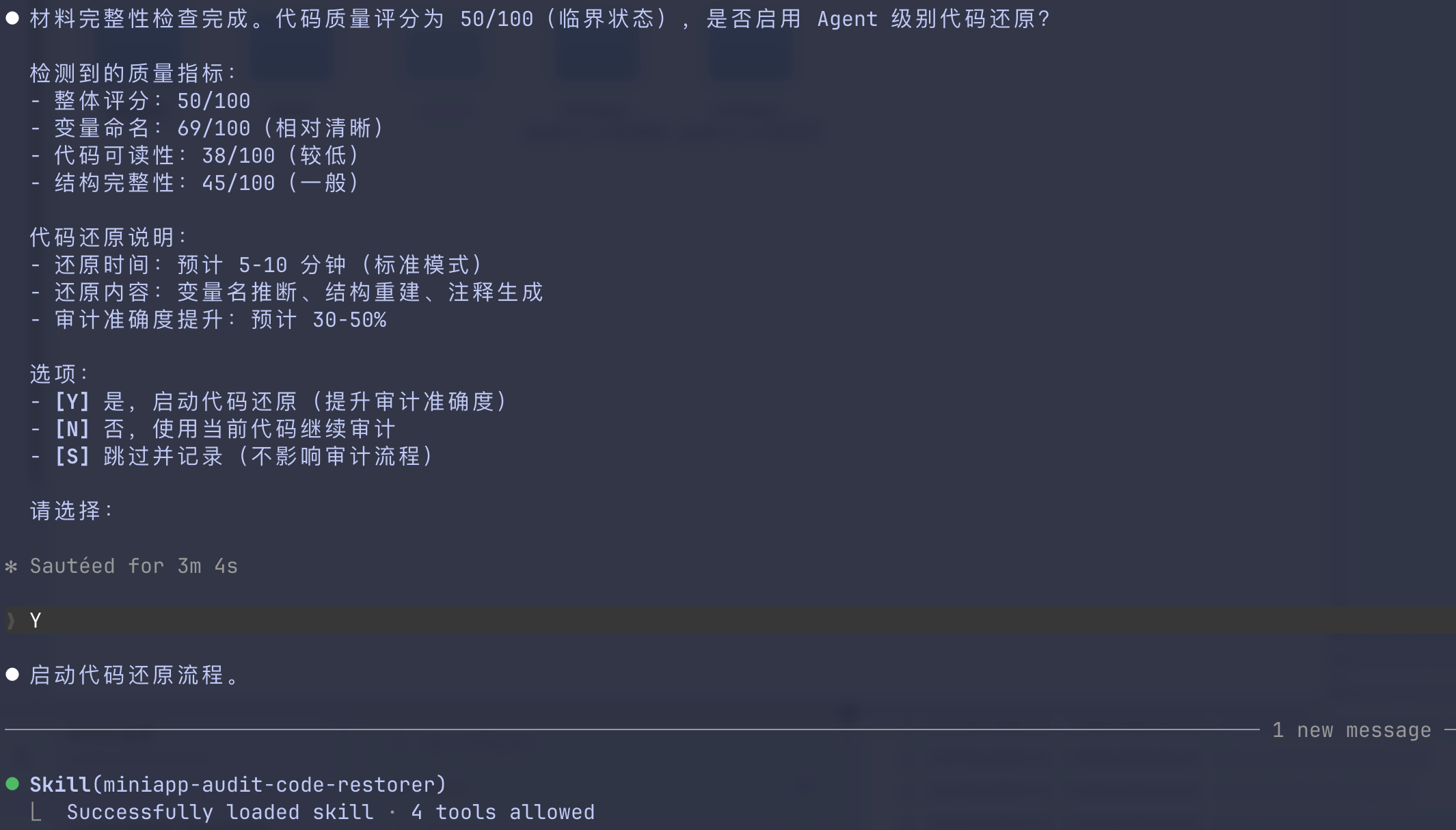
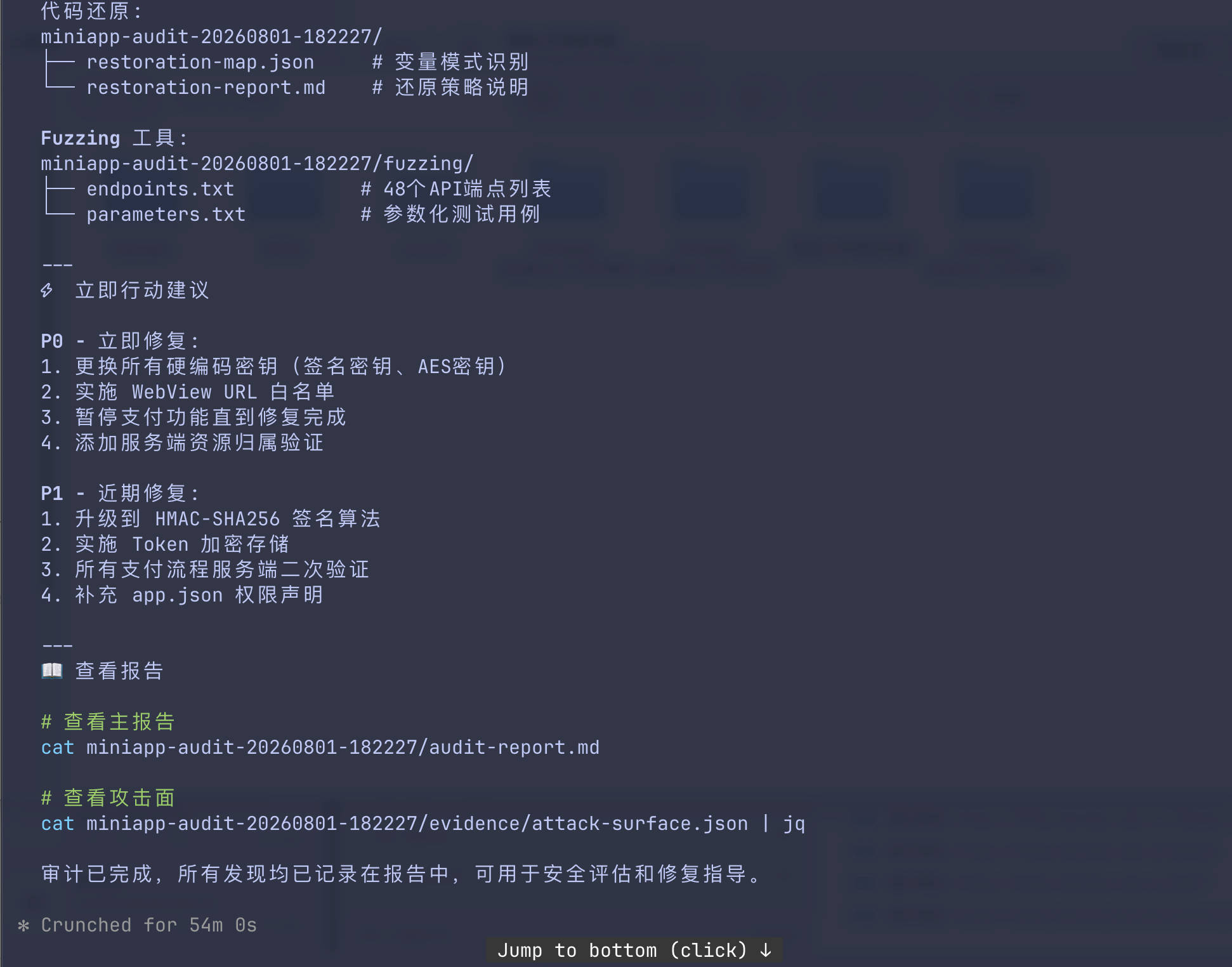
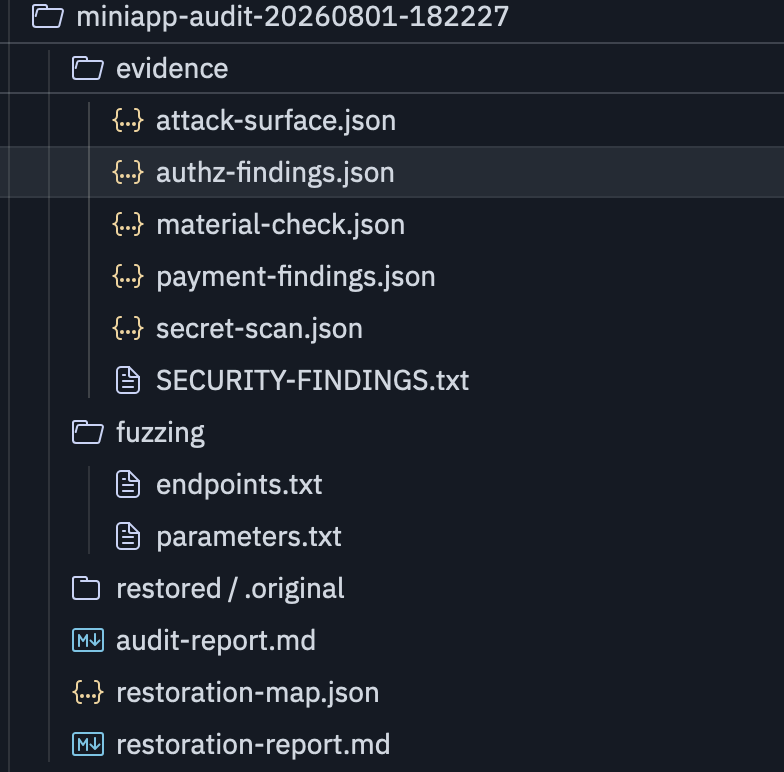
- Endpoint organization: Agents automatically organize highly structured
endpoints.txtandparameters.txt; compared with traditional regular-expression matching, this better captures dynamically concatenated parameter names and endpoint addresses:

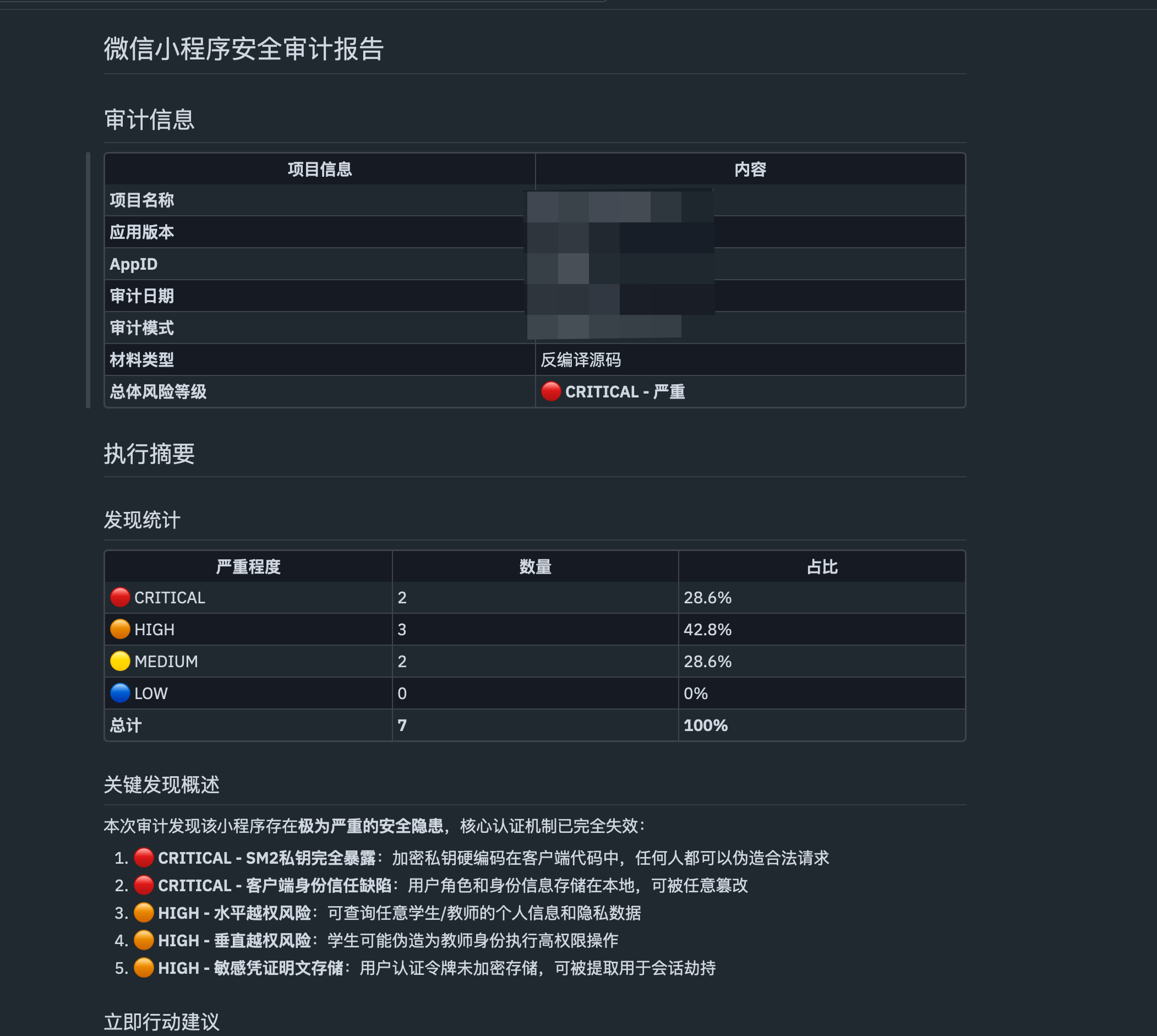
- Report generation: Automatically produce a complete, standardized Markdown audit report:
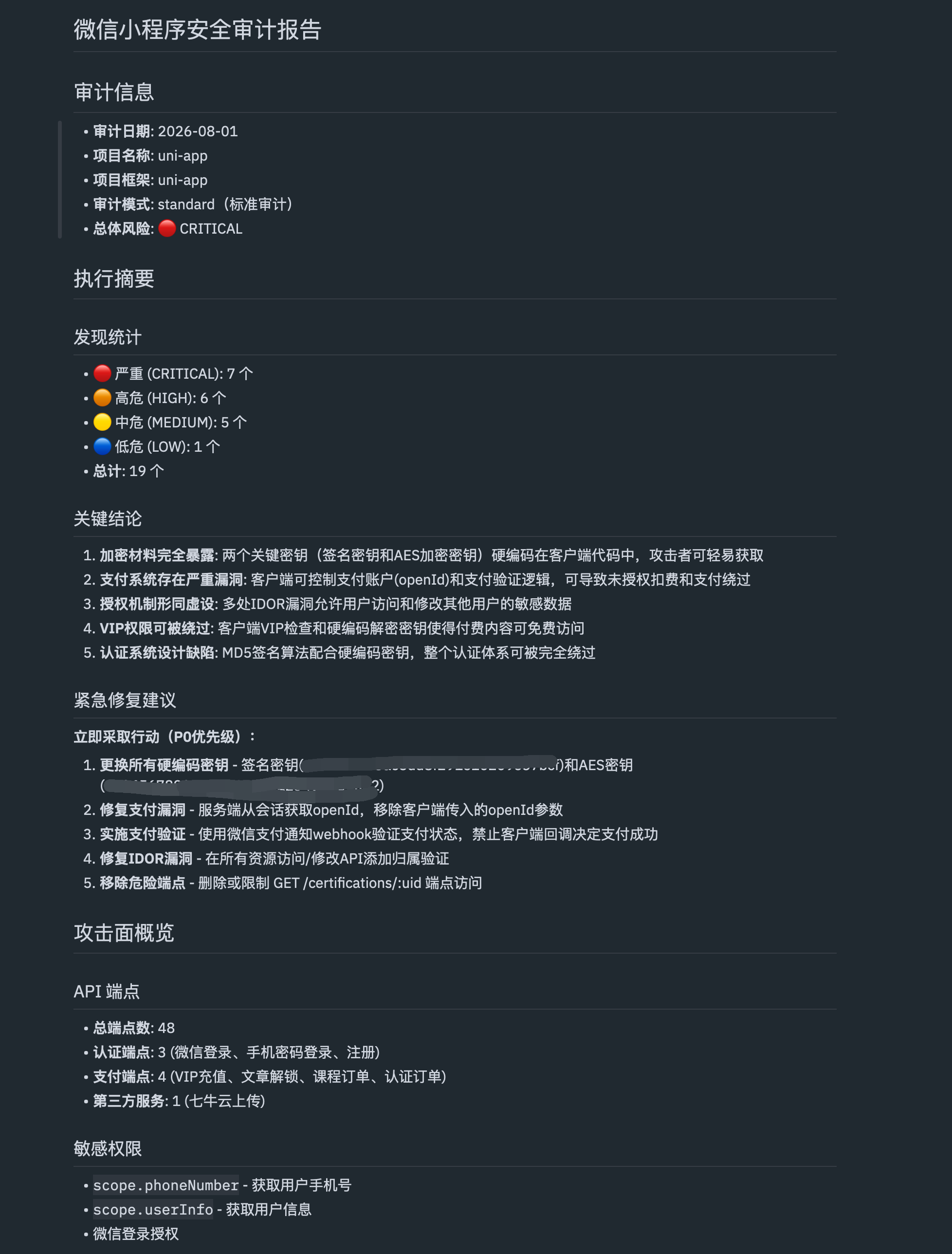
Key Audit Findings
【主要风险点摘要】

1. 硬编码凭据
   - 前端代码中散落云服务存储桶 SecretKey、短信签名第三方密钥。

2. 水平越权漏洞 (IDOR-001)
   - 严重级别: 🔴 CRITICAL
   - 置信度: HIGH
   - 漏洞端点: GET /certifications/:uid
   - 问题描述: 任意认证用户通过修改 uid 入参,可直接查询其他考生的真实姓名、就读高校、报考专业等完整认证数据,后端缺少用户归属权判定。

3. 越权篡改漏洞 (IDOR-002)
   - 严重级别: 🔴 CRITICAL
   - 置信度: HIGH
   - 漏洞端点: PUT /certifications/:id
   - 问题描述: 用户 A 提交的认证记录可被用户 B 调用接口恶意覆盖修改,造成数据篡改及假冒认证。

4. 付费权益绕过
   - 客户端根据本地缓存判定是否为 VIP 并控制跳转,修改客户端返回包即可未付费直接阅读 VIP 专属内容。
5.2 Case Two: A University Course Attendance System
Target Characteristics
- Business scenario: classroom location-based check-ins, leave approval, and student ongoing grade management;
- Audit strategy: Focus on the core check-in logic and leave approval workflow, selectively recovering and analyzing the corresponding code segments.
Audit Findings
- The teacher and student clients share the same API foundation, with no fine-grained role-authorization checks;
- The authentication SecretKey is exposed on the client and can be used directly to sign forged Tokens for arbitrary student IDs, enabling fully automated substitute check-ins and forged leave requests.
How to Validate Audit Results
In the two cases above, package extraction and endpoint extraction are only the starting point. What truly needs to be retained is the relationship between endpoints, parameters, identities, and returned data. Public resources, nonexistent resources, horizontal privilege escalation, and cross-tenant access should be recorded separately to avoid treating a single anomalous response as proof of a vulnerability.
Findings in the report should be checked against the corresponding business workflow: does the server verify data ownership, are role permissions enforced at the API layer, and are credentials found in the client still valid? Static code recovery provides leads; the identity matrix and request/response evidence are what support a conclusion. The case descriptions in this article do not imply that the same issues exist in other versions.
During traffic capture, you can refer to the Burp Suite proxy, scanning, and Collaborator notes; when analyzing permission boundaries between clients and servers, see threat modeling and trust boundaries.