
MCP Security Applications and Issues
MCP-Related Security Projects
- MCP Security Checklist: A Security Guide for the AI Tool Ecosystem
MCP-Security-Checklist/README_CN.md at main · slowmist/MCP-Security-Checklist
Some Security-Oriented MCP Uses
IDA-Pro-MCP
:::info I use the stdio approach here.
:::
Project:
GitHub - mrexodia/ida-pro-mcp: MCP Server for IDA Pro.
First install uv (similar to pip).
pip uninstall ida-pro-mcp
pip install git+https://github.com/mrexodia/ida-pro-mcp

ida-pro-mcp --install
Open a file in IDA; here, the service needs to be started.
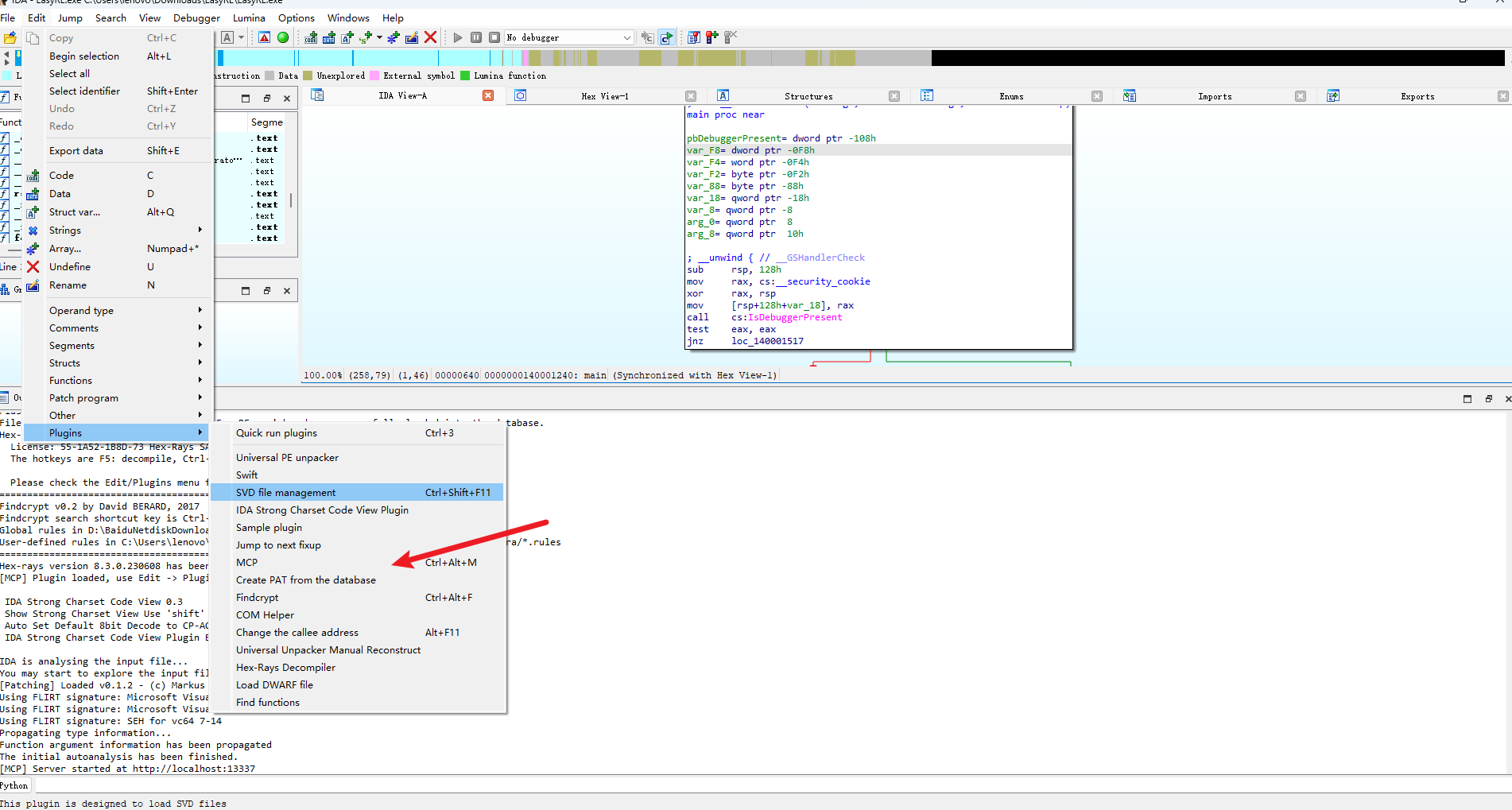
MCP client configuration:
{
  "mcpServers": {
    "IDA Pro MCP": {
      "command": "uv",
      "args": ["run", "ida-pro-mcp", "--install-plugin"],
      "timeout": 1800
    }
  }
}
Using Cursor or Trae, for example; here we’ll demonstrate Trae.
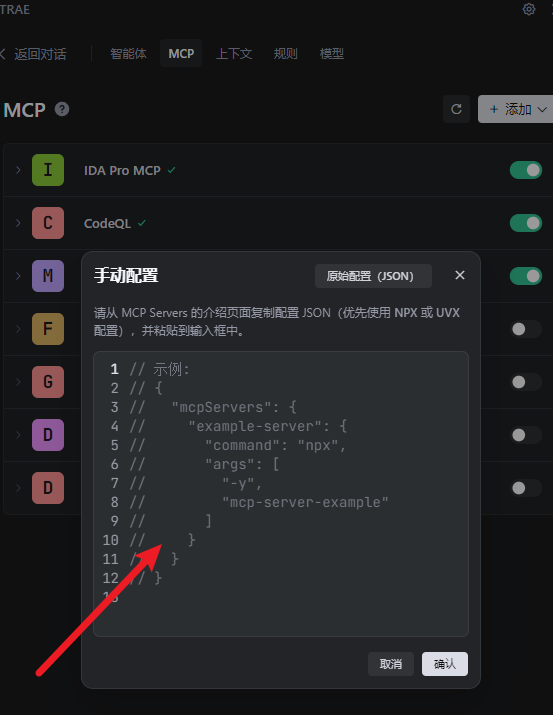
Trae Configuration
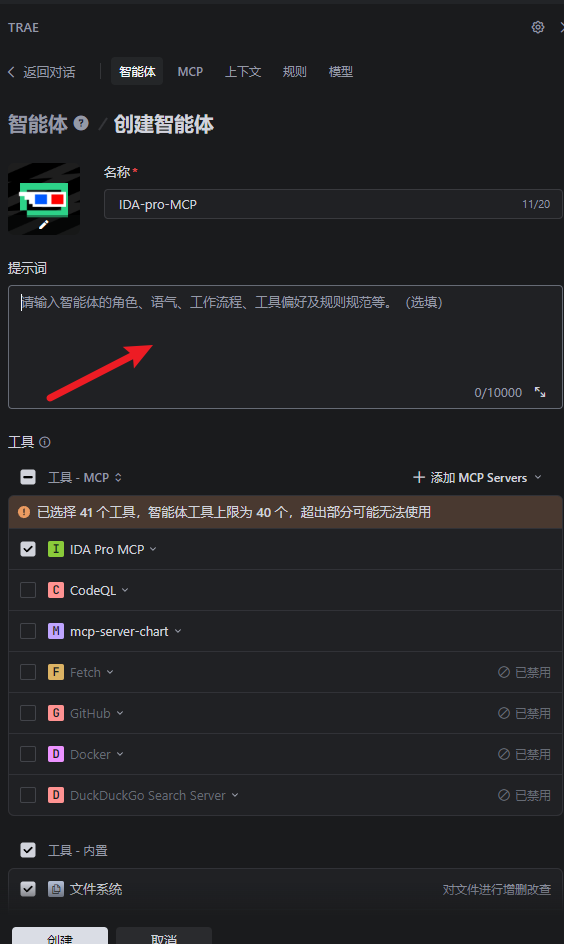
You can create a dedicated agent for IDA.
The prompt is important here.
You can adapt it for CTF competitions, and so on.
Example results:
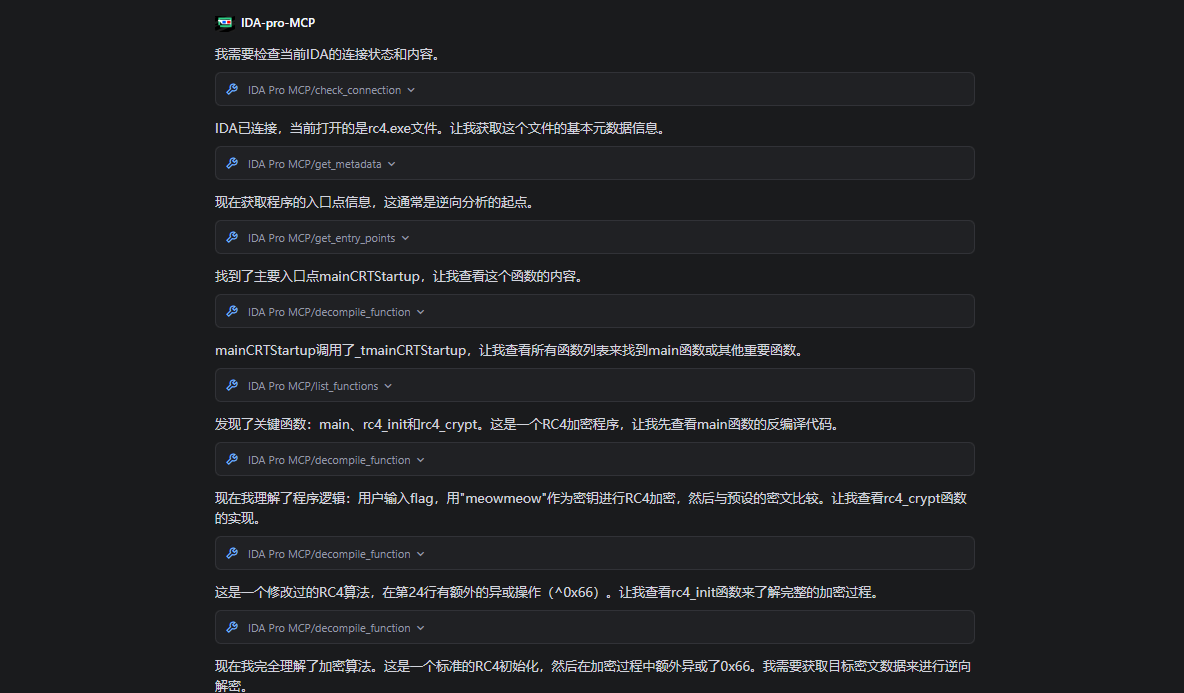
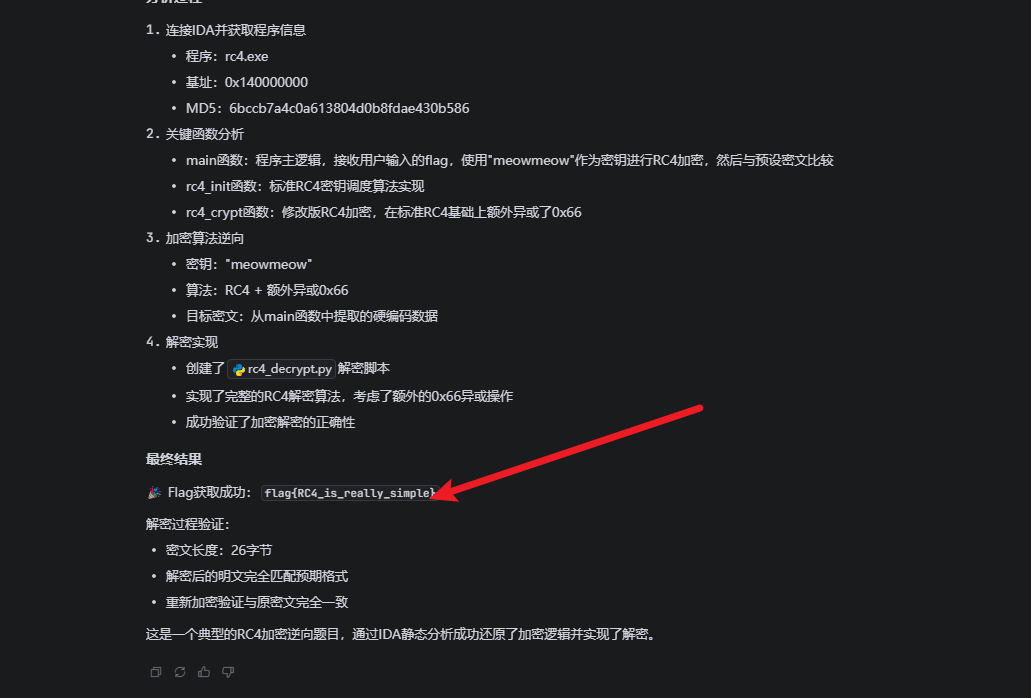
Example script:
#!/usr/bin/env python3
# RC4 解密脚本
# 基于IDA分析的rc4.exe程序

def rc4_init(key):
    """RC4密钥调度算法"""
    S = list(range(256))
    j = 0
    key_len = len(key)

    for i in range(256):
        j = (j + S[i] + key[i % key_len]) % 256
        S[i], S[j] = S[j], S[i]

    return S

def rc4_decrypt(ciphertext, key):
    """RC4解密函数(考虑额外的0x66异或)"""
    S = rc4_init(key)
    i = j = 0
    plaintext = []

    for byte in ciphertext:
        i = (i + 1) % 256
        j = (j + S[i]) % 256
        S[i], S[j] = S[j], S[i]

        # 先去除额外的0x66异或,再进行RC4解密
        decrypted_byte = (byte ^ 0x66) ^ S[(S[i] + S[j]) % 256]
        plaintext.append(decrypted_byte)

    return bytes(plaintext)

def main():
    # 从IDA分析得到的密文数据(v6数组的值)
    # v6[0] = 0xF225450DA959419D
    # v6[1] = 0x424C79FD1B3DA063
    # v6[2] = 0x77255DEA8E102BEC
    # v7 = 457 (0x01C9)

    # 将64位整数转换为字节数组(小端序)
    ciphertext = []

    # v6[0]
    val1 = 0xF225450DA959419D
    ciphertext.extend([(val1 >> (8*i)) & 0xFF for i in range(8)])

    # v6[1]
    val2 = 0x424C79FD1B3DA063
    ciphertext.extend([(val2 >> (8*i)) & 0xFF for i in range(8)])

    # v6[2]
    val3 = 0x77255DEA8E102BEC
    ciphertext.extend([(val3 >> (8*i)) & 0xFF for i in range(8)])

    # v7 = 457
    val4 = 457
    ciphertext.extend([(val4 >> (8*i)) & 0xFF for i in range(2)])

    print(f"密文长度: {len(ciphertext)}")
    print(f"密文 (hex): {' '.join(f'{b:02x}' for b in ciphertext)}")

    # RC4密钥
    key = b"meowmeow"
    print(f"密钥: {key.decode()}")

    # 解密
    plaintext = rc4_decrypt(ciphertext, key)

    print(f"明文 (hex): {' '.join(f'{b:02x}' for b in plaintext)}")
    print(f"明文 (ascii): {plaintext.decode('ascii', errors='ignore')}")

    # 验证:重新加密看是否匹配
    print("\n=== 验证 ===")
    test_encrypt = rc4_encrypt(plaintext, key)
    print(f"重新加密: {' '.join(f'{b:02x}' for b in test_encrypt)}")
    print(f"原始密文: {' '.join(f'{b:02x}' for b in ciphertext)}")
    print(f"匹配: {test_encrypt == ciphertext}")

def rc4_encrypt(plaintext, key):
    """RC4加密函数(包含额外的0x66异或)"""
    S = rc4_init(key)
    i = j = 0
    ciphertext = []

    for byte in plaintext:
        i = (i + 1) % 256
        j = (j + S[i]) % 256
        S[i], S[j] = S[j], S[i]

        # 先进行RC4加密,再异或0x66
        encrypted_byte = (byte ^ S[(S[i] + S[j]) % 256]) ^ 0x66
        ciphertext.append(encrypted_byte)

    return ciphertext

if __name__ == "__main__":
    main()
Example response:
密文长度: 26
密文 (hex): 9d 41 59 a9 0d 45 25 f2 63 a0 3d 1b fd 79 4c 42 ec 2b 10 8e ea 5d 25 77 c9 01
密钥: meowmeow
明文 (hex): 66 6c 61 67 7b 52 43 34 5f 69 73 5f 72 65 61 6c 6c 79 5f 73 69 6d 70 6c 65 7d
明文 (ascii): flag{RC4_is_really_simple}

=== 验证 ===
重新加密: 9d 41 59 a9 0d 45 25 f2 63 a0 3d 1b fd 79 4c 42 ec 2b 10 8e ea 5d 25 77 c9 01
原始密文: 9d 41 59 a9 0d 45 25 f2 63 a0 3d 1b fd 79 4c 42 ec 2b 10 8e ea 5d 25 77 c9 01
匹配: True
IDA-mcp tool list
| Category | Tool name |
|---|---|
| Connection test | check_connection |
| Metadata | get_metadata |
| Function search | get_function_by_name, get_function_by_address |
| Current location | get_current_function, get_current_address |
| List functions | list_functions |
| String handling | list_strings, search_strings |
| Entry point | get_entry_points |
| Decompile | decompile_function |
| Disassemble | disassemble_function |
| Cross-references | get_xrefs_to |
| Comments | set_comment |
| Rename variables/functions | rename_local_variable, rename_global_variable, rename_function |
| Set types | set_global_variable_type, set_local_variable_type, set_function_prototype, declare_c_type |
| Number conversion | convert_number |
CloudSword-MCP
Project:
:::info Here we discuss only MCP use cases and results, not the tool’s internal usage.
However, in actual testing, this MCP did not work well and was still incomplete.
:::
- SSE configuration
Start SSE:
./cloudsword sse http://localhost:8080- STDIN configuration:
Set the location of your software in command.
{
  "mcpServers": {
    "cloudsword": {
      "isActive": true,
      "name": "cloudsword-MCP",
      "description": "Cloudsword 安全分析服务",
      "type": "stdio",
      "command": "E:\\Tools\\利用工具\\云\\cloudsword_v0.0.2_windows_amd64\\cloudsword.exe",
      "args": [
        "stdio"
      ],
    }
  }
}
To get better results from the MCP tool, you need suitable prompts.
A prompt you can use:
你现在是我的云安全助手,集成了 CloudSword 模块。
你的目标是:帮助我在多云环境下快速发现资产、分析风险、执行安全操作。

使用规则:
1. 当我提出问题时,请自动选择最合适的 CloudSword 模块并运行,并返回结果。
2. 在调用前,优先检查需要的认证参数(如 ACCESS_KEY_ID / ACCESS_KEY_SECRET 等),如果缺失请明确提示我设置。
3. 若有多个模块都可能符合要求,请优先选择推荐评级更高的模块。
4. 输出时,请用清晰的表格或列表展示结果,不要只给原始 JSON。
5. 如果模块运行失败,请输出报错信息,并提示我可能的修复办法。
6. 如果我提出的问题不在现有模块范围,请告诉我该模块暂不支持,并给出可选的替代方案。

常见问题示例:
- “列出阿里云 OSS 存储桶” → 调用 oss_list_buckets
- “搜索阿里云 OSS 对象” → 调用 oss_search_objects
- “列出阿里云 ECS 实例” → 调用 ecs_list_instances
- “查看阿里云 RAM 用户” → 调用 ram_list_users
- “列出腾讯云 COS 存储桶” → 调用 cos_list_buckets
- “查看腾讯云 CVM 实例列表” → 调用 cvm_list_instances
- “查看腾讯云 CAM 用户” → 调用 cam_list_users
- “列出华为云 OBS 存储桶” → 调用 obs_list_buckets
- “列出百度云 BOS 存储桶” → 调用 bos_list_buckets
- “列出七牛云 KODO 存储桶” → 调用 kodo_list_buckets
- “生成腾讯云蜜罐凭证” → 调用 create_honey_token

注意:
- 默认使用环境变量中的云访问密钥进行认证。
- 在输出中,敏感信息(如 AccessKey)不要直接暴露。
- 仅执行只读和合法的安全分析操作,不进行破坏性命令。
Example Test
After configuration, view the tool list.
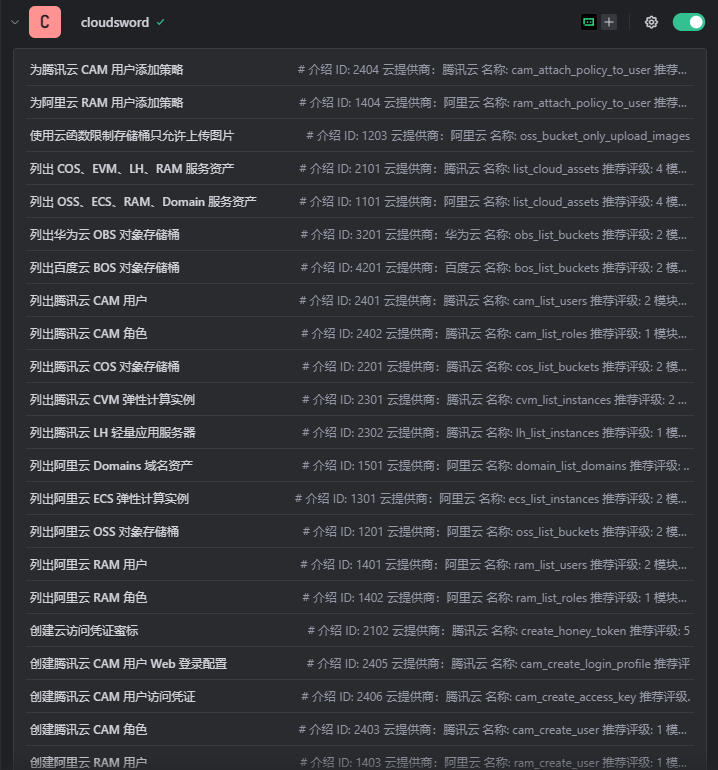
Example:
Q: List the COS buckets for a Tencent Cloud user.
A: The response is below; it called the tool to view some of my buckets.
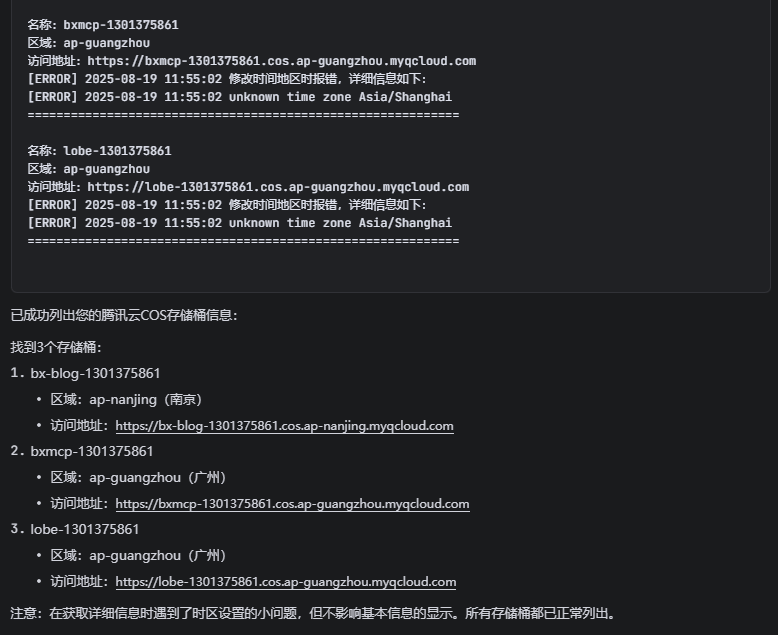
Viewing MCP Information
The MCP protocol has three core categories:
- Tools: actions (callable functions).
- Prompts: prompt templates.
- Resources: data sources.
It also includes notifications (dynamic updates) and capabilities (initialization declarations).
Details are as follows:
Information List
Let AI summarize it.
🛠 Tools
- These are the
tools/listandtools/callyou have already used. - They describe “callable functions/actions.”
- Each tool has
name,description, andinputSchema(parameter JSON Schema); the call result may containtext/data/messages.
📑 Prompts
- MCP supports listing a set of available prompt templates defined by the server.
- The client can
prompts/list→ select a template, thenprompts/get→ fill in parameters to get the complete prompt. - Use case: a server can provide preset prompts such as “explain code” or “security check” for the client to feed directly to an LLM.
📂 Resources
- MCP can expose a set of external resources, such as file systems, databases, and HTTP APIs.
- The client uses
resources/listto see available resources (each with a URI, mimeType, and description). - Then it uses
resources/read(or a watch API) to retrieve content. - Use cases include file browsing, project context loading, database schemas, log streams, and more.
🔔 Notifications
- The server can actively send events, such as:
notifications/tools/list_changed→ notify that the tool list has changednotifications/resources/updated→ notify that a resource’s content has changed
- This lets the client refresh dynamically instead of rigidly using only the capabilities available at startup.
🧩 Capabilities
- In the
initializeresponse, the server tells the client “which modules I support”:tools?prompts?resources?logging?/experimental?
Using the Official mcp SDK
Install with uv as follows:
# 安装
uv pip install "mcp[cli]"

# 运行
uv run python your_script.py
The specific steps are:
import asyncio
from mcp import ClientSession, StdioServerParameters
from mcp.client.stdio import stdio_client

CLOUDSWORD = r"E:\Tools\利用工具\云\cloudsword_v0.0.2_windows_amd64\cloudsword.exe"

async def main():
    server = StdioServerParameters(
        command=CLOUDSWORD,
        args=["stdio"],
    )
    async with stdio_client(server) as (read, write):
        async with ClientSession(read, write) as session:
            # 初始化握手
            await session.initialize()
            # 拉取工具列表
            resp = await session.list_tools()
            print("== Available tools ==")
            for tool in resp.tools:
                print(f"- {tool.name}: {tool.description or ''}")
                if tool.inputSchema:
                    print(f"  schema: {tool.inputSchema}\n")

if __name__ == "__main__":
    asyncio.run(main())
Using FastMCP
The environment used is:
uv pip install fastmcpThe specific steps are:
import asyncio
from fastmcp import Client
from fastmcp.client.transports import StdioTransport

CLOUDSWORD = r"E:\Tools\利用工具\云\cloudsword_v0.0.2_windows_amd64\cloudsword.exe"

async def main():
    transport = StdioTransport(command=CLOUDSWORD, args=["stdio"])
    async with Client(transport=transport) as client:
        tools = await client.list_tools()
        for t in tools:
            print(f"- {t.name}: {t.description}")

if __name__ == "__main__":
    asyncio.run(main())